Generic
Last updated: 2/1/2026
Index
1. Implementation Types
2. Difference between Org ID, Organization ID and Operating Unit
3. Concurrent program error (OPP Error)
4. LDT Commands
5. Loading shortcut file in Toad
6. DUNS Number
7. Types of GL Periods
8. Testing Types
9. Autonomous Transaction
10. To extend the session connectivity
11. Explain Plan
12. Editing values in Toad
13. Alter session in Toad
14. Converting an excel/csv file into cap format or ending with ','
15. OATS – Oracle Application Testing Suite
16. PTD & YTD
17. Bank Information
18. Concurrent Program output in MS Excel format
19. WHO Columns
20. FND_GLOBAL.APPS_INITIALIZE
21. ERRBUF & RETCODE
22. Concurrent Program Phase and Status codes
23. CEMLI
24. Qualifier
25. Kill Session
26. Query to identify locked objects
27. Concurrent Program
28. Setting up the Priority of Concurrent Program
29. Execute Procedure in Toad
30. Modules
31. Basic profile options to run any Responsibility
32. Custom Top
33. Clear Cache
34. To compare values in excel between two columns
35. Document types in Oracle EBS
36. FTP via Toad
37. Difference between APPS Schema and other Schemas
38. Extended SQL and XSL Functions
39. Constraints
40. Synonym
41. Synchronizing responsibilities
42. Adding a Function to Responsibility
43. Value Sets
44. Pseudo Columns
45. Set Operators
46. Difference Between 11i and R12
47. Instance access issue
48. Request Set
49. To run View – set below command
50. SDLC Flow
51. To get DFF values stored in which table n which column
52. Enable DFF
53. Concurrent Requests Inactive
54. Defining global parameters
55. FND_MESSAGES
56. Displaying dynamic value in FND Messages
57. NLS Language
58. Mapping Rule
59. Optimizer
60. Hints
61. Restore sql developer file
62. Query taking long time for first run and less time for second run
63. Save output data from SQL Developer in excel
64. SQL Developer Installation
65. Agile and Scrum
66. FSG (Financial Statement Generator)
67. Remove blank spaces from notepad++
68. Inactive - No Manager
69. Oracle Discoverer
70. API to delete Concurrent program definition and executable
71. Database Schemas Found in EBS
72. Oracle Applications Modules
73. Custom Top
74. Open & Closed Periods
1. Implementation Types 1. Fresh Implementation 2. Rollout Projects – Country specific 3. Upgradation Projects – Version specific – 12.1.1 to 12.1.3 4. Support Projects 5. Enhancement Project – Adding Modules or Modifies the functionality/ capability of existing design
2. Difference between Org ID, Organization ID and Operating Unit Operating Unit – Location – India/US; Each operating unit will have an ID known as Org ID In India we have three inventories – AP, Karnataka, Orissa. Each inventory organization will have an Organization ID
3. Concurrent program error (OPP Error) If the program errors then pick the request id >> System Administrator >> Concurrent >> Manager >> Administer >> Click on Output Post Processor >> Click on Processes button >> Status Active: Click on Manager Log and search with request ID
4. LDT Commands Login to WinScp and create folder where the files need to be downloaded. Next login to Putty and set environment path and the go the folder which was created above. Login to Putty: abc.xyz.net Enter Username and Password cd /u01/app/instancename/apps/apps_st/appl/ . ./APPSinstancename_servername.env cd /u01/app/instancename/apps/apps_st/appl/xxcustomtop/12.0.0/bin <Run download script> <FNDLOAD apps/pswd O Y DOWNLOAD $FND_TOP/patch/115/import/afscursp.lct file_name.ldt FND_RESPONSIBILITY RESP_KEY="resp_short_name"> <For upload use below steps in addition of above> $XXCUSTOM_TOP/bin/xxab_deploy.sh give pswd enter deployment link -- /u01/app/instancename/apps/apps_st/appl/xxcustomtop/12.0.0/bin lct = 'loader control file' ldt = 'loader data file'
5. Loading shortcut file in Toad First create a text file (.txt) with required syntaxes like the few given below: paaf=select * from hr.per_all_assignments_f papf=select * from hr.per_all_people_f hca=select * from apps.hz_cust_accounts_all where cust_account_id = hp=select * from apps.hz_parties hl=select * from apps.hz_locations Next navigation in Toad: View >> Toad Options >> Editor >> Behavior >> Auto Replace >> Import >> Ok
6. DUNS Number Dun & Bradstreet provides a D-U-N-S number, a unique nine digit identification number, for each physical location of your business. BIR – Business Information Report
7. Types of GL Periods Navigation: General Ledger Super User >> Setup >> Open/ Close >> Enter Ledger name like ‘Vision Operations (USA)’ >> Click on Find >> Select the period which you want to open and click Open Period button >> Enter Target Period which you want to open >> Click on Open >> Yes >> Ok >> Ensure the ‘Open Period’ program completed successfully >> Now you will find your period in open status. Also we can search in Receivables responsibility >> Control >> Accounting >> Open/ Close periods >> On status field open the period which you want to.
8. Testing Types Order By – Smoke Testing >> Sanity Testing >> Regression Testing >> Unit Testing Smoke Testing – Functional testing of application Sanity Testing – S/W testing of application Regression Testing – Testing by functional team Unit Testing – Code testing by developer
9. Autonomous Transaction Autonomous transaction is an independent transaction that can be committed or rollback regardless the state of parent transaction.
10. To extend the session connectivity Set the below profile option to Null
11. Explain Plan Simply select the whole query and give ctrl+e {or} Go to Toad >> Database Menu >> Monitor >> Session Browser >> Under Program check for Toad.EXE >> Select any of the apps session and in right window check for Current Statement >> Go to Explain Plan to get Cost details.
12. Editing values in Toad SELECT tablealiasname.rowid, tablealiasname.* FROM tablename tablealiasname; SELECT A.ROWID, A.* FROM CSI_INSTANCE_INTERFACE A;
13. Alter session in Toad ALTER SESSION SET current_schema = apps;
14. Converting an excel/csv file into cap format or ending with ',' =CONCATENATE("^",B1,"^",",") — Copy whole data & while pasting right click and select Paste Options: 123 (Removes Formula) To update whole sheet =CONCATENATE("^",SheetName!A1,"^",","). Use Ctrl+D to update all columns from last row
15. OATS – Oracle Application Testing Suite OATS is suite of testing product for testing of Oracle database, Oracle applications, Web Services, SOA applications, functional testing, load testing and test management of web applications. OATS Tools
16. PTD & YTD PTD: Period to Date — Only particular period transactions. YTD: Year to Date — From beginning of calendar date to till date
17. Bank Information Either Cash Management resp or Receivables Manager >> SetUp >> Receipts >> Banks
18. Concurrent Program output in MS Excel format System Administrator >> Install >> Viewer Options >> Add entries as below File Format =Text Mime Type=application/vnd.ms-excel Description=Microsoft Excel Save >> Run any CP >> Go to Tools and Copy file >> OP in excel format
19. WHO Columns CREATED_BY VARCHAR2, –fnd_profile.value(‘USER_ID’) CREATION_DATE DATE, — SYSDATE LAST_UPDATED_BY VARCHAR2, — fnd_profile.value(‘USER_ID’) LAST_UPDATE_DATE DATE, — SYSDATE LAST_UPDATE_LOGIN VARCHAR2
20. FND_GLOBAL.APPS_INITIALIZE Used for initializing the session and its good practise to use this profile at start of Procedure FND_GLOBAL.APPS_INITIALIZE( user_id => fnd_profile.value('USER_ID') -- User ID , resp_id => fnd_profile.value('RESP_ID') -- Responsibility ID. , resp_appl_id => fnd_profile.value('RESP_APPL_ID') -- Responsibility Application ID ); Alternatively we can get values from below query SELECT fu.user_id, frt.responsibility_id, frt.application_id FROM fnd_user fu, fnd_responsibility_tl frt WHERE fu.user_name = 'SYSADMIN' AND frt.responsibility_name = :responisbility_name Alternatively we can get values from Help >> Diagnostics >> Examine >> Get the values from $profile session_values
21. ERRBUF & RETCODE Mandatory parameters in any Procedure are – When we use proc in concurrent program 1. ERRBUF 2. RETCODE The sequence has to be followed as ERRBUF and then the RETCODE (as below) CREATE PROCEDURE procedure_name( p_errbuf OUT NOCOPY VARCHAR2 , p_retcode OUT NOCOPY VARCHAR2 , —– , —– ); While running the concurrent program when we come across any undefined exception then we can end the concurrent program with Error/ Warning. The retcode has three values returned by concurrent manager 0 – Success 1 – Warning 2 – Error We can set the concurrent program to any of the three status by using these values in the retcode parameter.
22. Concurrent Program Phase and Status codes Phase Code: I – Inactive; P – Pending; R – Running; C – Completed Status Code: A – Waiting; B – Resuming; C – Normal; D – Cancelled; E – Error; F – Scheduled; G – Warning; H – On Hold; I – Normal; M – No Manager; Q – Standby; R – Normal; S – Suspended; T – Terminating; U – Disabled; W – Paused; X – Terminated; Z – Waiting
23. CEMLI CUSTOMIZATION EXTENSION MODIFICATION LOCALIZATION INTERFACES
24. Qualifier Flexfield Qualifier – Defines property of segment Segment Qualifier – Defines property of segment values
25. Kill Session
26. Query to identify locked objects
27. Concurrent Program A concurrent program can have maximum of 100 parameters with maximum value size of 240bytes
28. Setting up the Priority of Concurrent Program System Administrator >> Profile >> System >> Check Site and User >> Enter User ID in User >> Enter profile value as ‘Concurrent:Request Priority’ >> Find >> Enter the value under User (1 is highest priority, 99 is lowest priority and 50 is default)
29. Execute Procedure in Toad EXECUTE procedure_name (parameters);
30. Modules
Finance: GL, AR, AP, CM, FA, EBT (Enterprise Business Tax)
HR: Core HR, Self Service HR, iRecruitment, iLearning, Training, Performance Management, Absence Management, Payroll, Time & Labor
Order Fufill Management: Order Management, Shipping, Advanced Pricing, Release Management
Purchasing/ Procurement: Requisition, RFQ, Quotation, PO
Manfacturing: WIP(Work in Progress), BOM(Bill of Materials), Inventory, Quality, Product Development, Process Execution, Costing
Maintenance: EAM (Enterprise Asset Management)
Project: Project Billing, Project Costing, Project Resource Management, Project Contract
Planning: Demand Planning, ASCP (Advanced Supply Chain Planning), Inventory Optimization, Manfacture Scheduling
CRM (Customer Relationship Management): SC (Service Contracts), Mobile Application, IB (Install Base)
SCM (Supply Chain Management): Purchasing, Inventory, OM (Order Management), OE (Order Entry)
31. Basic profile options to run any Responsibility Profile: The way Oracle apps runs. Profile Types: System Profile & User Profile Profile options are some set of options based on which the functional and technical behavior of Oracle apps depends. Navigation: System Administrator >> Profile >> System 1. HR: Business Group 2. HR: Security Profile 3. HR: User Type 4. GL Ledger Name 5. MO: Security Profile or MO: Operating Unit MO: Security Profile — If user wants to access the all OU’s from a single Resp MO: Operating Unit — If user wants to access single OU from a single Resp. Note: If the MO: Security Profile is set, then the MO: Operating Unit profile is ignored.
32. Custom Top Custom top is Customer top which is created only for customers. We can have multiple custom tops based on client requirement. It is used to store developed & customized components. Whenever Oracle corporation apply patches then it will override on all the modules except custom top.
33. Clear Cache Functional Administrator >> Home >> Core Services >> Caching Form >> Global Configuration >> Clear All Stats >> Yes >> Apply >> Clear Cache >> Yes >>Apply
34. To compare values in excel between two columns First ensure both the columns are in same format…either number or text format =VLOOKUP(A2,$B$2:$B$59,1,0) or =VLOOKUP(A2,B:B,1,0) or =IF(ISNA(VLOOKUP(TRIM(B1),$A$1:$B$59,1,FALSE)),””,B1) Here A2 is column which has more number of columns… Next select first column B2 and shift + control + down arrow which is B59…
As per accounting rule: what comes in is debit and what goes out is credit.
35. Document types in Oracle EBS MD – Module Design; CV – Data Conversion; MD050 – Functional Specification (FS); MD070 – Technical Specification (TS); MD120 – Installation Instructions CV060 – Conversion Technical Design Document
36. FTP via Toad Toad > Utilities > FTP > Connect to an FTP server > Extreme left on top of Local System > Connection type Secure FTP Give HostName(instancename.com), UserName and Password. Under Remote System type /usr/tmp which re-directs to /var/tmp
37. Difference between APPS Schema and other Schemas Apps schema contains only Synonyms we can’t create tables in apps schema, where as other schemas contains tables, & all the objects. Here we can create the tables and give grants on created tables. Almost all every time we will connect to apps schema only. We can have custom schema and is required when we want to create new table.
38. Extended SQL and XSL Functions BI Publisher has extended a set of SQL and XSL functions for use in RTF templates. The syntax for these extended functions is <?xdofx:expression?> for extended SQL functions <?xdoxslt:expression?> for extended XSL functions. You cannot mix xdofx statements with XSL expressions in the same context.
39. Constraints 1) PRIMARY KEY – NOT NULL & UNIQUE 2) FOREIGN KEY (REFERENTIAL INTEGRITY CONSTRAINT) 3) NOT NULL 4) UNIQUE 5) CHECK – Condition Note: The columns in a table that can act as a Primary Key are called Candidate Key.
40. Synonym A synonym is a schema object (Table, View, Package, Procedure, Function etc) which acts as an alternate name for existing schema object. By using Synonym we can avoid the entry of schema name when referencing upon objects that belong to other schema. Types: 1. PRIVATE SYNONYM 2. PUBLIC SYNONYM We should have CREATE PUBLIC SYNONYM privilege which can be accessed by all users in DB. CREATE PUBLIC SYNONYM synonym_name FOR schema_name.table_name;
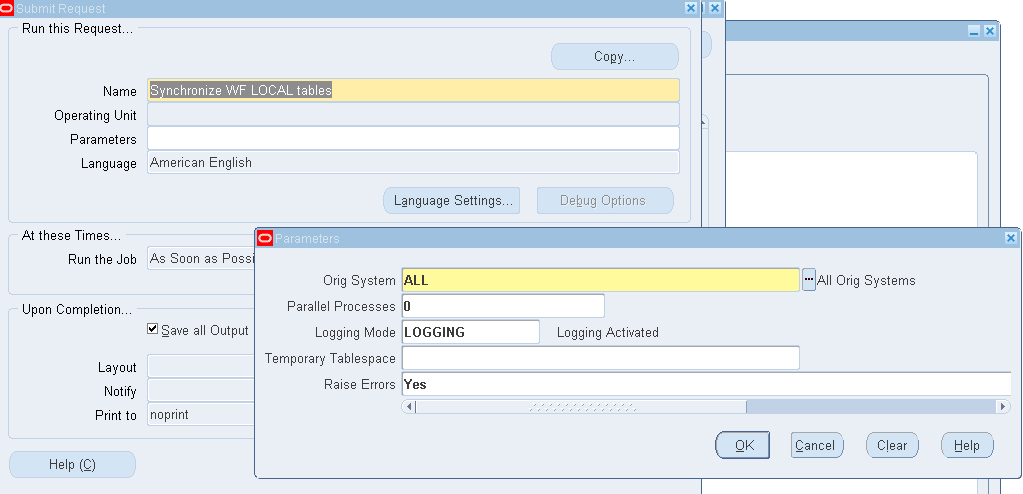
41. Synchronizing responsibilities We have come across an issue where the responsibilities have end date as NULL under SYSTEM ADMINISTRATOR >> User >> Define. Still we couldn’t find the responsibilities in navigator then please run below program in System Administrator. Please wait for some time to reflect the responsibilities under particular user. Synchronize WF LOCAL tables
 Still the problem persists the run below program…
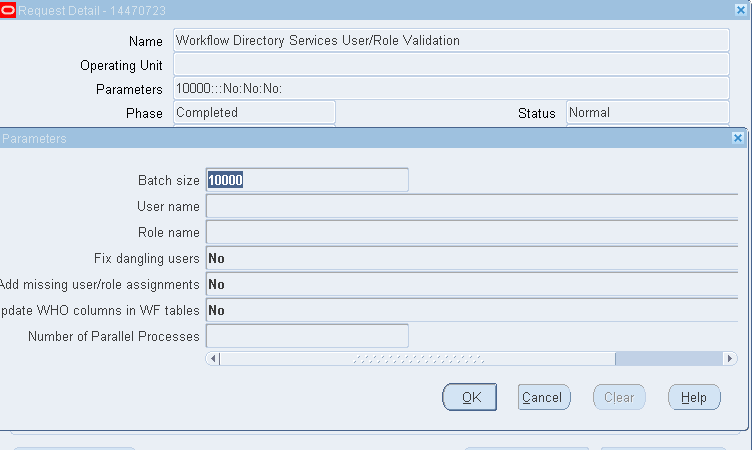
Workflow Directory Services User/Role Validation
Still the problem persists the run below program…
Workflow Directory Services User/Role Validation
42. Adding a Function to Responsibility System Administrator >> Security >> Responsibility >> Define >> Check resp name and copy Menu name >> System Administrator >> Application >> Search with Menu which you obtained earlier >> Enter new line with your prompt and Function name >> Now go to particular resp and check.
43. Value Sets We have 8 types of value sets 1. Dependent 2. Independent 3. None 4. Pair - Same as special but have high and low values. 5. Special - Used for report parameters 6. Table 7. Translatable Independent - Used for multi-language support 8. Translatable Dependent - Used for multi-language support Navigation: Application Developer or System Administrator >> Application >> Validation >> Set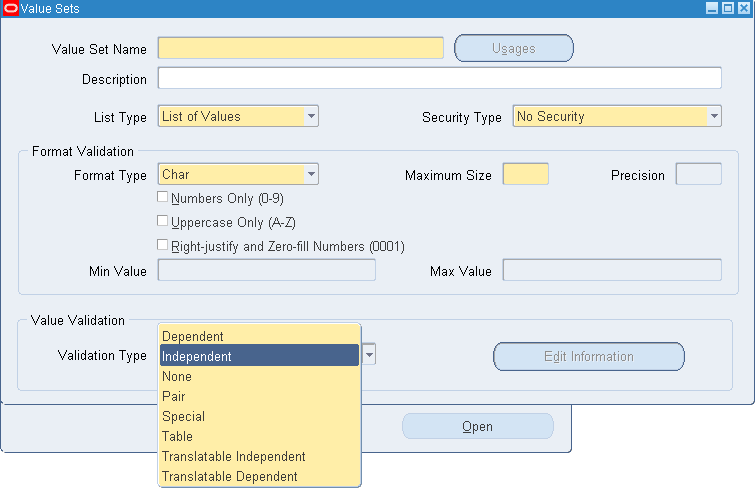
44. Pseudo Columns 1. ROWID 2. ROWNUM 3. CURRVAL 4. NEXTVAL 1. ROWID - Hexadecimal value. Returns Address for each row and provides the location in DB where the row is physically stored. The ROWID wont get changed with data updation. 2. ROWNUM - Integer. Sequence number in which rows are retrieved from DB Used to query top 'N' records. ORDER BY and ROWNUM should not be used together. ORDBER BY clause can be used in INLINE views Wrong Approach: SELECT ROWNUM, ename, sal FROM emp WHERE ROWNUM < 6 ORDER BY sal DESC; Correct Approach: SELECT ROWNUM, ename, sal FROM ( SELECT * FROM emp ORDER BY sal DESC) WHERE ROWNUM < 6
45. Set Operators UNION, UNION ALL, INTERSECT, MINUS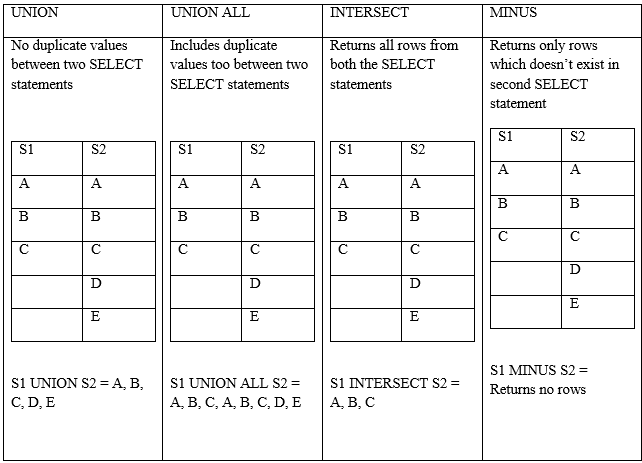
46. Difference Between 11i and R12 [table id=19 /]
47. Instance access issue Oracle JInitiator version too low. Please install version 1.1.8.2 or higher.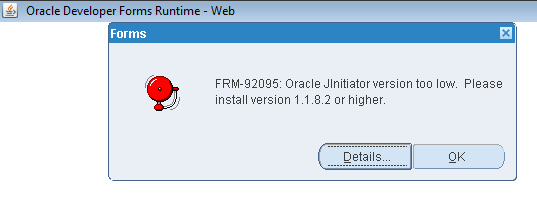 Include the below environmental variables:
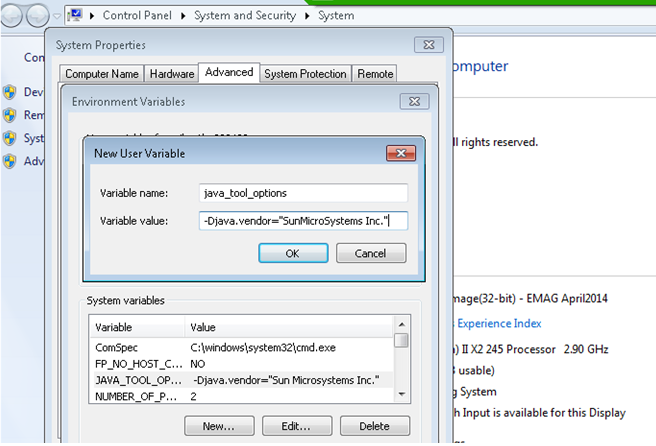
48. Request Set Collection of multiple concurrent programs. We have option to select processing of programs either Sequentially (one after another) or parallel (all at once).
49. To run View – set below command
50. SDLC Flow Requirement analysis and gathering >> to be designed (HLD and DLD) >> Configuration >> Development >> Unit Testing >> SIT >> UAT >> Cut Over
51. To get DFF values stored in which table n which column Go to particular line which has DFF >> Help >> Diagnostics >> Examine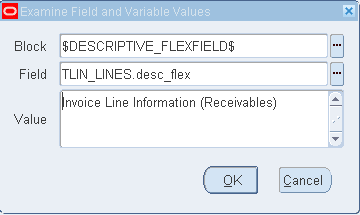 System Administrator >> Application >> Flexfiled >> Descriptive >> Enter Title as the value which is there above
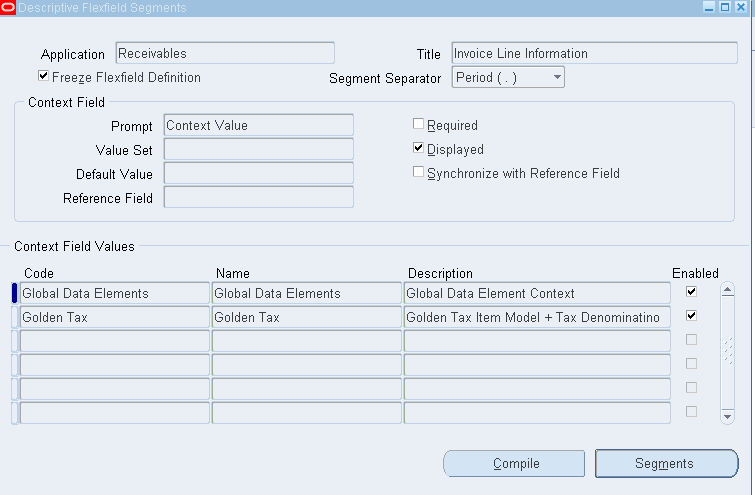 Click on Global Data Elements >> Segments button
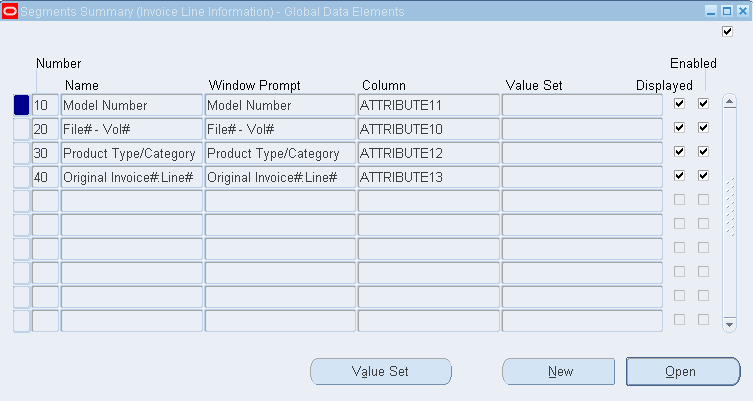
52. Enable DFF Fetch the name of DFF >> Help Menu >> Diagnostics >> Examine >> Block Name = $DESCRIPTIVE_FLEXFIELD$ >> Field = XXX.DF >> Check value To enable this: Application Developer >> Flexfield >> Descriptive >> Segments >> F11 >> Enter Title with the value which we have above (exclude the value which is in ()) >> CTL + F11 >> Include in code >> Enter Segment values and attributes
53. To change Concurrent Program short name System Administrator >> Profile >> System >> Enter user and give profile name as 'Utilities:Diagnostics'>> Give Yes under User
53. Concurrent Requests Inactive System Administrator > Control L > Administer Concurrent Managers > Under name query (F11) for Standard Manager and see the pending requests.
54. Defining global parameters gn_request_id NUMBER := fnd_global.conc_request_id; gn_user_id NUMBER := fnd_global.user_id; gn_login_id NUMBER := fnd_global.login_id; gn_org_id NUMBER := fnd_global.org_id; gn_created_by VARCHAR2(50) := fnd_profile.VALUE ('USER_ID'); gn_last_updated_by VARCHAR2(50) := fnd_profile.VALUE ('USER_ID');
55. FND_MESSAGES Application Developer >> Application >> Messages >> F11 n query for relevant name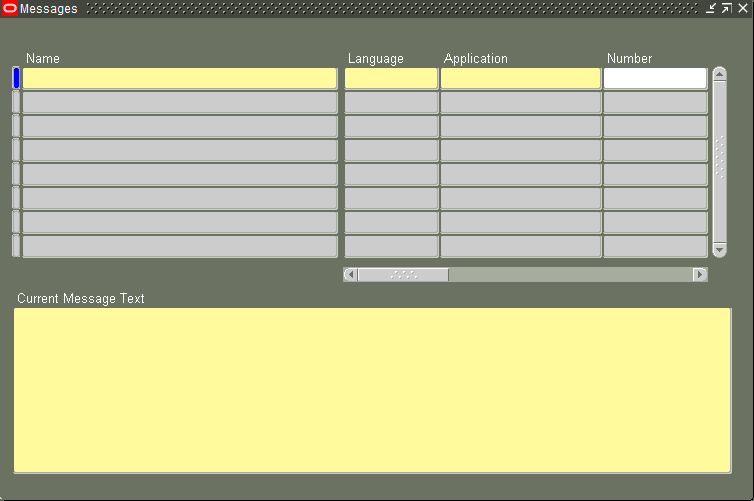 SELECT MESSAGE_TEXT
FROM fnd_new_messages
WHERE meaages_name = '' AND language_code = 'US'
SELECT MESSAGE_TEXT
FROM fnd_new_messages
WHERE meaages_name = '' AND language_code = 'US'
56. Displaying dynamic value in FND Messages The values which need to be displayed dynamically give &text in message text. The below function can be used to get dynamic text in message text. Here we have to get three dynamic texts. Say the text is like --- This is a test messages to test &ln_amount with currency &lv_currency_code and possessing &ln_tax in fnd_messages.
57. NLS Language NLS_LANGUAGE specifies the default language of the database. This language is used for messages, day and month names, symbols for AD, BC, a.m. and p.m. and the default sorting mechanism. This parameter also determines the default values of the parameters NLS_DATE_LANGUAGE and NLS_SORT. ALTER SESSION SET NLS_LANGUAGE= 'AMERICAN' NLS_TERRITORY= 'AMERICA' NLS_CURRENCY= '$' NLS_ISO_CURRENCY= 'AMERICA' NLS_NUMERIC_CHARACTERS= '.,' NLS_CALENDAR= 'GREGORIAN' NLS_DATE_FORMAT= 'DD-MON-RR' NLS_DATE_LANGUAGE= 'AMERICAN' NLS_SORT= 'BINARY' SELECT * FROM FND_LANGUAGES;
58. Mapping Rule The rules that change the legacy system values into valid Oracle apps values is called Mapping Rule.
59. Optimizer Oracle Optimizer has two modes of operation. 1. Cost based (CHOOSE) 2. Rule based (RULE)
60. Hints Hints instructs the database engine on execution of SQL query (how to execute SQL query). Hint may instructs database engine to use or not to use Index.
61. Restore sql developer file C:\Users\%USERNAME%\AppData\Roaming\SQL Developer\SqlHistory
62. Query taking long time for first run and less time for second run In case Query is taking long time for first run and less time during second run, Caching is main reason. In the second run instead of physical disc check it returns from Cache. To make the query run consistently during second run also, use below syntax. ALTER SYSTEM FLUSH BUFFER_CACHE; COMMIT;
63. Save output data from SQL Developer in excel Right click in data >> Click on Export >> Change the format to csv >> Enter file name (Missing/ Incorrect path name leads to an error) >> Browse your location to download the file >> Next >> Finish
64. SQL Developer Installation Install SQL Developer + Oracle Client 10g or 11g. Once Client 10g/ 11g is installed then we will be able to save TNS file in D:\app\<name>\product\11.1.0\client_1\ etwork\admin folder
65. Agile and Scrum Agile = 4 values and 12 principles Scrum = Framework in Agile Other frameworks in Agile are XP, Crystal, DSDM, FDD Scrum = Iteration duration is upto 1 calendar month XP = Iteration duration is upto 1 to 3 weeks DSDM = Iteration duration is upto 2 to 4 weeks In Scrum, 3 Roles, 5 Events, 3 Artifacts 3 Roles: Product Owner, Scrum Master, Development Team...all together we call as Scrum Team. The maximum size of Scrum team is 11 members. PO and Scrum master + 3 to 9 developers. There is no Manager in Scrum team. There are only three roles. The management activities are distributed among them. 5 Events: Event1: Sprint Event2: Sprint planning. Event3: Daily scrum Event4: Sprint Review Event5: Sprint Retrospective Backlog Refinement: Preparing for upcoming sprints. 3 Artifcats: 1. Product Backlog -- Product backlog is never frozen (base-lined). Business can keep adding and refining the backlog. 2. Sprint Backlog -- This is subset of product backlog and the teams plan, but for short term only. 3. Increment
66. FSG (Financial Statement Generator)
General Ledger Super User
¦-Reports
¦-Define
¦-Row Set >> Enter Name & Description >> Define Rows >> Enter values
¦-Column Set >> Enter Name & Description >> Define Columns >> Enter values
¦-Report >> Enter values and choose row & columns set value
Concurrent Program: 'Program - Publish FSG Report'
67. Remove blank spaces from notepad++ i) Go to Search -> Replace ii) Select "Regular expression" under Search mode. iii) For leading spaces use ^\s* and for trailing spaces use \s+$ for "Find what" and leave "Replace with" blank. iv) Click Replace All
68. Inactive - No Manager The concurrent manager defined to process this request is not active in the current work shift. The request will not process within this work shift. Contact your system administrator to verify that the concurrent manager work shifts are defined correctly. Navigation: System Administrator -> Concurrent -> Managers -> Administer Search for the Managers with pending requests and confirm your requests in running in this manager by clicking on requests button. Now go to System Administrator -> Concurrent -> Managers -> Define Query for this Manager and go to shifts. Here you can change the shift to Standard and the manager will then run for 24 hr.
69. Oracle Discoverer 1. Discoverer Desktop (Only for execution -- Running & seeing the report) 2. Discoverer Administrator (Developer Tool) 3. Discoverer Plus (Web Browser)
70. API to delete Concurrent program definition and executable
71. Database Schemas Found in EBS https://docs.oracle.com/cd/E26401_01/doc.122/e22952/T156458T659606.htm
72. Oracle Applications Modules ABM - Activity Based Management AD - Applications DBA AHL - Oracle Advanced Service Online AK - Oracle Common Modules-AK ALR - Oracle Alert AMF - Oracle Fulfillment Services AMS - Oracle Marketing AP - Oracle Payables AR - Oracle Receivables AS - Oracle Sales ASG - Oracle CRM Gateway for Mobile Services ASL - Oracle Mobile Field Sales Laptop ASO - Oracle Order Capture AST - TeleSales AX - Global Accounting Engine AZ - Application Implementation BEN - Oracle Advanced Benefits BIC - Customer Intelligence BIL - Sales Intelligence BIM - Marketing Intelligence BIS - Oracle Applications BIS BIX - Call Center Intelligence BNE - Oracle Web ADI BOM - Oracle Bills of Material BSC - Balanced Scorecard CCT - Oracle Call Center and Telephony CE - Oracle Cash Management CHV - Oracle Supplier Scheduling CLN - Supply Chain Trading Connector for RosettaNet CN - Oracle Sales Compensation CS - Oracle Service CSC - Customer Care CSD - Depot Repair CSE - Oracle Enterprise Install Base CSF - Field Service CSI - Install Base CSM - Oracle Field Service Palm CSP - Oracle Spares Management CSR - Oracle Scheduler CSS - Support CUG - Oracle Citizen Interaction Center CUN - Oracle Network Logistics NATS CZ - Oracle Configurator EAM - Oracle Enterprise Asset Management EC - Oracle e-Commerce Gateway ECX - Oracle XML Gateway EDR - Oracle E Records ENG - Oracle Engineering FII - Financials Intelligence FLM - Oracle Flow Manufacturing FND - Application Object Library FTE - Oracle Transportation Hub FV - Oracle Federal Financials GHR - Oracle Federal HR GL - Oracle General Ledger GMA - Oracle Process Manufacturing Systems GMD - Oracle Process Manufacturing Product Development GME - Oracle Process Manufacturing Process Execution GMF - Oracle Process Manufacturing Financials GMI - Oracle Process Manufacturing Inventory GML - Oracle Process Manufacturing Logistics GMP - Oracle Process Manufacturing Process Planning GMS - Oracle Grants Accounting GR - Oracle Process Regulatory Mgmt HRI - Human Resources Intelligence HXC - Oracle Time and Labor HXT - Oracle Time and Labor Rules IBA - iMarketing IBC - Oracle iContent IBE - iStore IBU - iSupport IBY - iPayment ICX - Oracle Self-Service Web Applications IEB - Oracle Interaction Blending IEC - Oracle Campaign Plus IEM - Oracle eMail Center IEO - Call Center Technology IES - Scripting IEU - Oracle Universal Work Queue IEX - Oracle Collections IGC - Commitment Administration IGF - Student Systems Fin Aid IGI - Oracle International Public Sector Financials IGS - Oracle Student Sytems IGW - Oracle Grants Proposal INV - Oracle Inventory IPD - Oracle Product Development Exchange ISC - Supply Chain Intelligence JTF - CRM Foundation JTM - Oracle CRM Mobile Foundation JTS - Oracle CRM Self Service Administration MRP - Oracle Master Scheduling/MRP MSC - Oracle Advanced Supply Chain Planning MSD - Oracle Demand Planning OFA - Oracle Assets OKC - Oracle Contracts Core OKI - Oracle Contracts Intelligence OKL - Oracle Lease Management OKR - Oracle Contracts for Rights OKS - Oracle Contracts Service Module ONT - Oracle Order Management OPI - Operations Intelligence OTA - Oracle Training Administration OZF - Funds & Budgets PA - Oracle Projects PAY - Oracle Payroll PER - Oracle Human Resources PJM - Oracle Project Manufacturing PN - Oracle Property Manager PO - Oracle Purchasing POA - Purchasing Intelligence POM - Oracle Exchange PON - Oracle Sourcing POS - Internet Supplier Portal (iSupplier Portal) PQH - Oracle Public Sector HR PSA - Public Sector Applications PSB - Oracle Public Sector Budgeting PSP - Oracle Labor Distribution PV - Partner Relationship Management QA - Oracle Quality QP - Oracle Pricing QRM - Oracle Risk Management RG - Application Report Generator RLM - Oracle Release Management VEA - Oracle Automotive WIP - Oracle Work in Process WMS - Oracle Warehouse Management System WSH - Oracle Shipping WSM - Shop Floor Management XDP - Oracle Provisioning XNC - Oracle Sales for Communications XNI - Oracle Install Base Intelligence XNP - Oracle Number Portability XNS - Oracle Service for Communications XTR - Oracle Treasury
73. Custom Top #${APPLCSF} = /u01/oraout/instance_name Custom Top: /u01/app/instance_name/apps/apps_st/appl/custom_schema/12.0.0 Shell script/ Host file/ .sh file: /u01/app/instance_name/apps/apps_st/appl/xx/12.0.0/bin
74. Open & Closed Periods Purchasing Period: Navigation: Purchasing Super User >Setup >Financials >Accounting >Control Purchasing Periods Enter the Fiscal year and click Go button. (If it prompts for selecting Operating Unit, select it and click Go button.) Then open the periods by changing the Period Status and click on Save button. Payables Period: Navigation: Payables Super User or Payable Manager >Accounting >Control Payables Periods Open the periods by changing the Period Status and click on Save button. General Ledger Period: Navigation: General Ledger Super User >Setup >Open/Close First find the required Ledger Then open the required periods by clicking "Open Periods" button, select the required period as Target Period and click Open button. Inventory Period: Navigation: Inventory Super User >Accounting Close Cycle >Inventory Accounting Periods Then select the period to be opened and click on Change Status button.
1. Implementation Types 1. Fresh Implementation 2. Rollout Projects – Country specific 3. Upgradation Projects – Version specific – 12.1.1 to 12.1.3 4. Support Projects 5. Enhancement Project – Adding Modules or Modifies the functionality/ capability of existing design
2. Difference between Org ID, Organization ID and Operating Unit Operating Unit – Location – India/US; Each operating unit will have an ID known as Org ID In India we have three inventories – AP, Karnataka, Orissa. Each inventory organization will have an Organization ID
3. Concurrent program error (OPP Error) If the program errors then pick the request id >> System Administrator >> Concurrent >> Manager >> Administer >> Click on Output Post Processor >> Click on Processes button >> Status Active: Click on Manager Log and search with request ID
4. LDT Commands Login to WinScp and create folder where the files need to be downloaded. Next login to Putty and set environment path and the go the folder which was created above. Login to Putty: abc.xyz.net Enter Username and Password cd /u01/app/instancename/apps/apps_st/appl/ . ./APPSinstancename_servername.env cd /u01/app/instancename/apps/apps_st/appl/xxcustomtop/12.0.0/bin <Run download script> <FNDLOAD apps/pswd O Y DOWNLOAD $FND_TOP/patch/115/import/afscursp.lct file_name.ldt FND_RESPONSIBILITY RESP_KEY="resp_short_name"> <For upload use below steps in addition of above> $XXCUSTOM_TOP/bin/xxab_deploy.sh give pswd enter deployment link -- /u01/app/instancename/apps/apps_st/appl/xxcustomtop/12.0.0/bin lct = 'loader control file' ldt = 'loader data file'
#Use below syntax in .sh file (XXAB_LDT.sh)

APPS_PASSWORD=$1

DB_INSTANCE=$2

$FND_TOP/bin/FNDLOAD apps/$APPS_PASSWORD@$DB_INSTANCE 0 Y UPLOAD $FND_TOP/patch/115/import/afscursp.lct XX_DOWNLOAD_FILE_NAME_CP.ldt - WARNING=YES UPLOAD_MODE=REPLACE CUSTOM_MODE=FORCE
Download & upload Concurrent Program: APPLICATION_SHORT_NAME="PER" is of 'Human Resources' application
FNDLOAD apps/password O Y DOWNLOAD $FND_TOP/patch/115/import/afcpprog.lct XX_DOWNLOAD_FILE_NAME_CP.ldt PROGRAM APPLICATION_SHORT_NAME="PER" CONCURRENT_PROGRAM_NAME="CONCURRENT_PROGRAM_SHORT_NAME"

FNDLOAD apps/password 0 Y UPLOAD $FND_TOP/patch/115/import/afcpprog.lct XX_DOWNLOAD_FILE_NAME_CP.ldt - WARNING=YES UPLOAD_MODE=REPLACE CUSTOM_MODE=FORCE
Download & upload Request Group:
FNDLOAD apps/password 0 Y DOWNLOAD $FND_TOP/patch/115/import/afcpreqg.lct XX_DOWNLOAD_FILE_NAME_RG.ldt REQUEST_GROUP REQUEST_GROUP_NAME="REQUEST_GROUP_NAME" APPLICATION_SHORT_NAME="PER" UNIT_NAME="CONCURRENT_PROGRAM_SHORT_NAME"

FNDLOAD apps/password 0 Y UPLOAD $FND_TOP/patch/115/import/afcpreqg.lct XX_DOWNLOAD_FILE_NAME_RG.ldt
Download & upload personalized form
FNDLOAD apps/<GIVE_PSWD_HERE> 0 Y DOWNLOAD $FND_TOP/patch/115/import/affrmcus.lct <GIVE_FILE_NAME_HERE>.ldt FND_FORM_CUSTOM_RULES function_name=<Give_Function_Name_Here>

FNDLOAD apps/<GIVE_PSWD_HERE> 0 Y UPLOAD $FND_TOP/patch/115/import/affrmcus.lct <Path_Name/Give_Download_File_Name_Here>.ldt
5. Loading shortcut file in Toad First create a text file (.txt) with required syntaxes like the few given below: paaf=select * from hr.per_all_assignments_f papf=select * from hr.per_all_people_f hca=select * from apps.hz_cust_accounts_all where cust_account_id = hp=select * from apps.hz_parties hl=select * from apps.hz_locations Next navigation in Toad: View >> Toad Options >> Editor >> Behavior >> Auto Replace >> Import >> Ok
6. DUNS Number Dun & Bradstreet provides a D-U-N-S number, a unique nine digit identification number, for each physical location of your business. BIR – Business Information Report
7. Types of GL Periods Navigation: General Ledger Super User >> Setup >> Open/ Close >> Enter Ledger name like ‘Vision Operations (USA)’ >> Click on Find >> Select the period which you want to open and click Open Period button >> Enter Target Period which you want to open >> Click on Open >> Yes >> Ok >> Ensure the ‘Open Period’ program completed successfully >> Now you will find your period in open status. Also we can search in Receivables responsibility >> Control >> Accounting >> Open/ Close periods >> On status field open the period which you want to.
8. Testing Types Order By – Smoke Testing >> Sanity Testing >> Regression Testing >> Unit Testing Smoke Testing – Functional testing of application Sanity Testing – S/W testing of application Regression Testing – Testing by functional team Unit Testing – Code testing by developer
9. Autonomous Transaction Autonomous transaction is an independent transaction that can be committed or rollback regardless the state of parent transaction.
CREATE OR REPLACE TRIGGER autonomous_transaction_trigger
  AFTER INSERT ON table_name
  DECLARE
  PRAGMA AUTONOMOUS_TRANSACTION;
  BEGIN
  UPDATE table_name
  SET column_name = VALUE;
  COMMIT;
END autonomous_transaction_trigger;10. To extend the session connectivity Set the below profile option to Null
11. Explain Plan Simply select the whole query and give ctrl+e {or} Go to Toad >> Database Menu >> Monitor >> Session Browser >> Under Program check for Toad.EXE >> Select any of the apps session and in right window check for Current Statement >> Go to Explain Plan to get Cost details.
12. Editing values in Toad SELECT tablealiasname.rowid, tablealiasname.* FROM tablename tablealiasname; SELECT A.ROWID, A.* FROM CSI_INSTANCE_INTERFACE A;
13. Alter session in Toad ALTER SESSION SET current_schema = apps;
14. Converting an excel/csv file into cap format or ending with ',' =CONCATENATE("^",B1,"^",",") — Copy whole data & while pasting right click and select Paste Options: 123 (Removes Formula) To update whole sheet =CONCATENATE("^",SheetName!A1,"^",","). Use Ctrl+D to update all columns from last row
15. OATS – Oracle Application Testing Suite OATS is suite of testing product for testing of Oracle database, Oracle applications, Web Services, SOA applications, functional testing, load testing and test management of web applications. OATS Tools
| Oracle Functional Testing (OFT) | Oracle Load Testing (OLT) | Oracle Test Manager (OTM) |
| OFT is used for automated functional testing of web applications, Oracle packaged applications and SOA web services. This can be used to automate functional as well as regression testing to increase the productivity and efficiency of the testing cycle. Here we uses a component called OpenScript as the scripting platform | OLT is used provide automated scalability, performance and load testing of Web applications, packaged applications and SOA Web Services. | OTM is a Test repository used for documenting and managing the overall test process including test requirements, define test plans, create and execute tests, document issues and design reports and dashboards. |
16. PTD & YTD PTD: Period to Date — Only particular period transactions. YTD: Year to Date — From beginning of calendar date to till date
17. Bank Information Either Cash Management resp or Receivables Manager >> SetUp >> Receipts >> Banks
18. Concurrent Program output in MS Excel format System Administrator >> Install >> Viewer Options >> Add entries as below File Format =Text Mime Type=application/vnd.ms-excel Description=Microsoft Excel Save >> Run any CP >> Go to Tools and Copy file >> OP in excel format
19. WHO Columns CREATED_BY VARCHAR2, –fnd_profile.value(‘USER_ID’) CREATION_DATE DATE, — SYSDATE LAST_UPDATED_BY VARCHAR2, — fnd_profile.value(‘USER_ID’) LAST_UPDATE_DATE DATE, — SYSDATE LAST_UPDATE_LOGIN VARCHAR2
20. FND_GLOBAL.APPS_INITIALIZE Used for initializing the session and its good practise to use this profile at start of Procedure FND_GLOBAL.APPS_INITIALIZE( user_id => fnd_profile.value('USER_ID') -- User ID , resp_id => fnd_profile.value('RESP_ID') -- Responsibility ID. , resp_appl_id => fnd_profile.value('RESP_APPL_ID') -- Responsibility Application ID ); Alternatively we can get values from below query SELECT fu.user_id, frt.responsibility_id, frt.application_id FROM fnd_user fu, fnd_responsibility_tl frt WHERE fu.user_name = 'SYSADMIN' AND frt.responsibility_name = :responisbility_name Alternatively we can get values from Help >> Diagnostics >> Examine >> Get the values from $profile session_values
21. ERRBUF & RETCODE Mandatory parameters in any Procedure are – When we use proc in concurrent program 1. ERRBUF 2. RETCODE The sequence has to be followed as ERRBUF and then the RETCODE (as below) CREATE PROCEDURE procedure_name( p_errbuf OUT NOCOPY VARCHAR2 , p_retcode OUT NOCOPY VARCHAR2 , —– , —– ); While running the concurrent program when we come across any undefined exception then we can end the concurrent program with Error/ Warning. The retcode has three values returned by concurrent manager 0 – Success 1 – Warning 2 – Error We can set the concurrent program to any of the three status by using these values in the retcode parameter.
22. Concurrent Program Phase and Status codes Phase Code: I – Inactive; P – Pending; R – Running; C – Completed Status Code: A – Waiting; B – Resuming; C – Normal; D – Cancelled; E – Error; F – Scheduled; G – Warning; H – On Hold; I – Normal; M – No Manager; Q – Standby; R – Normal; S – Suspended; T – Terminating; U – Disabled; W – Paused; X – Terminated; Z – Waiting
23. CEMLI CUSTOMIZATION EXTENSION MODIFICATION LOCALIZATION INTERFACES
24. Qualifier Flexfield Qualifier – Defines property of segment Segment Qualifier – Defines property of segment values
25. Kill Session
SELECT
 a.sid,
 owner,
 object,
 a.type,
 b.serial#,
 inst_id
FROM
 v$access a,
 gv$session b
WHERE
 object LIKE '%PKG_NAME%'
 AND a.sid = b.sid;

ALTER SYSTEM KILL SESSION '130,620,@1'; --130 = SID; 620 = SERIAL#; INST_ID = @1
26. Query to identify locked objects
SELECT
 a.object_id,
 a.session_id,
 b.object_name
FROM
 v$locked_object a,
 dba_objects b
WHERE
 a.object_id    = b.object_id
 AND object_name = 'OBJECT_NAME';
27. Concurrent Program A concurrent program can have maximum of 100 parameters with maximum value size of 240bytes
28. Setting up the Priority of Concurrent Program System Administrator >> Profile >> System >> Check Site and User >> Enter User ID in User >> Enter profile value as ‘Concurrent:Request Priority’ >> Find >> Enter the value under User (1 is highest priority, 99 is lowest priority and 50 is default)
29. Execute Procedure in Toad EXECUTE procedure_name (parameters);
31. Basic profile options to run any Responsibility Profile: The way Oracle apps runs. Profile Types: System Profile & User Profile Profile options are some set of options based on which the functional and technical behavior of Oracle apps depends. Navigation: System Administrator >> Profile >> System 1. HR: Business Group 2. HR: Security Profile 3. HR: User Type 4. GL Ledger Name 5. MO: Security Profile or MO: Operating Unit MO: Security Profile — If user wants to access the all OU’s from a single Resp MO: Operating Unit — If user wants to access single OU from a single Resp. Note: If the MO: Security Profile is set, then the MO: Operating Unit profile is ignored.
32. Custom Top Custom top is Customer top which is created only for customers. We can have multiple custom tops based on client requirement. It is used to store developed & customized components. Whenever Oracle corporation apply patches then it will override on all the modules except custom top.
33. Clear Cache Functional Administrator >> Home >> Core Services >> Caching Form >> Global Configuration >> Clear All Stats >> Yes >> Apply >> Clear Cache >> Yes >>Apply
34. To compare values in excel between two columns First ensure both the columns are in same format…either number or text format =VLOOKUP(A2,$B$2:$B$59,1,0) or =VLOOKUP(A2,B:B,1,0) or =IF(ISNA(VLOOKUP(TRIM(B1),$A$1:$B$59,1,FALSE)),””,B1) Here A2 is column which has more number of columns… Next select first column B2 and shift + control + down arrow which is B59…
As per accounting rule: what comes in is debit and what goes out is credit.
35. Document types in Oracle EBS MD – Module Design; CV – Data Conversion; MD050 – Functional Specification (FS); MD070 – Technical Specification (TS); MD120 – Installation Instructions CV060 – Conversion Technical Design Document
36. FTP via Toad Toad > Utilities > FTP > Connect to an FTP server > Extreme left on top of Local System > Connection type Secure FTP Give HostName(instancename.com), UserName and Password. Under Remote System type /usr/tmp which re-directs to /var/tmp
37. Difference between APPS Schema and other Schemas Apps schema contains only Synonyms we can’t create tables in apps schema, where as other schemas contains tables, & all the objects. Here we can create the tables and give grants on created tables. Almost all every time we will connect to apps schema only. We can have custom schema and is required when we want to create new table.
38. Extended SQL and XSL Functions BI Publisher has extended a set of SQL and XSL functions for use in RTF templates. The syntax for these extended functions is <?xdofx:expression?> for extended SQL functions <?xdoxslt:expression?> for extended XSL functions. You cannot mix xdofx statements with XSL expressions in the same context.
39. Constraints 1) PRIMARY KEY – NOT NULL & UNIQUE 2) FOREIGN KEY (REFERENTIAL INTEGRITY CONSTRAINT) 3) NOT NULL 4) UNIQUE 5) CHECK – Condition Note: The columns in a table that can act as a Primary Key are called Candidate Key.
40. Synonym A synonym is a schema object (Table, View, Package, Procedure, Function etc) which acts as an alternate name for existing schema object. By using Synonym we can avoid the entry of schema name when referencing upon objects that belong to other schema. Types: 1. PRIVATE SYNONYM 2. PUBLIC SYNONYM We should have CREATE PUBLIC SYNONYM privilege which can be accessed by all users in DB. CREATE PUBLIC SYNONYM synonym_name FOR schema_name.table_name;
41. Synchronizing responsibilities We have come across an issue where the responsibilities have end date as NULL under SYSTEM ADMINISTRATOR >> User >> Define. Still we couldn’t find the responsibilities in navigator then please run below program in System Administrator. Please wait for some time to reflect the responsibilities under particular user. Synchronize WF LOCAL tables
Still the problem persists the run below program…
Workflow Directory Services User/Role Validation
42. Adding a Function to Responsibility System Administrator >> Security >> Responsibility >> Define >> Check resp name and copy Menu name >> System Administrator >> Application >> Search with Menu which you obtained earlier >> Enter new line with your prompt and Function name >> Now go to particular resp and check.
43. Value Sets We have 8 types of value sets 1. Dependent 2. Independent 3. None 4. Pair - Same as special but have high and low values. 5. Special - Used for report parameters 6. Table 7. Translatable Independent - Used for multi-language support 8. Translatable Dependent - Used for multi-language support Navigation: Application Developer or System Administrator >> Application >> Validation >> Set
44. Pseudo Columns 1. ROWID 2. ROWNUM 3. CURRVAL 4. NEXTVAL 1. ROWID - Hexadecimal value. Returns Address for each row and provides the location in DB where the row is physically stored. The ROWID wont get changed with data updation. 2. ROWNUM - Integer. Sequence number in which rows are retrieved from DB Used to query top 'N' records. ORDER BY and ROWNUM should not be used together. ORDBER BY clause can be used in INLINE views Wrong Approach: SELECT ROWNUM, ename, sal FROM emp WHERE ROWNUM < 6 ORDER BY sal DESC; Correct Approach: SELECT ROWNUM, ename, sal FROM ( SELECT * FROM emp ORDER BY sal DESC) WHERE ROWNUM < 6
45. Set Operators UNION, UNION ALL, INTERSECT, MINUS
46. Difference Between 11i and R12 [table id=19 /]
47. Instance access issue Oracle JInitiator version too low. Please install version 1.1.8.2 or higher.
Include the below environmental variables:
48. Request Set Collection of multiple concurrent programs. We have option to select processing of programs either Sequentially (one after another) or parallel (all at once).
49. To run View – set below command
DECLARE
 lv_org_id VARCHAR2(10);
 ln_rowcount NUMBER;
 CURSOR c1 IS
 SELECT organization_id FROM hr_all_organization_units;
BEGIN
 OPEN c1;
 LOOP
 ln_rowcount := c1%rowcount;
 FETCH c1
 INTO lv_org_id;
 EXIT WHEN c1%notfound;
 --mo_global.set_policy_context('S',lv_org_id); --first check this and go with second
 --fnd_client_info.set_org_context(lv_org_id);

 END LOOP;
 dbms_output.put_line('Total records processed ' || ln_rowcount);
 CLOSE c1;
 COMMIT;
END;50. SDLC Flow Requirement analysis and gathering >> to be designed (HLD and DLD) >> Configuration >> Development >> Unit Testing >> SIT >> UAT >> Cut Over
51. To get DFF values stored in which table n which column Go to particular line which has DFF >> Help >> Diagnostics >> Examine
System Administrator >> Application >> Flexfiled >> Descriptive >> Enter Title as the value which is there above
Click on Global Data Elements >> Segments button
52. Enable DFF Fetch the name of DFF >> Help Menu >> Diagnostics >> Examine >> Block Name = $DESCRIPTIVE_FLEXFIELD$ >> Field = XXX.DF >> Check value To enable this: Application Developer >> Flexfield >> Descriptive >> Segments >> F11 >> Enter Title with the value which we have above (exclude the value which is in ()) >> CTL + F11 >> Include in code >> Enter Segment values and attributes
53. To change Concurrent Program short name System Administrator >> Profile >> System >> Enter user and give profile name as 'Utilities:Diagnostics'>> Give Yes under User
53. Concurrent Requests Inactive System Administrator > Control L > Administer Concurrent Managers > Under name query (F11) for Standard Manager and see the pending requests.
54. Defining global parameters gn_request_id NUMBER := fnd_global.conc_request_id; gn_user_id NUMBER := fnd_global.user_id; gn_login_id NUMBER := fnd_global.login_id; gn_org_id NUMBER := fnd_global.org_id; gn_created_by VARCHAR2(50) := fnd_profile.VALUE ('USER_ID'); gn_last_updated_by VARCHAR2(50) := fnd_profile.VALUE ('USER_ID');
55. FND_MESSAGES Application Developer >> Application >> Messages >> F11 n query for relevant name
SELECT MESSAGE_TEXT
FROM fnd_new_messages
WHERE meaages_name = '' AND language_code = 'US'
56. Displaying dynamic value in FND Messages The values which need to be displayed dynamically give &text in message text. The below function can be used to get dynamic text in message text. Here we have to get three dynamic texts. Say the text is like --- This is a test messages to test &ln_amount with currency &lv_currency_code and possessing &ln_tax in fnd_messages.
FUNCTION fnd_messages_function (
 in_n_customer_trx_id IN NUMBER
 ) RETURN VARCHAR2 IS
  ln_tax VARCHAR2(200) := NULL;
  ln_amount VARCHAR2(200) := NULL;
  lv_currency_code VARCHAR2(200) := NULL;
  lv_sql_err VARCHAR2(200) := NULL;
  lv_org_name VARCHAR2(200) := NULL;
  lv_output VARCHAR2(2000) := NULL;
 BEGIN
  BEGIN
   ln_tax := 'write another function to get this value';
   ln_amount := 'write another function to get this value';
   lv_currency_code := 'write another function to get this value';
   lv_org_name := 'write another function to get this value';
   IF
    lv_org_name = 'Org Name'
   THEN
    fnd_message.clear;
    fnd_message.set_name('AR (give application name)','message_name');
    fnd_message.set_token('AMOUNT',ln_amount);
    fnd_message.set_token('CURRENCY',lv_currency_code);
    fnd_message.set_token('TAX',ln_tax);
    lv_output := fnd_message.get;
   END IF;
   return(lv_output);
  EXCEPTION
   WHEN OTHERS THEN
   lv_output := NULL;
   lv_sql_err := sqlerrm;
   END;
 END;
57. NLS Language NLS_LANGUAGE specifies the default language of the database. This language is used for messages, day and month names, symbols for AD, BC, a.m. and p.m. and the default sorting mechanism. This parameter also determines the default values of the parameters NLS_DATE_LANGUAGE and NLS_SORT. ALTER SESSION SET NLS_LANGUAGE= 'AMERICAN' NLS_TERRITORY= 'AMERICA' NLS_CURRENCY= '$' NLS_ISO_CURRENCY= 'AMERICA' NLS_NUMERIC_CHARACTERS= '.,' NLS_CALENDAR= 'GREGORIAN' NLS_DATE_FORMAT= 'DD-MON-RR' NLS_DATE_LANGUAGE= 'AMERICAN' NLS_SORT= 'BINARY' SELECT * FROM FND_LANGUAGES;
SELECT DECODE (parameter,
'NLS_CHARACTERSET', 'CHARACTER SET',
'NLS_LANGUAGE', 'LANGUAGE',
'NLS_TERRITORY', 'TERRITORY')
name,
VALUE
FROM v$nls_parameters
WHERE parameter IN ('NLS_CHARACTERSET', 'NLS_LANGUAGE', 'NLS_TERRITORY');
58. Mapping Rule The rules that change the legacy system values into valid Oracle apps values is called Mapping Rule.
59. Optimizer Oracle Optimizer has two modes of operation. 1. Cost based (CHOOSE) 2. Rule based (RULE)
60. Hints Hints instructs the database engine on execution of SQL query (how to execute SQL query). Hint may instructs database engine to use or not to use Index.
61. Restore sql developer file C:\Users\%USERNAME%\AppData\Roaming\SQL Developer\SqlHistory
62. Query taking long time for first run and less time for second run In case Query is taking long time for first run and less time during second run, Caching is main reason. In the second run instead of physical disc check it returns from Cache. To make the query run consistently during second run also, use below syntax. ALTER SYSTEM FLUSH BUFFER_CACHE; COMMIT;
63. Save output data from SQL Developer in excel Right click in data >> Click on Export >> Change the format to csv >> Enter file name (Missing/ Incorrect path name leads to an error) >> Browse your location to download the file >> Next >> Finish
64. SQL Developer Installation Install SQL Developer + Oracle Client 10g or 11g. Once Client 10g/ 11g is installed then we will be able to save TNS file in D:\app\<name>\product\11.1.0\client_1\ etwork\admin folder
65. Agile and Scrum Agile = 4 values and 12 principles Scrum = Framework in Agile Other frameworks in Agile are XP, Crystal, DSDM, FDD Scrum = Iteration duration is upto 1 calendar month XP = Iteration duration is upto 1 to 3 weeks DSDM = Iteration duration is upto 2 to 4 weeks In Scrum, 3 Roles, 5 Events, 3 Artifacts 3 Roles: Product Owner, Scrum Master, Development Team...all together we call as Scrum Team. The maximum size of Scrum team is 11 members. PO and Scrum master + 3 to 9 developers. There is no Manager in Scrum team. There are only three roles. The management activities are distributed among them. 5 Events: Event1: Sprint Event2: Sprint planning. Event3: Daily scrum Event4: Sprint Review Event5: Sprint Retrospective Backlog Refinement: Preparing for upcoming sprints. 3 Artifcats: 1. Product Backlog -- Product backlog is never frozen (base-lined). Business can keep adding and refining the backlog. 2. Sprint Backlog -- This is subset of product backlog and the teams plan, but for short term only. 3. Increment
66. FSG (Financial Statement Generator)
| Mandatory Steps | Optional Steps |
| 1. Define Row Set 2. Define Column Set 3. Define Report (Row set + Column set = FSG report) | 1. Define Content Set 2. Define Row Order 3. Define Display Set |
67. Remove blank spaces from notepad++ i) Go to Search -> Replace ii) Select "Regular expression" under Search mode. iii) For leading spaces use ^\s* and for trailing spaces use \s+$ for "Find what" and leave "Replace with" blank. iv) Click Replace All
68. Inactive - No Manager The concurrent manager defined to process this request is not active in the current work shift. The request will not process within this work shift. Contact your system administrator to verify that the concurrent manager work shifts are defined correctly. Navigation: System Administrator -> Concurrent -> Managers -> Administer Search for the Managers with pending requests and confirm your requests in running in this manager by clicking on requests button. Now go to System Administrator -> Concurrent -> Managers -> Define Query for this Manager and go to shifts. Here you can change the shift to Standard and the manager will then run for 24 hr.
69. Oracle Discoverer 1. Discoverer Desktop (Only for execution -- Running & seeing the report) 2. Discoverer Administrator (Developer Tool) 3. Discoverer Plus (Web Browser)
70. API to delete Concurrent program definition and executable
CLEAR SCREEN;

SET SERVEROUTPUT ON;

DECLARE
    v_conc_program_id         NUMBER;
    v_conc_program_name       VARCHAR2(200);
    v_conc_prog_short_name    VARCHAR2(200);
    v_ccp_application_id      NUMBER;
    v_ccp_application_name    VARCHAR2(200);
    v_conc_program_count      NUMBER;
    v_conc_executable_id      NUMBER;
    v_conc_executable_name    VARCHAR2(200);
    v_conc_exec_short_name    VARCHAR2(200);
    v_cce_application_id      NUMBER;
    v_cce_application_name    VARCHAR2(200);
    v_conc_executable_count   NUMBER;
    TYPE tab_ccp_name IS
        TABLE OF VARCHAR2(200) INDEX BY BINARY_INTEGER;
    vtab_ccp_name             tab_ccp_name;
BEGIN
    vtab_ccp_name(1) := 'XX Supplier Conversion';
  --vtab_ccp_name(2) := 'Program Name';
  --vtab_ccp_name(3) := 'Program Name';
  --vtab_ccp_name(4) := 'Program Name';
    v_conc_program_count := 0;
    v_conc_executable_count := 0;
    FOR i IN 1..vtab_ccp_name.count LOOP
        BEGIN
            SELECT
                concurrent_program_id,
                concurrent_program_name,
                application_id,
                executable_id
            INTO
                v_conc_program_id,v_conc_prog_short_name,v_ccp_application_id,v_conc_executable_id
            FROM
                apps.fnd_concurrent_programs_vl
            WHERE
                user_concurrent_program_name = vtab_ccp_name(i);

            SELECT
                application_name
            INTO
                v_ccp_application_name
            FROM
                apps.fnd_application_vl
            WHERE
                application_id = v_ccp_application_id;

        EXCEPTION
            WHEN OTHERS THEN
                dbms_output.put_line('Caught in Exception while fetching the details of concurrent program : '
                || vtab_ccp_name(i)
                || ' : '
                || sqlerrm);
        END;

        IF
            v_conc_executable_id IS NOT NULL
        THEN
            BEGIN
                SELECT
                    executable_name,
                    application_id
                INTO
                    v_conc_exec_short_name,v_cce_application_id
                FROM
                    apps.fnd_executables
                WHERE
                    executable_id = v_conc_executable_id;

                SELECT
                    application_name
                INTO
                    v_cce_application_name
                FROM
                    apps.fnd_application_vl
                WHERE
                    application_id = v_cce_application_id;

            EXCEPTION
                WHEN OTHERS THEN
                    dbms_output.put_line('Caught in Exception while fetching the details of concurrent program Executable : '
                    || sqlerrm);
            END;

        ELSE
            dbms_output.put_line('Executable not existing for concurrent program : '
            || vtab_ccp_name(i) );
        END IF;

        IF
            v_conc_program_id > 0
        THEN
        /*-- API to Delete Concurrent Program ---- */
            BEGIN
                apps.fnd_program.delete_program(program_short_name => v_conc_prog_short_name,application => v_ccp_application_name);
                COMMIT;
                dbms_output.put_line('Concurrent Program has been deleted : '
                || vtab_ccp_name(i) );
                v_conc_program_count := v_conc_program_count + 1;
            EXCEPTION
                WHEN OTHERS THEN
                    dbms_output.put_line('Caught in Exception while deleting the Concurrent Program : '
                    || vtab_ccp_name(i)
                    || ' : '
                    || sqlerrm);
            END;

        /*-- API to Delete Concurrent Program Executable ---- */

            BEGIN
                apps.fnd_program.delete_executable(executable_short_name => v_conc_exec_short_name,application => v_cce_application_name);
                COMMIT;
                dbms_output.put_line('Concurrent Program Executable has been deleted : '
                || v_conc_exec_short_name);
                v_conc_executable_count := v_conc_executable_count + 1;
            EXCEPTION
                WHEN OTHERS THEN
                    dbms_output.put_line('Caught in Exception while deleting the Concurrent Program Executable : '
                    || v_conc_exec_short_name
                    || ' : '
                    || sqlerrm);
            END;

        ELSE
            dbms_output.put_line('Concurrent program Not Existing, Please create  : '
            || vtab_ccp_name(i) );
        END IF;

        dbms_output.put_line('Total Count of deleted Concurrent Program/s  : '
        || v_conc_program_count);
        dbms_output.put_line('Total Count of deleted Concurrent Program Executable  : '
        || v_conc_executable_count);
    END LOOP;

EXCEPTION
    WHEN OTHERS THEN
        dbms_output.put_line('Caught in Main Exception :'
        || sqlerrm);
END;
/
71. Database Schemas Found in EBS https://docs.oracle.com/cd/E26401_01/doc.122/e22952/T156458T659606.htm
72. Oracle Applications Modules ABM - Activity Based Management AD - Applications DBA AHL - Oracle Advanced Service Online AK - Oracle Common Modules-AK ALR - Oracle Alert AMF - Oracle Fulfillment Services AMS - Oracle Marketing AP - Oracle Payables AR - Oracle Receivables AS - Oracle Sales ASG - Oracle CRM Gateway for Mobile Services ASL - Oracle Mobile Field Sales Laptop ASO - Oracle Order Capture AST - TeleSales AX - Global Accounting Engine AZ - Application Implementation BEN - Oracle Advanced Benefits BIC - Customer Intelligence BIL - Sales Intelligence BIM - Marketing Intelligence BIS - Oracle Applications BIS BIX - Call Center Intelligence BNE - Oracle Web ADI BOM - Oracle Bills of Material BSC - Balanced Scorecard CCT - Oracle Call Center and Telephony CE - Oracle Cash Management CHV - Oracle Supplier Scheduling CLN - Supply Chain Trading Connector for RosettaNet CN - Oracle Sales Compensation CS - Oracle Service CSC - Customer Care CSD - Depot Repair CSE - Oracle Enterprise Install Base CSF - Field Service CSI - Install Base CSM - Oracle Field Service Palm CSP - Oracle Spares Management CSR - Oracle Scheduler CSS - Support CUG - Oracle Citizen Interaction Center CUN - Oracle Network Logistics NATS CZ - Oracle Configurator EAM - Oracle Enterprise Asset Management EC - Oracle e-Commerce Gateway ECX - Oracle XML Gateway EDR - Oracle E Records ENG - Oracle Engineering FII - Financials Intelligence FLM - Oracle Flow Manufacturing FND - Application Object Library FTE - Oracle Transportation Hub FV - Oracle Federal Financials GHR - Oracle Federal HR GL - Oracle General Ledger GMA - Oracle Process Manufacturing Systems GMD - Oracle Process Manufacturing Product Development GME - Oracle Process Manufacturing Process Execution GMF - Oracle Process Manufacturing Financials GMI - Oracle Process Manufacturing Inventory GML - Oracle Process Manufacturing Logistics GMP - Oracle Process Manufacturing Process Planning GMS - Oracle Grants Accounting GR - Oracle Process Regulatory Mgmt HRI - Human Resources Intelligence HXC - Oracle Time and Labor HXT - Oracle Time and Labor Rules IBA - iMarketing IBC - Oracle iContent IBE - iStore IBU - iSupport IBY - iPayment ICX - Oracle Self-Service Web Applications IEB - Oracle Interaction Blending IEC - Oracle Campaign Plus IEM - Oracle eMail Center IEO - Call Center Technology IES - Scripting IEU - Oracle Universal Work Queue IEX - Oracle Collections IGC - Commitment Administration IGF - Student Systems Fin Aid IGI - Oracle International Public Sector Financials IGS - Oracle Student Sytems IGW - Oracle Grants Proposal INV - Oracle Inventory IPD - Oracle Product Development Exchange ISC - Supply Chain Intelligence JTF - CRM Foundation JTM - Oracle CRM Mobile Foundation JTS - Oracle CRM Self Service Administration MRP - Oracle Master Scheduling/MRP MSC - Oracle Advanced Supply Chain Planning MSD - Oracle Demand Planning OFA - Oracle Assets OKC - Oracle Contracts Core OKI - Oracle Contracts Intelligence OKL - Oracle Lease Management OKR - Oracle Contracts for Rights OKS - Oracle Contracts Service Module ONT - Oracle Order Management OPI - Operations Intelligence OTA - Oracle Training Administration OZF - Funds & Budgets PA - Oracle Projects PAY - Oracle Payroll PER - Oracle Human Resources PJM - Oracle Project Manufacturing PN - Oracle Property Manager PO - Oracle Purchasing POA - Purchasing Intelligence POM - Oracle Exchange PON - Oracle Sourcing POS - Internet Supplier Portal (iSupplier Portal) PQH - Oracle Public Sector HR PSA - Public Sector Applications PSB - Oracle Public Sector Budgeting PSP - Oracle Labor Distribution PV - Partner Relationship Management QA - Oracle Quality QP - Oracle Pricing QRM - Oracle Risk Management RG - Application Report Generator RLM - Oracle Release Management VEA - Oracle Automotive WIP - Oracle Work in Process WMS - Oracle Warehouse Management System WSH - Oracle Shipping WSM - Shop Floor Management XDP - Oracle Provisioning XNC - Oracle Sales for Communications XNI - Oracle Install Base Intelligence XNP - Oracle Number Portability XNS - Oracle Service for Communications XTR - Oracle Treasury
73. Custom Top #${APPLCSF} = /u01/oraout/instance_name Custom Top: /u01/app/instance_name/apps/apps_st/appl/custom_schema/12.0.0 Shell script/ Host file/ .sh file: /u01/app/instance_name/apps/apps_st/appl/xx/12.0.0/bin
74. Open & Closed Periods Purchasing Period: Navigation: Purchasing Super User >Setup >Financials >Accounting >Control Purchasing Periods Enter the Fiscal year and click Go button. (If it prompts for selecting Operating Unit, select it and click Go button.) Then open the periods by changing the Period Status and click on Save button. Payables Period: Navigation: Payables Super User or Payable Manager >Accounting >Control Payables Periods Open the periods by changing the Period Status and click on Save button. General Ledger Period: Navigation: General Ledger Super User >Setup >Open/Close First find the required Ledger Then open the required periods by clicking "Open Periods" button, select the required period as Target Period and click Open button. Inventory Period: Navigation: Inventory Super User >Accounting Close Cycle >Inventory Accounting Periods Then select the period to be opened and click on Change Status button.