Java
Last updated: 2/1/2026
Index
1. JDK Architecture
2. JVM Architecture
3. Assembler
4. Compiler
5. Interpreter
6. Linker
7. Loader
8. Types of Java applications
9. Common Java errors
10. Java installation and JDK Installation
11. Example of ‘My first Java program’
12. Process to keep “.class” file in separate folder
13. Example of ‘Using import library having package java.io.*’
14. Example of ‘Using escape sequence’
15. Example of ‘Using escape sequence of double quotes’
16. Data Types and Variables
17. Different ways to read input from console in Java
18. Java Keywords
19. Java Operators
20. Constants in Java
21. Type Casting in Java
22. Control Structures in Java
23. Arrays
24. Methods in Java
25. Exceptions in Java
26. Errors
27. Exception handling mechanism in Java
28. Object Orientation
29. Abstraction
30. Encapsulation
31. Message Passing
32. Class in OOP
33. Variable Types in Java
34. Class (or Static) Variables
35. Creating an Object in Java
36. Memory Management in Java
37. References in Java
38. Garbage collection process in Java
39. Performance and Optimization tips
40. Constructors
41. Method Overloading
42. Inheritance
43. Aggregation
44. Abstract Classes
45. Interfaces
46. Packages
47. Applets
48. Abstract Windows Tool kit (AWT)
49. Multithreading
1. JDK Architecture Any program requires three phases of execution: 1. Writing a program 2. Compilation: The Java program is compiled by javac compiler and generates java bytecode as output. The java compiler exists in JDK (java development kit). 3. Execution: JVM (Java Virtual Machine) executes java bytecode and provides output.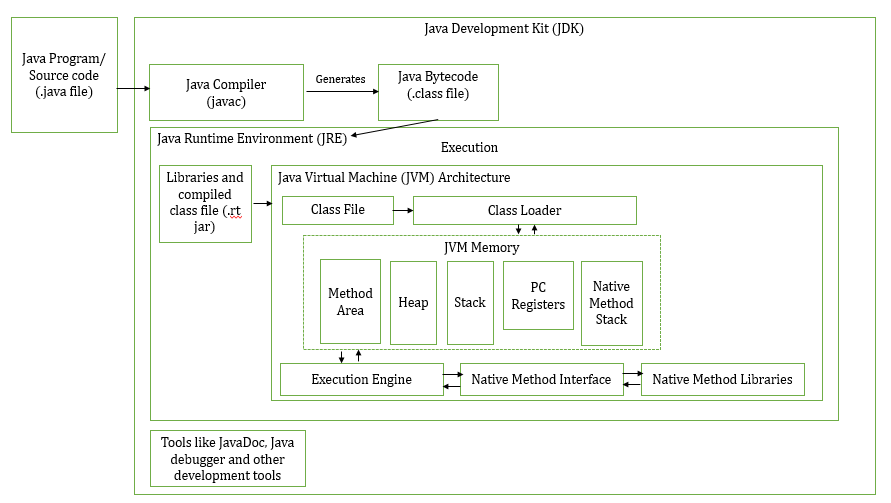 In short the source code (.java file) gets compiled in javac (java compiler) which resides in JDK and the javac generates the bytecode (.class file) which gets executed in JVM. The bytecode is saved in .class file by compiler. Along with compilers, JDK also consists JRE and tools like Javadoc and debugger etc. In order to create, compile and execute we have to install JDK into our machine. The JVM is a virtual machine that runs on your computer and executes bytecode (.class file) generated by javac. JVM doesn’t understand the source code (.java file) hence the javac compiles the source code and generates bytecode (.class file) which gets executed by JVM and provides the output. Every OS has different JVM but the output is same across all OS’s.
JRE: JRE is used to run java code but we wont be able to compile it.
In short the source code (.java file) gets compiled in javac (java compiler) which resides in JDK and the javac generates the bytecode (.class file) which gets executed in JVM. The bytecode is saved in .class file by compiler. Along with compilers, JDK also consists JRE and tools like Javadoc and debugger etc. In order to create, compile and execute we have to install JDK into our machine. The JVM is a virtual machine that runs on your computer and executes bytecode (.class file) generated by javac. JVM doesn’t understand the source code (.java file) hence the javac compiles the source code and generates bytecode (.class file) which gets executed by JVM and provides the output. Every OS has different JVM but the output is same across all OS’s.
JRE: JRE is used to run java code but we wont be able to compile it.
2. JVM Architecture Class Loader: The class loader reads the .class file and saves the file in Method Area. Method Area: There is only one MA in JVM which is shared among all classes. This holds the class level information of each .class file Heap: Allocation of objects. JVM creates a class object for each .class file. Stack: Used for storing temporary variables PC Register: This provides information about the instructions which has been executed and which are going to be executed. Since the instructions are executed by threads, each thread has a separate PC Register. Native Method Stack: This can access the runtime data areas of the virtual machine. Four main concepts of Object Oriented Programming are: 1. Abstraction 2. Encapsulation 3. Inheritance 4. Polymorphism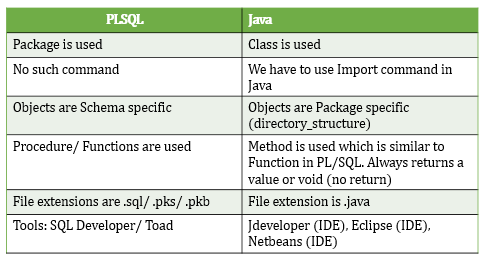
Java Sessions by Satish Sir Java is a programming language. There is no standard process of writing an algorithm but need to adapt few features. Flow chart is a pictorial or diagrammatic representation of an Algorithm. 3. Assembler →Assembler: Computer understands any program in machine language. This translation of any language to machine language is done by Assembler. ⇒Types: 1. Self assembler; 2. Resident assembler; 3. Cross assembler Java is cross assembler where C and C++ is not cross assembler ⇒Categories: 1. One pass assembler – Assigns memory addresses to variables and translates the source code into machine code in first pass itself 2. Two pass assembler – This reads source code twice. First to read all variables and assigns to memory address. Second read the source code and translates the source code into object code.
4. Compiler →Compiler: Translates a high level language into machine language. This is more intelligent than Assembler as it checks all kinds of limits, ranges and errors. Their run time is more and occupies more memory. It scans and parses through entire program and then translates the entire program into machine code. ⇒Types: 1. Self compiler/ Resident compiler: Runs and produces machine code for same computer 2. Cross compiler: Runs and produces machine code for same computer
5. Interpreter →Interpreter: Translates statement by statement into machine language. Reads only one statement, translates and then executes it. The machine codes are not saved in computer.
6. Linker →Linker: Links all libraries.
7. Loader →Loader: Loads the program into system memory. Loaders are part of OS. Java is a high level programming language. It is robust, secured and object oriented by nature. Also it is considered as Platform since we can develop programs, run/ compile the programs and it has its own execution engine, compiler and set of pre-defined libraries. It has its own runtime environment called ‘Java Runtime Engine’ (JRE) and own collection of API’s (Application Program Interfaces) like network libraries, security libraries, controller libraries. Java is platform independent (any code, any hardware, any OS) due to its byte code generation. It is distributed by nature due to ‘Remote Method Invocation’ (RMI) and ‘Enterprise Java Beans’ (EJB). High performance due to Just-in-time (JIT) compilers. Byte code (.class file) to machine code is converted by JVM. JVM resides on OS side. JVM contains Class Loader, Byte Code Verifier and Execution Engine.
8. Types of Java applications Standalone Application: Desktop/ Window-based application. They need to be installed on every machine. Web Application: Runs on the server side and creates dynamics web based pages. Technologies used for developing web applications are Servlet and JSP; Struts; Hibernate and Spring; JSF Enterprise Application: Distributed in nature taking the control of data for the entire business establishment. Ex: Oracle EBS. EJB (Enterprise Java Beans) is used for creation enterprise applications. Mobile Application: Created for mobile devices. Android and Java ME are used for creation mobile applications. Different Java Platforms or Editions Java SE is a Java programming platform. Java SE includes Java programming API’s such as • java.lang • java.io • java.net • java.util • java.sql • java.math Java SE includes core areas of programming through • OOPS • String • Regex • Exception • Inner Classes • Multithreading • I/O Stream • Networking • AWT • Swing • Reflection • Collection Java EE(Enterprise Edition) JEE is an enterprise platform which is mainly used to develop web, enterprise applications, large scale applications. JEE is built on top of all the features provided by Java SE platform. JEE is extension of JSE. JEE includes core areas of programming through • Servlet • JSP • Web Services • EJB • JPA Java ME (Micro Edition) Used to develop mobile applications. Effectively used in Mobile phones; Set-Top boxes; Blu-Ray disc players; Digital Media devices; M2M modules; Printers JavaFx Used to develop rich internet applications. JavaFx uses light-weight user interface API for developing multi-media applications. Source code (.java file) ⇒ Java Compiler ⇒ Byte code (.class file) ⇒ JVM (Class Loader, Byte Code Verifier, Execution Engine) ⇒ Windows/ Linux/ Mac machine. • Java is platform independent as it generates byte code • Used for application programming. Mostly used in Window, web-based, enterprise and mobile applications. • Java doesnt support ‘goto’ statement • Java doesnt support multiple inheritance through class. It can be achieved by interfaces in Java. • Java doesnt support operator overloading • Java supports pointers internally in the context of references. Developer cannot write pointer program in Java. • Java uses both compiler and interpreter for its application execution • Java supports the concept of call by value only • Java doesnt supports the application of data structures like structures and unions. • Java has built-in multi thread concept • Java supports documentation comment (/**…*/) to create documentation for java source code • Java doesnt support conditional compilation and inclusion concept • Java has automatic garbage collection. Supports a non-deterministic finalize() method for customization. • Java has no virtual keyword. • Java uses single inheritance tree as classes in java are child of object class in Java. Object class in Java is the root of inheritance tree. • Java is case sensitive programming language. • Packages imported by default in Java. A Java class which is not in a named package will automatically be placed in unnamed package. • If the programmer explicitly does not create any package to organize the Java program files, the Java compiler automatically adds a package statement. • The “java.lang” package is imported implicitly, which contains a number of components that are used very commonly in Java programs. • “java.lang” package contains all the bundles of the fundamental classes that make the Java language to operate. • “java.io” package contains all the classes for data input and data output functions. Note: • The Java programs when compiled will place all the “.class” files by default into the directory where the source files are maintained • When executing the “.class” files we have to specify the path where the bytecode files are available as current directory. • Once the compilation or execution is completed the Java compiler or Java interpreter will terminate returning to operating system console. • By default the latest Java platforms import the required packages and classes that are essential to compile and run the fundamental Java program.
9. Common Java errors Error 01: ‘javac’ is not recognized as an internal or external command, operable program or batch file Reason: Windows cannot find the compiler (javac) Solution: Tell Windows where to find Javac, i.e where JDK is installed Syntax: C:\Program Files\Java\jdk1.8.0_171\bin\javac C:\Java\MyProgram001.java Error 02: Class names, ‘HelloWorldApp’, are only accepted if annotation processing is explicitly requested Reason: ‘.java’ extension doesnt exist while compiling the program Solution: Include ‘.java’ while compiling the program Syntax: C:\Program Files\Java\jdk1.8.0_171\bin\javac C:\Java\MyProgram001.java Error 03: Exception in thread “main” java.lang.NoClassDefFoundError:MyProgram001.java Reason: ‘.java’ cannot find the byte code file MyProgram001.class Solution: Change the directory to the location where the .class files are available and re-execute the code Error 04: Could not find or load main class MyProgram001.class Reason: Programmer is trying to run the Java launcher on the .class file that was created by the compiler Solution: Re-execute the Java program that is already compiled with the file name without the “.class” extension Compiling Java program with redirection of .class file: javac -d F:\javaprograms\classfiles F:\javaprograms\myprogram001.java Executing “.class” file redirecting from class files folder: java -cp classfiles myprogram002
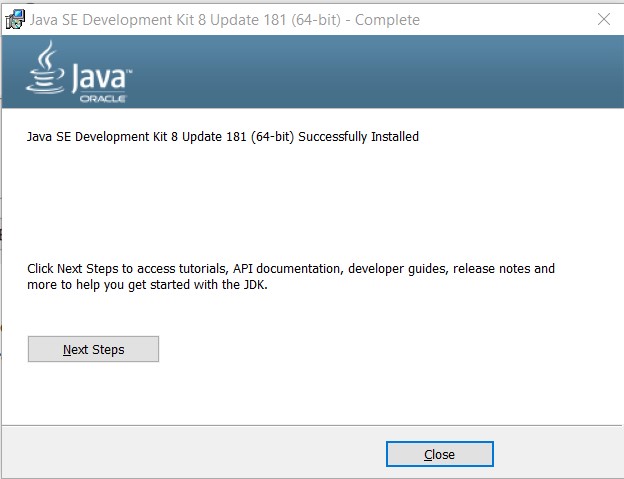
10. Java installation Steps to verify if Java has been installed in your machine: Option 1: Go to Control Panel >> Programs and Features >> Here we can look for Java like “Java 8 Update 171 (64-bit)” and “Java SE Development Kit 8 Update 171 (64-bit)” Option 2: Open Command Prompt >> type “javac -version” and “java -version” to get Java details. Use below steps to install Java in your machine: Click on link https://www.oracle.com/technetwork/java/javase/downloads/jdk8-downloads-2133151.html Under Java SE Development Kit 8u181 click on download which is specific to your OS. Here I’ve considered Windows x64 202.73 MB jdk-8u181-windows-x64.exe Place the file at some location, say C:\Softwares\Java and start installing by double click on application. JDK Installation Step 1: In Google search for JDK and open "Java SE - Downloads | Oracle Technology Network | Oracle" ((https://www.oracle.com/technetwork/java/javase/downloads/index.html) ) Step 2: Click on Oracle JDK DOWNLOAD (My latest version is JAVA SE 13) Step 3: Click on 'Accept Licence Agreement' and download the version compatible with your machine (jdk-13_windows-x64_bin.exe) Step 4: Right click the application and Run as administrator. Conntinue installation Step 5: Note down the Install to path 'C:\Program Files\Java\jdk-13\'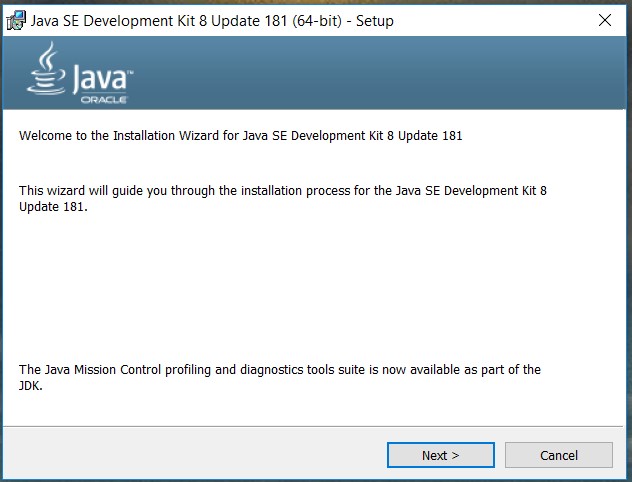 Its ideal to change path name without any spaces. Since we have space between Program and Files, its better to create in another folder but for time being I am considering same path (Program Files) >> Next >> Next >> Close.
 JDK — Java Development Kit used to develop Java programs
JRE — Java Runtime Environment used to execute and test Java programs
Java is installed in machine but OS wont recognize since Java is not considered as a Service. In command prompt type ‘javac -version’ and we get message as ‘javac’ is not recognized as an internal or external command, operable program or batch file. This means my OS is unable to find where that particular program called as “javac” is available. So change to the directory where Java is available. My “javac” is at C:\Program Files\Java\jdk1.8.0_181\bin
Let us assign this path to Environment variable. Go to Control Panel\All Control Panel Items\System >> Advanced system settings >> Advanced tab >> Environment Variables >> Under System Variables click on New and create as below:
JDK — Java Development Kit used to develop Java programs
JRE — Java Runtime Environment used to execute and test Java programs
Java is installed in machine but OS wont recognize since Java is not considered as a Service. In command prompt type ‘javac -version’ and we get message as ‘javac’ is not recognized as an internal or external command, operable program or batch file. This means my OS is unable to find where that particular program called as “javac” is available. So change to the directory where Java is available. My “javac” is at C:\Program Files\Java\jdk1.8.0_181\bin
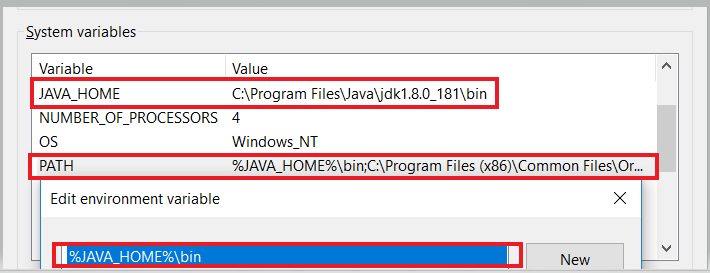
Let us assign this path to Environment variable. Go to Control Panel\All Control Panel Items\System >> Advanced system settings >> Advanced tab >> Environment Variables >> Under System Variables click on New and create as below: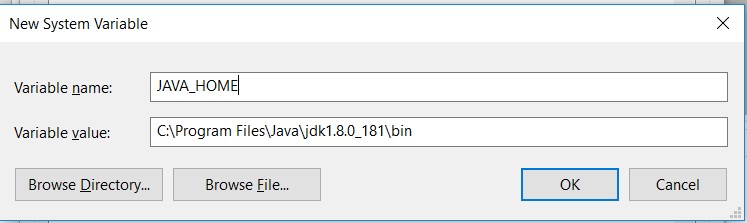 Next select System Variable “PATH” and click on Edit >> New and enter %JAVA_HOME%\bin >> Ok >> Ok
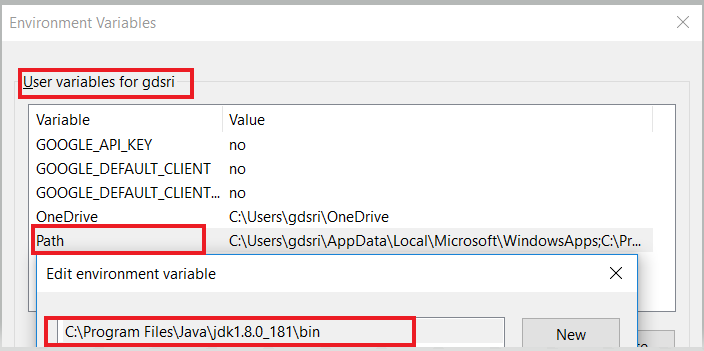
 Also make sure to enter the path (C:\Program Files\Java\jdk1.8.0_181\bin) under “User variables” >> Path as well
 Close the command prompt (if its in opened) and open again. Later type as echo %PATH% in command prompt and we should see following paths C:\Users\gdsri>echo %PATH%
C:\Program Files (x86)\Common Files\Oracle\Java\javapath;……………….C:\Program Files\Java\jdk1.8.0_181\bin;
C:\Users\gdsri>echo %JAVA_HOME%
C:\Program Files\Java\jdk1.8.0_181\bin
JDK configuration test:
C:\Users\gdsri>javac -version
javac 1.8.0_181
JRE configuration test:
C:\Users\gdsri>java -version
java version “1.8.0_181” Java(TM) SE Runtime Environment (build 1.8.0_181-b13) Java HotSpot(TM) 64-Bit Server VM (build 25.181-b13, mixed mode)
Close the command prompt (if its in opened) and open again. Later type as echo %PATH% in command prompt and we should see following paths C:\Users\gdsri>echo %PATH%
C:\Program Files (x86)\Common Files\Oracle\Java\javapath;……………….C:\Program Files\Java\jdk1.8.0_181\bin;
C:\Users\gdsri>echo %JAVA_HOME%
C:\Program Files\Java\jdk1.8.0_181\bin
JDK configuration test:
C:\Users\gdsri>javac -version
javac 1.8.0_181
JRE configuration test:
C:\Users\gdsri>java -version
java version “1.8.0_181” Java(TM) SE Runtime Environment (build 1.8.0_181-b13) Java HotSpot(TM) 64-Bit Server VM (build 25.181-b13, mixed mode)
11. Example of 'My first Java program' Example 001: Step1: Open any text editor (notepad++ or edit plus) and write below code
12. Process to keep “.class” file in separate folder Create folder in some path. The folder I created here is ‘ClasssFiles’ under path ‘C:\Java_Programs\ClassFiles’ C:\Java_Programs>javac -d ClassFiles MyProgram001.java Here -d is instruction to redirect class files to ClassFiles folder. In case you want to keep the class files in different folder and path, see below syntax. C:\Java_Programs>javac -d ClassFiles MyProgram001.java = C:\Java_Programs>javac -d C:\Java_Programs\ClassFiles MyProgram001.java For execution use below command: Here cp stands for class path. C:\Java_Programs>java -cp ClassFiles MyProgram001 My first Java program
13. Example of ‘Using import library having package java.io.*’ Example 002: javac is available in bin directory where JDK is installed — C:\Program Files\Java\jdk1.8.0_181\bin and this path has already been configured to the path environment variable associated to the JAVA_HOME.
14. Example of 'Using escape sequence'
15. Example of 'Using escape sequence of double quotes'
Example 005:
16. Data Types and Variables Java supports two types of data types: i) Primitive data types ii) Reference or Object data type →Primitive data types: Java supports 8 primitive data types 1) byte: 8-bit signed two’s complement integer. Min value is -128(-2^7) and max value is 127(2^7-1). If not initialized, default value is zero. Used when we want to save space in large arrays, as byte is four times smaller than an integer. Syntax: byte variablename = 10, byte variablename = 5 2) short: 16-bit signed two’s complement integer. Min value is -32,768(-2^15) and max value is 32,767(2^15-1). If not initialized, default value is zero. Used when we want to save memory as byte data type, as short is two times smaller than an integer. Syntax: short variablename = 10000, short variablename = 25000 3) int: 32-bit signed two’s complement integer. Min value is -2,147,483,648(-2^31) and max value is 2,147,483,647(2^31-1). If not initialized, default value is zero. Used as default data type for any integral values unless programmer has concern about memory. Syntax: int variablename = 1000000, short variablename = 2500000 4) long: 64-bit signed two’s complement integer. Min value is -9,223,372,036,854,775,808(-2^63) and max value is 9,223,372,036,854,775,807(2^63-1). If not initialized, default value is 0L. Used when we want to wider range of memory than the integer. Syntax: long variablename = 1000000000L, long variablename = 2500000000L 5) float: float type is a single precision 32-bit IEEE 754 floating point. If not initialized, default value is 0.0f. Used to save memory in large arrays of floating point numbers. float is generally never used for precise value management. Syntax: float variablename = 123.45f 6) double: double type is a double precision 64-bit IEEE 754 floating point. If not initialized, default value is 0.0d. Used as default type for decimal values. float is generally never used for precise value management. Syntax: double variablename = 123.45 7) boolean: Represents one bit of information. Only two possible values, true or false (lowercase not uppercase). If not initialized, default value is False. Syntax: boolean variablename = true 8) char: Single 16-bit unicode character. Minimum value is ‘\u0000’ (0) and maximum value is ‘\uffff’ (65,535). It occupies two bytes of memory for each character. As per ASCII notation the char occupies only one byte of memory, but Java supports only unicode character set. Used to store any character including foreign language characters. Syntax: char variablename = ‘A’ Numeric primitives: • short, int, long, float and double — These primitive data types hold only numeric data. All numeric data types are signed (+/-) values Textual primitives: • byte and char — These primitive data types hold characters • boolean and null — These primitive data types hold boolean and null data. Variable Types: A variable is a container which holds the value. A variable is assigned with a datatype. Variable is a name of memory location. There are three types of variables in java: local, instance and static.
17. Different ways to read input from console in Java • Buffered reader class • Console class • Scanner class → Buffered reader class: • This is the most primitive class to take input and introduced in JDK1.0 • Java.io.BufferedReader class reads text from a character-input stream by buffering characters. Its a string of data/ stream of text. • It provides efficient reading of Character, Arrays and Lines • The buffer size can be specified by programmer, if not specified the default size will be used • The class declaration for “Java.io.BufferedReader” is “public class BufferedReader extends Reader” • BufferedReader has its own attributes and methods for operations. Example 006:
18. Java Keywords abstract
assert
boolean
break
byte
case
catch
char
class –> Every Java program is one class –> class keyword indicates that everything in a Java program should be within the Java class, which acts like a container for properties and behavior of Java objects. –> class name should begin with letter and later can be alphanumeric –> Length of class name is unlimited and should not be Java reserved word –> Save the Java source code file with the same name of the public class with an extension of .java –> A class is a group of objects which have common properties. –> Class is a template or blueprint from which objects are created.
const
continue
default
do
double
else
enum
extends
final –> Used for declaring constant variable
finally
float
for
goto
if
implements
import
instanceof
int
interface
long
main –> To run a compiled program, JVM always starts execution with the code in the “main” method in the class indicated by programmer. –> Java program must have a “main” method in the source file for the Java class for the code to execute. –> Programmer can add his own operational methods to a Java class and call them from the “main” method. –> The “main” method in Java should be qualified as “public” because it can be called by JVM or Java Runtime. A command line executes Java command and the Java command in turn executes Java “main” program. –> The “main” method in Java should be qualified as “static”. When JVM or Java Runtime is started, there is no presence of the object of the class. When we declare the “main” method as “static”, JVM or Java Runtime can load the class into memory and call the “main” method. When “main” method is ignored with “static”, JVM cannot call the “main” method as there is no object of the class. –> The “main” method return type should be “void”. As per Java programming every method signature should provide a return type. Java “main” method doesn’t returns anything, hence its return type is declared as “void”. Once “main” method execution is finished, Java program terminates. Hence need not return anything. –> The “main” method has string[] args. “main” method accepts a single argument of type string array. The argument for “main” method is called as Java command line arguments. All command line arguments passed at runtime are treated as “string” type. –> Objects cannot be communicated without a method. Multiple classes can exist in Java. To communicate with any other object in another class, we need “main” method. “main” method controls overall objects of entire Java application.
native
new
out –> out is an object
Overriding –> The process of replacing or augmenting the original code with new code to suit the current purpose. –> An Overridden method's signature in the sub class remains the same as that of the super class but the contents of the method will be changed to meet the goal of the method in its new form in the derived class.
package
print –> print() and println() are methods defined by the class “printstream” –> print() doesn’t move cursor to new line after printing. –> println() moves cursor to next line after printing and can be used without parameters. –> Escape sequence: \t – tab; \b – backspace; \ – newline; \ – carriage return; \f – Form feed; \’ – single quote ; \” – double quote; \\ – backslash character
private –> Declare private at start of code (top of code), could be attributes or methods6
protected
public –> public keyword is called as Access modifier. –> Controls level of access to other parts of the Java program in this code.
return
Re-usability –> Inheritance supports the concept of Re-usability because the base class includes some of the code that is essential to the next level. –> The next level classes can reuse the fields and methods of the existing class or the super class.
short
static –> The only method that can be executed even if the object is not available. –> Share among all the objects of the application
strictfp
Sub Class –> Inherits the other class. –> Also known as "Derived class" or "Extended class" or "Child class" –> Can add its own fields and methods in addition to the super class fields and methods.
super
super class –> Super class is the class whose features are inherited to the next level of the classes. –> Also known as "Base class" or "Parent class"
switch
synchronized
System.out –> Output stream to which Java output will be redirected. Default is “stdout” –> “System” is a final class which is declared in “java.lang” package –> Features of “System” class: i) Standard input (System.in) ii) Standard output (System.out) iii) Error output –> “out” is a static member field of “System” class and is of type “printstream” –> “out” access specifiers are “public” and “final”
this
throw
throws
transient
try
void –> Returns the status code. –> The void keyword indicates that the main method doesnt returns a value. Not even an “exit code” to the operating system. –> When the main method exits normally, the Java program manages the exit code as 0, which indicates successful completion of Java program –> The programmer can terminate the Java program with a different exit code, using “system.exit” method.
volatile
while
19. Java Operators • Arithmetic • Unary • Assignment • Relational • Logical • Ternary • Bitwise • Shift • Arithmetic: +, -, *, /, % • Unary: Unary Minus(-) is used to get negative values. Unary Plus(+) is used to get positive values. • Increment Operator(++): Used to increment the value by 1 Post-Increment: Result/ Final value is incremented by 1. Pre-Increment: First the variable value is incremented by 1 and then computes the result. • Decrement Operator(++): Used to decrement the value by 1 Post-Decrement: Result/ Final value is decremented by 1. Pre-Decrement: First the variable value is decremented by 1 and then computes the result. • Logical Not Operator (!): Used for inverting a Boolean value. Example 024:
20. Constants in Java • Constants are variables whose value cannot change through out its lifetime • Java provide “final” keyword to declare any variable as a constant. The “final” keyword indicates the compiler and JRE that the programmer should assign a value to the variable only once at the time of variable declaration. • As per naming convention standards all Java constants should be declared in “UPPERCASE”. • Java being an application oriented language, many times we have to make the constant available to multiple methods in the application. • Constants can be made available to the whole application by declaring them as “Class Constants”. The “Class Constants” will be declared with “static final” keyword and they are declared at Java class level scope before “main” method. • The definition of the “Class Constants” appear outside the “main” method. Hence the class constant can be used in others methods of same class. • “const” is a reserved keyword but it is not currently used in Java. Hence the programmer must use “final” keyword for representing a constant. • We use constants for sharing and value to be fixed. Means the value should not alter when a function returns a value. • Types: i) Integer ii) Real iii) Single Character iv) String v) Backslash Character – Escape sequences Example 034
21. Type Casting in Java • Assigning a value of one data type to a variable to another data type is known as Type Casting. • When assigning a value of one variable to another variable both the variables should be of compatible types. • When assigning the values if the two types are not compatible with each other but as per Java the data types are compatible, the Java will perform the conversion automatically. • When auto conversion from one type to another type is not possible then the programmer has to define explicit type conversion. • Casting a type upon the variable is of two types: i) Widening a Type: Casting a type with a small range of a type with a larger range. Byte to Short. ii) Narrowing a Type: Casting a type with a large range of a type with a smaller range • The syntax for casting a type is to specify the target type in parenthesis, followed by the variable or the value to be cast. Automatic Conversions or Widening • When one type of data is assigned to another type of variable, an automatic type conversion happens during following two conditions: i) Two types are compatible ii) The destination type is larger than the source type • When the size of one type is able to fit into size of another type then auto conversion takes place and explicit type casting is not required. • All smaller size datatype variables are always auto convertible to higher size datatype variables and this called as Widening byte –> short –> int –> long –> float –> double Casting Incompatible types or Narrowing or Explicit Casting • When one type of data is assigned to another type of variable, a narrowing type conversion happens during following two conditions: i) Two types are incompatible ii) The destination type is smaller than the source type • When the size of one type is not able to fit into size of another type then explicit conversion takes place. byte <– short <– int <– long <– float <– double Example 036
22. Control Structures in Java • Control structure is a block of program that analyzes variables and chooses the direction in which the program has to operate based on the given parameters or conditions. • Flow control – details the direction the program should take depending on the situation that is encountered. • Decision making is a process applied in computing program using which we determine the way the computer should respond specific to certain conditions and parameters. Pre-conditions: i) Preconditions are the initial conditions and parameters determining the state of variables before entering a control structure. ii) Based on the defined preconditions only the computer runs an algorithm or the control structure to determine what has to be done. Post-conditions: i) The result that is returned after the execution of the control structure is called Post condition. ii) Post conditions are the state of variables after the algorithm or the control structure is run. Use of Control Structures • Control structure provide the real time intelligence to the computing operations. • Control structures are the main source of implementing validations and verification in programming applications Types of Control Structure Branching based • “if” statement • “if-else” statement • Nested “if” statement • “if-else-if” ladder Sequential flow based • Switch Iterative based • “while” loop • “do…while” loop • “for” loop • “for-each” OR enhanced for loop • Labeled for loop “if” statement • “if” statement executes an action based on the state of the condition is “TRUE” or “FALSE”. • “if” statement is a conditional statement and is used to test the situational conditions of the program. • Using “if” programmer can route the program flow to execute certain section of the code specific to state. • “if” checks the boolean condition of “True” or “False”. If the boolean expression evaluates to true the the statements in the block following the “if” statement is executed. • Syntax: if (boolean-expression) { Operational statements when condition is TRUE; } if (condition) { action statement(s) } Example 039
“switch-case” statement in Java • Provides multiple choice selection criteria of the statements. • “switch-case” is a multi-way branch statement. • Executes one statement from multiple conditions that are provided. • Provides an easy way to dispatch execution to different parts of the programming code based on the value. • Syntax: switch(expression) { case value1: statements matching to value1 break; case value2: statements matching to value2 break; ………….. ………….. case valuen: statements matching to valuen break; default: Default statements sequence, when none of the cases match } Why break is necessary in switch statement: • The “break” statement in switch terminates a statement sequence. • When a “break” statement in encountered, execution branches to the first line of code that follows the entire switch statement. • If “break” is omitted then execution will continue onto the next case. Example 051
Iterative Statements in Java • A loop is a sequence of instructions that are continually repeated until a certain condition is reached. • Generally a loop begins when the condition is True and terminates when the condition is False. • A loop can be either pre-tested or post-tested by nature. • Pre-Tested loop: Checks the condition first and then executes the action(s) later. Ensures zero number of minimum iterations. • Post-Tested loop: Executes the action(s) first and then checks the condition later. Promises minimum one execution compulsorily. • Five rules of iteration: Initialization > Condition > Action > Updation > Termination. Java Loops → “while” loop • while loop first checks the condition. If the condition is True then the control goes inside the loop body, else the control goes outside the body. → “do-while” loop • A do-while loop executes a block of code at least once and the repeatedly executes the block depending on a given condition at the end of the block. → “for” loop • for loop executes a set of statements repeatedly until the condition is True. → “for-each” loop • for-each loop is used to traverse an array or collection in Java. • for-each loop is easier to use than simple for loop, as in for-each loop we dont need to increment the value and use subscript notation. → Labeled “for” loop • Labeled “for” loop has a name for each “for” loop. • Labeled “for” loop is useful when we have nested “for” loop such that we can break/ continue specific “for” loop.
→ “while” loop • “while” loop is the most fundamental loop statement in Java. • “while” loop repeats a statement or block of statements while the condition is “True”. • Syntax: while(condition) { Operational statements when the condition is True } • The condition can be any boolean expression that returns True or False. • The body of the loop will be executed until the conditional expression is True. • When the condition becomes False, the control passes to the next line of code immediately following the loop. • “while” loop falls under the principle of “pre-tested” loop, hence it promises minimum zero number of executions. • “off-by-one” error: When a loop is executed more/ less than one expected number of times is called “off-by-one” error. The error takes place due to improper condition in the boolean expression. Example 053
→ “do-while” loop • Executes the loop body first and then checks the loop condition for continuation. • This is post-tested loop. Hence its body executes definitely once as its condition is checked at the end of the loop. • Also called as Exit controlled loop as the condition is checked at the end of the loop. • Mainly used in the menu driven programs. • Syntax: do { statements to be executed in the iteration } while (Conditional expression); Example 058
→ “for” loop • “for” loop continues to process a block of code until a statement becomes false. • Syntax is defined totally within a single line. • “for” loop has a concise and precise syntax and has certain level of automation in execution. • Syntax: for (initialization; condition; updation) { Statements for execution/ body of loop } • The initialization is executed only once at the time of the loop starting. • The condition can be any boolean expression that can return “True” or “False”. • The body of the loop will be executed until the conditional expression is satisfied. • The updation is evaluated with each iteration, to make the loop to go to the next level of iteration. Example 062
→ Nested Loops • A loop declared and operated within another loop. • The first pass of the outer loop triggers the inner loop. The inner loop initiates execution till its completion. • The termination of the inner loop will trigger the outer loop for next level updation. • The overall loop termination is dictated by the termination of the outer loop. • Once the outer loop is terminated the process is released to the next part of the program. • The outer loop and the inner loop coordinate among themselves to complete one process of operation. • Till the inner loop is not terminated the outer loop process is suspended from execution. • Labels in Nested loops: i) The programmer can have a name for each of the “for” loop. ii) To name the “for” loop, we use a label before the “for” loop. iii) Labels are useful in Nested “for” loop to execute break/ continue specific to the level of the “for” loop. iv) We should define label for a “for” loop along with a prefixed colon(:) before loop. Labelled “for” loop syntax: labelname: for(initialization; condition; updation) { statements to be executed in the iteration } Nested “for” loop syntax: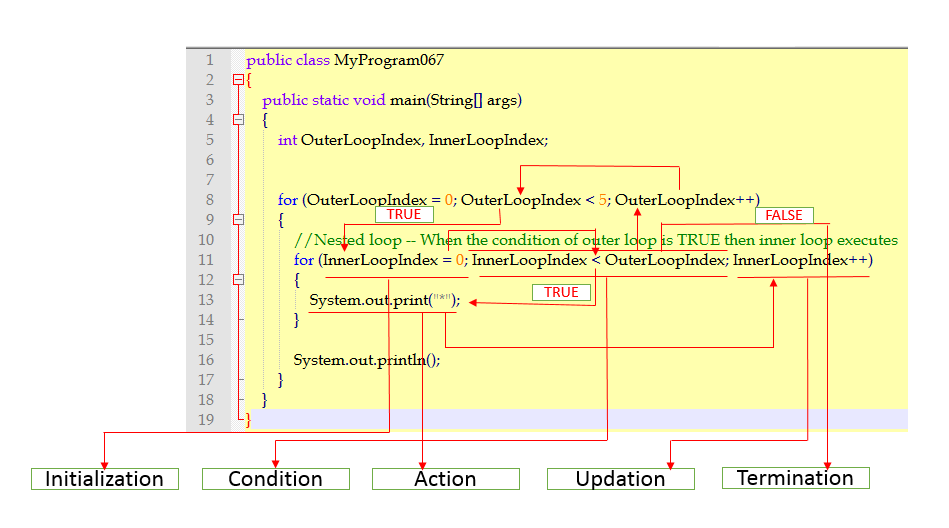 Example 068
“break” statement • The “break” statement is generally used to terminate the loop or iteration process immediately. • The “break” statement is generally used along with decision making statement such as “if..else”. • Uses: i) It terminates a sequence of statements in a “switch” statement. ii) It can be used to exit from a loop or iteration. iii) It can be used as a civilized form of “goto” statement. • By using “break” keyword we can force quick termination of a loop, by bye-passing the remaining part of the code in the body of the loop. • Once a “break” statement is encountered within the loop, the loop is terminated and the program control resumes to the next statement following the loop. • Syntax:
“continue” statement • The “continue” statement is used inside loops. • When a “continue” statement is encountered inside a loop, the control jumps to the beginning of the loop for next iteration, skipping the execution of statements inside the body of the loop for the current iteration. • “continue” statement is useful when we want to force an early iteration of the loop, half the way in the current iteration. Example 072
23. Arrays • Arrays will not save memory. • Array is an object in Java. • An Array is a continuous collection of similar type of elements. • An Array is a container object which holds values of homogeneous type of elements. • The size of an Array is always fixed and cannot be increased or decreased at run time. • An Array is a self indexed data structure, where the first element of an array starts with an index of zero. • An Array is a static data structure as the size of an Array must be definitely specified at the time of its declaration. • An Array can be either a primitive type or reference type. • Reference type Array memory is allocated within a heap area. • The index of an Array start from zero and ends with (ArraySize – 1). • Any element in the Array is accessed by its index number. • Arrays are more convenient way of grouping the related data information of similar type. • An Array is always indexed and index always begins from 0. • An Array is a collection of similar data types. • An Array occupies contiguous memory location. • Code Optimization: An Array makes the code optimized, we can store, retrieve, search or sort the data easily. • Random Access: We can access any data element located at any index position. • Disadvantage of Array is Size limit: An array can store only fixed size of elements and cannot grow by its size at runtime. • Java checks the boundary of an array while accessing an element in it. • Java will not allow the programmer to exceed its actual declared boundary. • All Arrays in Java are dynamically allocated. • Arrays are not variables they are Objects. • When Array is declared, only a reference of the Array is created, to use an Array it should be instantiated. • Types: i) One dimensional or single dimensional arrays. ii) Multi-dimensional array. Array declaration: type array-name[]; type[] var-name; Example 073
24. Methods in Java • A Java method is a collection of operational statements which are grouped together to perform specific operation. • Java method can be considered as a function in structured programming principles. The only difference in a method is part of the class and is called upon an object. • A method can be referenced by a name and can be invoked at any point in a program simply by using the methods name. • A method can be considered as a sub program that can act on the operational data and often returns a value to the calling environment. • Whenever a method is encountered in the program, the execution of the program branches to the body of that method. • Once the operational responsibility of the method is completed, the exceptional state of the method returns to the calling area. • Methods help in keeping the application code in modular fashion, which provides operational independency and integration easiness. • Methods save great amount of productive time, by avoiding repetition of the code segments. • Method definition is Encapsulation and name is Abstraction. • In general methods are always Public, we do not have Private or Protected methods. Types: • Standard library methods • User defined methods • Standard library methods i) Java Standard library methods are built-in methods in Java that are readily available for use in programming. ii) Java standard libraries come along with the Java class library (JCL) in a Java archive (*.jar) file with JVM and JRE. iii) All built-in methods are part of the compiler package that comes along with the Java platform. • User defined methods i) Created by Java programmer. ii) They have their own name and perform customized tasks as defined by Programmer. iii) They should be created and defined inside a Java class. iv) Before we call a Java method for its execution it has to be defined by its signature. Syntax in Java: Modifiers returntype methodname(parameters) ExceptionList { method body } • The only required elements of a method declaration are the method’s return type, name, a pair of parentheses () and a body between the braces {}. Components of a Java method → Modifiers i) Modifiers define the method as Public, Private or Protected. ii) Method modifiers define the scope at which the method operates. → Return Type i) The data type of the value returned by the method. If the method does not return a value then “void”. → Method Name i) The name of the method with which it will be accessed in the calling environment. → The parameter list in parenthesis i) A comma-delimited list of input parameters preceded by their data types enclosed by parenthesis (). ii) If there are no parameters then we must use empty parenthesis. → An Exception list i) The list of exception that we want to reference when this method is invoked in the calling environment. → The method body i) The method body is enclosed between the braces which references the methods code. ii) The method body can contain the declaration of local variables where these variables will influence the operational standards only with respect to the method definition only. Method Signature • Method Signature consists of a method name and parameter list. • Parameter list consists of i) Number of parameters ii) Type of parameters iii) Order of parameters • Return type of the method and exceptions are not considered as part of the method signature. Method Name • A method name is a single word that should be a verb in lowercase. If its multi-word, then first word should be a verb in lowercase and next word should be adjective or noun with first letter in uppercase. • A method should have a unique name declared within the scope of the class. • A method can have the same name as other method name within the scope of same class which is called Method Overloading. • Two methods can have same name between two different classes as the scope of the classes is independent to one another. The operational state of the methods dont have any conflicts. Calling Java Method • Once the Java method is declared, it can be called any number of times within the available scope. • Each time the Java method is called, the execution of the code branches to the definition of the method. • Once the code execution is completed, the program returns to the location from where the method is called. General Flow class classname { public static void main(String[] args) { operational code …………………………. myFunction();— code goes to private static void myFunction() ………………………… operational code } private static void myFunction() { operational code in the function } } Example 109: Method structure
Call By Value in Java • When we call a method by passing a value either by hard code or by a variable with soft code is known as “Call By Value”. • When a method is implemented with “Call By Value”, the changes being done in the called method will not be affected in the calling method. Call By Reference in Java • When “Call By Reference” is implemented, the original value is changed when we make changes in the called method. • As per Java is considered to implement “Call By Reference”, we have to pass object in place of any primitive value, then only the original value will be changed. Key-points • As per Java, the method parameters can be either primitive data types or object references. • Either primitive datatype or object references both are passed as value to the method. • When Java object is passed as an argument the original object is passed as a reference to the same Java object. • In “Call By Reference”, the original object is not actually passed but the reference of the object is passed in practicality. • When object reference is passed to the Java method, the object acts as a handle to a Java object, hence change reflects the original data. Example 119: Call By Value
25. Exceptions in Java • Exceptions are kind of abnormal behavior. • Exception is always a part of method because a method is a executable section in Java. • If exception is not handled properly then whole application will be terminated. • Exceptions are events that occurs during the execution of programs that disrupt the normal flow of instructions. • Every Exception is an abnormal behavior of an object while it is in the process of execution. • As per Java, an Exception is an “Object” which wraps as “Error Event” which occurred within a method while it is in executional state. • Every exception when raised will contains i) Information about the error including its execution type. ii) The state of the program when the error occurred. iii) Optionally, any other custom information. • Exception objects can be thrown and they can be caught. • When an exception occurs the normal flow of the program is disrupted and the program or application terminates abnormally. • The abnormal termination of the application or program can have adverse effect in real-time. To avoid this adverse effect upon the application or program, exception handling is done. • Exceptions can be caused due to the failure of i) User Error ii) Programmer Error iii) Physical Resources Categories of Exception • Checked or Compile time exceptions • Un-checked or Run time exceptions • Errors Checked Exception • Exception which occurs at the time of compiling the program. • They cannot be ignored as these exceptions will not allow the compilation of Java program. The source code should be corrected. Un-Checked Exception • Exception which occurs at the time of execution of the program. • They occurs after the successful compilation of the Java source code. • They generally occurs due to programming bugs, logic errors or improper use of an API. • Java ignores all the run time exceptions at the time of compilation. 26. Errors • Errors are not considered as Exceptions. • Errors are problems that arise when the program is in execution and are beyond the control of programmer. • Errors are ignored at the time of compilation but identified while the program is under execution. JVM Errors • OutOfMemory Error • StackOverflow Error • Linkage Error System Errors • FileNotFound Exception • IO Exception • SocketTimeout Exception Programming Errors • NullPointer Exception • ArrayIndexOutofBounds Exception • Arithmetic Exception Built-in Exceptions • Many exceptions and errors are automatically generated by JVM. • Errors are generally abnormal situations encountered by the JVM, where the abnormal situations can include: i) Running out of memory ii) Infinite Recursion iii) Inability to link to another class • Java run time exceptions are generally a result of programming errors, which can be situations like: i) De-Referencing a null reference ii) Trying to read outside the bounds of an array iii) Dividing an integer value by zero Java Exception Hierarchy • All exception classes in Java are sub types of java.lang.Exception class. • The java exception class is a subclass of the “Throwable” class. • Other than the exception class there is another subclass called “Error” class which is derived from the “Throwable” class. • Errors are actually abnormal conditions that happen in case of severe failures when they are not handled by the programs. • Errors are generated to indicate the programmer or end user about the errors generated by the run time environment. • Any Java program cannot recover from the error hence it goes to an abnormal termination of the program. • The exception class in java has two main sub classes: i) IO Exception class ii) Runtime Exception class • The error class defines the exception or the problems that are not expected to occur under normal circumstances by the program • The exception class represents the exceptions that can be handled by the Java program and the Java program can be recovered from an exception by implementing “try” and “catch” blocks.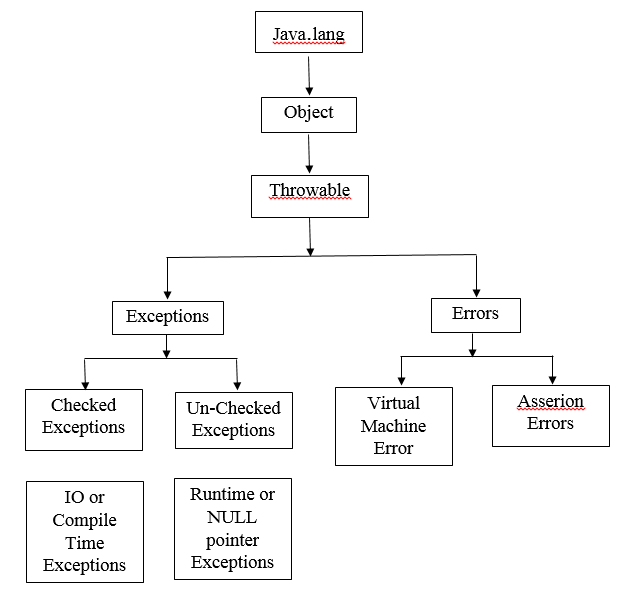
How JVM Handle an Exception Default exception handling • Within a method when an exception is occurred, the method creates an object known as “Exception object” and hands over the exception object to the Run-Time system (JVM). • The exception object contains: i) Name of the exception ii) Description of the exception iii) Current state of program where exception has occurred • Creating the exception object and handing it over to the run-time system is called throwing an exception. • When an exception has occurred, there might be the list of the methods that had been called to get to the method where exception has occurred. • The ordered list of the methods that are called as exception “Call Stack”. Procedure applied by JVM • The run time system searches the call stack to find the method that contains block of code that can handle the occurred exception. • The block of the code that can handle the exception is called exception handler. • The run time system starts searching from the method in which exception occurred, proceeds through call stack in the reverse order in which methods were called. • If the exception handler finds an appropriate handler then it passes the occurred exception to the corresponding handler. • An appropriate handler is the type of the exception object thrown that exactly matches the type of the exception object can handle. • If run time system searches all the methods on call stack and couldn’t found the appropriate handler the run time system hands over the exception object to default exception handler, which is always part of the run time system. • The corresponding exception handler prints the exception information in the specific format as applied by Java and terminates the program automatically. Exceptions should be checked or un-checked? • If a client demands that he reasonable expects to recover from an exception, make it a checked exception. • If a client cannot confirms that he cannot do anything to recover from the exception, then make it un-checked exception.
27. Exception handling mechanism in Java • try • catch • throw • throws • finally try-catch blocks try block • The “try” block contains a set of statements where an exception can occur. • A “try” block is always followed by a “catch” block, which handles the exception that occurs in the associated “try” block. • A “try” block must be followed by “catch” block or blocks or “finally” block or can be both. Syntax: try { statements that may cause an exception } • While writing a java program, if we think that certain statements in the program can throw a exception, enclose those statements in try block and handle the corresponding exception. “catch” block • A “catch” block is the area where the programmer will handle the exceptions. “catch” block must follow the “try” block. • A single “try” block can have several “catch” blocks associated with it. • A programmer can catch different exceptions in different “catch” blocks. • When an exception occurs in “try” block the corresponding catch block that handles that particular exception will be automatically executed. Syntax: try { statements that may cause an exception } catch (exception(type) e(object)) { code to handle the state of exception } operational code >> an object of exception class is thrown >> an object of exception >> if not handled the JVM i) Prints the exception description ii) Prints the stack trace iii) Terminates the program.
Example 123
“Throws” in Java • The “throws” keyword is used to declare an exception. • “throws” keyword gives information to the programmer that an exception may occur. • The “throw” keyword in Java is used to explicitly throw an exception from a method or any block of code. • We can throw either checked or un-checked exception. • The “throw” keyword is mainly used to throw custom exceptions. • The flow of execution of the program stops immediately after the “throw” statement is executed. • The nearest enclosing “try” block is checked to see if it has a “catch” statement that matches the type of exception. • The “catch” statement if found with a proper match then control is transferred to the statement. • If no matching “catch” is found then the default exception handler will halt the program. • Checked exception can be propagated or forwarded to the call stack. • “throws” keyword provides information to the programmer about the method about the exception that is raised. • We can use “throws” keyword to delegate the responsibility of exception handling to the caller method. Example 132
Nested “try” statements • Java allows nesting a “try” statement inside another “try” statement. • If one “try” block does not have a corresponding “catch” block that can handle the exception, Java will search the next outer “try” block for a “catch” block that can handle the exception back through successive nesting. • If Java cannot find the perfect “catch” block for the exception then it will pass the exception to its default exception handler. • Nested “try” statements are used to allow different categories of errors to be handled in different ways with accurate specifics while informing the end user about the failure. • Generally it is a good idea to use an inner “try” block to catch the less severe errors and outer “try” block to catch the more severe errors. Example 136: Nested try block
28. Object Orientation Object: Every object is a real time entity that has two characteristics. i) State of object ii) Behaviour of object. Object: Student State: Name, Address, Course name, College name Behaviour: Take admission, Pay fees, Attend exam Object: College State: Address, Affiliated University Behaviour: Student registrations, Conduct classes, Conduct Examinations • Using programming languages, the states and behaviours of an object will be represented by variables and methods encapsulated within the class. • Every object in real time should be associated to one class which is a signature that identifies the object in its ideal state of its existence. • Every object in real time should have following characteristics, i) Abstraction ii) Encapsulation iii) Message Passing
29. Abstraction: Abstraction is a process where the programmer has to show only “relevant” data and “hide” unnecessary details of an object from the end user. Everything in Public scope is Abstraction.
30. Encapsulation: Encapsulation is the concept of binding object state i.e. fields and behaviors i.e. methods together. As per programming construct creating a class refers to the concept of encapsulation. Everything in Private scope is Encapsulation.
31. Message Passing i) As per real time implementation a single object by itself may not be very useful. ii) An application in real time execution contains many objects operating for multiple different situations. iii) One object in real time interacts with another object by invoking methods on that object which is called message passing. iv) The concept of message passing between the objects is called as method invocation.
32. Class in OOP: • Class is a blueprint or a template, using which the programmer can create multiple objects for real time implementation. • Collection of objects in real time is called as class and class is a logical entity. • Class by itself doesnt stores any space within the application. • As a template, class always contains the collection of attributes and methods that define the state of objects in real time. • Every component declared in the class is formal by its nature as it doesnt carries any real time value in physical sense. • Any class consists of : class name >> attributes/ data members (Public, Private & Protected) >> methods Syntax to build a class in Java class <class_name>{ Attributes/ data members; Constructors; Method: } • The class body contains all the code that provides for the life cycle of the objects created from the class i) Constructors for initializing new objects. ii) Declarations for the fields that provide the state of the class and its objects. iii) Methods to implement the behavior of the class and its objects. • Class attributes and methods can contain modifiers like “public” or “private”. • “public” and “private” modifiers determine what other classes and objects can access from the current class. • The class body is surrounded by braces {} and class body contains actual components that will actually make the object to be sensible at runtime. • Every class has two types of members. i) Data members or Attributes ii) Operational members or Methods • Java class is not active by itself hence it doesn’t carries any data in its definition. In order to implement the Java class in real time we have to create an instance upon the Java class called as Object by using “new” keyword. Once the object is created it is allocated with its memory space with memory slots for every attribute in the class definition.
33. Variable Types in Java Local Variable: • Local variables in Java are variables defined inside i) Method definition ii) Constructor definition iii) Exception blocks • All local variables will be declared and initialized within the method, constructor or exception block and will be destroyed when the method, constructor or exception block is terminated. • Local variables cannot be forces with access modifiers. • All local variables are internally implemented at stack level. • Local variables cannot have default values hence local variables should be declared and initialized by assigning before the first use. Instance Variable: • Instance variables are variables within the class but outside any method. • Instance variables are initialized when the class is initialized. • Instance variables can be accessed from inside any method, constructor or exception blocks of that particular class. • Every object is allocated with space with in the heap and a slot of memory is allocated for each instance variable existing in the class. • All instance variables are created when an object is created with the execution of “new” keyword and all instance variables are destroyed when the object is destroyed. • Instance variables will hold values which have to be referenced by more than one method, constructor or exception block or for an objects state that must be present through out the class. • All instance variables have to be provided access modifiers else Java will pick up the default access modifier. • All instance variables are visible to all the methods, constructors and exception blocks within the class. • As per standards of security and privacy it is always recommended to make all instance variables “private” by nature. • Java programmer can provide visibility for all the instance variables to the next level subclasses with the help of access modifiers or through message passing using methods. • All instance variables in Java carry default values: i) Numbers : The default value is 0 ii) Boolean: False iii) Object references: null • Values can be assigned to instance variables during the declaration or within the help of constructor method. • Within the class, instance variables can be accessed directly by calling the variable name without any qualifier. • Within static methods instance variables should be called using the fully qualified name ‘ObjectReference.Variablename’.
34. Class (or Static) Variables • Class variables are variables declared within a class, outside any method with the “static” keyword. • Class variables are known as static variables and are declared outside a method, constructor or an exception block. • All class variables will have only one copy per class irrespective of number of objects are created using that class. • Static variables are mostly declared as constants in real time. • Constants in Java are variables that are declared as: i) Public or Private ii) Final iii) Static • Constant variables in Java never change from their initial values which was assigned at the time of declaration. • All static variables are stored in the static memory created for that application at run time. • All static variables are created when the program execution starts and stay in the memory for the whole life of the program and get destroyed only when the program stops. • Static variables visibility is exactly similar to instance variables. • Majority of static variables are declared with “public” as they should be definitely available for all the users of that class. • All static variables default values are same as instance variables i) Numbers : The default value is 0 ii) Boolean: False iii) Object references: null • Static variable values can be assigned during the declaration or within the constructor. • Static variables can be accessed by calling with the class name as qualifier Classname.Variablename • When declaring class variables as “public static final”, they are declared in upper class. • When static variables are not “public” and “final”, the naming syntax is applied same as instance and local variables.
35. Creating an Object in Java • A class provides only the blueprint for objects in execution as class will not contain any values by itself. • Real implementation of a class is practically possible when an object is created from class. • To create objects in Java we have to use “new” keyword. • Steps followed when creating an object from a class: Object Declaration: i) Every object is like a variable, hence the object declaration will have a name along with the object type which is taken from class. Object Instantiation: i) Object instantiation is the process where the required space for the object is allocated and the object is loaded into the memory. ii) The Java programmer will create an object using “new” keyword. Object Initialization: i) The “new” keyword is generally followed by a call to the constructor where the constructor initializes the new object that is being created. ii) Every object in Java will be initialized with default values as prescribed by the Java primitive types.
Example 145
36. Memory Management in Java • Java has an automatic memory management system, a quiet garbage collector which works in the background and cleans up the unused objects and free up some amount of memory. • To write high performance and optimized Java applications which doesnt encounter “OutOfMemoryError”, every Java programmer has to understand the Java memory management. • Java application divides the memory into two big parts. i) Stack Memory ii) Heap Memory • Practically the heap memory is a huge amount of memory when compared to the stack memory. Java Stack Memory • Stack memory is responsible for holding references to heap objects and for storing primitive value types. • The Java primitive types will hold the value itself rather than a reference to an object from the heap. • Every variable on the stack will have a certain visibility which is also called Scope, where only the objects from active scope are used. • When compiler executes a methods body it can access only objects from the stack that are within methods body but cannot access other local variables as they are out of scope. • Once the method completes and returns the top of the stack pops out and the active scope changes to the next method. • A Java application can have multiple stack memories as Java allocates one stack memory per thread. Hence in Java each time a thread is created and started, it has its own stack memory. • One Java threads stack memory cannot access another Java thread’s stack memory. Java Heap Memory • Java heap memory stores the actual object that are created in Java. • Every object that is stored in the Java heap is referenced by the variables stored in the stack. • The “new” keyword in Java is responsible for ensuring that there is enough free space on heap when creating an object of Java class. • The class type is placed in the heap memory and is referred via the object name which goes on to the stack memory. • Java application will have only one heap memory for each running JVM process. • Heap memory is a shared part of the memory regardless of how many threads are running in the Java application. • The Java heap itself is divided into a few parts which facilitates the process of automatic garbage collection. • The maximum stack and the heap sizes are not predefined. Hence the size depends on the running machine. • Certain JVM configurations will allow the developer to specify the stack and heap size explicitly for a running Java application.
37. References in Java • According to Java’s memory architecture references are of four types: • The difference between each reference type depends on the objects they refer upon the heap are eligible for garbage collecting under what different criteria.
38. Garbage collection process in Java • Garbage collector = Removal of objects which are not in use • Depending on the type of reference a variable from the stack holds with respect to an object from the heap, every object in Java at a certain point in time becomes eligible for garbage collector for garbage collection. • Garbage collection process is triggered automatically by Java and is totally upto Java when and whether or not to start the garbage collection process. • Garbage collection process is in practicality an expensive proess, becuase when the garbage collector runs all the threads in the application are paused depending on the garbage collector type. • The programmer can call the garbage collector explicitly by calling system.gc() method but it is highly not advisable. Garbage collection is quite a complex process and it might affect the application performance. Hence it is implemented in a smart way by the Java platform. • Java analyzes the variables from the stack and marks all the objects that need to be kept alive and then all the unused objects are cleaned up which is called as “Mark and Sweep” process. • Garbage collection is more optimized by dividing the heap memory into multiple parts.
Garbage Collector Types in Java • The Java JRE (JVM) has three types of garbage collectors and the Java programmer can choose which one to be use. • Java by default, chooses the type of garbage collector type to be used depending on the underlying hardware.
39. Performance and Optimization tips • Minimize the memory footprint by limiting the scope of variables as much as possible. • Every time the top scope, from the stack is popped up, the references from that scope are lost, making the objects eligible for garbage collection. • Explicitly refer to null obsolete references. • A null obsolete references make objects get eligible for garbage collection. • Avoid finalizers. Finalizers slow down the process and in practical reality do not guarantee anything. • Rather finalizers prefer Phantom references for cleanup work. • Do not use strong references where weak or soft references apply. The most common memory pitfalls by programmers are caching scenarios where the data is held in memory even if it might not be needed. • JVisualVM has functionality to make a heap dump at a certain point. Hence the programmer can analyze per class how much memory the class is occupying. • Java programmer should configure his JVM based on the application requirements by specifying explicitly the heap size for the requied JVM when running the application. • Memory allocation process is very expensive. Hence allocate reasonable amount of initial and maximum amount of memory for the heap. • It is not sensible to start with a small initial heap size from the beginning, The JVM will extend this memory space • Java provides the facility for changing the memory options. • Java programmer can make changes to the memory options for initial heap size, maximum heap size, thread stack size, young generation size.
Example 145
Example 146 - Private scope data members (attributes)
Example 149 - Using two strings one after another in Scanner type (nextLine method)
Example 150 - Using two strings one after another in Scanner type (next method)
Example 152 - Multiple object instances
40. Constructors Constructor is special kind of method which is used to instantiate and initialise a newly created object within the boundary. They do have any return type. Class name and Constructor name should be same. Three types of Constructors: i) Default ii) No-Arguments iii) Parameterized Constructor chaining: It is one kind of process in object oriented analysis and design where one constructor calls another constructor with respect to the current object. Constructor chaining can be done in two ways i) Chaining within the same class - It is a methodology which is implemented by using this() keyword, for the constructors in the same class. ii) Chaining from the base class - It is a methodology which is implemented by using super() keyword for calling the constructor from the base class. Practical use of Constructor chaining: i) Constructor chaining is a process that is used when the programmer wants to perform multiple tasks within the single constructor rather than creating the code once again repeating the within the second Constructor. ii) Constructor chaining makes the code readable. Ruled to be followed for Constructor chaining: i) The this() keyword or expression should always be the first instruction or call within the constructor. ii) When Constructor chaining is implemented we have to declare all the constructors in the class in the order of their execution. iii) There should be at-least one constructor (first constructor) without this() keyword. Example 153 - Default Constructor
41. Method Overloading Declaring different Methods with the same name within the class. But these Methods are differentiated with the difference in declaration of parameters. Number of parameters or Data types of the parameters or order of parameters should be different. Method overloading falls under the concept of static polymorphism, which is also called as static binding or compile time binding or early binding. In Java we have only method overloading but no function overloading. Example 159 -- Change in number of parameters
42. Inheritance • Inheritance is the process by which one class acquires the properties and functionalities of another class. • Provide re-usability of code such that the derived class will write only unique features extending the common properties and functionalities from the base class. • We can implement "Method Overriding" such that runtime polymorphism can be achieved. • Prefix the method in the sub class with "super" keyword to call the overridden method from the base class. • A sub class constructor can invoke the constructor of the super class, either implicitly or by using the "super" • Syntax: super.MethodName() • Inheritance is implemented in Java by using "extends" and "implements" keywords • Types: i) Single Inheritance ii) Multi Level Inheritance iii) Hierarchial Inheritance iv) Multiple Inheritance v) Hybrid Inheritance i) Single Inheritance: The principle in which derived class inherits the features of only one super class.
ii) Multi Level Inheritance: The principle in which derived class inherits the features of one super class and the derived class also acts like a base class to the next level derived class
iii) Hierarchial Inheritance: The principle in which one super class serves multiple subclasses. The developer can derive multiple derived classes from one single super class.
iv) Multiple Inheritance: The principle in which one derived class can inherit the properties and behaviours from more than one super class.
v) Hybrid Inheritance: The principle in which multiple different inheritances will be managed at a time.
→ Default Super Class
i) Except object class, which has no super class, every class has one and only one direct super class.
ii) In the absence of any other explicit super class, every class is implicitly a sub class of object class
→ Super class can only be one
i) A super class can have any number of sub classes.
ii) But a subclass can have only one super class as Java doesnt supports multiple inheritance with classes
→Inheriting constructors
i) A sub class inherits all the members that is fields, methods and nested classes from its super class.
ii) Constructors are not members so they are not inherited by sub classes but the constructor of the super class can be invoked from the subclass.
→Private member inheritance
i) A sub class doesnt inherit the private members of its parent class.
ii) If the super class has public or protected methods which are generally getters and setters designed for accessing the private fields of the super class these member can be used by the sub class.
• In sub classes we can inherit members "as-is", replace them, hide them or supplement them with new members.
• The inherited fields from the base class can be used directly just like any other fields declared in the derived class.
• The inherited methods from the super class can be used directly with in the sub class as they are.
• We can write a new instance method in the sub class that has the same signature as the one in the super class thus over ridding the super class method.
• We can write a new static method in the sub class that has the same signature as as that of the super class method thus hiding the super class static method.
• We can declare new methods in the sub class that are not in the super class thus extending the operational status of that sub class.
• We can write a sub class constructor that invokes the constructor of the super class either implicitly or by using the keyword "super".
• The derived class inherits all the members and methods that are declared as public or protected.
• If the members or methods of super class are declared as private then the derived class cannot use them directly.
• The private members can be accessed only within the class in which they are declared.
• private member of the super class can be accesses using public or protected methods called "getters" and "setters" of super class.
Example 172 - Single Inheritance
43. Aggregation • Aggregation is a special form of association in object oriented principles. • Association is a relationship between two classes representing 'has-a' relationship. • The aggregate class contains a reference to another class as an instance of declaration and is said to have ownership of that class. • Each class referenced in aggregation is considered to be 'part-of' the aggregate class. • Aggregation is strictly a one way association from one class to the other class. Hence it cannot create cyclic reference. • When aggregation principle is implemented both the entries can survive individually hence ending one entity will not effect the other. • Mainly implemented to maintain code re-usability in application development. Example 182 - Aggregation
44. Abstract Classes • Single level of inheritance, go with abstract class. • Multilevel of inheritance, go with interface. Example 183
45. Interfaces • Is like a blueprint of a class. • Declared with static constants and abstract methods without any method body. • Used to achieve full abstraction. Means all the methods are declared with the empty body and all the fields are public, static and final by default. • Every interface method should be overridden. • Is-a relationship • Multiple inheritances can be achieved • Declared by using 'interface' keyword • Syntax: interface <interface_name> { Declare all the required constant fields Declare all the methods that are abstract by default } • The Java compiler adds: i) 'public' and 'abstract' keywords before the interface method. ii) 'public', 'static' and 'final' keywords before data members. Relationship between classes and interfaces
46. Packages • Package is a logical group of similar types of i) Classes ii) Interfaces iii) Sub-Packages • Categories: i) Built-in package - Provided by Java language ii) User-defined package - Created by developer • Declare Class name in public (public class class_name) and methods in public.Even declare constructors as public. Step 1: Stage Preparation Create the required directories as per the requirement of the application. Default stage for source directory is src and for binary files directory is bin. Means create two folders src and bin in your machine in some location. assume src directory = D:\JavaClass\src assume bin directory = D:\JavaClass\bin Step 2: Creating Java programs Create the required Java programs and save them in source (src) directory (D:\JavaClass\src)
47. Applets • An applet is a Java program which fundamentally runs in a web browser. • It can be a fully functional Java application as it carries the entire Java API at its disposal. • Applet provides GUI. • Runs inside the browser and works as a client side component. • All Java applets are sub-classes that extend the java.applet.Applet class. • The main() method is not invoked on a Java applet and Java applet class will not defines the main() method. • Designed to be embedded within an html page for execution. • The security principle followed by an applet is generally referred as "Sandbox Security" • The additional classes that are required by the applet can be downloaded in a single Java Archive(JAR) file. • The output of an applet is handled using various AWT methods. The most primitive is drawString(). • Life cycle of an Applet: i) Applet is Initialized : init method - "public void init()" used for initialization and invoked only once. This is the only method for initialization. This method is called after the "param" tags inside the "applet" tag has been processed. ii) Applet is Started: start method - "public void start()" iii) Applet is Painted: "public void paint(Graphics g)". Inherited from java.awt iv) Applet is Stopped: stop method - "public void stop()" v) Applet is Destroyed: destroy method - "public void destroy()" • The java.applet.Applet class takes the responsibility of 4 life cycle methods and java.awt.Component class takes the responsibility of 1 life cycle method for an applet. • java.applet.Applet class must be inherited to create an applet. • Applet class: Every Java applet is an extension of java.applet.Applet class. Example
48. Abstract Windows Tool kit (AWT) Understanding Graphical User Interface (GUI) • GUI offers end user interaction with the help of graphical components. • In GUI every thing user interacts is known as 'Component'. • The GUI components can be use to create an interactive user interface for an application. • GUI environment provides response and result to the end user in response to the request for raised events. • GUI environment is based on the concept of raising events. • Activity done by the end user in GUI is called as an Event. Important jargon's in GUI • Component: i) Component in GUI is an object having a graphical representation. ii) Component can be displayed on the end user screen and the component also can interact with the end user by executing an event. • Container: i) Container object in GUI is a component that can contain other components. ii) All the components added to a container are tracked in a list. iii) Order of the list will define the components front-to-back stacking order within the container. iv) If the developer does not specifies the index when adding a component to a container then it will be added to end of the list. • Panel i) GUI panel provides space in which an application can attach any other components. ii) A GUI panel can include other panels. • Window i) According to GUI a window is a rectangular area which is displayed on the screen. ii) As GUI supports multi-tasking different windows can execute different programs and display different data. iii) A window must have either a frame, dialog or another window defined as its owner when it is constructed. • Frame i) A frame in GUI is a top-level window with a title and a border ii) The size of the frame in GUI includes any area designated for the border iii) As per GUI a frame should encapsulate a window iv) A frame can have:Title bar, Menu bar, Borders, Resizing Corners • Canvas i) As per GUI canvas is a component representing a blank rectangular area of the screen which the application can draw ii) Application can also trap input events from the end user from the blank area of the canvas component. Browser >> Applet >> Window >> Container >> Panel >> Component Highest component in Java is Object. Object >> Components. Different components of AWT are Button, Label, Check Box, Choice (Radio Buttons), List, Container. Under the container we can create Window and Panel. Under the window we can create Frame and Dialog. Under the Panel we have Applet. Hierarchy of AWT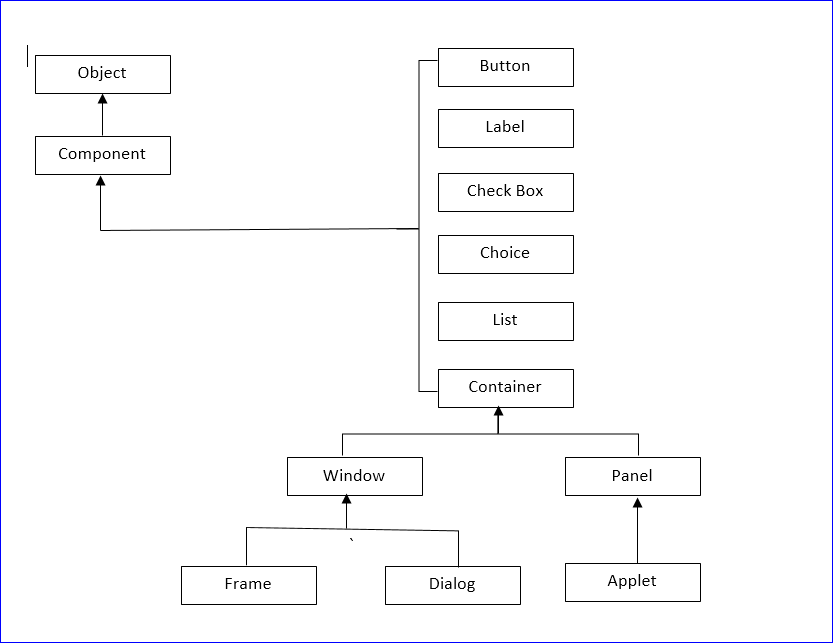 • Every AWT control provided by Java will inherit all the properties and the required behaviors from the "Component" class
• Component class declaration for java.awt.Component Class
public abstract class Component extends Object
implements ImageObserver, MenuContainer, Serializable
• Component Class Fields
i) static float BOTTOM_ALIGNMENT : Constant used for getting bottom alignment i.e getAlignmentY()
ii) static float CENTER_ALIGNMENT : Constant used for getting center alignment i.e getAlignmentY() and getAlignmentX()
iii) static float LEFT_ALIGNMENT : Constant used for getting left alignment i.e getAlignmentX()
iv) static float RIGHT_ALIGNMENT : Constant used for getting right alignment i.e getAlignmentX()
v) static float TOP_ALIGNMENT : Constant used for getting top alignment i.e getAlignmentY()
• Component Class Constructors
i) protected Component() - This is a default non-parametrical constructor which is used to create a new component.
• Component Class methods - We have around 220 class methods
i) boolean action(Event evt, Object what)
ii) void add(PopupMenu popup)
iii) void addComponentListener(ComponentListener |)
iv) void addFocusListener(Focus Listener |)
v) void addHierarchyBoundsListener(HierarchyBoundsListener |)
vi) void addHierarchyListener(HierarchyListener |)
vii) void addInputMethodListener(InputMethodListener |)
8) void addKeyListener(KeyListener |)
9) void addMouseListener(MouseListener |)
10) void addMouseMotionListener(MouseMotionListener |)
11) void addMouseWheelListener(MouseWheelListener |)
12) void addNotify()
13) void addPropertyChangeListener(PropertyChangeListener |)
Example
• Every AWT control provided by Java will inherit all the properties and the required behaviors from the "Component" class
• Component class declaration for java.awt.Component Class
public abstract class Component extends Object
implements ImageObserver, MenuContainer, Serializable
• Component Class Fields
i) static float BOTTOM_ALIGNMENT : Constant used for getting bottom alignment i.e getAlignmentY()
ii) static float CENTER_ALIGNMENT : Constant used for getting center alignment i.e getAlignmentY() and getAlignmentX()
iii) static float LEFT_ALIGNMENT : Constant used for getting left alignment i.e getAlignmentX()
iv) static float RIGHT_ALIGNMENT : Constant used for getting right alignment i.e getAlignmentX()
v) static float TOP_ALIGNMENT : Constant used for getting top alignment i.e getAlignmentY()
• Component Class Constructors
i) protected Component() - This is a default non-parametrical constructor which is used to create a new component.
• Component Class methods - We have around 220 class methods
i) boolean action(Event evt, Object what)
ii) void add(PopupMenu popup)
iii) void addComponentListener(ComponentListener |)
iv) void addFocusListener(Focus Listener |)
v) void addHierarchyBoundsListener(HierarchyBoundsListener |)
vi) void addHierarchyListener(HierarchyListener |)
vii) void addInputMethodListener(InputMethodListener |)
8) void addKeyListener(KeyListener |)
9) void addMouseListener(MouseListener |)
10) void addMouseMotionListener(MouseMotionListener |)
11) void addMouseWheelListener(MouseWheelListener |)
12) void addNotify()
13) void addPropertyChangeListener(PropertyChangeListener |)
Example
49. Multithreading Thread • A thread by concept is a light-weight, smallest part of a process that can run concurrently with the other of the same process. • Threads are independent as every thread has its own separate path of execution. • As a thread is independent of itself, when an exception occurs in one thread that thread doesn't affects the execution of other threads. • All threads of a specific process share the common memory in execution. Multi-Threading • The process of executing multiple threads simultaneously in synchronization • Provides simultaneous execution of two or more parts of a program to maximum utilise the CPU time. • Multi-thread programming contains two or more parts that can run concurrently, each part of the program is called as Thread. Different states of a Thread • NEW state • RUNNABLE state • BLOCKED state • WAITING state • TIMED_WAITING • TERMINATED Multitasking • Ability to execute more than one task at the same time. • Multithreading is also known as Thread-Based Multitasking. • One CPU is involved Mutliprocessing • Same as Multitasking. More than one CPU is involved. Parallel Processing • The utilization of multiple CPU's in a single computer system Thread life cycle • Start() • Ready to run • Running • Waiting or sleeping or blocked • Dead Creation of Thread • By extending thread class • By implementing runnable interface Methods used to operate thread • getName() - used to obtain thread's name • getPriority() - used to obtain thread's priority • isAlive() - used to determine if a thread is still running • join() - used to wait for a thread to terminate • run() - used to make a entry point for the thread • sleep() - used to suspend a thread for a period of time • start() - starts a thread by calling its run() method Creating thread by extending "Thread" class class myThreadClassName extends Thread Creating thread by implementing runnable interface class myThreadClassName implements Runnable Commonly used Constructors in the Thread class 1. Thread() -- Non parametrical default constructor 2. Thread(String name) --Name of thread is provided 3. Thread(Runnable r) -- Passing runnable object 4. Thread(Runnable r, String name) What are the tasks that are performed by the start() method on the thread object? 1. A new thread starts with a new CallStack. 2. The thread moves from the new state to the runnable state. 3. When the thread gets a chance to execute it target method run() will run. Example
Continue from Java 131
1. JDK Architecture Any program requires three phases of execution: 1. Writing a program 2. Compilation: The Java program is compiled by javac compiler and generates java bytecode as output. The java compiler exists in JDK (java development kit). 3. Execution: JVM (Java Virtual Machine) executes java bytecode and provides output.
In short the source code (.java file) gets compiled in javac (java compiler) which resides in JDK and the javac generates the bytecode (.class file) which gets executed in JVM. The bytecode is saved in .class file by compiler. Along with compilers, JDK also consists JRE and tools like Javadoc and debugger etc. In order to create, compile and execute we have to install JDK into our machine. The JVM is a virtual machine that runs on your computer and executes bytecode (.class file) generated by javac. JVM doesn’t understand the source code (.java file) hence the javac compiles the source code and generates bytecode (.class file) which gets executed by JVM and provides the output. Every OS has different JVM but the output is same across all OS’s.
JRE: JRE is used to run java code but we wont be able to compile it.
2. JVM Architecture Class Loader: The class loader reads the .class file and saves the file in Method Area. Method Area: There is only one MA in JVM which is shared among all classes. This holds the class level information of each .class file Heap: Allocation of objects. JVM creates a class object for each .class file. Stack: Used for storing temporary variables PC Register: This provides information about the instructions which has been executed and which are going to be executed. Since the instructions are executed by threads, each thread has a separate PC Register. Native Method Stack: This can access the runtime data areas of the virtual machine. Four main concepts of Object Oriented Programming are: 1. Abstraction 2. Encapsulation 3. Inheritance 4. Polymorphism
Java Sessions by Satish Sir Java is a programming language. There is no standard process of writing an algorithm but need to adapt few features. Flow chart is a pictorial or diagrammatic representation of an Algorithm. 3. Assembler →Assembler: Computer understands any program in machine language. This translation of any language to machine language is done by Assembler. ⇒Types: 1. Self assembler; 2. Resident assembler; 3. Cross assembler Java is cross assembler where C and C++ is not cross assembler ⇒Categories: 1. One pass assembler – Assigns memory addresses to variables and translates the source code into machine code in first pass itself 2. Two pass assembler – This reads source code twice. First to read all variables and assigns to memory address. Second read the source code and translates the source code into object code.
4. Compiler →Compiler: Translates a high level language into machine language. This is more intelligent than Assembler as it checks all kinds of limits, ranges and errors. Their run time is more and occupies more memory. It scans and parses through entire program and then translates the entire program into machine code. ⇒Types: 1. Self compiler/ Resident compiler: Runs and produces machine code for same computer 2. Cross compiler: Runs and produces machine code for same computer
5. Interpreter →Interpreter: Translates statement by statement into machine language. Reads only one statement, translates and then executes it. The machine codes are not saved in computer.
6. Linker →Linker: Links all libraries.
7. Loader →Loader: Loads the program into system memory. Loaders are part of OS. Java is a high level programming language. It is robust, secured and object oriented by nature. Also it is considered as Platform since we can develop programs, run/ compile the programs and it has its own execution engine, compiler and set of pre-defined libraries. It has its own runtime environment called ‘Java Runtime Engine’ (JRE) and own collection of API’s (Application Program Interfaces) like network libraries, security libraries, controller libraries. Java is platform independent (any code, any hardware, any OS) due to its byte code generation. It is distributed by nature due to ‘Remote Method Invocation’ (RMI) and ‘Enterprise Java Beans’ (EJB). High performance due to Just-in-time (JIT) compilers. Byte code (.class file) to machine code is converted by JVM. JVM resides on OS side. JVM contains Class Loader, Byte Code Verifier and Execution Engine.
8. Types of Java applications Standalone Application: Desktop/ Window-based application. They need to be installed on every machine. Web Application: Runs on the server side and creates dynamics web based pages. Technologies used for developing web applications are Servlet and JSP; Struts; Hibernate and Spring; JSF Enterprise Application: Distributed in nature taking the control of data for the entire business establishment. Ex: Oracle EBS. EJB (Enterprise Java Beans) is used for creation enterprise applications. Mobile Application: Created for mobile devices. Android and Java ME are used for creation mobile applications. Different Java Platforms or Editions Java SE is a Java programming platform. Java SE includes Java programming API’s such as • java.lang • java.io • java.net • java.util • java.sql • java.math Java SE includes core areas of programming through • OOPS • String • Regex • Exception • Inner Classes • Multithreading • I/O Stream • Networking • AWT • Swing • Reflection • Collection Java EE(Enterprise Edition) JEE is an enterprise platform which is mainly used to develop web, enterprise applications, large scale applications. JEE is built on top of all the features provided by Java SE platform. JEE is extension of JSE. JEE includes core areas of programming through • Servlet • JSP • Web Services • EJB • JPA Java ME (Micro Edition) Used to develop mobile applications. Effectively used in Mobile phones; Set-Top boxes; Blu-Ray disc players; Digital Media devices; M2M modules; Printers JavaFx Used to develop rich internet applications. JavaFx uses light-weight user interface API for developing multi-media applications. Source code (.java file) ⇒ Java Compiler ⇒ Byte code (.class file) ⇒ JVM (Class Loader, Byte Code Verifier, Execution Engine) ⇒ Windows/ Linux/ Mac machine. • Java is platform independent as it generates byte code • Used for application programming. Mostly used in Window, web-based, enterprise and mobile applications. • Java doesnt support ‘goto’ statement • Java doesnt support multiple inheritance through class. It can be achieved by interfaces in Java. • Java doesnt support operator overloading • Java supports pointers internally in the context of references. Developer cannot write pointer program in Java. • Java uses both compiler and interpreter for its application execution • Java supports the concept of call by value only • Java doesnt supports the application of data structures like structures and unions. • Java has built-in multi thread concept • Java supports documentation comment (/**…*/) to create documentation for java source code • Java doesnt support conditional compilation and inclusion concept • Java has automatic garbage collection. Supports a non-deterministic finalize() method for customization. • Java has no virtual keyword. • Java uses single inheritance tree as classes in java are child of object class in Java. Object class in Java is the root of inheritance tree. • Java is case sensitive programming language. • Packages imported by default in Java. A Java class which is not in a named package will automatically be placed in unnamed package. • If the programmer explicitly does not create any package to organize the Java program files, the Java compiler automatically adds a package statement. • The “java.lang” package is imported implicitly, which contains a number of components that are used very commonly in Java programs. • “java.lang” package contains all the bundles of the fundamental classes that make the Java language to operate. • “java.io” package contains all the classes for data input and data output functions. Note: • The Java programs when compiled will place all the “.class” files by default into the directory where the source files are maintained • When executing the “.class” files we have to specify the path where the bytecode files are available as current directory. • Once the compilation or execution is completed the Java compiler or Java interpreter will terminate returning to operating system console. • By default the latest Java platforms import the required packages and classes that are essential to compile and run the fundamental Java program.
9. Common Java errors Error 01: ‘javac’ is not recognized as an internal or external command, operable program or batch file Reason: Windows cannot find the compiler (javac) Solution: Tell Windows where to find Javac, i.e where JDK is installed Syntax: C:\Program Files\Java\jdk1.8.0_171\bin\javac C:\Java\MyProgram001.java Error 02: Class names, ‘HelloWorldApp’, are only accepted if annotation processing is explicitly requested Reason: ‘.java’ extension doesnt exist while compiling the program Solution: Include ‘.java’ while compiling the program Syntax: C:\Program Files\Java\jdk1.8.0_171\bin\javac C:\Java\MyProgram001.java Error 03: Exception in thread “main” java.lang.NoClassDefFoundError:MyProgram001.java Reason: ‘.java’ cannot find the byte code file MyProgram001.class Solution: Change the directory to the location where the .class files are available and re-execute the code Error 04: Could not find or load main class MyProgram001.class Reason: Programmer is trying to run the Java launcher on the .class file that was created by the compiler Solution: Re-execute the Java program that is already compiled with the file name without the “.class” extension Compiling Java program with redirection of .class file: javac -d F:\javaprograms\classfiles F:\javaprograms\myprogram001.java Executing “.class” file redirecting from class files folder: java -cp classfiles myprogram002
10. Java installation Steps to verify if Java has been installed in your machine: Option 1: Go to Control Panel >> Programs and Features >> Here we can look for Java like “Java 8 Update 171 (64-bit)” and “Java SE Development Kit 8 Update 171 (64-bit)” Option 2: Open Command Prompt >> type “javac -version” and “java -version” to get Java details. Use below steps to install Java in your machine: Click on link https://www.oracle.com/technetwork/java/javase/downloads/jdk8-downloads-2133151.html Under Java SE Development Kit 8u181 click on download which is specific to your OS. Here I’ve considered Windows x64 202.73 MB jdk-8u181-windows-x64.exe Place the file at some location, say C:\Softwares\Java and start installing by double click on application. JDK Installation Step 1: In Google search for JDK and open "Java SE - Downloads | Oracle Technology Network | Oracle" ((https://www.oracle.com/technetwork/java/javase/downloads/index.html) ) Step 2: Click on Oracle JDK DOWNLOAD (My latest version is JAVA SE 13) Step 3: Click on 'Accept Licence Agreement' and download the version compatible with your machine (jdk-13_windows-x64_bin.exe) Step 4: Right click the application and Run as administrator. Conntinue installation Step 5: Note down the Install to path 'C:\Program Files\Java\jdk-13\'
Its ideal to change path name without any spaces. Since we have space between Program and Files, its better to create in another folder but for time being I am considering same path (Program Files) >> Next >> Next >> Close.
JDK — Java Development Kit used to develop Java programs
JRE — Java Runtime Environment used to execute and test Java programs
Java is installed in machine but OS wont recognize since Java is not considered as a Service. In command prompt type ‘javac -version’ and we get message as ‘javac’ is not recognized as an internal or external command, operable program or batch file. This means my OS is unable to find where that particular program called as “javac” is available. So change to the directory where Java is available. My “javac” is at C:\Program Files\Java\jdk1.8.0_181\bin
Let us assign this path to Environment variable. Go to Control Panel\All Control Panel Items\System >> Advanced system settings >> Advanced tab >> Environment Variables >> Under System Variables click on New and create as below:
Next select System Variable “PATH” and click on Edit >> New and enter %JAVA_HOME%\bin >> Ok >> Ok
Also make sure to enter the path (C:\Program Files\Java\jdk1.8.0_181\bin) under “User variables” >> Path as well
Close the command prompt (if its in opened) and open again. Later type as echo %PATH% in command prompt and we should see following paths C:\Users\gdsri>echo %PATH%
C:\Program Files (x86)\Common Files\Oracle\Java\javapath;……………….C:\Program Files\Java\jdk1.8.0_181\bin;
C:\Users\gdsri>echo %JAVA_HOME%
C:\Program Files\Java\jdk1.8.0_181\bin
JDK configuration test:
C:\Users\gdsri>javac -version
javac 1.8.0_181
JRE configuration test:
C:\Users\gdsri>java -version
java version “1.8.0_181” Java(TM) SE Runtime Environment (build 1.8.0_181-b13) Java HotSpot(TM) 64-Bit Server VM (build 25.181-b13, mixed mode)
11. Example of 'My first Java program' Example 001: Step1: Open any text editor (notepad++ or edit plus) and write below code
public class MyProgram001
{
 public static void main(String[] args)
 {
 System.out.println("My first Java program");
 }
}12. Process to keep “.class” file in separate folder Create folder in some path. The folder I created here is ‘ClasssFiles’ under path ‘C:\Java_Programs\ClassFiles’ C:\Java_Programs>javac -d ClassFiles MyProgram001.java Here -d is instruction to redirect class files to ClassFiles folder. In case you want to keep the class files in different folder and path, see below syntax. C:\Java_Programs>javac -d ClassFiles MyProgram001.java = C:\Java_Programs>javac -d C:\Java_Programs\ClassFiles MyProgram001.java For execution use below command: Here cp stands for class path. C:\Java_Programs>java -cp ClassFiles MyProgram001 My first Java program
13. Example of ‘Using import library having package java.io.*’ Example 002: javac is available in bin directory where JDK is installed — C:\Program Files\Java\jdk1.8.0_181\bin and this path has already been configured to the path environment variable associated to the JAVA_HOME.
import java.io.*;

public class MyProgram002
{
 public static void main(String[] args)
 {
 System.out.println("Using import library having package java.io.*;");
 }
}14. Example of 'Using escape sequence'
public class MyProgram003
{
public static void main(String[] args)
 {
 System.out.println("\
Using escape sequence");
 System.out.println("----------------------------------");
 System.out.print("Print this message in first line \
Print this message in second line");
 }
}15. Example of 'Using escape sequence of double quotes'
public class MyProgram004
{
public static void main(String[] args)
 {
 System.out.println("\
Using escape sequence of double quotes");
 System.out.println("----------------------------------");
 System.out.print("Print the text \"Apple\" in double quotes\
");
 }
}Example 005:
import static java.lang.System.out;
public class MyProgram005
{
public static void main(String[] args)
 {
 out.println("\
Using escape sequence of double quotes");
 out.println("----------------------------------");
 out.print("Print the text \"Apple\" in double quotes\
");
 }
}16. Data Types and Variables Java supports two types of data types: i) Primitive data types ii) Reference or Object data type →Primitive data types: Java supports 8 primitive data types 1) byte: 8-bit signed two’s complement integer. Min value is -128(-2^7) and max value is 127(2^7-1). If not initialized, default value is zero. Used when we want to save space in large arrays, as byte is four times smaller than an integer. Syntax: byte variablename = 10, byte variablename = 5 2) short: 16-bit signed two’s complement integer. Min value is -32,768(-2^15) and max value is 32,767(2^15-1). If not initialized, default value is zero. Used when we want to save memory as byte data type, as short is two times smaller than an integer. Syntax: short variablename = 10000, short variablename = 25000 3) int: 32-bit signed two’s complement integer. Min value is -2,147,483,648(-2^31) and max value is 2,147,483,647(2^31-1). If not initialized, default value is zero. Used as default data type for any integral values unless programmer has concern about memory. Syntax: int variablename = 1000000, short variablename = 2500000 4) long: 64-bit signed two’s complement integer. Min value is -9,223,372,036,854,775,808(-2^63) and max value is 9,223,372,036,854,775,807(2^63-1). If not initialized, default value is 0L. Used when we want to wider range of memory than the integer. Syntax: long variablename = 1000000000L, long variablename = 2500000000L 5) float: float type is a single precision 32-bit IEEE 754 floating point. If not initialized, default value is 0.0f. Used to save memory in large arrays of floating point numbers. float is generally never used for precise value management. Syntax: float variablename = 123.45f 6) double: double type is a double precision 64-bit IEEE 754 floating point. If not initialized, default value is 0.0d. Used as default type for decimal values. float is generally never used for precise value management. Syntax: double variablename = 123.45 7) boolean: Represents one bit of information. Only two possible values, true or false (lowercase not uppercase). If not initialized, default value is False. Syntax: boolean variablename = true 8) char: Single 16-bit unicode character. Minimum value is ‘\u0000’ (0) and maximum value is ‘\uffff’ (65,535). It occupies two bytes of memory for each character. As per ASCII notation the char occupies only one byte of memory, but Java supports only unicode character set. Used to store any character including foreign language characters. Syntax: char variablename = ‘A’ Numeric primitives: • short, int, long, float and double — These primitive data types hold only numeric data. All numeric data types are signed (+/-) values Textual primitives: • byte and char — These primitive data types hold characters • boolean and null — These primitive data types hold boolean and null data. Variable Types: A variable is a container which holds the value. A variable is assigned with a datatype. Variable is a name of memory location. There are three types of variables in java: local, instance and static.
| Local Variable | Instance/ Class Variable | Static Variable |
|---|---|---|
| Declared inside the body of "method" | Declared inside the "class" but outside of body of "method" | Declared as static |
| Able to access within the "method" itself. Have scope only to the definition of method. | The value is instance specific and will not be shared among instances | We can create a single copy of static variable and share across all the instances of the class |
| Cannot be declared as Static | Cannot be declared as Static | Cannot be declared as Local |
| Instance variables can be used by all methods of a class | If the value of this variable is changed, all the other instances will also have the same new value | |
| Instance variables are object specific within the application | Initialized only once at the start of program execution. | |
| Instance variables are objects in Java. | They should be initialized first before initialization of any instance variable. |
Class var//var is a class name
 {
  int a;// Here 'a' is an Instance variable
  Static int m = 100; // Here 'm' is a Static/Class variable and value   100 is assigned.
  Void method1 () // Start of method -> method1
  {
   int b=10; // Here 'b' is a Local variable and can’t be used   outside the method/function
  }// End of method
 }// End of class
17. Different ways to read input from console in Java • Buffered reader class • Console class • Scanner class → Buffered reader class: • This is the most primitive class to take input and introduced in JDK1.0 • Java.io.BufferedReader class reads text from a character-input stream by buffering characters. Its a string of data/ stream of text. • It provides efficient reading of Character, Arrays and Lines • The buffer size can be specified by programmer, if not specified the default size will be used • The class declaration for “Java.io.BufferedReader” is “public class BufferedReader extends Reader” • BufferedReader has its own attributes and methods for operations. Example 006:
import java.io.*; // java.io.* is Java package
class MyProgram006 //MyProgram006 is class name
{
 public static void main(String args[]) throws Exception
 {
 InputStreamReader readData = new InputStreamReader(System.in); //InputStreamReader is class provided by Java ; readData is object; System.in is a parameter provided by Java;
 BufferedReader bufferedReaderObject = new BufferedReader(readData); //BufferedReader is class provided by Java; bufferedReaderObject is object;
 System.out.print("\
Please enter your first name : ");
 String firstName = bufferedReaderObject.readLine(); //readLine() is method; firstName is variable; String is data type;
 System.out.print("\
Please enter your middle name : ");
 String middleName = bufferedReaderObject.readLine();
 System.out.print("\
Please enter your last name : ");
 String lastName = bufferedReaderObject.readLine();
 System.out.println("\
Your first name is : " + firstName);
 System.out.println("\
Your middle name is : " + middleName);
 System.out.println("\
Your last name is : " + lastName);
 System.out.println("\
Your full name is : " + firstName + "" + middleName + "" + lastName);
 bufferedReaderObject.close();
 readData.close();
 }
}
//First create one object (readData) on class (InputStreamReader) and then give that object (readData) to another class (BufferedReader) and finally push into local variable (firstName);import java.io.*; // java.io.* is Java package
class MyProgram007 //MyProgram007 is class name
{
public static void main(String args[]) throws Exception
{
InputStreamReader readData = new InputStreamReader(System.in); //InputStreamReader is class provided by Java ; readData is object; System.in is a parameter provided by Java;
BufferedReader bufferedReaderObject = new BufferedReader(readData); //BufferedReader is class provided by Java; bufferedReaderObject is object;
System.out.print("\
Please enter first integer value: ");
int firstinteger = bufferedReaderObject.readLine(); //readLine() is method; firstinteger is variable; int is data type;
System.out.print("\
Please enter second integer value : ");
int secondinteger = bufferedReaderObject.readLine();
bufferedReaderObject.close();
readData.close();
}
}
//2 errors found when compiling (-javac) the code. bufferedReaderObject is text stream and cannot convert into numerical string.import java.io.*;
class MyProgram008
{
public static void main(String args[]) throws Exception
{
InputStreamReader readData = new InputStreamReader(System.in);
BufferedReader bufferedReaderObject = new BufferedReader(readData);
System.out.print("\
Please enter first number in the range of (-127 to +128): ");
String FirstValue = bufferedReaderObject.readLine();
byte FirstValueParsed = Byte.parseByte(FirstValue);
System.out.print("\
Please enter second number in the range of (-127 to +128): ");
String SecondValue = bufferedReaderObject.readLine();
byte SecondValueParsed = Byte.parseByte(SecondValue);
System.out.println("\Your given first number is : " + FirstValueParsed) ;
System.out.println("\Your given second number is : " + SecondValueParsed) ;
System.out.println("\The sum of " + FirstValueParsed + " and " + SecondValueParsed + " is " + (FirstValueParsed + SecondValueParsed));
bufferedReaderObject.close();
readData.close();
}
}import java.io.*;
class MyProgram009
{
public static void main(String args[]) throws Exception
{
InputStreamReader readData = new InputStreamReader(System.in);
BufferedReader bufferedReaderObject = new BufferedReader(readData);
System.out.print("\
Please enter first number in the range of (-32,768 to +32,767): ");
String FirstValue = bufferedReaderObject.readLine();
short FirstValueParsed = Short.parseShort(FirstValue);
System.out.print("\
Please enter second number in the range of (-32,768 to +32,767): ");
String SecondValue = bufferedReaderObject.readLine();
short SecondValueParsed = Short.parseShort(SecondValue);
System.out.println("\Your given first number is : " + FirstValueParsed);
System.out.println("\Your given second number is : " + SecondValueParsed) ;
System.out.println("\The sum of " + FirstValueParsed + " and " + SecondValueParsed + " is " + (FirstValueParsed + SecondValueParsed));
bufferedReaderObject.close();
readData.close();
}
}import java.io.*;
class MyProgram010
{
public static void main(String args[]) throws Exception
{
InputStreamReader readData = new InputStreamReader(System.in);
BufferedReader bufferedReaderObject = new BufferedReader(readData);
System.out.print("\
Please enter first number in the range of (-2,147,483,648 to +2,147,483,647): ");
String FirstValue = bufferedReaderObject.readLine();
int FirstValueParsed = Integer.parseInt(FirstValue);
System.out.print("\
Please enter second number in the range of (-32,768 to +32,767): ");
String SecondValue = bufferedReaderObject.readLine();
int SecondValueParsed = Integer.parseInt(SecondValue);
System.out.println("\Your given first number is : " + FirstValueParsed);
System.out.println("\Your given second number is : " + SecondValueParsed) ;
System.out.println("\The sum of " + FirstValueParsed + " and " + SecondValueParsed + " is " + (FirstValueParsed + SecondValueParsed));
bufferedReaderObject.close();
readData.close();
}
}import java.io.*;
class MyProgram011
{
public static void main(String args[]) throws Exception
{
InputStreamReader readData = new InputStreamReader(System.in);
BufferedReader bufferedReaderObject = new BufferedReader(readData);
System.out.print("\
Please enter first number in the range of (-9,223,372,036,854,775,808 to 9,223,372,036,854,775,807): ");
String FirstValue = bufferedReaderObject.readLine();
long FirstValueParsed = Long.parseLong(FirstValue);
System.out.print("\
Please enter second number in the range of (-9,223,372,036,854,775,808 to 9,223,372,036,854,775,807): ");
String SecondValue = bufferedReaderObject.readLine();
long SecondValueParsed = Long.parseLong(SecondValue);
System.out.println("\Your given first number is : " + FirstValueParsed);
System.out.println("\Your given second number is : " + SecondValueParsed) ;
System.out.println("\The sum of " + FirstValueParsed + " and " + SecondValueParsed + " is " + (FirstValueParsed + SecondValueParsed));
bufferedReaderObject.close();
readData.close();
}
}import java.io.*;
class MyProgram012
{
public static void main(String args[]) throws Exception
{
InputStreamReader readData = new InputStreamReader(System.in);
BufferedReader bufferedReaderObject = new BufferedReader(readData);
System.out.print("\
Please enter first number including decimal points: ");
String FirstValue = bufferedReaderObject.readLine();
float FirstValueParsed = Float.parseFloat(FirstValue);
System.out.print("\
Please enter second number including decimal points: ");
String SecondValue = bufferedReaderObject.readLine();
float SecondValueParsed = Float.parseFloat(SecondValue);
System.out.println("\Your given first number is : " + FirstValueParsed);
System.out.println("\Your given second number is : " + SecondValueParsed) ;
System.out.println("\The sum of " + FirstValueParsed + " and " + SecondValueParsed + " is " + (FirstValueParsed + SecondValueParsed));
bufferedReaderObject.close();
readData.close();
}
}import java.io.*;
class MyProgram013
{
public static void main(String args[]) throws Exception
{
InputStreamReader readData = new InputStreamReader(System.in);
BufferedReader bufferedReaderObject = new BufferedReader(readData);
System.out.print("\
Please enter first number including decimal points: ");
String FirstValue = bufferedReaderObject.readLine();
double FirstValueParsed = Double.parseDouble(FirstValue);
System.out.print("\
Please enter second number including the decimal points: ");
String SecondValue = bufferedReaderObject.readLine();
double SecondValueParsed = Double.parseDouble(SecondValue);
System.out.println("\Your given first number is : " + FirstValueParsed);
System.out.println("\Your given second number is : " + SecondValueParsed) ;
System.out.println("\The sum of " + FirstValueParsed + " and " + SecondValueParsed + " is " + (FirstValueParsed + SecondValueParsed));
bufferedReaderObject.close();
readData.close();
}
}Method Description ------------------------- ------------------------------------------ public String next() Returns the next token from the scanner public String nextLine() Moves the scanner position to the next line public byte nextByte() Scans the next token as a byte public short nextShort() Scans the next token as a short value public int nextInt() Scans the next token as a int value public long nextLong() Scans the next token as a long value public float nextFloat() Scans the next token as a float value public double nextDouble() Scans the next token as a double valueExample 014: When we are typing the data in input console, from your input buffer the data started moving into the object (scannerObject) which is created upon that particular console. The data is now available on object and we have transfer the data into variable (firstName). Variable is in another instance. The variable is expecting to get the data that is fundamentally typed by the end user at the console and the data is stored within one of the object that is created on one of my particular console called scannerObject. This object is open and it is capturing the data that is given through the console. But this data cannot be transferred directly into variable until the method called as next is provided.
import java.io*;
import java.util.Scanner;
class MyProgram014
{
 public static void main(String args[]) throws Exception
 {
 Scanner scannerObject = new Scanner(System.in);
 System.out.print("\
Please enter your first name : ");
 String firstName = scannerObject.next();
 System.out.print("\
Please enter your middle name : ");
 String middleName = scannerObject.next();
 System.out.print("\
Please enter your last name);
 String lastName = scannerObject.next();
 System.out.println("\
Given first name is : " + firstName);
 System.out.println("\
Given middle name is : " + middleName);
 System.out.println("\
Given last name is : " + lastName);
 System.out.println("\
Your full name is : " + firstName + " " + middleName + " " + lastName);
 scannerObject.close();
 }
}import java.io*;
import java.util.Scanner;
class MyProgram015
{
public static void main(String args[]) throws Exception
{
Scanner scannerObject = new Scanner(System.in);
System.out.print("\
Please enter first number in the range of (-32,768 to +32,767): ");
short FirstValue = scannerObject.nextShort();
System.out.print("\
Please enter second number in the range of (-32,768 to +32,767): ");
short SecondValue = scannerObject.nextShort();
System.out.println("\
Given first number is : " + FirstValue);
System.out.println("\
Given second number is : " + SecondValue);
System.out.println("\
Sum of two numbers is : " + (FirstValue + SecondValue));
scannerObject.close();
}
}import java.io*;
import java.util.Scanner;
class MyProgram016
{
public static void main(String args[]) throws Exception
{
Scanner scannerObject = new Scanner(System.in);
System.out.print("\
Please enter first number in the range of (-2,147,483,648 to +2,147,483,647) : ");
int FirstValue = scannerObject.nextInt();
System.out.print("\
Please enter second number in the range of (-2,147,483,648 to +2,147,483,647) : ");
int SecondValue = scannerObject.nextInt();
System.out.println("\
Given first number is : " + FirstValue);
System.out.println("\
Given second number is : " + SecondValue);
System.out.println("\
Sum of " + FirstValue + " and " + SecondValue + " is : " + (FirstValue + SecondValue));
scannerObject.close();
}
}import java.io*;
import java.util.Scanner;
class MyProgram017
{
public static void main(String args[]) throws Exception
{
Scanner scannerObject = new Scanner(System.in);
System.out.print("\
Please enter first number in the range of (-9,223,372,036,854,775,808 to 9,223,372,036,854,775,807) : ");
long FirstValue = scannerObject.nextLong();
System.out.print("\
Please enter second number in the range of (-9,223,372,036,854,775,808 to 9,223,372,036,854,775,807) : ");
long SecondValue = scannerObject.nextLong();
System.out.println("\
Given first number is : " + FirstValue);
System.out.println("\
Given second number is : " + SecondValue);
System.out.println("\
Sum of " + FirstValue + " and " + SecondValue + " is : " + (FirstValue + SecondValue));
scannerObject.close();
}
}import java.io*;
import java.util.Scanner;
class MyProgram018
{
public static void main(String args[]) throws Exception
{
Scanner scannerObject = new Scanner(System.in);
System.out.print("\
Please enter first number including decimal points : ");
float FirstValue = scannerObject.nextFloat();
System.out.print("\
Please enter second number including decimal points : ");
float SecondValue = scannerObject.nextFloat();
System.out.println("\
Given first number is : " + FirstValue);
System.out.println("\
Given second number is : " + SecondValue);
System.out.println("\
Sum of " + FirstValue + " and " + SecondValue + " is : " + (FirstValue + SecondValue));
scannerObject.close();
}
}import java.io*;
import java.util.Scanner;
class MyProgram019
{
public static void main(String args[]) throws Exception
{
Scanner scannerObject = new Scanner(System.in);
System.out.print("\
Please enter first number including decimal points : ");
double FirstValue = scannerObject.nextDouble();
System.out.print("\
Please enter second number including decimal points : ");
double SecondValue = scannerObject.nextDouble();
System.out.println("\
Given first number is : " + FirstValue);
System.out.println("\
Given second number is : " + SecondValue);
System.out.println("\
Sum of " + FirstValue + " and " + SecondValue + " is : " + (FirstValue + SecondValue));
scannerObject.close();
}
}import java.io*;
import java.util.Scanner;
class MyProgram020
{
public static void main(String args[]) throws Exception
{
Scanner scannerObject = new Scanner(System.in);
System.out.print("\
Please enter any single character : ");
char CharValue = scannerObject.next().charAt(0);
System.out.println("\
Your character is : "+CharValue);
scannerObject.close();
}
}import java.io*;
class MyProgram021
{
public static void main(String args[]) throws Exception
{
InputStreamReader readData = new InputStreamReader(System.in);
BufferedReader bufferedReaderObject = new BufferedReader(readData);
System.out.print("\
Please enter any single character : ");
int CharValue = bufferedReaderObject.read();
char myCharacter = (char) CharValue; //(char) is type casting
System.out.println("\
Your given character is : " + myCharacter);
bufferedReaderObject.close();
readData.close();
}
}
C:\Java_Programs>javac -d ClassFiles MyProgram021.java
C:\Java_Programs>java -cp ClassFiles MyProgram021
Example 022:
import java.io*;
import java.util.Scanner;

public class MyProgram022
{
 public static void main(String[] args)
 {
 Scanner ScannerObject = new Scanner(System.in);

 System.out.print("\Please enter your first name: ");
 String FirstName = ScannerObject.next();

 System.out.print("\Please enter your middle name: ");
 String MiddleName = ScannerObject.next();

 System.out.print("\Please enter your last name: ");
 String LastName = ScannerObject.next();

 System.out.print("\Please enter your gender: ");
 char Gender = ScannerObject.next().charAt(0);

 System.out.print("\Please enter your contact number: ");
 long ContactNumber = ScannerObject.nextLong();

 System.out.print("\Please enter your age in Years.Months: ");
 double age = ScannerObject.nextDouble();

 System.out.println("\Your given first name is: " + FirstName);
 System.out.println("\Your given middle name is: " + MiddleName);
 System.out.println("\Your given last name is: " + LastName);
 System.out.println("\Your full name is: " + FirstName + " " + MiddleName + " " + LastName);
 System.out.println("\Your given gender is: " + Gender);
 System.out.println("\Your given contact number is: " + ContactNumber);
 System.out.println("\Your given age is: " + age);

 ScannerObject.close();
 }
}
C:\Java_Programs>javac -d ClassFiles MyProgram022.java
C:\Java_Programs>java -cp ClassFiles MyProgram022
→ Console Class
• Console class can be used to get input from console and is introduced since 1.5
• Provides methods to read texts and passwords
• The java.io.console class is attached with system console internally and provides its functionality through System.in and System.out
• Console class do not provide constructors. A console object is obtained by calling System.console()
• Console returns a reference else a NULL is referenced.
• Declaration: public final class Console extends Object implements Flushable
Method        Description
------------- ------------------------
Reader reader() -- Retrives the reader object associated with console
String readLine() -- Used to read a single line of text from console
String readLine(String format, Object...args) -- Provides a formatted prompt then reads the single line of text from console
char[] readPassword() -- Used to read password which is not displayed
char[] readPassword(String fmt, Object...args) -- Provides a formatted prompt then reads the password which doestnt displayed on the console
Console format(String format, Object...args) -- Used to write a formatted string to the console output stream
Console printf(String format, Object...args) -- Used to write a string to the console output stream
PrintWriter writer() -- Used to retrieve the printwriter object associated with the console
void flush() -- Used to flush the console
Example 023:
import java.io.*;
import java.io.Console;

class MyProgram023
{
 public static void main(String[] args) throws Exception
 {
 Console ConsoleObject = System.console(); //System.console() is an instantiated object provided by Java and the properties are assigned to ConsoleObject object.

 System.out.print("\
Please enter your first name: ");
 String FirstName = ConsoleObject.readLine();

 System.out.print("\
Please enter your middle name: ");
 String MiddleName = ConsoleObject.readLine();

 System.out.print("\
Please enter your last name: ");
 String LastName = ConsoleObject.readLine();

 System.out.print("\
Please enter your gender: ");
 char Gender = (char) System.in.read();

 System.out.print("\
Please enter your contact number: ");
 String MyContactNumber = ConsoleObject.readLine();
 long ContactNumber = Long.parseLong(MyContactNumber);

 System.out.print("\
Please enter your age in Years.Months: ");
 String MyAge = ConsoleObject.readLine();
 double Age = Double.parseDouble(MyAge);

 System.out.print("\
Please provide username: ");
 String UserName = ConsoleObject.readLine();

 System.out.print("\
Please provide password: ");
 char[] UserPassword = ConsoleObject.readPassword();
 String Password = String.valueOf(UserPassword);

 System.out.print("\
Please enter first number in the range of (-127 to +128): ");
 String FirstNumber = ConsoleObject.readLine();
 byte FirstNumberParsed = Byte.parseByte(FirstNumber);

 System.out.print("\
Please enter second number in the range of (-9,223,372,036,854,775,808 to +9,223,372,036,854,775,807): ");
 String SecondNumber = ConsoleObject.readLine();
 long SecondNumberParsed = Long.parseLong(SecondNumber);


 System.out.println("\
Your given first name is: " + FirstName);
 System.out.println("\
Your given middle name is: " + MiddleName);
 System.out.println("\
Your given last name is: " + LastName);
 System.out.println("\
Your full name is: " + FirstName + " " + MiddleName + " " + LastName);
 System.out.println("\
Your given gender is: " + Gender);
 System.out.println("\
Your given contact number is: " + ContactNumber);
 System.out.println("\
Your age is: " + Age);
 System.out.println("\
Your registered user name is: " + UserName);
 System.out.println("\
Your password is: " + Password);
 System.out.println("\
Your given first number is: " + FirstNumberParsed);
 System.out.println("\
Your given second number is: " + SecondNumberParsed);
 System.out.println("\
The sum of two numbers is: " + (FirstNumberParsed + SecondNumberParsed));

 }
}
18. Java Keywords abstract
assert
boolean
break
byte
case
catch
char
class –> Every Java program is one class –> class keyword indicates that everything in a Java program should be within the Java class, which acts like a container for properties and behavior of Java objects. –> class name should begin with letter and later can be alphanumeric –> Length of class name is unlimited and should not be Java reserved word –> Save the Java source code file with the same name of the public class with an extension of .java –> A class is a group of objects which have common properties. –> Class is a template or blueprint from which objects are created.
const
continue
default
do
double
else
enum
extends
final –> Used for declaring constant variable
finally
float
for
goto
if
implements
import
instanceof
int
interface
long
main –> To run a compiled program, JVM always starts execution with the code in the “main” method in the class indicated by programmer. –> Java program must have a “main” method in the source file for the Java class for the code to execute. –> Programmer can add his own operational methods to a Java class and call them from the “main” method. –> The “main” method in Java should be qualified as “public” because it can be called by JVM or Java Runtime. A command line executes Java command and the Java command in turn executes Java “main” program. –> The “main” method in Java should be qualified as “static”. When JVM or Java Runtime is started, there is no presence of the object of the class. When we declare the “main” method as “static”, JVM or Java Runtime can load the class into memory and call the “main” method. When “main” method is ignored with “static”, JVM cannot call the “main” method as there is no object of the class. –> The “main” method return type should be “void”. As per Java programming every method signature should provide a return type. Java “main” method doesn’t returns anything, hence its return type is declared as “void”. Once “main” method execution is finished, Java program terminates. Hence need not return anything. –> The “main” method has string[] args. “main” method accepts a single argument of type string array. The argument for “main” method is called as Java command line arguments. All command line arguments passed at runtime are treated as “string” type. –> Objects cannot be communicated without a method. Multiple classes can exist in Java. To communicate with any other object in another class, we need “main” method. “main” method controls overall objects of entire Java application.
native
new
out –> out is an object
Overriding –> The process of replacing or augmenting the original code with new code to suit the current purpose. –> An Overridden method's signature in the sub class remains the same as that of the super class but the contents of the method will be changed to meet the goal of the method in its new form in the derived class.
package
print –> print() and println() are methods defined by the class “printstream” –> print() doesn’t move cursor to new line after printing. –> println() moves cursor to next line after printing and can be used without parameters. –> Escape sequence: \t – tab; \b – backspace; \ – newline; \ – carriage return; \f – Form feed; \’ – single quote ; \” – double quote; \\ – backslash character
private –> Declare private at start of code (top of code), could be attributes or methods6
protected
public –> public keyword is called as Access modifier. –> Controls level of access to other parts of the Java program in this code.
return
Re-usability –> Inheritance supports the concept of Re-usability because the base class includes some of the code that is essential to the next level. –> The next level classes can reuse the fields and methods of the existing class or the super class.
short
static –> The only method that can be executed even if the object is not available. –> Share among all the objects of the application
strictfp
Sub Class –> Inherits the other class. –> Also known as "Derived class" or "Extended class" or "Child class" –> Can add its own fields and methods in addition to the super class fields and methods.
super
super class –> Super class is the class whose features are inherited to the next level of the classes. –> Also known as "Base class" or "Parent class"
switch
synchronized
System.out –> Output stream to which Java output will be redirected. Default is “stdout” –> “System” is a final class which is declared in “java.lang” package –> Features of “System” class: i) Standard input (System.in) ii) Standard output (System.out) iii) Error output –> “out” is a static member field of “System” class and is of type “printstream” –> “out” access specifiers are “public” and “final”
this
throw
throws
transient
try
void –> Returns the status code. –> The void keyword indicates that the main method doesnt returns a value. Not even an “exit code” to the operating system. –> When the main method exits normally, the Java program manages the exit code as 0, which indicates successful completion of Java program –> The programmer can terminate the Java program with a different exit code, using “system.exit” method.
volatile
while
19. Java Operators • Arithmetic • Unary • Assignment • Relational • Logical • Ternary • Bitwise • Shift • Arithmetic: +, -, *, /, % • Unary: Unary Minus(-) is used to get negative values. Unary Plus(+) is used to get positive values. • Increment Operator(++): Used to increment the value by 1 Post-Increment: Result/ Final value is incremented by 1. Pre-Increment: First the variable value is incremented by 1 and then computes the result. • Decrement Operator(++): Used to decrement the value by 1 Post-Decrement: Result/ Final value is decremented by 1. Pre-Decrement: First the variable value is decremented by 1 and then computes the result. • Logical Not Operator (!): Used for inverting a Boolean value. Example 024:
import java.io.*;

class MyProgram024
{
 public static void main(String args[]) throws Exception
 {
 InputStreamReader readData = new InputStreamReader(System.in);
 BufferedReader bufferedReaderObject = new BufferedReader(readData);

 //Addition of two numbers
 System.out.print("\
Please enter first number for addition: ");
 String FirstValueAdd = bufferedReaderObject.readLine();
 float FirstValueAddParsed = Float.parseFloat(FirstValueAdd);

 System.out.print("\
Please enter second number for addition: ");
 String SecondValueAdd = bufferedReaderObject.readLine();
 float SecondValueAddParsed = Float.parseFloat(SecondValueAdd);

 System.out.println("\
Your given first number for addition is : " + FirstValueAddParsed);
 System.out.println("\
Your given second number for addition is : " + SecondValueAddParsed);
 System.out.println("\
The sum of " + FirstValueAddParsed + " and " + SecondValueAddParsed + " is " + (FirstValueAddParsed + SecondValueAddParsed));

 //Subtraction of two numbers
 System.out.print("\
Please enter first number for subtraction: ");
 String FirstValueSub = bufferedReaderObject.readLine();
 float FirstValueSubParsed = Float.parseFloat(FirstValueSub);

 System.out.print("\
Please enter second number for subtraction: ");
 String SecondValueSub = bufferedReaderObject.readLine();
 float SecondValueSubParsed = Float.parseFloat(SecondValueSub);

 System.out.println("\
Your given first number for subtraction is : " + FirstValueSubParsed);
 System.out.println("\
Your given second number for subtraction is : " + SecondValueSubParsed);
 System.out.println("\
The subtraction of " + FirstValueSubParsed + " and " + SecondValueSubParsed + " is " + (FirstValueSubParsed - SecondValueSubParsed));

 //Multiplication of two numbers
 System.out.print("\
Please enter first number for multiplication: ");
 String FirstValueMul = bufferedReaderObject.readLine();
 float FirstValueMulParsed = Float.parseFloat(FirstValueMul);

 System.out.print("\
Please enter second number for multiplication: ");
 String SecondValueMul = bufferedReaderObject.readLine();
 float SecondValueMulParsed = Float.parseFloat(SecondValueMul);

 System.out.println("\
Your given first number for multiplication is : " + FirstValueSubParsed);
 System.out.println("\
Your given second number for multiplication is : " + SecondValueSubParsed);
 System.out.println("\
The multiplication of " + FirstValueMulParsed + " and " + SecondValueMulParsed + " is " + (FirstValueMulParsed * SecondValueMulParsed));

 //Division of two numbers
 System.out.print("\
Please enter first number for division: ");
 String FirstValueDiv = bufferedReaderObject.readLine();
 float FirstValueDivParsed = Float.parseFloat(FirstValueDiv);

 System.out.print("\
Please enter second number for division: ");
 String SecondValueDiv = bufferedReaderObject.readLine();
 float SecondValueDivParsed = Float.parseFloat(SecondValueDiv);

 System.out.println("\
Your given first number for division is : " + FirstValueDivParsed);
 System.out.println("\
Your given second number for division is : " + SecondValueDivParsed);
 System.out.println("\
The division of " + FirstValueDivParsed + " and " + SecondValueDivParsed + " is " + (FirstValueDivParsed / SecondValueDivParsed));

 //Modulus (remainder) of two numbers
 System.out.print("\
Please enter first number for modulus: ");
 String FirstValueMod = bufferedReaderObject.readLine();
 float FirstValueModParsed = Float.parseFloat(FirstValueMod);

 System.out.print("\
Please enter second number for modulus: ");
 String SecondValueMod = bufferedReaderObject.readLine();
 float SecondValueModParsed = Float.parseFloat(SecondValueMod);

 System.out.println("\
Your given first number for modulus is : " + FirstValueModParsed);
 System.out.println("\
Your given second number for modulus is : " + SecondValueModParsed);
 System.out.println("\
The modulus of " + FirstValueModParsed + " and " + SecondValueModParsed + " is " + (FirstValueModParsed % SecondValueModParsed));

 //Concatenation of two strings
 System.out.print("\
Please enter first string for concatenation: ");
 String FirstValueCon = bufferedReaderObject.readLine();

 System.out.print("\
Please enter second string for concatenation: ");
 String SecondValueCon = bufferedReaderObject.readLine();

 System.out.println("\
Your given first string for concatenation is : " + FirstValueCon);
 System.out.println("\
Your given second string for concatenation is : " + SecondValueCon);
 System.out.println("\
The concatenation of " + FirstValueCon + " and " + SecondValueCon + " is " + (FirstValueCon + SecondValueCon));

 //Unary operator
 System.out.print("\
Please enter first number for unary: ");
 String FirstValueUna = bufferedReaderObject.readLine();
 float FirstValueUnaParsed = Float.parseFloat(FirstValueUna);

 System.out.print("\
Please enter second number for unary: ");
 String SecondValueUna = bufferedReaderObject.readLine();
 float SecondValueUnaParsed = Float.parseFloat(SecondValueUna);

 System.out.println("\
Your given first number for unary is : " + FirstValueUnaParsed);
 System.out.println("\
Your given second number for unary is : " + SecondValueUnaParsed);
 System.out.println("\
The unary of " + FirstValueUnaParsed + " and " + SecondValueUnaParsed + " is " + (-(FirstValueUnaParsed - SecondValueUnaParsed)));

 //Post Increment operator
 System.out.print("\
Please enter any number for Post Increment operator (X++): ");
 String FirstValuePostInc = bufferedReaderObject.readLine();
 int FirstValuePostIncParsed = Integer.parseInt(FirstValuePostInc);

 System.out.println("\
Your given number for Post Increment operator is : " + FirstValuePostIncParsed);
 System.out.println("\
Expression Value\t" + "Memory Value\
");
 System.out.println("-----------------\t" + "---------------");
 System.out.println("\
\t" + FirstValuePostIncParsed++ + "\t\t\t" + FirstValuePostIncParsed);
 System.out.println("\
\t" + FirstValuePostIncParsed++ + "\t\t\t" + FirstValuePostIncParsed);
 System.out.println("\
\t" + FirstValuePostIncParsed++ + "\t\t\t" + FirstValuePostIncParsed);
 System.out.println("\
\t" + FirstValuePostIncParsed++ + "\t\t\t" + FirstValuePostIncParsed);
 System.out.println("\
\t" + FirstValuePostIncParsed++ + "\t\t\t" + FirstValuePostIncParsed);

 //Pre Increment operator
 System.out.print("\
Please enter any number for Pre Increment operator (++X): ");
 String FirstValuePreInc = bufferedReaderObject.readLine();
 int FirstValuePreIncParsed = Integer.parseInt(FirstValuePreInc);

 System.out.println("\
Your given number for Pre Increment operator is : " + FirstValuePreIncParsed);
 System.out.println("\
Expression Value\t" + "Memory Value\
");
 System.out.println("-----------------\t" + "---------------");
 System.out.println("\
\t" + ++FirstValuePreIncParsed + "\t\t\t" + FirstValuePreIncParsed);
 System.out.println("\
\t" + ++FirstValuePreIncParsed + "\t\t\t" + FirstValuePreIncParsed);
 System.out.println("\
\t" + ++FirstValuePreIncParsed + "\t\t\t" + FirstValuePreIncParsed);
 System.out.println("\
\t" + ++FirstValuePreIncParsed + "\t\t\t" + FirstValuePreIncParsed);
 System.out.println("\
\t" + ++FirstValuePreIncParsed + "\t\t\t" + FirstValuePreIncParsed);

 //Post Decrement operator
 System.out.print("\
Please enter any number for Post Decrement operator (X--): ");
 String FirstValuePostDec = bufferedReaderObject.readLine();
 int FirstValuePostDecParsed = Integer.parseInt(FirstValuePostDec);

 System.out.println("\
Your given number for Post Decrement operator is : " + FirstValuePostDecParsed);
 System.out.println("\
Expression Value\t" + "Memory Value\
");
 System.out.println("-----------------\t" + "---------------");
 System.out.println("\
\t" + FirstValuePostDecParsed-- + "\t\t\t" + FirstValuePostDecParsed);
 System.out.println("\
\t" + FirstValuePostDecParsed-- + "\t\t\t" + FirstValuePostDecParsed);
 System.out.println("\
\t" + FirstValuePostDecParsed-- + "\t\t\t" + FirstValuePostDecParsed);
 System.out.println("\
\t" + FirstValuePostDecParsed-- + "\t\t\t" + FirstValuePostDecParsed);
 System.out.println("\
\t" + FirstValuePostDecParsed-- + "\t\t\t" + FirstValuePostDecParsed);

 //Pre Decrement operator
 System.out.print("\
Please enter any number for Pre Decrement operator (--X): ");
 String FirstValuePreDec = bufferedReaderObject.readLine();
 int FirstValuePreDecParsed = Integer.parseInt(FirstValuePreDec);

 System.out.println("\
Your given number for Pre Decrement operator is : " + FirstValuePreDecParsed);
 System.out.println("\
Expression Value\t" + "Memory Value\
");
 System.out.println("-----------------\t" + "---------------");
 System.out.println("\
\t" + --FirstValuePreDecParsed + "\t\t\t" + FirstValuePreDecParsed);
 System.out.println("\
\t" + --FirstValuePreDecParsed + "\t\t\t" + FirstValuePreDecParsed);
 System.out.println("\
\t" + --FirstValuePreDecParsed + "\t\t\t" + FirstValuePreDecParsed);
 System.out.println("\
\t" + --FirstValuePreDecParsed + "\t\t\t" + FirstValuePreDecParsed);
 System.out.println("\
\t" + --FirstValuePreDecParsed + "\t\t\t" + FirstValuePreDecParsed);


 bufferedReaderObject.close();
 readData.close();
 }
}
Assignment Operator: ‘=’
variable = value; value is assigned to variable
Example 025:
import java.io.*;

class MyProgram025
{
 public static void main(String[] args) throws Exception
 {
 int FirstValue = 0;

 System.out.println("\
The initial assigned value for variable \"FirstValue\" is : " + FirstValue);

 InputStreamReader ReadData = new InputStreamReader(System.in);
 BufferedReader BufferedReaderObject = new BufferedReader(ReadData);

 System.out.print("\
Please enter any number: ");
 String InputValue = BufferedReaderObject.readLine();
 FirstValue = Integer.parseInt(InputValue);

 System.out.println("\
The new scanned value in variable \"FirstValue\" is " + FirstValue);

 FirstValue = 100;

 System.out.println("\
The new assigned value in variable \"FirstValue\" is " + FirstValue);

 System.out.print("\
Please enter any number: ");
 InputValue = BufferedReaderObject.readLine();
 FirstValue = Integer.parseInt(InputValue);

 System.out.println("\
The new scanned value in variable \"FirstValue\" is " + FirstValue);

 BufferedReaderObject.close();
 ReadData.close();
 }
}
Example 026:
import java.io.*;

class MyProgram026
{
 public static void main(String[] args) throws Exception
 {
 InputStreamReader ReadData = new InputStreamReader(System.in);
 BufferedReader BufferedReaderObject = new BufferedReader(ReadData);

 //Assigning +ve value to variable
 System.out.print("\
Please enter any number: ");
 String FirstValueAdd = BufferedReaderObject.readLine();
 float FirstValueAddParsed = Float.parseFloat(FirstValueAdd);
 System.out.println("\
The original value scanned into variable \"FirstValueAddParsed\" is " + FirstValueAddParsed);

 FirstValueAddParsed = FirstValueAddParsed + 10;
 System.out.println("\
The result after adding 10 to variable \"FirstValueAddParsed + 10\" is " + FirstValueAddParsed);

 System.out.print("\
Please enter any number: ");
 FirstValueAdd = BufferedReaderObject.readLine();
 FirstValueAddParsed = Float.parseFloat(FirstValueAdd);

 System.out.println("\
The recent scanned value in variable \"FirstValueAddParsed\" is " + FirstValueAddParsed);
 FirstValueAddParsed += 10; //+= gives good performance and called as short circuited assignment. Use this syntax when we go with same variable
 System.out.println("\
The final result after adding 10 to variable \"FirstValueAddParsed +=10\" is " + FirstValueAddParsed);

 //Assigning -ve value to variable
 System.out.print("\
Please enter any number: ");
 String FirstValueSub = BufferedReaderObject.readLine();
 float FirstValueSubParsed = Float.parseFloat(FirstValueSub);
 System.out.println("\
The original value scanned into variable \"FirstValueSubParsed\" is " + FirstValueSubParsed);

 FirstValueSubParsed = FirstValueSubParsed - 10;
 System.out.println("\
The result after subtracting 10 to variable \"FirstValueSubParsed - 10\" is " + FirstValueSubParsed);

 System.out.print("\
Please enter any number: ");
 FirstValueSub = BufferedReaderObject.readLine();
 FirstValueSubParsed = Float.parseFloat(FirstValueSub);

 System.out.println("\
The recent scanned value in variable \"FirstValueSubParsed\" is " + FirstValueSubParsed);
 FirstValueSubParsed -= 10; //-= gives good performance and called as short circuited assignment. Use this syntax when we go with same variable
 System.out.println("\
The final result after subtracting 10 to variable \"FirstValueSubParsed +=10\" is " + FirstValueSubParsed);

 //Assigning * value to variable
 System.out.print("\
Please enter any number: ");
 String FirstValueMul = BufferedReaderObject.readLine();
 float FirstValueMulParsed = Float.parseFloat(FirstValueMul);
 System.out.println("\
The original value scanned into variable \"FirstValueMulParsed\" is " + FirstValueMulParsed);

 FirstValueMulParsed = FirstValueMulParsed * 10;
 System.out.println("\
The result after multiplying 10 to variable \"FirstValueMulParsed * 10\" is " + FirstValueMulParsed);

 System.out.print("\
Please enter any number: ");
 FirstValueMul = BufferedReaderObject.readLine();
 FirstValueMulParsed = Float.parseFloat(FirstValueMul);

 System.out.println("\
The recent scanned value in variable \"FirstValueMulParsed\" is " + FirstValueMulParsed);
 FirstValueMulParsed *= 10; //*= gives good performance and called as short circuited assignment. Use this syntax when we go with same variable
 System.out.println("\
The final result after multiplying 10 to variable \"FirstValueMulParsed *=10\" is " + FirstValueMulParsed);

 //Assigning / value to variable
 System.out.print("\
Please enter any number: ");
 String FirstValueDiv = BufferedReaderObject.readLine();
 float FirstValueDivParsed = Float.parseFloat(FirstValueDiv);
 System.out.println("\
The original value scanned into variable \"FirstValueDivParsed\" is " + FirstValueDivParsed);

 FirstValueDivParsed = FirstValueDivParsed / 10;
 System.out.println("\
The result after dividing 10 to variable \"FirstValueDivParsed / 10\" is " + FirstValueDivParsed);

 System.out.print("\
Please enter any number: ");
 FirstValueDiv = BufferedReaderObject.readLine();
 FirstValueDivParsed = Float.parseFloat(FirstValueDiv);

 System.out.println("\
The recent scanned value in variable \"FirstValueDivParsed\" is " + FirstValueDivParsed);
 FirstValueDivParsed /= 10; // /= gives good performance and called as short circuited assignment. Use this syntax when we go with same variable
 System.out.println("\
The final result after dividing 10 to variable \"FirstValueDivParsed /=10\" is " + FirstValueDivParsed);

 //Assigning % value to variable
 System.out.print("\
Please enter any number: ");
 String FirstValueMod = BufferedReaderObject.readLine();
 float FirstValueModParsed = Float.parseFloat(FirstValueMod);
 System.out.println("\
The original value scanned into variable \"FirstValueModParsed\" is " + FirstValueModParsed);

 FirstValueModParsed = FirstValueModParsed % 10;
 System.out.println("\
The result after modulus 10 to variable \"FirstValueModParsed % 10\" is " + FirstValueModParsed);

 System.out.print("\
Please enter any number: ");
 FirstValueMod = BufferedReaderObject.readLine();
 FirstValueModParsed = Float.parseFloat(FirstValueMod);

 System.out.println("\
The recent scanned value in variable \"FirstValueModParsed\" is " + FirstValueModParsed);
 FirstValueModParsed %= 10; // /= gives good performance and called as short circuited assignment. Use this syntax when we go with same variable
 System.out.println("\
The final result after modulus 10 to variable \"FirstValueModParsed %=10\" is " + FirstValueModParsed);

 BufferedReaderObject.close();
 ReadData.close();
 }
}
Bitwise Operators in Java:
• Used to perform manipulation of individual bits of a number
• Used with any of the integer types supported by Java
• Used when performing update and query operations of binary indexed tree
• Types of Bitwise operators:
i) Bitwise AND operator(&) – Returns Bit by Bit AND of input values (AND Logic is TRUE:TRUE = TRUE, rest all FALSE). Returns 1 if both bits are 1. For testing convert the number into binary and then check. For example: 8 gives 1000 and 6 gives 0110. So when multiply 1000 with 0110 we get all 0’s. So finally result will be 0.
1000
0110
——–
0000
ii) Bitwise OR operator(|) – Returns Bit by Bit OR of input values (OR Logic is FALSE:FALSE = FALSE, rest all TRUE). Returns 1 if either bit is 1
iii) Bitwise XOR operator(^) – Returns Bit by Bit XOR of input values. Returns 1 if both bits are different.
iv) Bitwise COMPLIMENT operator(~) – Returns one’s COMPLIMENT of input values, with all bits inversed. This is a unary operator.
Example 027:
import java.io.*;

class MyProgram027
{
 public static void main(String[] args) throws Exception
 {
 InputStreamReader ReadData = new InputStreamReader(System.in);
 BufferedReader BufferedReaderObject = new BufferedReader(ReadData);

 //AND Operator
 System.out.print("\
Please enter first number: ");
 String FirstValueAnd = BufferedReaderObject.readLine();
 int FirstValueAndParsed = Integer.parseInt(FirstValueAnd);

 System.out.print("\
Please enter second number: ");
 String SecondValueAnd = BufferedReaderObject.readLine();
 int SecondValueAndParsed = Integer.parseInt(SecondValueAnd);

 System.out.println("\
The decimal value is:" + FirstValueAndParsed + " The binary value is: " + Integer.toBinaryString(FirstValueAndParsed));
 System.out.println("\
The decimal value is:" + SecondValueAndParsed + " The binary value is: " + Integer.toBinaryString(SecondValueAndParsed));

 System.out.println("\
The Bitwise AND operation of " + FirstValueAndParsed + " & " + SecondValueAndParsed + " is: " + (FirstValueAndParsed & SecondValueAndParsed));
 System.out.println("\
The Bitwise AND operation of " + Integer.toBinaryString(FirstValueAndParsed) + " & " + Integer.toBinaryString(SecondValueAndParsed) + " is: " + Integer.toBinaryString((FirstValueAndParsed & SecondValueAndParsed)));

 //OR Operator
 System.out.print("\
Please enter first number: ");
 String FirstValueOr = BufferedReaderObject.readLine();
 int FirstValueOrParsed = Integer.parseInt(FirstValueOr);

 System.out.print("\
Please enter second number: ");
 String SecondValueOr = BufferedReaderObject.readLine();
 int SecondValueOrParsed = Integer.parseInt(SecondValueOr);

 System.out.println("\
The decimal value is:" + FirstValueOrParsed + " The binary value is: " + Integer.toBinaryString(FirstValueOrParsed));
 System.out.println("\
The decimal value is:" + SecondValueOrParsed + " The binary value is: " + Integer.toBinaryString(SecondValueOrParsed));

 System.out.println("\
The Bitwise OR operation of " + FirstValueOrParsed + " & " + SecondValueOrParsed + " is: " + (FirstValueOrParsed | SecondValueOrParsed));
 System.out.println("\
The Bitwise OR operation of " + Integer.toBinaryString(FirstValueOrParsed) + " | " + Integer.toBinaryString(SecondValueOrParsed) + " is: " + Integer.toBinaryString((FirstValueOrParsed | SecondValueOrParsed)));

 //XOR Operator
 System.out.print("\
Please enter first number: ");
 String FirstValueXor = BufferedReaderObject.readLine();
 int FirstValueXorParsed = Integer.parseInt(FirstValueXor);

 System.out.print("\
Please enter second number: ");
 String SecondValueXor = BufferedReaderObject.readLine();
 int SecondValueXorParsed = Integer.parseInt(SecondValueXor);

 System.out.println("\
The decimal value is:" + FirstValueXorParsed + " The binary value is: " + Integer.toBinaryString(FirstValueXorParsed));
 System.out.println("\
The decimal value is:" + SecondValueXorParsed + " The binary value is: " + Integer.toBinaryString(SecondValueXorParsed));

 System.out.println("\
The Bitwise XOR operation of " + FirstValueXorParsed + " ^ " + SecondValueXorParsed + " is: " + (FirstValueXorParsed ^ SecondValueXorParsed));
 System.out.println("\
The Bitwise XOR operation of " + Integer.toBinaryString(FirstValueXorParsed) + " ^ " + Integer.toBinaryString(SecondValueXorParsed) + " is: " + Integer.toBinaryString((FirstValueXorParsed ^ SecondValueXorParsed)));

 //COMPLIMENT Operator
 System.out.print("\
Please enter first number: ");
 String FirstValueCom = BufferedReaderObject.readLine();
 int FirstValueComParsed = Integer.parseInt(FirstValueCom);

 System.out.println("\
The decimal value is:" + FirstValueComParsed + " The binary value is: " + Integer.toBinaryString(FirstValueComParsed));

 System.out.println("\
The Bitwise NOT ~ operation of " + FirstValueComParsed + " is: " + (~FirstValueComParsed));
 System.out.println("\
The Bitwise NOT ~ operation of " + Integer.toBinaryString(FirstValueComParsed) + " ~ " + " is: " + Integer.toBinaryString(~FirstValueComParsed));

 BufferedReaderObject.close();
 ReadData.close();
 }
}
Shift Operators in Java:
• Used to shift bits of a number left OR right
• Used when we have to multiply or divide a number by two
• Types of Shift operators:
i) Left shift operator (<<): Shifts the bits of the number to the left and fills 0 on voids left as a result
ii) Signed right shift operator (>>): Shifts the bits of the number to the right and fills 0. The leftmost bit depends on the sign of the initial number. Similar effect as of dividing the number with some power of two
Iii) UnSigned right shift operator (>>>): Shifts the bits of the number to the right and fills 0 on voids left as a result. The leftmost bit is set to 0.
Example 028:
import java.io.*;

class MyProgram028
{
 public static void main(String[] args) throws Exception
 {
 InputStreamReader ReadData = new InputStreamReader(System.in);
 BufferedReader BufferedReaderObject = new BufferedReader(ReadData);

 System.out.print("\
Please enter first number: ");
 String FirstValue = BufferedReaderObject.readLine();
 int FirstValueParsed = Integer.parseInt(FirstValue);

 System.out.print("\
Please enter shift value: ");
 String ShiftValue = BufferedReaderObject.readLine();
 int ShiftValueParsed = Integer.parseInt(ShiftValue);


 System.out.println("\
The decimal value is:" + FirstValueParsed + " The binary value is: " + Integer.toBinaryString(FirstValueParsed));
 System.out.println("\
The final value of:" + FirstValueParsed + " after left shifting with a shift value of: " + ShiftValueParsed + " is: " + (FirstValueParsed << ShiftValueParsed));

 BufferedReaderObject.close();
 ReadData.close();
 }
}
Ternary Operator in Java
• They are short hand version of ‘if else’ statements
• Syntax: Expr01 Condition ? Expr02 for True : Expr03 for False
• Conditional operator (?:) is the only Ternary operator available in Java which operates in three operands
• The symbol “?” is placed between first and second operator and “:” is placed between second and third operator
• The first expression must always return a boolean value
• The Expr02 and Expr03 must be of same datatype.
Example 029:
import java.io.*;

class MyProgram029
{
 public static void main(String[] args) throws Exception
 {
 InputStreamReader ReadData = new InputStreamReader(System.in);
 BufferedReader BufferedReaderObject = new BufferedReader(ReadData);

 System.out.print("Please enter first number: ");
 String FirstValue = BufferedReaderObject.readLine();
 int FirstValueParsed = Integer.parseInt(FirstValue);

 System.out.print("Please enter second value: ");
 String SecondValue = BufferedReaderObject.readLine();
 int SecondValueParsed = Integer.parseInt(SecondValue);

 int ResultValue = (FirstValueParsed > SecondValueParsed) ? FirstValueParsed : SecondValueParsed;


 System.out.println("The maximum value of " + FirstValueParsed + " and " + SecondValueParsed + " is: " + ResultValue);

 BufferedReaderObject.close();
 ReadData.close();
 }
}
Example 030:
import java.io.*;

class MyProgram030
{
 public static void main(String[] args) throws Exception
 {
 InputStreamReader ReadData = new InputStreamReader(System.in);
 BufferedReader BufferedReaderObject = new BufferedReader(ReadData);

 System.out.print("Please enter first number: ");
 String FirstValue = BufferedReaderObject.readLine();
 int FirstValueParsed = Integer.parseInt(FirstValue);

 System.out.print("Please enter second value: ");
 String SecondValue = BufferedReaderObject.readLine();
 int SecondValueParsed = Integer.parseInt(SecondValue);

 System.out.print("Please enter third value: ");
 String ThirdValue = BufferedReaderObject.readLine();
 int ThirdValueParsed = Integer.parseInt(ThirdValue);

 int ResultValue = ((FirstValueParsed > SecondValueParsed) ? (FirstValueParsed > ThirdValueParsed) ? FirstValueParsed : ThirdValueParsed : (SecondValueParsed > ThirdValueParsed) ? SecondValueParsed : ThirdValueParsed);


 System.out.println("The maximum value of " + FirstValueParsed + " and " + SecondValueParsed + " and " + ThirdValueParsed +" is: " + ResultValue);

 BufferedReaderObject.close();
 ReadData.close();
 }
}
Example 031:
import java.io.*;

class MyProgram031
{
 public static void main(String[] args) throws Exception
 {
 InputStreamReader ReadData = new InputStreamReader(System.in);
 BufferedReader BufferedReaderObject = new BufferedReader(ReadData);

 System.out.print("Please enter the cost price of product: ");
 String CostPrice = BufferedReaderObject.readLine();
 float CostPriceParsed = Float.parseFloat(CostPrice);

 System.out.print("Please enter the selling price of product: ");
 String SellingPrice = BufferedReaderObject.readLine();
 float SellingPriceParsed = Float.parseFloat(SellingPrice);


 String SaleMessage = (SellingPriceParsed > CostPriceParsed) ? "The deal is profit with an amount of: " + (SellingPriceParsed - CostPriceParsed) + "INR" :
 "The deal is loss with an amount of: " + (CostPriceParsed - SellingPriceParsed) + "INR";

 System.out.println("The final sale message is: " + SaleMessage);

 BufferedReaderObject.close();
 ReadData.close();
 }
}
Example 032:
import java.io.*;

class MyProgram032
{
 public static void main(String[] args) throws Exception
 {
 InputStreamReader ReadData = new InputStreamReader(System.in);
 BufferedReader BufferedReaderObject = new BufferedReader(ReadData);

 System.out.print("Please enter the principal amount: ");
 String PrincipalAmount = BufferedReaderObject.readLine();
 float PrincipalAmountParsed = Float.parseFloat(PrincipalAmount);

 System.out.print("Please enter the time period: ");
 String TimeValue = BufferedReaderObject.readLine();
 float TimeValueParsed = Float.parseFloat(TimeValue);

 System.out.print("Please enter the rate of interest: ");
 String InterestValue = BufferedReaderObject.readLine();
 float InterestValueParsed = Float.parseFloat(InterestValue);

 float SimpleInterest = (PrincipalAmountParsed * TimeValueParsed * InterestValueParsed)/100;

 System.out.println("The actual amount taken for interest is: " + PrincipalAmountParsed + " INR " + " for a time period of " + TimeValueParsed + " years, with rate of interest " + InterestValueParsed + "%");
 System.out.println("The simple interest calculated is: " + SimpleInterest + "INR");

 float TotalAmount = PrincipalAmountParsed + SimpleInterest;
 System.out.println("The total amount with principal to be paid after " + TimeValueParsed + " years is " + TotalAmount + "INR");

 BufferedReaderObject.close();
 ReadData.close();
 }
}
Example 033:
import java.io.*;
import static java.lang.Math.pow; // Java Package and pow = power
import java.text.DecimalFormat;//Java Package

class MyProgram033
{
 public static void main(String[] args) throws Exception
 {
 InputStreamReader ReadData = new InputStreamReader(System.in);
 BufferedReader BufferedReaderObject = new BufferedReader(ReadData);

 System.out.print("Please enter the principal amount: ");
 String PrincipalAmount = BufferedReaderObject.readLine();
 double PrincipalAmountParsed = Float.parseFloat(PrincipalAmount);

 System.out.print("Please enter the time period: ");
 String TimeValue = BufferedReaderObject.readLine();
 double TimeValueParsed = Float.parseFloat(TimeValue);

 System.out.print("Please enter the rate of interest: ");
 String InterestValue = BufferedReaderObject.readLine();
 double InterestValueParsed = Float.parseFloat(InterestValue);

 DecimalFormat doubleFormat = new DecimalFormat(".##"); //doubleFormat is object created on DecimalFormat

 double ActualInterestValue = (1 + InterestValueParsed/100);
 ActualInterestValue = pow(ActualInterestValue, TimeValueParsed);

 double FinalAmount = PrincipalAmountParsed * ActualInterestValue;

 double CompoundInterest = FinalAmount - PrincipalAmountParsed;

 System.out.println("The actual amount taken for interest is: " + PrincipalAmountParsed + "INR");
 System.out.println("The compound interest calculated is: " + CompoundInterest + "INR");
 System.out.println("The total amount to be paid with interest is: " + FinalAmount + "INR");
 System.out.println("---------------------------------------------------------------------");
 System.out.println("The actual amount taken for interest is: " + doubleFormat.format(PrincipalAmountParsed) + "INR");//doubleFormat.format is method
 System.out.println("The compound interest calculated is: " + doubleFormat.format(CompoundInterest) + "INR");
 System.out.println("The total amount to be paid with interest is: " + doubleFormat.format(FinalAmount) + "INR");


 BufferedReaderObject.close();
 ReadData.close();
 }
}
20. Constants in Java • Constants are variables whose value cannot change through out its lifetime • Java provide “final” keyword to declare any variable as a constant. The “final” keyword indicates the compiler and JRE that the programmer should assign a value to the variable only once at the time of variable declaration. • As per naming convention standards all Java constants should be declared in “UPPERCASE”. • Java being an application oriented language, many times we have to make the constant available to multiple methods in the application. • Constants can be made available to the whole application by declaring them as “Class Constants”. The “Class Constants” will be declared with “static final” keyword and they are declared at Java class level scope before “main” method. • The definition of the “Class Constants” appear outside the “main” method. Hence the class constant can be used in others methods of same class. • “const” is a reserved keyword but it is not currently used in Java. Hence the programmer must use “final” keyword for representing a constant. • We use constants for sharing and value to be fixed. Means the value should not alter when a function returns a value. • Types: i) Integer ii) Real iii) Single Character iv) String v) Backslash Character – Escape sequences Example 034
import java.io.*;
import static java.lang.Math.pow;

public class MyProgram034
{
 private static final double PI = 3.14159;

 public static void main(String[] args) throws Exception
 {
 InputStreamReader ReadData = new InputStreamReader(System.in);
 BufferedReader BufferedReaderOject = new BufferedReader(ReadData);

 System.out.println("\
\tSelect the Object Type");
 System.out.println("\t-----------OOO-----------");
 System.out.println("\t1. Volume of Sphere"); //Formula is 4/3*πr3
 System.out.println("\t2. Volume of Cylinder"); //Formula is πr2h
 System.out.println("\t3. Area of circle"); //Formula is πr2

 System.out.print("\
Please enter your choice(1 or 2 or 3): ");
 String ChoiceValue = BufferedReaderOject.readLine();
 byte ChoiceValueParsed = Byte.parseByte(ChoiceValue);

 System.out.print("\
Please enter the value of radius: ");
 String RadiusValue = BufferedReaderOject.readLine();
 double RadiusValueParsed = Double.parseDouble(RadiusValue);

 System.out.print("\
Please enter the value of height: ");
 String HeightValue = BufferedReaderOject.readLine();
 double HeightValueParsed = Double.parseDouble(HeightValue);

 double CalculatedValue;

 CalculatedValue = (ChoiceValueParsed == 1) ? (4/3) * Math.pow(PI * RadiusValueParsed, 3) :
 (ChoiceValueParsed == 2) ? Math.pow(RadiusValueParsed * PI, 2) * HeightValueParsed :
 Math.pow(RadiusValueParsed * 3.14159, 2);//Hard coded the value here

 String FinalMessage;

 FinalMessage = (ChoiceValueParsed == 1) ? "The volume of the sphere with radius of " + RadiusValueParsed + " is: " + CalculatedValue : (ChoiceValueParsed == 2) ? "The volume of the cylinder with the radius of " + RadiusValueParsed + " and height of " + HeightValueParsed +" is: " + CalculatedValue : "The area of the circle with the radius of " + RadiusValueParsed + " is: " + CalculatedValue;

 System.out.println("\
" + FinalMessage);

 }
}
Example 035
import java.io.*;
import static java.lang.Math.pow;

public class MyProgram035
{

 public static void main(String[] args) throws Exception
 {

 final double PI = 3.14159; //Method scope need not be static

 InputStreamReader ReadData = new InputStreamReader(System.in);
 BufferedReader BufferedReaderOject = new BufferedReader(ReadData);

 System.out.println("\
\tSelect the Object Type");
 System.out.println("\t-----------OOO-----------");
 System.out.println("\t1. Volume of Sphere"); //Formula is 4/3*πr3
 System.out.println("\t2. Volume of Cylinder"); //Formula is πr2h
 System.out.println("\t3. Area of circle"); //Formula is πr2

 System.out.print("\
Please enter your choice(1 or 2 or 3): ");
 String ChoiceValue = BufferedReaderOject.readLine();
 byte ChoiceValueParsed = Byte.parseByte(ChoiceValue);

 System.out.print("\
Please enter the value of radius: ");
 String RadiusValue = BufferedReaderOject.readLine();
 double RadiusValueParsed = Double.parseDouble(RadiusValue);

 System.out.print("\
Please enter the value of height: ");
 String HeightValue = BufferedReaderOject.readLine();
 double HeightValueParsed = Double.parseDouble(HeightValue);

 double CalculatedValue;

 CalculatedValue = (ChoiceValueParsed == 1) ? (4/3) * Math.pow(PI * RadiusValueParsed, 3) :
 (ChoiceValueParsed == 2) ? Math.pow(RadiusValueParsed * PI, 2) * HeightValueParsed :
 Math.pow(RadiusValueParsed * 3.14159, 2);//Hard coded the value here

 String FinalMessage;

 FinalMessage = (ChoiceValueParsed == 1) ? "The volume of the sphere with radius of " + RadiusValueParsed + " is: " + CalculatedValue : (ChoiceValueParsed == 2) ? "The volume of the cylinder with the radius of " + RadiusValueParsed + " and height of " + HeightValueParsed +" is: " + CalculatedValue : "The area of the circle with the radius of " + RadiusValueParsed + " is: " + CalculatedValue;

 System.out.println("\
" + FinalMessage);

 }
}
21. Type Casting in Java • Assigning a value of one data type to a variable to another data type is known as Type Casting. • When assigning a value of one variable to another variable both the variables should be of compatible types. • When assigning the values if the two types are not compatible with each other but as per Java the data types are compatible, the Java will perform the conversion automatically. • When auto conversion from one type to another type is not possible then the programmer has to define explicit type conversion. • Casting a type upon the variable is of two types: i) Widening a Type: Casting a type with a small range of a type with a larger range. Byte to Short. ii) Narrowing a Type: Casting a type with a large range of a type with a smaller range • The syntax for casting a type is to specify the target type in parenthesis, followed by the variable or the value to be cast. Automatic Conversions or Widening • When one type of data is assigned to another type of variable, an automatic type conversion happens during following two conditions: i) Two types are compatible ii) The destination type is larger than the source type • When the size of one type is able to fit into size of another type then auto conversion takes place and explicit type casting is not required. • All smaller size datatype variables are always auto convertible to higher size datatype variables and this called as Widening byte –> short –> int –> long –> float –> double Casting Incompatible types or Narrowing or Explicit Casting • When one type of data is assigned to another type of variable, a narrowing type conversion happens during following two conditions: i) Two types are incompatible ii) The destination type is smaller than the source type • When the size of one type is not able to fit into size of another type then explicit conversion takes place. byte <– short <– int <– long <– float <– double Example 036
import java.io.*;

class MyProgram036
{
 public static void main(String[] args) throws Exception
 {
 InputStreamReader ReadData = new InputStreamReader(System.in);
 BufferedReader BufferedReaderObject = new BufferedReader(ReadData);

 //byte datatype type casting
 System.out.print("\
Please enter first number in the range of (-127 to +128): ");
 String FirstValueTypeCast = BufferedReaderObject.readLine();
 byte FirstValueTypeCastParsed = Byte.parseByte(FirstValueTypeCast);

System.out.print("\
Please enter second number in the range of (-127 to +128): ");
 String SeondValueTypeCast = BufferedReaderObject.readLine();
 byte SecondValueTypeCastParsed = Byte.parseByte(SeondValueTypeCast);

 short FinalResultShort = (short)(FirstValueTypeCastParsed + SecondValueTypeCastParsed);

 System.out.println("\
Your given first number is: " + FirstValueTypeCastParsed);
 System.out.println("\
Your given second number is: " + SecondValueTypeCastParsed);
 System.out.println("\
The sum of " + FirstValueTypeCastParsed + " and " + SecondValueTypeCastParsed + " is " + FinalResultShort);

 //int datatype type casting
 System.out.print("\
Please enter third number in the range of (-32,768 to +32,767): ");
 String ThirdValueTypeCast = BufferedReaderObject.readLine();
 short ThirdValueTypeCastParsed = Short.parseShort(ThirdValueTypeCast);

System.out.print("\
Please enter fourth number in the range of (-127 to +128): ");
 String FourthValueTypeCast = BufferedReaderObject.readLine();
 short FourthValueTypeCastParsed = Short.parseShort(FourthValueTypeCast);

 int FinalResultInt = (int)(ThirdValueTypeCastParsed + FourthValueTypeCastParsed);

 System.out.println("\
Your given third number is: " + ThirdValueTypeCastParsed);
 System.out.println("\
Your given fourth number is: " + FourthValueTypeCastParsed);
 System.out.println("\
The sum of " + ThirdValueTypeCastParsed + " and " + FourthValueTypeCastParsed + " is " + FinalResultInt);

 BufferedReaderObject.close();
 ReadData.close();
 }
}
Example 037
import java.io.*;

class MyProgram037
{
 public static void main(String[] args) throws Exception
 {
 int IntegerValue;
 float FloatValue = 356.35f;
 IntegerValue = (int)FloatValue;//variable based type casting
 System.out.println("\
The final value is: " + IntegerValue);
 }
}
Example 038
import java.io.*;

class MyProgram038
{
 public static void main(String[] args) throws Exception
 {
 System.out.println("\
The float value of 345.87 type casted to integer is: " + (int) 345.87);
 System.out.println("\
The final value of the division of 253/42 is: " + (double)253/42);
 }
}
22. Control Structures in Java • Control structure is a block of program that analyzes variables and chooses the direction in which the program has to operate based on the given parameters or conditions. • Flow control – details the direction the program should take depending on the situation that is encountered. • Decision making is a process applied in computing program using which we determine the way the computer should respond specific to certain conditions and parameters. Pre-conditions: i) Preconditions are the initial conditions and parameters determining the state of variables before entering a control structure. ii) Based on the defined preconditions only the computer runs an algorithm or the control structure to determine what has to be done. Post-conditions: i) The result that is returned after the execution of the control structure is called Post condition. ii) Post conditions are the state of variables after the algorithm or the control structure is run. Use of Control Structures • Control structure provide the real time intelligence to the computing operations. • Control structures are the main source of implementing validations and verification in programming applications Types of Control Structure Branching based • “if” statement • “if-else” statement • Nested “if” statement • “if-else-if” ladder Sequential flow based • Switch Iterative based • “while” loop • “do…while” loop • “for” loop • “for-each” OR enhanced for loop • Labeled for loop “if” statement • “if” statement executes an action based on the state of the condition is “TRUE” or “FALSE”. • “if” statement is a conditional statement and is used to test the situational conditions of the program. • Using “if” programmer can route the program flow to execute certain section of the code specific to state. • “if” checks the boolean condition of “True” or “False”. If the boolean expression evaluates to true the the statements in the block following the “if” statement is executed. • Syntax: if (boolean-expression) { Operational statements when condition is TRUE; } if (condition) { action statement(s) } Example 039
import java.io.*;

class MyProgram039
{
 public static void main(String[] args) throws Exception
 {
 InputStreamReader ReadData = new InputStreamReader(System.in);
 BufferedReader BufferedReaderObject = new BufferedReader(ReadData);

 System.out.print("\
Please enter any number: ");
 String FirstValue = BufferedReaderObject.readLine();
 int FirstValueParsed = Integer.parseInt(FirstValue);

 if (FirstValueParsed > 0)
 {
 System.out.println("\
The given number is " + FirstValueParsed + " and is positive");
 }
 BufferedReaderObject.close();
 ReadData.close();
 }
}
Example 040
import java.io.*;

class MyProgram040
{
 public static void main(String[] args) throws Exception
 {
 InputStreamReader ReadData = new InputStreamReader(System.in);
 BufferedReader BufferedReaderObject = new BufferedReader(ReadData);

 System.out.print("\
Please enter any number: ");
 String FirstValue = BufferedReaderObject.readLine();
 int FirstValueParsed = Integer.parseInt(FirstValue);

 if (FirstValueParsed > 0)
 {
 System.out.println("\
The given number is positive");
 System.out.println("\
The given number is " + FirstValueParsed );
 }
 BufferedReaderObject.close();
 ReadData.close();
 }
}
Example 041
import java.io.*;

class MyProgram041
{
 public static void main(String[] args) throws Exception
 {
 InputStreamReader ReadData = new InputStreamReader(System.in);
 BufferedReader BufferedReaderObject = new BufferedReader(ReadData);

 System.out.print("\
Please enter your name: ");
 String NameValue = BufferedReaderObject.readLine();

 System.out.print("\
Please enter your age: ");
 String AgeValue = BufferedReaderObject.readLine();
 float AgeValueParsed = Float.parseFloat(AgeValue);

 if (AgeValueParsed >= 18)
 {
 System.out.println("\
\tHi " + NameValue + "\
\
\t 1. You are eligible for voting..!!");
 System.out.println("\t 2. You are eligible to apply driving licence..!!");
 }
 BufferedReaderObject.close();
 ReadData.close();
 }
}
Example 042
import java.io.*;

class MyProgram042
{
 public static void main(String[] args) throws Exception
 {
 InputStreamReader ReadData = new InputStreamReader(System.in);
 BufferedReader BufferedReaderObject = new BufferedReader(ReadData);

 System.out.print("\
Please enter your name: ");
 String NameValue = BufferedReaderObject.readLine();

 System.out.print("\
Do you want to open FaceBook account (Yes or No): ");
 String ChoiceValue = BufferedReaderObject.readLine();

 if ((ChoiceValue.equals("Yes")) || (ChoiceValue.equals("yes")) || (ChoiceValue.equals("YES")))
 {
 System.out.print("\
Please enter your age: ");
 String AgeValue = BufferedReaderObject.readLine();
 float AgeValueParsed = Float.parseFloat(AgeValue);

 if(AgeValueParsed >= 18)
 {
 System.out.println("\
\tHi " + NameValue + "\
\
\t 1. You are eligible for opening FaceBook account..!!");
 System.out.println("\t 2. Please keep the documents for uploading as proof..!!");
 }
 }
 BufferedReaderObject.close();
 ReadData.close();
 }
}
“if..else” statement in Java
• “if-else” executes the “if” block when the condition is “True” executes the “else” block when the condition is “False” .
• Syntax:
if(condition)
{
statement(s) when condition is true
}
else
{
statement(s) when condition is false
}
Example 043
import java.io.*;

class MyProgram043
{
 public static void main(String[] args) throws Exception
 {
 InputStreamReader ReadData = new InputStreamReader(System.in);
 BufferedReader BufferedReaderObject = new BufferedReader(ReadData);

 System.out.print("\
Please enter any number: ");
 String FirstValue = BufferedReaderObject.readLine();
 int FirstValueParsed = Integer.parseInt(FirstValue);

 if (FirstValueParsed > 0)
 {
 System.out.println("\
The given number " + FirstValueParsed + " is positive");
 }
 else
 {
 System.out.println("\
The given number " + FirstValueParsed + " is negative");
 }
 BufferedReaderObject.close();
 ReadData.close();
 }
}
Example 044
import java.io.*;

class MyProgram044
{
//Anything declared here will be of class scope
public static void main(String[] args) throws Exception
 {
//Anything declared here will be of main method scope
 InputStreamReader ReadData = new InputStreamReader(System.in);
 BufferedReader BufferedReaderObject = new BufferedReader(ReadData);

 System.out.print("\
Please enter any number: ");
 String FirstValue = BufferedReaderObject.readLine();
 int FirstValueParsed = Integer.parseInt(FirstValue);

 if (FirstValueParsed > 0)
 {
 int SampleValue = 10;
 System.out.println("\
The given number " + FirstValueParsed + " is positive");
 System.out.println("\
The given sample number " + SampleValue);
 }
 else
 {
 System.out.println("\
The given number " + FirstValueParsed + " is negative");
 }

 System.out.println("\
The given sample number " + SampleValue);//Program gives error since SampleValue is in control structure scope but not in main scope.

 BufferedReaderObject.close();
 ReadData.close();
 }
}
Example 045
import java.io.*;

class MyProgram045
{
 public static void main(String[] args) throws Exception
 {
 InputStreamReader ReadData = new InputStreamReader(System.in);
 BufferedReader BufferedReaderObject = new BufferedReader(ReadData);

 System.out.print("\
Please enter your name: ");
 String NameValue = BufferedReaderObject.readLine();

 System.out.print("\
Please enter your age: ");
 String AgeValue = BufferedReaderObject.readLine();
 float AgeValueParsed = Float.parseFloat(AgeValue);

 if (AgeValueParsed >= 18)
 {
 System.out.println("\
\tHi " + NameValue + "\
\
\t 1. You are eligible for voting..!!");
 System.out.println("\t 2. You are eligible to apply driving licence..!!");
 }
 else
 {
 System.out.println("\
\t Hi " + NameValue + ", You are not eligible for voting and to apply driving licence");
 }
 BufferedReaderObject.close();
 ReadData.close();
 }
}
Example 046
import java.io.*;

class MyProgram046
{
 public static void main(String[] args) throws Exception
 {
 InputStreamReader ReadData = new InputStreamReader(System.in);
 BufferedReader BufferedReaderObject = new BufferedReader(ReadData);

 System.out.print("\
Please enter your name: ");
 String NameValue = BufferedReaderObject.readLine();

 System.out.print("\
Do you want to open FaceBook account (Yes or No): ");
 String ChoiceValue = BufferedReaderObject.readLine();

 if ((ChoiceValue.equals("Yes")) || (ChoiceValue.equals("yes")) || (ChoiceValue.equals("YES")))
 {
 System.out.print("\
Please enter your age: ");
 String AgeValue = BufferedReaderObject.readLine();
 float AgeValueParsed = Float.parseFloat(AgeValue);

 if(AgeValueParsed >= 18)
 {
 System.out.println("\
\tHi " + NameValue + "\
\
\t 1. You are eligible for opening FaceBook account..!!");
 System.out.println("\t 2. Please keep the documents for uploading as proof..!!");
 }
 else
 {
 System.out.println("\
\tHi " + NameValue + "\
\
\t 1. You are not eligible for opening FaceBook account..!!");
 System.out.println("\t 2. You will be eligible after " + (18-AgeValueParsed) + "years..!!");
 }
 }
 else
 {
 System.out.println("\
\tHi " + NameValue + "\
\
\t 1. We found that you are not interested for opening FaceBook account..!!");
 System.out.println("\t 2. We hope you to come back some time later!!");
 }
 BufferedReaderObject.close();
 ReadData.close();
 }
}
Nested “if” statement in Java
if(condition01)
  if(condition02)
  {
    block for condition 02 True
   }
   else
   {
      block for condition 02 True
   }
else
  {
   block for conditon 01 False
  }
Example 047
import java.io.*;

class MyProgram047
{
 public static void main(String[] args) throws Exception
 {
 InputStreamReader ReadData = new InputStreamReader(System.in);
 BufferedReader BufferedReaderObject = new BufferedReader(ReadData);

 System.out.print("\
Please enter your first number: ");
 String FirstValue = BufferedReaderObject.readLine();
 float FirstValueParsed = Float.parseFloat(FirstValue);

 System.out.print("\
Please enter your second number: ");
 String SecondValue = BufferedReaderObject.readLine();
 float SecondValueParsed = Float.parseFloat(SecondValue);

 System.out.print("\
Please enter your third number: ");
 String ThirdValue = BufferedReaderObject.readLine();
 float ThirdValueParsed = Float.parseFloat(ThirdValue);

 float BiggestNumber;

 if (FirstValueParsed >= SecondValueParsed)
 {
 if (FirstValueParsed >= ThirdValueParsed)
 {
 BiggestNumber = FirstValueParsed;
 }
 else
 {
 BiggestNumber = FirstValueParsed;
 }
 }
else
{
 {
 if (SecondValueParsed >= ThirdValueParsed)
 {
 BiggestNumber = SecondValueParsed;
 }
 else
 {
 BiggestNumber = ThirdValueParsed;
 }
 }
 }

 System.out.println("\
Largest number of " + FirstValueParsed + " , " + SecondValueParsed + " and " + ThirdValueParsed + " is " + BiggestNumber);

 BufferedReaderObject.close();
 ReadData.close();
 }
}
Example 048
import java.io.*;

class MyProgram048
{
 public static void main(String[] args) throws Exception
 {
 InputStreamReader ReadData = new InputStreamReader(System.in);
 BufferedReader BufferedReaderObject = new BufferedReader(ReadData);

 System.out.print("\
Please enter your first value: ");
 String FirstValue = BufferedReaderObject.readLine();
 float FirstValueParsed = Float.parseFloat(FirstValue);


 if (FirstValueParsed > 0)
 {
  if (FirstValueParsed < 10)
    {
      System.out.println("\
The given number " + FirstValueParsed + " is in between 1 to 9");
    }
   else
    {
      System.out.println("\
The given number " + FirstValueParsed + " is not in between 1 to 9");
    }
 }
else
{
 System.out.println("\
The given number " + FirstValueParsed + "is -ve value");
}

 BufferedReaderObject.close();
 ReadData.close();
 }
}
Example 049
import java.io.*;

class MyProgram049
{
 public static void main(String[] args) throws Exception
 {
 InputStreamReader ReadData = new InputStreamReader(System.in);
 BufferedReader BufferedReaderObject = new BufferedReader(ReadData);

 System.out.print("\
Please enter your first value: ");
 String FirstValue = BufferedReaderObject.readLine();
 float FirstValueParsed = Float.parseFloat(FirstValue);


 if (FirstValueParsed > 0)
 {
 if (FirstValueParsed < 10)
 {
 if (FirstValueParsed % 2 == 0)
 {
 System.out.println("\
The given number " + FirstValueParsed + " is in between 1 and 9 and is an even number");
 }
 else
 {
 System.out.println("\
The given number " + FirstValueParsed + " is in between 1 and 9 and is an odd number");
 }
 }
 else
 {
 System.out.println("\
The given number " + FirstValueParsed + " is not in between 1 to 9");
 }
 }
else
{
 System.out.println("\
The given number " + FirstValueParsed + " is -ve value");
}

BufferedReaderObject.close();
 ReadData.close();
 }
}
if-else-if Statement in Java
• Also known as “if else if” Ladder.
Syntax:
if (condition)
 {
  statement(s) when condition is True;
 }
else
  {
  if (condition)
   {
      statements(s) when condition is True;
      }
     else
      {
       statement(s) when condition is False;
      }
  }
Example 050
import java.io.*;

class MyProgram050
{
 public static void main(String[] args) throws Exception
 {
 InputStreamReader ReadData = new InputStreamReader(System.in);
 BufferedReader BufferedReaderObject = new BufferedReader(ReadData);

 System.out.print("\
Please enter your examination score : ");
 String ScoreValue = BufferedReaderObject.readLine();
 int ScoreValueParsed = Integer.parseInt(ScoreValue);

 char AllocatedGrade;

 if (ScoreValueParsed >= 90)
 {
 AllocatedGrade = 'A';
 }
 else
 if (ScoreValueParsed >= 80)
 {
 AllocatedGrade = 'B';
 }
 else
 if (ScoreValueParsed >= 70)
 {
 AllocatedGrade = 'C';
 }
 else
 if (ScoreValueParsed >= 60)
 {
 AllocatedGrade = 'D';
 }
 else
 {
 AllocatedGrade = 'E';
 }

 System.out.println("\
The final score of candidate is " + ScoreValueParsed + " and his grade is " + AllocatedGrade);

 BufferedReaderObject.close();
 ReadData.close();
 }
}
“switch-case” statement in Java • Provides multiple choice selection criteria of the statements. • “switch-case” is a multi-way branch statement. • Executes one statement from multiple conditions that are provided. • Provides an easy way to dispatch execution to different parts of the programming code based on the value. • Syntax: switch(expression) { case value1: statements matching to value1 break; case value2: statements matching to value2 break; ………….. ………….. case valuen: statements matching to valuen break; default: Default statements sequence, when none of the cases match } Why break is necessary in switch statement: • The “break” statement in switch terminates a statement sequence. • When a “break” statement in encountered, execution branches to the first line of code that follows the entire switch statement. • If “break” is omitted then execution will continue onto the next case. Example 051
import java.util.Scanner;

class MyProgram051
{
 public static void main(String[] args) throws Exception
 {
 double value1, value2;

 Scanner ScannerObject = new Scanner(System.in);

 System.out.print("\
Enter the first number ");
 value1 = ScannerObject.nextDouble();

 System.out.print("\
Enter the second number ");
 value2 = ScannerObject.nextDouble();

 System.out.print("\
Please enter the required operator (+, -, *, /, %): ");
 char OperatorValue = ScannerObject.next().charAt(0);

 ScannerObject.close();

 double OperationResult;

 switch(OperatorValue)
 {
 case '+': OperationResult = value1 + value2;
 break;

 case '-': OperationResult = value1 - value2;
 break;

 case '*': OperationResult = value1 * value2;
 break;

 case '/': OperationResult = value1 / value2;
 break;

 case '%': OperationResult = value1 % value2;
 break;

 default: System.out.println("\
Not a valid operator");
 return;
 }

 System.out.println("\
" + value1 + " " + OperatorValue + " " + value2 + " = " + OperationResult);
 }
}
Example 052
import java.util.Scanner;

class MyProgram052
{
 public static void main(String[] args) throws Exception
 {
 boolean VowelValue = false;

 Scanner ScannerObject = new Scanner(System.in);

 System.out.print("\
Please enter a character: ");
 char GivenCharacter = ScannerObject.next().charAt(0);

 ScannerObject.close();

 switch(GivenCharacter)
 {
 case 'a' :
 case 'e' :
 case 'i' :
 case 'o' :
 case 'u' :
 case 'A' :
 case 'E' :
 case 'I' :
 case 'O' :
 case 'U' : VowelValue = true;
 }

 if(VowelValue == true)
  {
   System.out.println("\
The given character \"" + GivenCharacter + "\" is a Vowel");
  }
 else
  {
   if ((GivenCharacter >= 'a' && GivenCharacter <= 'z') || (GivenCharacter >= 'A' && GivenCharacter <= 'Z'))
    {
     System.out.println("\
The given character \"" + GivenCharacter + "\" is a Consonant");
    }
   else
    {
     System.out.println("\
The given character \"" + GivenCharacter + "\" is not an alphabet");
    }
   }
 }
}
Iterative Statements in Java • A loop is a sequence of instructions that are continually repeated until a certain condition is reached. • Generally a loop begins when the condition is True and terminates when the condition is False. • A loop can be either pre-tested or post-tested by nature. • Pre-Tested loop: Checks the condition first and then executes the action(s) later. Ensures zero number of minimum iterations. • Post-Tested loop: Executes the action(s) first and then checks the condition later. Promises minimum one execution compulsorily. • Five rules of iteration: Initialization > Condition > Action > Updation > Termination. Java Loops → “while” loop • while loop first checks the condition. If the condition is True then the control goes inside the loop body, else the control goes outside the body. → “do-while” loop • A do-while loop executes a block of code at least once and the repeatedly executes the block depending on a given condition at the end of the block. → “for” loop • for loop executes a set of statements repeatedly until the condition is True. → “for-each” loop • for-each loop is used to traverse an array or collection in Java. • for-each loop is easier to use than simple for loop, as in for-each loop we dont need to increment the value and use subscript notation. → Labeled “for” loop • Labeled “for” loop has a name for each “for” loop. • Labeled “for” loop is useful when we have nested “for” loop such that we can break/ continue specific “for” loop.
→ “while” loop • “while” loop is the most fundamental loop statement in Java. • “while” loop repeats a statement or block of statements while the condition is “True”. • Syntax: while(condition) { Operational statements when the condition is True } • The condition can be any boolean expression that returns True or False. • The body of the loop will be executed until the conditional expression is True. • When the condition becomes False, the control passes to the next line of code immediately following the loop. • “while” loop falls under the principle of “pre-tested” loop, hence it promises minimum zero number of executions. • “off-by-one” error: When a loop is executed more/ less than one expected number of times is called “off-by-one” error. The error takes place due to improper condition in the boolean expression. Example 053
class MyProgram053
{
 public static void main(String args[])
 {
 int LoopCounter = 1; //Variable or loop initialization

 System.out.println();

 while(LoopCounter <= 5) //Loop condition and loop termination point
  {
   System.out.println("Iteration level: " + LoopCounter); // Action statement
   LoopCounter++; //Loop updation statement
  }
 }
}
Example 054
import java.util.Scanner;

class MyProgram054
{
 public static void main(String[] args)
 {
 boolean LoopState = true;
 int LoopCounter = 1;

 Scanner ScannerObject = new Scanner(System.in);

 System.out.print("\
Enter the abnormal condition to consider: ");
 int AbnormalState = ScannerObject.nextInt();

 while (LoopState)
 {
 System.out.println("Iteration level: " + LoopCounter);
 LoopCounter++;

 if(LoopCounter == AbnormalState)
 {
 LoopState = false;
 }
 }
 }
}
Example 055
import java.util.Scanner;

class MyProgram055
{
 public static void main(String[] args)
 {
 int InputValue;

 Scanner ScannerObject = new Scanner(System.in);
 System.out.print("\
Please enter any integer value: ");

 while ((InputValue = ScannerObject.nextInt()) !=0)
 {
 System.out.println("\
The value entered by the end user is: " + InputValue);
 System.out.print("\
Please enter any integer value: ");
 }
 System.out.println("\
Leaving the loop process..!!");
 }
}
Example 056
import java.util.Scanner;

class MyProgram056
{
 public static void main(String[] args)
 {
 int FactorialNumber = 5;
 long FactorialValue = 1;
 int LoopCounter = 1;

 while (LoopCounter <= FactorialNumber)
 {
 FactorialValue = FactorialValue * LoopCounter;
 LoopCounter++;
 }
 System.out.println("\
The Factorial of " + FactorialNumber + " is " + FactorialValue);
 }
}
Example 057
import java.util.Scanner;

class MyProgram057
{
 public static void main(String[] args)
 {
 int FactorialNumber;
 System.out.print("\
Please enter the number to calculate factorial..!!");

 Scanner ScannerObject = new Scanner(System.in);
 FactorialNumber = ScannerObject.nextInt();

 ScannerObject.close();

 long FactorialValue = 1;
 int LoopCounter = 1;

 while (LoopCounter <= FactorialNumber)
 {
 FactorialValue = FactorialValue * LoopCounter;
 LoopCounter++;
 }
 System.out.println("\
The Factorial of " + FactorialNumber + " is " + FactorialValue);
 }
}
→ “do-while” loop • Executes the loop body first and then checks the loop condition for continuation. • This is post-tested loop. Hence its body executes definitely once as its condition is checked at the end of the loop. • Also called as Exit controlled loop as the condition is checked at the end of the loop. • Mainly used in the menu driven programs. • Syntax: do { statements to be executed in the iteration } while (Conditional expression); Example 058
import java.util.Scanner;

class MyProgram058
{
 public static void main(String[] args)
 {
 int LoopCounter = 1;
 System.out.println();

 do
 {
 System.out.println("Iteration level: " + LoopCounter);
 LoopCounter++
 }while(LoopCounter <= 5);
 }
}
Example 059
import java.util.Scanner;

class MyProgram059
{
 public static void main(String[] args)
 {
 boolean LoopState = true;
 int LoopCounter = 1;

 Scanner ScannerObject = new Scanner(System.in);

 System.out.print("\
Enter the abnormal condition to consider: ");
 int AbnormalState = ScannerObject.nextInt();

 do
 {
 System.out.println("Iteration level: " + LoopCounter);
 LoopCounter++;

 if(LoopCounter == AbnormalState)
 {
 LoopState = false;
 }
 }while (LoopState)
 }
}
Example 060
import java.util.Scanner;

class MyProgram060
{
 public static void main(String[] args)
 {
 int InputValue;

 Scanner ScannerObject = new Scanner(System.in);

do
 {
 System.out.print("\
Please enter any integer value: ");
 InputValue = ScannerObject.nextInt();
 System.out.println("\
The value entered by the end user is: " + InputValue);
 } while (InputValue = !=0)
 System.out.println("\
Leaving the loop process..!!");
 }
}
Example 061
import java.util.Scanner;

class MyProgram061
{
 public static void main(String[] args)
 {
 int FactorialNumber = 5;
 long FactorialValue = 1;
 int LoopCounter = 1;

 do
 {
 FactorialValue = FactorialValue * LoopCounter;
 LoopCounter++;
 }while (LoopCounter <= FactorialNumber)
 System.out.println("\
The Factorial of " + FactorialNumber + " is " + FactorialValue);
 }
}
→ “for” loop • “for” loop continues to process a block of code until a statement becomes false. • Syntax is defined totally within a single line. • “for” loop has a concise and precise syntax and has certain level of automation in execution. • Syntax: for (initialization; condition; updation) { Statements for execution/ body of loop } • The initialization is executed only once at the time of the loop starting. • The condition can be any boolean expression that can return “True” or “False”. • The body of the loop will be executed until the conditional expression is satisfied. • The updation is evaluated with each iteration, to make the loop to go to the next level of iteration. Example 062
class MyProgram062
{
 public static void main(String args[])
 {
 int LoopCounter;
 System.out.println();

 for(LoopCounter = 1; LoopCounter <= 5; LoopCounter++)
 {
 System.out.println("Iteration Level: " + LoopCounter);
 }
 }
}
Example 063
import java.util.Scanner;

class MyProgram063
{
 public static void main(String[] args)
 {
 boolean LoopState = true;
 int LoopCounter = 1;

 Scanner ScannerObject = new Scanner(System.in);

 System.out.print("\
Enter the abnormal condition to consider: ");
 int AbnormalState = ScannerObject.nextInt();

 for(; LoopState; LoopCounter++)
 {
 System.out.println("\
Iteration Level: " + LoopCounter);

 if(LoopCounter == AbnormalState)
 {
 LoopState = false;
 }
 }
 }
}
Example 064
import java.util.Scanner;

class MyProgram064
{
 public static void main(String[] args)
 {
 int InputValue;

 Scanner ScannerObject = new Scanner(System.in);
 System.out.print("\
Please enter any integer value: ");
 InputValue = ScannerObject.nextInt();

 for(; InputValue != 0;)
 {
 System.out.println("\
The value entered by the end user is: " + InputValue);
 System.out.print("\
Please enter any integer value: ");
 InputValue = ScannerObject.nextInt();
 }
 System.out.println("\
Leaving the loop process..!!");
 }
}
Example 065
import java.util.Scanner;

class MyProgram065
{
 public static void main(String[] args)
 {
 int FactorialNumber = 5;
 long FactorialValue = 1;
 int LoopCounter = 1;

 for(; LoopCounter <= FactorialNumber; LoopCounter++)
 {
 FactorialValue = FactorialValue * LoopCounter;
 }
 System.out.println("\
The Factorial of " + FactorialNumber + " is " + FactorialValue);
 }
}
Example 066
import java.util.Scanner;

class MyProgram066
{
 public static void main(String[] args)
 {
 int FactorialNumber;
 System.out.print("\
Please enter the number to calculate factorial..!!");

 Scanner ScannerObject = new Scanner(System.in);
 FactorialNumber = ScannerObject.nextInt();

 ScannerObject.close();

 long FactorialValue = 1;
 int LoopCounter = 1;

 for (; LoopCounter <= FactorialNumber; LoopCounter++)
 {
 FactorialValue = FactorialValue * LoopCounter;
 }
 System.out.println("\
The Factorial of " + FactorialNumber + " is " + FactorialValue);
 }
}
• We have a straight forward condition available, straight forward initialization applied locally by your analysis, and we are very clear what is the next level of the updation to which the loop has to go for — then use for loop
• We have a situation where initializations are clear, updations are clear, but your conditions are depending upon the user inputs — then use while loop
• You are always having atleast one operation to be displayed to the end user and then you have to take a decision according to the criteria of the input that is given by the end user — then use do-while loop
→ Nested Loops • A loop declared and operated within another loop. • The first pass of the outer loop triggers the inner loop. The inner loop initiates execution till its completion. • The termination of the inner loop will trigger the outer loop for next level updation. • The overall loop termination is dictated by the termination of the outer loop. • Once the outer loop is terminated the process is released to the next part of the program. • The outer loop and the inner loop coordinate among themselves to complete one process of operation. • Till the inner loop is not terminated the outer loop process is suspended from execution. • Labels in Nested loops: i) The programmer can have a name for each of the “for” loop. ii) To name the “for” loop, we use a label before the “for” loop. iii) Labels are useful in Nested “for” loop to execute break/ continue specific to the level of the “for” loop. iv) We should define label for a “for” loop along with a prefixed colon(:) before loop. Labelled “for” loop syntax: labelname: for(initialization; condition; updation) { statements to be executed in the iteration } Nested “for” loop syntax:
labelname:
for(initialization; condition; updation)
{
statements to be executed in the iteration
  labelname:
  for(initialization; condition; updation)
  {
  statements to be executed in the iteration
  }
statements to be executed in the iteration
}
Example 067
public class MyProgram067
{
 public static void main(String[] args)
 {
 int OuterLoopIndex, InnerLoopIndex;


 for (OuterLoopIndex = 0; OuterLoopIndex < 5; OuterLoopIndex++)
 {
 for (InnerLoopIndex = 0; InnerLoopIndex < OuterLoopIndex; InnerLoopIndex++)
 {
 System.out.print("*");
 }
 System.out.println();
 }
 }
}
Example 068
public class MyProgram068
{
 public static void main(String[] args)
 {
 int OuterLoopIndex, InnerLoopIndex, KeySpace, ApplySpace = 10;


 for (OuterLoopIndex = 0; OuterLoopIndex < 10; OuterLoopIndex++)
 {
 for (KeySpace = 0; KeySpace < ApplySpace; KeySpace++)
 {
 System.out.print(" ");
 }

 for(InnerLoopIndex = 0; InnerLoopIndex < OuterLoopIndex; InnerLoopIndex++)
 {
 System.out.print("*");
 }
 System.out.println();
 ApplySpace--;
 }
 }
}
“break” statement • The “break” statement is generally used to terminate the loop or iteration process immediately. • The “break” statement is generally used along with decision making statement such as “if..else”. • Uses: i) It terminates a sequence of statements in a “switch” statement. ii) It can be used to exit from a loop or iteration. iii) It can be used as a civilized form of “goto” statement. • By using “break” keyword we can force quick termination of a loop, by bye-passing the remaining part of the code in the body of the loop. • Once a “break” statement is encountered within the loop, the loop is terminated and the program control resumes to the next statement following the loop. • Syntax:
while(condition)
{
operational code
 if(condition)
 {
 break;
 }
operational code
}
for(initialization; condition; updation)
{
operational code
 if(condition)
 {
 break;
 }
operational code
}
Example 069
class MyProgram069
{
 public static void main(String[] args)
 {
 System.out.println("\
The loop is actually initiated for 10 iterations..!!\
");
 for (int LoopIndex = 1; LoopIndex <=10; ++LoopIndex)
 {
 if (LoopIndex == 5)
 {
 System.out.println("\
Abnormality encountered, applying \"break\" at level: " + LoopIndex);
 break;
 }
 System.out.println("The iterative level of the loop is: " + LoopIndex);
 }
 }
}
Example 070
import java.util.Scanner;

class MyProgram070
{
 public static void main(String[] args)
 {
 Scanner ScannerObject = new Scanner(System.in);

 System.out.print("\
Please enter abnormal condition to consider: ");
 int AbnormalState = ScannerObject.nextInt();

 System.out.println("\
The loop is actually initiated for 10 iterations..!!\
");
 for (int LoopIndex = 1; LoopIndex <=10; ++LoopIndex)
 {
 if (LoopIndex == AbnormalState)
 {
 System.out.println("\
Abnormality encountered, applying \"break\" at level: " + LoopIndex);
 break;
 }
 System.out.println("The iterative level of the loop is: " + LoopIndex);
 }
 }
}
Example 071
import java.util.Scanner;

class MyProgram071
{
 public static void main(String[] args)
 {
 Double BreakValue, SumValue = 0.0;

 Scanner ScannerObject = new Scanner(System.in);

 while(true)
 {
 System.out.print("\
Enter the value for calculating sum (-ve number to stop): ");
 BreakValue = ScannerObject.nextDouble();

 if BreakValue < 0.0
 {
 break;
 }
 SumValue += BreakValue;
 System.out.println("\
Sum calculated till now is: " + SumValue);
 }
 System.out.println("\
Total sum calculated till now is: " + SumValue);
 }
}
“continue” statement • The “continue” statement is used inside loops. • When a “continue” statement is encountered inside a loop, the control jumps to the beginning of the loop for next iteration, skipping the execution of statements inside the body of the loop for the current iteration. • “continue” statement is useful when we want to force an early iteration of the loop, half the way in the current iteration. Example 072
public class MyProgram072
{
 public static void main(String args[])
 {
 for (int LoopIndex = 0; LoopIndex <= 10; LoopIndex++)
 {
 if (LoopIndex == 5)
 {
 System.out.println("\
Here the \"Continue\" statement is executed\
");
 continue;
 }
 System.out.println("The loop iterative state is: " + LoopIndex);
 }
 }
}
23. Arrays • Arrays will not save memory. • Array is an object in Java. • An Array is a continuous collection of similar type of elements. • An Array is a container object which holds values of homogeneous type of elements. • The size of an Array is always fixed and cannot be increased or decreased at run time. • An Array is a self indexed data structure, where the first element of an array starts with an index of zero. • An Array is a static data structure as the size of an Array must be definitely specified at the time of its declaration. • An Array can be either a primitive type or reference type. • Reference type Array memory is allocated within a heap area. • The index of an Array start from zero and ends with (ArraySize – 1). • Any element in the Array is accessed by its index number. • Arrays are more convenient way of grouping the related data information of similar type. • An Array is always indexed and index always begins from 0. • An Array is a collection of similar data types. • An Array occupies contiguous memory location. • Code Optimization: An Array makes the code optimized, we can store, retrieve, search or sort the data easily. • Random Access: We can access any data element located at any index position. • Disadvantage of Array is Size limit: An array can store only fixed size of elements and cannot grow by its size at runtime. • Java checks the boundary of an array while accessing an element in it. • Java will not allow the programmer to exceed its actual declared boundary. • All Arrays in Java are dynamically allocated. • Arrays are not variables they are Objects. • When Array is declared, only a reference of the Array is created, to use an Array it should be instantiated. • Types: i) One dimensional or single dimensional arrays. ii) Multi-dimensional array. Array declaration: type array-name[]; type[] var-name; Example 073
public class MyProgram073
{
 public static void main(String args[])
 {
 double[] VarArray = {12.34, 45.56, 67.89, 98.76, 54.03}; //[] indicates an Array; We have 0, 1, 2, 3, 4 indexes; VarArray acts as an Object; {12.34, 45.56, 67.89, 98.76, 54.03} called as compound declaration of an Array
 System.out.println("\
The total length of Array is: " + VarArray.length + "\
"); //length is method - Returns size of Array by number of indexes

 for (int LoopIndex = 0; LoopIndex < VarArray.length; LoopIndex++) // First iteration 0<5
 {
 System.out.println("The element in index [" + LoopIndex + "] : " + VarArray[LoopIndex]) //VarArray[LoopIndex] = Value that is existing in a particular index of that particular variable
 }
 }
}
Example 074
public class MyProgram074
{
 public static void main(String args[])
 {
 int[] VarArray = new int[5]; // 5 elements. Here the indexes are auto created but allocated manually

 VarArray[0] = 10;
 VarArray[1] = 20;
 VarArray[2] = 30;
 VarArray[3] = 40;
 VarArray[4] = 50;

 System.out.println("\
The total length of Array is: " + VarArray.length + "\
");

 for (int LoopIndex = 0; LoopIndex < VarArray.length; LoopIndex++) // First iteration 0<5
 {
 System.out.println("The element in index [" + LoopIndex + "] : " + VarArray[LoopIndex])
 }
 }
}
Example 075
public class MyProgram075
{
 public static void main(String args[])
 {
 int[] VarArray = new int[10];

 for (int ArrayIndex = 0; ArrayIndex < VarArray.length; ArrayIndex++)
 {
 VarArray[ArrayIndex] = ArrayIndex + 1;
 }

 System.out.println("\
The total length of Array is: " + VarArray.length + "\
");

 for (int LoopIndex = 0; LoopIndex < VarArray.length; LoopIndex++)
 {
 System.out.println("The element in index [" + LoopIndex + "] : " + VarArray[LoopIndex])
 }
 }
}
Example 076
import java.util.Scanner;

public class MyProgram076
{
 public static void main(String args[])
 {
 Scanner ScannerObject = new Scanner(System.in);

 System.out.print("\
Please enter the number of Array elements to process: ");
 int ArraySize = ScannerObject.nextInt();

 int[] VarArray = new int[ArraySize];

 for (int ArrayIndex = 0; ArrayIndex < VarArray.length; ArrayIndex++)
 {
 System.out.print("\
Please enter the element for index [" + ArrayIndex + "] : ");
 int ArrayValue = ScannerObject.nextInt();
 VarArray[ArrayIndex] = ArrayValue;


 if(ArrayIndex == (VarArray.length - 1))
 {
 System.out.println("\
Reached the end of Array index...will terminate...\
");
 }
 }

 System.out.println("\
Processing the total length of an Array with : " + VarArray.length);

 for (int LoopIndex = 0; LoopIndex < VarArray.length; LoopIndex++)
 {
 System.out.println("The element in index [" + LoopIndex + "] is " + VarArray[LoopIndex]);
 }

 }
}
Example 077
import java.util.Scanner;

public class MyProgram077
{
 public static void main(String args[])
 {
 Scanner ScannerObject = new Scanner(System.in);

 System.out.print("\
Please enter the number of Array elements to process: ");
 int ArraySize = ScannerObject.nextInt();

 int[] VarArray = new int[ArraySize];

 for (int ArrayIndex = 0; ArrayIndex < VarArray.length; ArrayIndex++)
 {
 System.out.print("\
Please enter the element for index [" + ArrayIndex + "] : ");
 int ArrayValue = ScannerObject.nextInt();
 VarArray[ArrayIndex] = ArrayValue;

 if(ArrayIndex == (VarArray.length - 1))
 {
 System.out.println("\
Reached the end of Array index...will terminate...\
");
 }
 }

 System.out.println("\
Processing the total length of an Array with : " + VarArray.length + " elements, Please wait...\
");
 System.out.print("\
Enter the element index to display within 1 to " + VarArray.length + " elements : ");
 int ArrayInputIndex = ScannerObject.nextInt();

 if (ArrayInputIndex >= 1 && ArrayInputIndex <= VarArray.length)
 {
 System.out.println("\
The element search is within the boundary of search...");
 System.out.println("\
The element found in the index " + ArrayInputIndex + " is : " + VarArray[ArrayInputIndex - 1]);
 }
 else
 {
 System.out.println("\
The element search is outside the boundary of search...");
 System.out.println("\Sorry..Cannot process your request for search...Terminating the process...");
 }
 }
}
Example 078
import java.util.Scanner;

public class MyProgram078
{
 public static void main(String args[])
 {
 Scanner ScannerObject = new Scanner(System.in);

 System.out.print("\
Please enter the number of Array elements to process: ");
 int ArraySize = ScannerObject.nextInt();

 int[] VarArray = new int[ArraySize];

 for (int ArrayIndex = 0; ArrayIndex < VarArray.length; ArrayIndex++)
 {
 System.out.print("\
Please enter the element for index [" + ArrayIndex + "] : ");
 int ArrayValue = ScannerObject.nextInt();
 VarArray[ArrayIndex] = ArrayValue;

 if(ArrayIndex == (VarArray.length - 1))
 {
 System.out.println("\
Reached the end of Array index...will terminate...\
");
 }
 }

 System.out.println("\
Processing the total length of an Array with : " + VarArray.length + " elements, Please wait...\
");

 boolean SearchState = true;

 while (SearchState)
 {
 System.out.print("\
Enter the element index to display within 1 to " + VarArray.length + " elements (0 to exit) : ");
 int ArrayInputIndex = ScannerObject.nextInt();

 if (ArrayInputIndex >= 1 && ArrayInputIndex <= VarArray.length)
 {
 System.out.println("\
The element search is within the boundary of search...");
 System.out.println("\
The element found in the index " + ArrayInputIndex + " is : " + VarArray[ArrayInputIndex - 1]);
 }
 else
 {
 System.out.println("\
The element search is outside the boundary of search...");
 System.out.println("\Sorry..Cannot process your request for search...Terminating the process...");
 }
 if (ArrayInputIndex == 0)
 {
 System.out.println("\
Leaving the search process...Thank you for using the services..")
 SearchState = false;
 }
 }
 }
}
Example 079
import java.util.Scanner;

public class MyProgram079
{
 public static void main(String args[])
 {
 Scanner ScannerObject = new Scanner(System.in);

 System.out.print("\
Please enter the number of Array elements to process: ");
 int ArraySize = ScannerObject.nextInt();

 int[] VarArray = new int[ArraySize];

 for (int ArrayIndex = 0; ArrayIndex < VarArray.length; ArrayIndex++)
 {
 System.out.print("\
Please enter the element for index [" + ArrayIndex + "] : ");
 int ArrayValue = ScannerObject.nextInt();
 VarArray[ArrayIndex] = ArrayValue;

 if(ArrayIndex == (VarArray.length - 1))
 {
 System.out.println("\
Reached the end of Array index...will terminate...\
");
 }
 }

 System.out.println("\
Calculating the total sum of the elements in the Array...\
");

 int ArraySum = 0;

 for (int IndexKey = 0; IndexKey < VarArray.length; IndexKey++)
 {
 ArraySum = ArraySum + VarArray[IndexKey];
 }
 System.out.println("The total sum of all the elements in the Array is : " + ArraySum);
 }
}
Example 080
import java.util.Scanner;

public class MyProgram080
{
 public static void main(String args[])
 {
 Scanner ScannerObject = new Scanner(System.in);

 System.out.print("\
Please enter the number of Array elements to process: ");
 int ArraySize = ScannerObject.nextInt();

 int[] VarArray = new int[ArraySize];

 for (int ArrayIndex = 0; ArrayIndex < VarArray.length; ArrayIndex++)
 {
 System.out.print("\
Please enter the element for index [" + ArrayIndex + "] : ");
 int ArrayValue = ScannerObject.nextInt();
 VarArray[ArrayIndex] = ArrayValue;

 if(ArrayIndex == (VarArray.length - 1))
 {
 System.out.println("\
Reached the end of Array index...will terminate...\
");
 }
 }

 System.out.println("\
Finding the maximum element in the Array...\
");

 int MaxElement = VarArray[0];// First element in Array having index 0

 for (int IndexKey = 1; IndexKey < VarArray.length; IndexKey++)
 {
 if (VarArray[IndexKey] > MaxElement)
 {
 MaxElement = VarArray[IndexKey];
 }
 }
 System.out.println("The maximum element found in the Array is : " + MaxElement);
 }
}
Example 081
import java.util.Scanner;

public class MyProgram081
{
 public static void main(String args[])
 {
 Scanner ScannerObject = new Scanner(System.in);

 System.out.print("\
Please enter the number of Array elements to process: ");
 int ArraySize = ScannerObject.nextInt();

 int[] VarArray = new int[ArraySize];

 for (int ArrayIndex = 0; ArrayIndex < VarArray.length; ArrayIndex++)
 {
 System.out.print("\
Please enter the element for index [" + ArrayIndex + "] : ");
 int ArrayValue = ScannerObject.nextInt();
 VarArray[ArrayIndex] = ArrayValue;

 if(ArrayIndex == (VarArray.length - 1))
 {
 System.out.println("\
Reached the end of Array index...will terminate...\
");
 }
 }

 System.out.println("\
Finding the minimum element in the Array...\
");

 int MinElement = VarArray[0]; //First element in Array having index 0

 for (int IndexKey = 0; IndexKey < VarArray.length; IndexKey++)
 {
 if (VarArray[IndexKey] < MinElement)
 {
 MinElement = VarArray[IndexKey];
 }
 }
 System.out.println("The minimum element found in the Array is : " + MinElement);
 }
}
Example 082
import java.util.Scanner;

public class MyProgram082
{
 public static void main(String args[])
 {
 Scanner ScannerObject = new Scanner(System.in);

 System.out.print("\
Please enter the number of Array elements to process: ");
 int ArraySize = ScannerObject.nextInt();

 int[] VarArray = new int[ArraySize];

 ArraySize = VarArray.length;

 for (int ArrayIndex = 0; ArrayIndex < ArraySize; ArrayIndex++)
 {
 System.out.print("\
Please enter the element for index [" + ArrayIndex + "] : ");
 int ArrayValue = ScannerObject.nextInt();
 VarArray[ArrayIndex] = ArrayValue;

 if(ArrayIndex == (ArraySize - 1))
 {
 System.out.println("\
Reached the end of Array index...will terminate...\
");
 }
 }

 System.out.println("\
The total length of the array is : " + ArraySize + "\
");
 System.out.println("\
Printing the original elements in the array..!!");

 int FirstElement, NextElement;

 for (FirstElement = 0; FirstElement < ArraySize; FirstElement++)
 {
 for (NextElement = FirstElement + 1; NextElement < ArraySize;)
 {
 if (VarArray[FirstElement] == VarArray[NextElement])
 {
 ArraySize = ArraySize - 1;
 for(int TempStore = NextElement; TempStore < ArraySize; ++TempStore)
 {
 VarArray[TempStore] = VarArray[TempStore + 1];
 }
 }
 else
 {
 NextElement++;
 }
 }
 }
 System.out.println("\
Printing the elements after removing the duplicates from the array...!!");
 for (int LoopIndex = 0; LoopIndex < ArraySize; LoopIndex++)
 {
 System.out.println("\
The element in index [" + LoopIndex + "] : " + VarArray[LoopIndex]);
 }
 }
}
Example 083
import java.util.Scanner;

public class MyProgram083
{
 public static void main(String args[])
 {
 int tempstore;
 Scanner ScannerObject = new Scanner(System.in);

 System.out.print("\
Please enter the number of Array elements to process: ");
 int arraysize = ScannerObject.nextInt();

 int[] vararray = new int[arraysize];

 arraysize = vararray.length;

 for (int arrayindex = 0; arrayindex < arraysize; arrayindex++)
 {
 System.out.print("\
Please enter the element for index [" + arrayindex + "] : ");
 int ArrayValue = ScannerObject.nextInt();
 vararray[arrayindex] = ArrayValue;

 if(arrayindex == (arraysize - 1))
 {
 System.out.println("\
Reached the end of Array index...will terminate...\
");
 }
 }

 System.out.println("\
The total length of the array is : " + arraysize + "\
");
 System.out.println("\
Printing the original elements in the array..!!");

 for (int loopindex = 0; loopindex < arraysize; loopindex++)
 {
 System.out.println("\
The element in index [" + loopindex + "] : " + vararray[loopindex]);
 }

 System.out.print("\
Analyzing odd numbers in the array and printing..!!\
\
The odd numbers found are ");
 for (int arrayindex = 0; arrayindex < arraysize; arrayindex++)
 {
 if(vararray[arrayindex] % 2 != 0)
 {
 System.out.print(vararray[arrayindex] + ", ");
 }
 }

 System.out.println();

 System.out.print("\
Analyzing even numbers in the array and printing..!!\
\
The even numbers found are ");
 for (int arrayindex = 0; arrayindex < arraysize; arrayindex++)
 {
 if(vararray[arrayindex] % 2 == 0)
 {
 System.out.print(vararray[arrayindex] + ", ");
 }
 }
 }
}
Example 084
import java.util.Scanner;

public class MyProgram084
{
 public static void main(String args[])
 {
 int tempstore, elementcount = 0;
 Scanner ScannerObject = new Scanner(System.in);

 System.out.print("\
Please enter the number of Array elements to process: ");
 int arraysize = ScannerObject.nextInt();

 int[] vararray = new int[arraysize];

 arraysize = vararray.length;

 for (int arrayindex = 0; arrayindex < arraysize; arrayindex++)
 {
 System.out.print("\
Please enter the element for index [" + arrayindex + "] : ");
 int arrayvalue = ScannerObject.nextInt();
 vararray[arrayindex] = arrayvalue;

 if(arrayindex == (arraysize - 1))
 {
 System.out.println("\
Reached the end of Array index...will terminate...\
");
 }
 }

 System.out.println("\
The total length of the array is : " + arraysize + "\
");
 System.out.println("\
Printing the original elements in the array..!!");

 for (int loopindex = 0; loopindex < arraysize; loopindex++)
 {
 System.out.println("\
The element in index [" + loopindex + "] : " + vararray[loopindex]);
 }
 System.out.print("\
Enter the element to be deleted : ");
 int deleteelement = ScannerObject.nextInt();

 for(int deleteindex = 0; deleteindex < arraysize; deleteindex++)
 {
 if(vararray[deleteindex] == deleteelement)
 {
 for(int tempdeleteindex = deleteindex; tempdeleteindex < (arraysize - 1); tempdeleteindex++)
 {
 vararray[tempdeleteindex] = vararray[tempdeleteindex + 1];
 }
 elementcount++;
 break;
 }
 }
 if(elementcount == 0)
 {
 System.out.print("\
Sorry the element you enetered is not found..!!");
 }
 else
 {
 System.out.print("\
The requested element deleted successfully..!!");
 System.out.print("\
Array after deletion of element is ");

 for(int finalindex = 0; finalindex < (arraysize - 1); finalindex++)
 {
 System.out.print(vararray[finalindex] + " ");
 }
 }
 }
}
Example 085
import java.util.Scanner;

public class MyProgram085
{
 public static void main(String args[])
 {
 int tempstore;
 Scanner ScannerObject = new Scanner(System.in);

 System.out.print("\
Please enter the number of Array elements to process: ");
 int arraysize = ScannerObject.nextInt();

 int[] vararray = new int[arraysize];

 arraysize = vararray.length;

 for (int arrayindex = 0; arrayindex < arraysize; arrayindex++)
 {
 System.out.print("\
Please enter the element for index [" + arrayindex + "] : ");
 int arrayvalue = ScannerObject.nextInt();
 vararray[arrayindex] = arrayvalue;

 if(arrayindex == (arraysize - 1))
 {
 System.out.println("\
Reached the end of Array index...will terminate...\
");
 }
 }

 System.out.println("\
The total length of the array is : " + arraysize + "\
");
 System.out.println("\
Printing the original elements in the array..!!");

 for (int loopindex = 0; loopindex < arraysize; loopindex++)
 {
 System.out.println("\
The element in index [" + loopindex + "] : " + vararray[loopindex]);
 }
 System.out.print("\
Initiating the sorting process..!!");

 for(int sortindex01 = 0; sortindex01 < (arraysize - 1); sortindex01++)
 {
 for(int sortindex02 = 0; sortindex02 < (arraysize - sortindex01 - 1); sortindex02++)
 {
 if(vararray[sortindex02] > vararray[sortindex02 + 1]) // for descending use <
 {
 tempstore = vararray[sortindex02];
 vararray[sortindex02] = vararray[sortindex02 + 1];
 vararray[sortindex02 + 1] = tempstore;
 }
 }
 }
 System.out.print("\
Sorting the array is done successfully...Printing the sorted array..!!");

 for(int loopindex = 0; loopindex < arraysize; loopindex++)
 {
 System.out.println("\
The element in index [" + loopindex + "] : " + vararray[loopindex]);
 }
 }
}
Example 086
import java.util.Scanner;

public class MyProgram086
{
 public static void main(String args[])
 {
 int tempstore, count = 0;
 Scanner ScannerObject = new Scanner(System.in);

 System.out.print("\
Please enter the number of Array elements to process: ");
 int arraysize = ScannerObject.nextInt();

 int[] vararray = new int[arraysize];

 arraysize = vararray.length;

 for (int arrayindex = 0; arrayindex < arraysize; arrayindex++)
 {
 System.out.print("\
Please enter the element for index [" + arrayindex + "] : ");
 int arrayvalue = ScannerObject.nextInt();
 vararray[arrayindex] = arrayvalue;

 if(arrayindex == (arraysize - 1))
 {
 System.out.println("\
Reached the end of Array index...will terminate...\
");
 }
 }

 System.out.println("\
The total length of the array is : " + arraysize + "\
");
 System.out.println("\
Printing the original elements in the array..!!");

 for (int finalindex = 0; finalindex < arraysize; finalindex++)
 {
 System.out.print(vararray[finalindex] + " ");
 }

 for(int moveindex = 0; moveindex < arraysize; moveindex++)
 {
 if(vararray[moveindex] != 0)
 {
 vararray[count++] = vararray[moveindex];
 }
 }

 while (count < arraysize)
 {
 vararray[count++] = 0;
 }
 System.out.print("\
Shifting the dummy elements in the array is done successfully...Printing the shifted array..!!");

 for(int finalindex = 0; finalindex < arraysize; finalindex++)
 {
 System.out.print(vararray[finalindex] + " ");
 }
 System.out.println("");
 }
}
Example 087: Merging of elements from two different Arrays
import java.util.Scanner;

public class MyProgram087
{
public static void main(String args[])
{

Scanner ScannerObject = new Scanner(System.in);

System.out.print("Please enter the number of Array elements to process first array: ");
int arraysize = ScannerObject.nextInt();


int[] firstarray = new int[arraysize];

int firstarraysize = firstarray.length;

for (int arrayindex = 0; arrayindex < firstarraysize; arrayindex++)
{
System.out.print("Please enter the element for index [" + arrayindex + "] : ");
int arrayvalue = ScannerObject.nextInt();
firstarray[arrayindex] = arrayvalue;

if(arrayindex == (firstarraysize - 1))
{
System.out.println("Reached the end of Array index..will terminate...!!");
}
}

System.out.println("The total length of the first array is : " + firstarraysize);
System.out.println("Printing the original elements in the first array..!!");

for (int finalindex = 0; finalindex < firstarraysize; finalindex++)
 {
 System.out.print(firstarray[finalindex] + " ");
 }

System.out.print("\
Please enter the number of Array elements to process second array: ");
 arraysize = ScannerObject.nextInt();

 int[]secondarray = new int[arraysize];
 int secondarraysize = secondarray.length;

 for (int arrayindex = 0; arrayindex < secondarraysize; arrayindex++)
{
System.out.print("Please enter the element for index [" + arrayindex + "] : ");
int arrayvalue = ScannerObject.nextInt();
secondarray[arrayindex] = arrayvalue;

if(arrayindex == (secondarraysize - 1))
{
System.out.println("Reached the end of second array index..will terminate...!!");
}
}

System.out.println("The total length of the second array is : " + secondarraysize);
System.out.println("Printing the original elements in the second array..!!");

for (int finalindex = 0; finalindex < secondarraysize; finalindex++)
 {
 System.out.print(secondarray[finalindex] + " ");
 }

//Merge logic
int finalsize = firstarraysize + secondarraysize;
int[] finalmergedarray = new int[finalsize];
int firstarrayindex;
for(firstarrayindex = 0; firstarrayindex < firstarraysize; firstarrayindex++)
{
 finalmergedarray[firstarrayindex] = firstarray[firstarrayindex];
}

int secondarrayindex;
for(firstarrayindex = 0, secondarrayindex = firstarraysize; secondarrayindex < finalsize && firstarrayindex < secondarrayindex; firstarrayindex++, secondarrayindex++)
{
 finalmergedarray[secondarrayindex] = secondarray[firstarrayindex];
}


System.out.print("\
\
The final merged array is : ");
for(firstarrayindex = 0; firstarrayindex < finalsize; firstarrayindex++)
 {
 System.out.print(finalmergedarray[firstarrayindex] + " ");
 }
}
}
Example 088: Common elements in two arrays
import java.util.Scanner;

public class MyProgram088
{
public static void main(String args[])
{

Scanner ScannerObject = new Scanner(System.in);

System.out.print("Please enter the number of Array elements to process first array: ");
int arraysize = ScannerObject.nextInt();


int[] firstarray = new int[arraysize];

int firstarraysize = firstarray.length;

for (int arrayindex = 0; arrayindex < firstarraysize; arrayindex++)
{
System.out.print("Please enter the element for index [" + arrayindex + "] : ");
int arrayvalue = ScannerObject.nextInt();
firstarray[arrayindex] = arrayvalue;

if(arrayindex == (firstarraysize - 1))
{
System.out.println("Reached the end of Array index..will terminate...!!");
}
}

System.out.println("The total length of the first array is : " + firstarraysize);
System.out.println("Printing the original elements in the first array..!!");

for (int finalindex = 0; finalindex < firstarraysize; finalindex++)
 {
 System.out.print(firstarray[finalindex] + " ");
 }

System.out.print("\
Please enter the number of Array elements to process second array: ");
 arraysize = ScannerObject.nextInt();

 int[]secondarray = new int[arraysize];
 int secondarraysize = secondarray.length;

 for (int arrayindex = 0; arrayindex < secondarraysize; arrayindex++)
{
System.out.print("Please enter the element for index [" + arrayindex + "] : ");
int arrayvalue = ScannerObject.nextInt();
secondarray[arrayindex] = arrayvalue;

if(arrayindex == (secondarraysize - 1))
{
System.out.println("Reached the end of second array index..will terminate...!!");
}
}

System.out.println("The total length of the second array is : " + secondarraysize);
System.out.println("Printing the original elements in the second array..!!");

for (int finalindex = 0; finalindex < secondarraysize; finalindex++)
 {
 System.out.print(secondarray[finalindex] + " ");
 }

//Common elements logic (intersect)
System.out.print("The common elements found between both the arrays are : ");
for (int firstarrayindex = 0; firstarrayindex < firstarray.length; firstarrayindex++)
{
 for (int secondarrayindex = 0; secondarrayindex < secondarray.length; secondarrayindex++)
 {
 if(firstarray[firstarrayindex] == (secondarray[secondarrayindex]))
 {
 System.out.print(firstarray[firstarrayindex] + " ");
 }
 }
}
}
}
Example 089: Two dimensional array
class MyProgram089
{
 public static void main(String args[])
 {
 int array[][] = {{1, 2, 3}, {4, 5, 6}, {7, 8, 9}};
 System.out.print("\
");
 for(int rowindex = 0; rowindex < 3; rowindex++)
 {
 for(int columnindex = 0; columnindex < 3; columnindex++)
 {
 System.out.print(array[rowindex][columnindex] + " ");
 }
 System.out.print("\
");
 }
 }
}
Example 090: Two dimensional array
import java.util.Scanner;

public class MyProgram090
{
 public static void main(String args[])
 {
 Scanner ScannerObject = new Scanner(System.in);

 System.out.print("\
Enter the number of rows to process : ");
 int rowarraysize = ScannerObject.nextInt();

 System.out.print("\
Enter the number of columns to process : ");
 int columnarraysize = ScannerObject.nextInt();

 int[][] array = new int[rowarraysize][columnarraysize];

 for(int rowindex = 0; rowindex < rowarraysize; rowindex++)
 {
 System.out.print("\
Processing the array for row " + rowindex + " elements ");
 {
 for(int columnindex = 0; columnindex < columnarraysize; columnindex++)
 {
 System.out.print("\
Please enter the element for [" + rowindex + "] [" + columnindex + "] : ");
 int arrayvalue = ScannerObject.nextInt();
 array[rowindex][columnindex] = arrayvalue;

 if(columnindex == columnarraysize - 1)
 {
 System.out.println("\
Reached the end of row " + rowindex + " moving to row number " + (rowindex + 1));
 }
 }
 }
 }

 System.out.println("\
Processing the array..!!");
 for(int rowindex = 0; rowindex < rowarraysize; rowindex++)
 {
 for(int columnindex = 0; columnindex < columnarraysize; columnindex++)
 {
 //System.out.print(array[rowindex][columnindex] + " ");
System.out.printf("%4d", array[rowindex][columnindex]);
 }
 System.out.print("\
");
 }
 }
}
Example 091: Sum of elements in a row
import java.util.Scanner;

public class MyProgram091
{
 public static void main(String args[])
 {
 Scanner ScannerObject = new Scanner(System.in);

 System.out.print("\
Enter the number of rows to process : ");
 int rowarraysize = ScannerObject.nextInt();

 System.out.print("\
Enter the number of columns to process : ");
 int columnarraysize = ScannerObject.nextInt();

 int[][] array = new int[rowarraysize][columnarraysize];

 for(int rowindex = 0; rowindex < rowarraysize; rowindex++)
 {
 System.out.print("\
Processing the array for row " + rowindex + " elements ");
 {
 for(int columnindex = 0; columnindex < columnarraysize; columnindex++)
 {
 System.out.print("\
Please enter the element for [" + rowindex + "] [" + columnindex + "] : ");
 int arrayvalue = ScannerObject.nextInt();
 array[rowindex][columnindex] = arrayvalue;

 if(columnindex == columnarraysize - 1)
 {
 System.out.println("\
Reached the end of row " + rowindex + " moving to row number " + (rowindex + 1));
 }
 }
 }
 }

 System.out.println("\
Processing the array..!!");
 for(int rowindex = 0; rowindex < rowarraysize; rowindex++)
 {
 for(int columnindex = 0; columnindex < columnarraysize; columnindex++)
 {
 System.out.printf("%4d", array[rowindex][columnindex]);
 }
 System.out.print("\
");
 }

 int rowsum = 0;
 for(int rowindex = 0; rowindex < rowarraysize; rowindex++)
 {
 rowsum = 0;
 for (int columnindex = 0; columnindex < rowarraysize; columnindex++)
 {
 rowsum = rowsum + array[rowindex][columnindex];
 }
 System.out.println("\
The total sum of row " + (rowindex + 1) + " : " + rowsum);
 }
 }
}
Example 092: Finding maximum element in a row in a two dimensional array
import java.util.Scanner;

public class MyProgram092
{
 public static void main(String args[])
 {
 Scanner ScannerObject = new Scanner(System.in);

 System.out.print("\
Enter the number of rows to process : ");
 int rowarraysize = ScannerObject.nextInt();

 System.out.print("\
Enter the number of columns to process : ");
 int columnarraysize = ScannerObject.nextInt();

 int[][] array = new int[rowarraysize][columnarraysize];

 for(int rowindex = 0; rowindex < rowarraysize; rowindex++)
 {
 System.out.print("\
Processing the array for row " + rowindex + " elements ");
 {
 for(int columnindex = 0; columnindex < columnarraysize; columnindex++)
 {
 System.out.print("\
Please enter the element for [" + rowindex + "] [" + columnindex + "] : ");
 int arrayvalue = ScannerObject.nextInt();
 array[rowindex][columnindex] = arrayvalue;

 if(columnindex == columnarraysize - 1)
 {
 System.out.println("\
Reached the end of row " + rowindex + " moving to row number " + (rowindex + 1));
 }
 }
 }
 }

 System.out.println("\
Processing the array..!!");
 for(int rowindex = 0; rowindex < rowarraysize; rowindex++)
 {
 for(int columnindex = 0; columnindex < columnarraysize; columnindex++)
 {
 System.out.printf("%4d", array[rowindex][columnindex]);
 }
 System.out.print("\
");
 }

 int maxelement;
 for(int rowindex = 0; rowindex < rowarraysize; rowindex++)
 {
 maxelement = array[rowindex][0];
 for (int columnindex = 1; columnindex < rowarraysize; columnindex++)
 {
 if (maxelement < array[rowindex][columnindex])
 {
 maxelement = array[rowindex][columnindex];
 }
 }
 System.out.println("\
The maximum element found in a row " + (rowindex + 1) + " : " + maxelement);
 }
 }
}
Example 093: Sorting all the elements in a two dimensional array
import java.util.Scanner;

public class MyProgram093
{
 public static void main(String args[])
 {
 Scanner ScannerObject = new Scanner(System.in);

 System.out.print("\
Enter the number of rows to process : ");
 int rowarraysize = ScannerObject.nextInt();

 System.out.print("\
Enter the number of columns to process : ");
 int columnarraysize = ScannerObject.nextInt();

 int[][] array = new int[rowarraysize][columnarraysize];

 for(int rowindex = 0; rowindex < rowarraysize; rowindex++)
 {
 System.out.print("\
Processing the array for row " + rowindex + " elements ");
 {
 for(int columnindex = 0; columnindex < columnarraysize; columnindex++)
 {
 System.out.print("\
Please enter the element for [" + rowindex + "] [" + columnindex + "] : ");
 int arrayvalue = ScannerObject.nextInt();
 array[rowindex][columnindex] = arrayvalue;

 if(columnindex == columnarraysize - 1)
 {
 System.out.println("\
Reached the end of row " + rowindex + " moving to row number " + (rowindex + 1));
 }
 }
 }
 }

 System.out.println("\
Processing the array..!!");
 for(int rowindex = 0; rowindex < rowarraysize; rowindex++)
 {
 for(int columnindex = 0; columnindex < columnarraysize; columnindex++)
 {
 System.out.printf("%4d", array[rowindex][columnindex]);
 }
 System.out.print("\
");
 }

 //Sorting logic
 int tempkeyvalue = 0;
 for(int rowindex = 0; rowindex < array.length; rowindex++)
 {
 for(int columnindex = 0; columnindex < array[rowindex].length; columnindex++)
 {
 for(int comprowindex = 0; comprowindex < array.length; comprowindex++)
 {
 for(int compcolumnindex = 0; compcolumnindex < array[comprowindex].length; compcolumnindex++)
 {
 if (array[comprowindex][compcolumnindex] > array[rowindex][columnindex])
 {
 tempkeyvalue = array[rowindex][columnindex];
 array[rowindex][columnindex] = array[comprowindex][compcolumnindex];
 array[comprowindex][compcolumnindex] = tempkeyvalue;
 }
 }
 }
 }
 }

 System.out.print("\
Sorting of the array is done successfully...Printing the sorted array..!!\
");

 for (int rowindex = 0; rowindex < array.length; rowindex++)
 {
 for (int columnindex = 0; columnindex < array[rowindex].length; columnindex++)
 {
 System.out.printf("%4d", array[rowindex][columnindex]);
 }
 System.out.println();
 }
 }
}
Example 094: Printing boundary elements in two dimensional array
import java.util.Scanner;

public class MyProgram094
{
 public static void main(String args[])
 {
 Scanner ScannerObject = new Scanner(System.in);

 System.out.print("\
Enter the number of rows to process : ");
 int rowarraysize = ScannerObject.nextInt();

 System.out.print("\
Enter the number of columns to process : ");
 int columnarraysize = ScannerObject.nextInt();

 int[][] array = new int[rowarraysize][columnarraysize];

 for(int rowindex = 0; rowindex < rowarraysize; rowindex++)
 {
 System.out.print("\
Processing the array for row " + rowindex + " elements ");
 {
 for(int columnindex = 0; columnindex < columnarraysize; columnindex++)
 {
 System.out.print("\
Please enter the element for [" + rowindex + "] [" + columnindex + "] : ");
 int arrayvalue = ScannerObject.nextInt();
 array[rowindex][columnindex] = arrayvalue;

 if(columnindex == columnarraysize - 1)
 {
 System.out.println("\
Reached the end of row " + rowindex + " moving to row number " + (rowindex + 1));
 }
 }
 }
 }

 System.out.println("\
Processing the original array..!!");
 for(int rowindex = 0; rowindex < array.length; rowindex++)
 {
 for(int columnindex = 0; columnindex < array[rowindex].length; columnindex++)
 {
 System.out.printf("%4d", array[rowindex][columnindex]);
 }
 System.out.print("\
");
 }

 //Boundary logic
 System.out.println("The boundary elements are : ");
 for(int rowindex = 0; rowindex < array.length; rowindex++)
 {
 for(int columnindex = 0; columnindex < array[rowindex].length; columnindex++)
 {
 {
 if (rowindex == 0 || columnindex == 0 || rowindex == array.length - 1 || columnindex == array[rowindex].length - 1)
 System.out.print(array[rowindex][columnindex] + "\t");
 else
 System.out.print("\t");
 }
 System.out.println();
 }
 }
 }
}
Example 095:
import java.util.Scanner;

public class MyProgram095
{
 public static void main(String args[])
 {
 Scanner ScannerObject = new Scanner(System.in);

 System.out.print("\
Enter the number of rows to process : ");
 int rowarraysize = ScannerObject.nextInt();

 System.out.print("\
Enter the number of columns to process : ");
 int columnarraysize = ScannerObject.nextInt();

 char[][] array = new char[rowarraysize][columnarraysize];

 for(int rowindex = 0; rowindex < rowarraysize; rowindex++)
 {
 System.out.print("\
Processing the array for row " + rowindex + " elements ");
 {
 for(int columnindex = 0; columnindex < columnarraysize; columnindex++)
 {
 array[rowindex][columnindex] = '*';
 }
 }
 }

 System.out.println("\
Processing the original array..!!");
 for(int rowindex = 0; rowindex < array.length; rowindex++)
 {
 for(int columnindex = 0; columnindex < array[rowindex].length; columnindex++)
 {
 System.out.printf("%4s", array[rowindex][columnindex]);
 }
 System.out.print("\
");
 }

 //Boundary logic
 System.out.println("The boundary elements are : ");
 for(int rowindex = 0; rowindex < array.length; rowindex++)
 {
 for(int columnindex = 0; columnindex < array[rowindex].length; columnindex++)
 {
 if (rowindex == 0 || columnindex == 0 || rowindex == array.length - 1 || columnindex == array[rowindex].length - 1)
 System.out.print(array[rowindex][columnindex] + "\t");
 else
 System.out.print("\t");
 }
 System.out.println();
 }
 }
}
Example 096
import java.util.Scanner;

public class MyProgram096
{
 public static void main(String args[])
 {
 Scanner ScannerObject = new Scanner(System.in);

 System.out.print("\
Enter the number of rows to process : ");
 int rowarraysize = ScannerObject.nextInt();

 System.out.print("\
Enter the number of columns to process : ");
 int columnarraysize = ScannerObject.nextInt();

 int[][] array = new int[rowarraysize][columnarraysize];

 int arrayvalue

 System.println("\
Capturing the data into array..!!")
 for(int rowindex = 0; rowindex < array.length; rowindex++)
 {
 System.out.print("\
Processing the array for row " + rowindex + " elements ");
 {
 for(int columnindex = 0; columnindex < array[rowindex].length; columnindex++)
 {
 System.out.print("\
Please enter the element for [" + rowindex + "] [" + columnindex + "] : ");
 arrayvalue = ScannerObject.nextInt();
 array[rowindex][columnindex] = arrayvalue;

 if(columnindex == columnarraysize - 1)
 {
 System.out.println("\
Reached the end of row " + rowindex + " moving to row number " + (rowindex + 1));
 }
 }
 }
 }

 System.out.println("\
Processing the original array..!!");
 for(int rowindex = 0; rowindex < array.length; rowindex++)
 {
 for(int columnindex = 0; columnindex < array[rowindex].length; columnindex++)
 {
 System.out.printf("%4d", array[rowindex][columnindex]);
 }
 System.out.print("\
");
 }

 //Transpose logic
 System.out.println("The Transpose elements are : ");
 int[][]transposearray = new int[rowarraysize][columnarraysize];
 for(int rowindex = 0; rowindex < transposearray.length; rowindex++)
 {
 for(int columnindex = 0; columnindex < transposearray[rowindex].length; columnindex++)
 {
 transposearray[columnindex][rowindex] = array[rowindex][columnindex];
 }
 }

 System.out.println("\
Printing the transposed array elements..:\
");
 for(int rowindex = 0; rowindex < transposearray.length; rowindex++)
 {
 for(int columnindex = 0; columnindex < transposearray[rowindex].length; columnindex++)
 {
 System.out.printf("%4d", transposearray[rowindex][columnindex]);
 }
 System.out.println();
 }
 }
}
Example 097: Addition of two arrays in two dimensional array
import java.util.Scanner;

public class MyProgram097
{
 public static void main(String args[])
 {
 Scanner ScannerObject = new Scanner(System.in);

 System.out.print("\
Enter the number of rows to process : ");
 int rowarraysize = ScannerObject.nextInt();

 System.out.print("\
Enter the number of columns to process : ");
 int columnarraysize = ScannerObject.nextInt();

 int[][] array01 = new int[rowarraysize][columnarraysize];

 int arrayvalue

 System.println("\
Capturing the data into first array01..!!")
 for(int rowindex = 0; rowindex < array01.length; rowindex++)
 {
 System.out.print("\
Processing the first array01 for row " + rowindex + " elements ");
 {
 for(int columnindex = 0; columnindex < array01[rowindex].length; columnindex++)
 {
 System.out.print("\
Please enter the element for [" + rowindex + "] [" + columnindex + "] : ");
 arrayvalue = ScannerObject.nextInt();
 array01[rowindex][columnindex] = arrayvalue;

 if(columnindex == columnarraysize - 1)
 {
 System.out.println("\
Reached the end of row " + rowindex + " moving to row number " + (rowindex + 1));
 }
 }
 }
 }

 int[][] array02 = new int[rowarraysize][columnarraysize];

 System.println("\
Capturing the data into second array02..!!")
 for(int rowindex = 0; rowindex < array02.length; rowindex++)
 {
 System.out.print("\
Processing the second array02 for row " + rowindex + " elements ");
 {
 for(int columnindex = 0; columnindex < array02[rowindex].length; columnindex++)
 {
 System.out.print("\
Please enter the element for [" + rowindex + "] [" + columnindex + "] : ");
 arrayvalue = ScannerObject.nextInt();
 array02[rowindex][columnindex] = arrayvalue;

 if(columnindex == columnarraysize - 1)
 {
 System.out.println("\
Reached the end of row " + rowindex + " moving to row number " + (rowindex + 1));
 }
 }
 }
 }

 System.out.println("\
Processing the first original array..!!");
 for(int rowindex = 0; rowindex < array01.length; rowindex++)
 {
 for(int columnindex = 0; columnindex < array01[rowindex].length; columnindex++)
 {
 System.out.printf("%4d", array01[rowindex][columnindex]);
 }
 System.out.print("\
");
 }

 System.out.println("\
Processing the second original array..!!");
 for(int rowindex = 0; rowindex < array02.length; rowindex++)
 {
 for(int columnindex = 0; columnindex < array02[rowindex].length; columnindex++)
 {
 System.out.printf("%4d", array02[rowindex][columnindex]);
 }
 System.out.print("\
");
 }

 //Addition of two arrays logic
 System.out.println("Initiating the matrix addition..\
");
 int[][]resultarray = new int[rowarraysize][columnarraysize];
 for(int rowindex = 0; rowindex < resultarray.length; rowindex++)
 {
 for(int columnindex = 0; columnindex < resultarray[rowindex].length; columnindex++)
 {
 resultarray[rowindex][columnindex] = array01[rowindex][columnindex] + array02[rowindex][columnindex];
 System.out.printf("%4d", resultarray[rowindex][columnindex]);
 }
 System.out.println();
 }
 }
}
Example 098: Multiplication of two arrays in two dimensional array
//Rules of matrix multiplication
// 1) First arrayrowsize * Second arraycolumnsize = Resultant array
//2) The number of columns in first array = The number of rows in second array

import java.util.Scanner;

public class MyProgram098
{
 public static void main(String args[])
 {
 Scanner ScannerObject = new Scanner(System.in);

 System.out.print("\
Enter the number of rows to process : ");
 int rowarraysize = ScannerObject.nextInt();

 System.out.print("\
Enter the number of columns to process : ");
 int columnarraysize = ScannerObject.nextInt();

 int[][] array01 = new int[rowarraysize][columnarraysize];

 int arrayvalue

 System.println("\
Capturing the data into first array01..!!")
 for(int rowindex = 0; rowindex < array01.length; rowindex++)
 {
 System.out.print("\
Processing the first array01 for row " + rowindex + " elements ");
 {
 for(int columnindex = 0; columnindex < array01[rowindex].length; columnindex++)
 {
 System.out.print("\
Please enter the element for [" + rowindex + "] [" + columnindex + "] : ");
 arrayvalue = ScannerObject.nextInt();
 array01[rowindex][columnindex] = arrayvalue;

 if(columnindex == columnarraysize - 1)
 {
 System.out.println("\
Reached the end of row " + rowindex + " moving to row number " + (rowindex + 1));
 }
 }
 }
 }

 int[][] array02 = new int[rowarraysize][columnarraysize];

 System.println("\
Capturing the data into second array02..!!")
 for(int rowindex = 0; rowindex < array02.length; rowindex++)
 {
 System.out.print("\
Processing the second array02 for row " + rowindex + " elements ");
 {
 for(int columnindex = 0; columnindex < array02[rowindex].length; columnindex++)
 {
 System.out.print("\
Please enter the element for [" + rowindex + "] [" + columnindex + "] : ");
 arrayvalue = ScannerObject.nextInt();
 array02[rowindex][columnindex] = arrayvalue;

 if(columnindex == columnarraysize - 1)
 {
 System.out.println("\
Reached the end of row " + rowindex + " moving to row number " + (rowindex + 1));
 }
 }
 }
 }

 System.out.println("\
Processing the first original array..!!");
 for(int rowindex = 0; rowindex < array01.length; rowindex++)
 {
 for(int columnindex = 0; columnindex < array01[rowindex].length; columnindex++)
 {
 System.out.printf("%4d", array01[rowindex][columnindex]);
 }
 System.out.print("\
");
 }

 System.out.println("\
Processing the second original array..!!");
 for(int rowindex = 0; rowindex < array02.length; rowindex++)
 {
 for(int columnindex = 0; columnindex < array02[rowindex].length; columnindex++)
 {
 System.out.printf("%4d", array02[rowindex][columnindex]);
 }
 System.out.print("\
");
 }

 //Multiplication of two arrays logic
 System.out.println("Initiating the matrix addition..\
");
 int[][]resultarray = new int[rowarraysize][columnarraysize];
 for(int rowindex = 0; rowindex < array02.length; rowindex++)
 {
 for(int columnindex = 0; columnindex < array02[rowindex].length; columnindex++)
 {
 {
 for(int keyindex = 0; keyindex < array02.length; keyindex++)
 {
 resultarray[rowindex][columnindex] = resultarray[rowindex][columnindex] + array01[rowindex][keyindex] * array02[keyindex][columnindex];
 System.out.printf("%4d", resultarray[rowindex][columnindex]);
 }
 }
 }
 System.out.println();
 }
 }
}
Example 099: String based Array
public class MyProgram099
{
 public static void main(String[] args)
 {
 String[] shoppingcart = {"Apple", "Orange", "Mango", "Water Melon", "Green Apple"};

 System.out.println("\
Printing the items locked in shoppingcart...");
 System.out.println("---------------------000---------------------");
 System.out.println("\
S.No.\t\tItem Name");
 System.out.println("-------\t\t---------");
 for (int cartindex = 0; cartindex < shoppingcart.length; cartindex++)
 {
 System.out.println(" " + (cartindex + 1) + "\t\t" + shoppingcart[cartindex]);
 }
 System.out.println("\
The total number of elements in the shoppingcart are : " + shoppingcart.length);
 }
}
Example 100:
public class MyProgram100
{
 public static void main(String[] args)
 {
 String[] shoppingcart = new String[] {"Apple", "Orange", "Mango", "Water Melon", "Green Apple"};

 System.out.println("\
Printing the items locked in shoppingcart...");
 System.out.println("---------------------000---------------------");
 System.out.println("\
S.No.\t\tItem Name");
 System.out.println("-------\t\t---------");

 int cartindex = 1;
 for (String cartitem : shoppingcart)
 {
 System.out.println(" " + (cartindex) + "\t\t" + cartitem);
 }
 System.out.println("\
The total number of elements in the shoppingcart are : " + shoppingcart.length);
 }
}
Example 101:
import java.util.Scanner;

public class MyProgram101
{
 public static void main(String[] args)
 {
 Scanner scannerobject = new Scanner(System.in);
 String[] shoppingcart = new String[5];

 for (int cartindex = 0; cartindex < shoppingcart.length; cartindex++)
 {
 System.out.print("Enter the item number " + (cartindex + 1) + " for the shoping cart : ");
 String scanneditem = scannerobject.nextLine();
 shoppingcart[cartindex] = scanneditem;
 }
 System.out.println("\
Printing the items locked in shoppingcart...");
 System.out.println("---------------------000---------------------");
 System.out.println("\
S.No.\t\tItem Name");
 System.out.println("-------\t\t---------");

 int cartindex = 1;
 for (String cartitem : shoppingcart)
 {
 System.out.println(" " + (cartindex) + "\t\t" + cartitem);
 }
 System.out.println("\
The total number of elements in the shoppingcart are : " + shoppingcart.length);
 }
}
Example 102:
import java.util.Scanner;

public class MyProgram102
{
 public static void main(String[] args)
 {
 Scanner scannerobject = new Scanner(System.in);
 String[] shoppingcart = new String[5];

 for (int cartindex = 0; cartindex < shoppingcart.length; cartindex++)
 {
 System.out.print("Enter the item number " + (cartindex + 1) + " for the shoping cart : ");
 String scanneditem = scannerobject.nextLine();
 shoppingcart[cartindex] = scanneditem;
 }
 System.out.println("\
Printing the items locked in shoppingcart...");
 System.out.println("---------------------000---------------------");
 System.out.println("\
S.No.\t\tItem Name");
 System.out.println("-------\t\t---------");

 int cartindex = 1;
 for (String cartitem : shoppingcart)
 {
 System.out.println(" " + (cartindex) + "\t\t" + cartitem);
 }
 System.out.println("\
The total number of elements in the shopping cart are : " + shoppingcart.length);
 String joinedstring = String.join(",", shoppingcart);//Join is method declared in String class
 System.out.println("\
The total elements in the shopping cart in a single string are : " + joinedstring);
 }
}
Unstructured data = Data without metadata.
Example 103:
import java.util.Scanner;

public class MyProgram103
{
 public static void main(String[] args)
 {
 Scanner scannerobject = new Scanner(System.in);

 System.out.println("\
Please enter your cart items using a comma : ");

 String[] shoppingcart = scanneditem.split(",");

 int cartindex = 1;

 System.out.println("\
S.No.\t\tItem Name");
 System.out.println("-------\t\t---------");

 for (String cartitem : shoppingcart)
 {
 System.out.println(" " + (cartindex) + "\t\t" + cartitem);
 cartindex = cartindex + 1;
 }
 System.out.println("\
The total elements in the shopping cart in a single string are : " + joinedstring);
 }
}
Example 104:
import java.util.Scanner;

public class MyProgram104
{
 public static void main(String[] args)
 {
 Scanner scannerobject = new Scanner(System.in);

 System.out.println("\
Please enter your personal information to store : ");

 String[] personalinfo = scanneditem.split(" ", 8); //Try testing using 0 and 1 in place of 8

 int personalinfoindex = 1;

 System.out.println("\
S.No.\t\tItem Name");
 System.out.println("-------\t\t---------");

 for (String infovalue : personalinfo)
 {
 System.out.println(" " + (personalinfoindex) + "\t\t" + infovalue);
 personalinfoindex = personalinfoindex + 1;
 }
 System.out.println("\
The total elements in the personal information in a single string is : " + joinedstring);
 }
}
Example 105:
import java.util.Scanner;

public class MyProgram105
{
 public static void main(String[] args)
 {
 Scanner scannerobject = new Scanner(System.in);

 System.out.println("\
Please enter your personal information to store : ");

 String[] personalinfo = scanneditem.split("\\s");

 int personalinfoindex = 1;

 System.out.println("\
S.No.\t\tItem Name");
 System.out.println("-------\t\t---------");

 for (String infovalue : personalinfo)
 {
 System.out.println(" " + (personalinfoindex) + "\t\t" + infovalue);
 personalinfoindex = personalinfoindex + 1;
 }
 System.out.println("\
The total elements in the personal information in a single string is : " + joinedstring);
 }
}
Example 106:
import java.util.Scanner;

public class MyProgram106
{
 public static void main(String[] args)
 {
 Scanner scannerobject = new Scanner(System.in);
 String[] shoppingcart = new String[5];

 for (int cartindex = 0; cartindex < shoppingcart.length; cartindex++)
 {
 System.out.print("Enter the item number " + (cartindex + 1) + " for the shoping cart : ");
 String scanneditem = scannerobject.nextLine();
 shoppingcart[cartindex] = scanneditem;
 }
 System.out.println("\
Printing the items locked in shoppingcart...");
 System.out.println("---------------------000---------------------");
 System.out.println("\
S.No.\t\tItem Name");
 System.out.println("-------\t\t---------");

 int cartindex = 1;
 for (String cartitem : shoppingcart)
 {
 System.out.println(" " + (cartindex) + "\t\t" + cartitem);
 cartindex = cartindex + 1;
 }
 System.out.println("\
The total number of elements in the shopping cart are : " + shoppingcart.length);


 System.out.println("\
Sorting the items in shopping cart..!!\
");
 String tempcart = null;
 for(int originalcartindex = 0; originalcartindex < shoppingcart.length; originalcartindex++)
 {
 for(int comparecartindex = 1; comparecartindex < shoppingcart.length; comparecartindex++)
 {
 if(shoppingcart[comparecartindex - 1].compareTo(shoppingcart[comparecartindex]) > 0) //compareTo is method in Java
 {
 tempcart = shoppingcart[comparecartindex - 1];
 shoppingcart[comparecartindex - 1] = shoppingcart[comparecartindex];
 shoppingcart[comparecartindex] = tempcart;
 }
 }
 }

 System.out.println("\
Printing the items in shoppingcart with sorting...");
 System.out.println("---------------------000---------------------");
 System.out.println("\
S.No.\t\tItem Name");
 System.out.println("-------\t\t---------");

 for (String cartitem : shoppingcart)
 {
 System.out.println(" " + (cartindex) + "\t\t" + cartitem);
 cartindex = cartindex + 1;
 }
 }
}
Example 107
import java.util.Scanner;

public class MyProgram107
{
 public static void main(String[] args)
 {
 Scanner scannerobject = new Scanner(System.in);

 //Session 01 elements
 System.out.println("\
Collecting the items into session 01 shopping cart...\
");

 String[] session01shoppingcart = new String[5];

 for(int cartindex = 0; cartindex < session01shoppingcart.length; cartindex++)
 {
 System.out.println("\
Enter the item number " + (cartindex + 1) + "for the session 01 shopping cart : ");
 String scanneditem = (scannerobject.nextLine());
 session01shoppingcart[cartindex] = scanneditem;
 }

 System.out.println("\
Printing the items locked in the sesssion01 shopping cart...");
 System.out.println("---------------------000---------------------");
 System.out.println("\
S.No.\t\tItem Name");
 System.out.println("-------\t\t---------");

 int cartindex = 1;

 for (String cartitem : session01shoppingcart)
 {
 System.out.println(" " + (cartindex) + "\t\t" + cartitem);
 cartindex = cartindex + 1;
 }

 System.out.println("\
The total number of elements in the session 01 shopping cart are : " + session01shoppingcart.length + " items in total.");

 //Session 02 elements
 System.out.println("\
Collecting the items into session 02 shopping cart...\
");

 String[] session02shoppingcart = new String[5];

 for(cartindex = 0; cartindex < session02shoppingcart.length; cartindex++)
 {
 System.out.println("\
Enter the item number " + (cartindex + 1) + "for the session 02 shopping cart : ");
 String scanneditem = (scannerobject.nextLine());
 session02shoppingcart[cartindex] = scanneditem;
 }

 System.out.println("\
Printing the items locked in the sesssion02 shopping cart...");
 System.out.println("---------------------000---------------------");
 System.out.println("\
S.No.\t\tItem Name");
 System.out.println("-------\t\t---------");

 cartindex = 1;

 for (String cartitem : session02shoppingcart)
 {
 System.out.println(" " + (cartindex) + "\t\t" + cartitem);
 cartindex = cartindex + 1;
 }

 System.out.println("\
The total number of elements in the session 02 shopping cart are : " + session02shoppingcart.length + " items in total.");

 //Equals logic
 String[] commonelementarray = new String[5];
 int commonelementindex = 0;
 for (int firstarrayindex = 0; firstarrayindex < session01shoppingcart.length; firstarrayindex++)
 {
 for (int secondarrayindex = 0; secondarrayindex < session02shoppingcart.length; secondarrayindex++)
 {
 if (session01shoppingcart[firstarrayindex].equals(session02shoppingcart[secondarrayindex]))
 {
 commonelementarray[commonelementindex] = session01shoppingcart[firstarrayindex];
 commonelementindex = commonelementindex + 1;
 }
 }
 }

System.out.println("\
Printing the common items from both the sessions...");
 System.out.println("---------------------000---------------------");
 System.out.println("\
S.No.\t\tItem Name");
 System.out.println("-------\t\t---------");

 cartindex = 1;
 int duplicatecount = 0;

 for(String commoncartitem : commonelementarray)
 {
 if (commoncartitem != null)
 {
 System.out.println(" " + (cartindex) + "\t\t" + commoncartitem);
 duplicatecount = duplicatecount + 1;
 }
 cartindex = cartindex + 1;
 }

 System.out.println("\
The total number of common elements in the shopping cart are : " + duplicatecount + " items in total.");
 }
}
Example 108
import java.util.Scanner;

public class MyProgram108
{
 public static void main(String[] args)
 {
 Scanner scannerobject = new Scanner(System.in);

 System.out.print("\
Enter the number of rows to process : ");
 int rowarraysize = scannerobject.nextInt();

 System.out.print("\
Enter the number of columns to process : ");
 int columnarraysize = scannerobject.nextInt();

 int[][]array = new int[rowarraysize][columnarraysize];
 int countsparse = 0;

 for (int rowindex = 0; rowindex < rowarraysize; rowindex++)
 {
 System.out.print("\
Processing the array for row " + rowindex + " elements");
 {
 for (int columnindex = 0; columnindex < columnarraysize; columnindex++)
 {
 System.out.print("\
Please enter the element for [" + rowindex + "][" + columnindex + "]");
 int arrayvalue = scannerobject.nextInt();
 array[rowindex][columnindex] = arrayvalue;

 if (array[rowindex][columnindex] == 0)
 {
 countsparse++;
 }
 if (columnindex == columnarraysize)
 {
 System.out.print("\
Reached the end of row " + rowindex);
 }
 }
 }
 }

 for (int rowindex = 0; rowindex < array.length; rowindex++)
 {
 for (int columnindex = 0; columnindex < array[rowindex].length; columnindex++)
 {
 System.out.printf("%4d", array[rowindex][columnindex]);
 }
 System.out.println();
 }

 System.out.println("\
Calculating the sparsity of the matrix..\
");
 if (countsparse > (rowarraysize * columnarraysize) / 2)
 {
 System.out.println("The matrix is a Sparse matrix");
 }
 else
 {
 System.out.println("The matrix is not a Sparse matrix");
 }
 }
}
24. Methods in Java • A Java method is a collection of operational statements which are grouped together to perform specific operation. • Java method can be considered as a function in structured programming principles. The only difference in a method is part of the class and is called upon an object. • A method can be referenced by a name and can be invoked at any point in a program simply by using the methods name. • A method can be considered as a sub program that can act on the operational data and often returns a value to the calling environment. • Whenever a method is encountered in the program, the execution of the program branches to the body of that method. • Once the operational responsibility of the method is completed, the exceptional state of the method returns to the calling area. • Methods help in keeping the application code in modular fashion, which provides operational independency and integration easiness. • Methods save great amount of productive time, by avoiding repetition of the code segments. • Method definition is Encapsulation and name is Abstraction. • In general methods are always Public, we do not have Private or Protected methods. Types: • Standard library methods • User defined methods • Standard library methods i) Java Standard library methods are built-in methods in Java that are readily available for use in programming. ii) Java standard libraries come along with the Java class library (JCL) in a Java archive (*.jar) file with JVM and JRE. iii) All built-in methods are part of the compiler package that comes along with the Java platform. • User defined methods i) Created by Java programmer. ii) They have their own name and perform customized tasks as defined by Programmer. iii) They should be created and defined inside a Java class. iv) Before we call a Java method for its execution it has to be defined by its signature. Syntax in Java: Modifiers returntype methodname(parameters) ExceptionList { method body } • The only required elements of a method declaration are the method’s return type, name, a pair of parentheses () and a body between the braces {}. Components of a Java method → Modifiers i) Modifiers define the method as Public, Private or Protected. ii) Method modifiers define the scope at which the method operates. → Return Type i) The data type of the value returned by the method. If the method does not return a value then “void”. → Method Name i) The name of the method with which it will be accessed in the calling environment. → The parameter list in parenthesis i) A comma-delimited list of input parameters preceded by their data types enclosed by parenthesis (). ii) If there are no parameters then we must use empty parenthesis. → An Exception list i) The list of exception that we want to reference when this method is invoked in the calling environment. → The method body i) The method body is enclosed between the braces which references the methods code. ii) The method body can contain the declaration of local variables where these variables will influence the operational standards only with respect to the method definition only. Method Signature • Method Signature consists of a method name and parameter list. • Parameter list consists of i) Number of parameters ii) Type of parameters iii) Order of parameters • Return type of the method and exceptions are not considered as part of the method signature. Method Name • A method name is a single word that should be a verb in lowercase. If its multi-word, then first word should be a verb in lowercase and next word should be adjective or noun with first letter in uppercase. • A method should have a unique name declared within the scope of the class. • A method can have the same name as other method name within the scope of same class which is called Method Overloading. • Two methods can have same name between two different classes as the scope of the classes is independent to one another. The operational state of the methods dont have any conflicts. Calling Java Method • Once the Java method is declared, it can be called any number of times within the available scope. • Each time the Java method is called, the execution of the code branches to the definition of the method. • Once the code execution is completed, the program returns to the location from where the method is called. General Flow class classname { public static void main(String[] args) { operational code …………………………. myFunction();— code goes to private static void myFunction() ………………………… operational code } private static void myFunction() { operational code in the function } } Example 109: Method structure
class javaMethod001 //javaMethod001 is Main class or Main Java application name
{// starting of the class scope
 public static void main(String[] args)// main - name of method is main
 {// start of scope of the method called as main
 System.out.println("\
Currently operating in the method -- main");// println = Standard library method. println is been called upon one of the object called out. System is class.
 //("\
Currently operating in the method -- main") = passing a parameter to the method called as println.
 System.out.println("-----------------------000------------------------------");
 System.out.println("\
Operational statement in the method -- main");
 System.out.println("\
Calling the method -- myMethodOne");

 myMethodOne(); //call to one of the method created by developer. () empty braces signifies method will not accept any parameters.

 System.out.println("\
Method myMethodOne has returned after completion");
 System.out.println("\
Continuing the suspended operations in the main method");
 System.out.println("\
Finalizing the main method and now moving for termination of main method");
 }// end of scope of the method called as main

 //start of user defined method. Called as definition of method or body of method.
 private static void myMethodOne() //Whenever method is not returning a value we use void. The method after completion of its process is not going to return any value to the location from where it is called.
 {
 System.out.println("\
Currently operating in the method -- myMethodOne"); //operational statement
 System.out.println("\
Operational statement in the method -- myMethodOne"); //operational statement
 System.out.println("\
Leaving the method -- myMethodOne"); //operational statement
 }//end of user defined method
} // ending of the class scope
Example 110: Method definition after main class and before main method
class javaMethod002 //javaMethod001 is Main class or Main Java application name
{// starting of the class scope

//start of user defined method. Called as definition of method or body of method.
 private static void myMethodOne() //Whenever method is not returning a value we use void. The method after completion of its process is not going to return any value to the location from where it is called.
 {
 System.out.println("\
Currently operating in the method -- myMethodOne"); //operational statement
 System.out.println("\
Operational statement in the method -- myMethodOne"); //operational statement
 System.out.println("\
Leaving the method -- myMethodOne"); //operational statement
 }//end of user defined method

public static void main(String[] args)// main - name of method is main
 {// start of scope of the method called as main
 System.out.println("\
Currently operating in the method -- main");// println = Standard library method. println is been called upon one of the object called out. System is class.
 //("\
Currently operating in the method -- main") = passing a parameter to the method called as println.
 System.out.println("-----------------------000------------------------------");
 System.out.println("\
Operational statement in the method -- main");
 System.out.println("\
Calling the method -- myMethodOne");

 myMethodOne(); //call to one of the method created by developer. () empty braces signifies method will not accept any parameters.

 System.out.println("\
Method myMethodOne has returned after completion");
 System.out.println("\
Continuing the suspended operations in the main method");
 System.out.println("\
Finalizing the main method and now moving for termination of main method");
 }// end of scope of the method called as main
} // ending of the class scope
Note: A definition of one method cannot contain another definition of method. Means we cannot write myMethodOne() inside main method scope. It should always be part of class.
Example 111:
class javaMethod003 //javaMethod003 is Main class or Main Java application name
{// starting of the class scope

//start of user defined method. Called as definition of method or body of method.
 private static void myMethodOne() //Whenever method is not returning a value we use void. The method after completion of its process is not going to return any value to the location from where it is called.
 {
 System.out.println("\
Currently operating in the method -- myMethodOne"); //operational statement
 System.out.println("\
Operational statement in the method -- myMethodOne"); //operational statement
 System.out.println("\
Leaving the method -- myMethodOne"); //operational statement
 }//end of user defined method

 //start of user defined method. Called as definition of method or body of method.
 private static void myMethodTwo() //Whenever method is not returning a value we use void. The method after completion of its process is not going to return any value to the location from where it is called.
 {
 System.out.println("\
Currently operating in the method -- myMethodTwo"); //operational statement
 System.out.println("\
Operational statement in the method -- myMethodTwo"); //operational statement
 System.out.println("\
Leaving the method -- myMethodTwo"); //operational statement
 }//end of user defined method

 //start of user defined method. Called as definition of method or body of method.
 private static void myMethodThree() //Whenever method is not returning a value we use void. The method after completion of its process is not going to return any value to the location from where it is called.
 {
 System.out.println("\
Currently operating in the method -- myMethodThree"); //operational statement
 System.out.println("\
Operational statement in the method -- myMethodThree"); //operational statement
 System.out.println("\
Leaving the method -- myMethodThree"); //operational statement
 }//end of user defined method

public static void main(String[] args)// main - name of method is main
 {// start of scope of the method called as main
 System.out.println("\
Currently operating in the method -- main");// println = Standard library method. println is been called upon one of the object called out. System is class.
 //("\
Currently operating in the method -- main") = passing a parameter to the method called as println.
 System.out.println("-----------------------000------------------------------");
 System.out.println("\
Operational statement in the method -- main");
 System.out.println("\
Calling the method -- myMethodOne");

 myMethodOne(); //call to one of the method created by developer. () empty braces signifies method will not accept any parameters.

 System.out.println("\
Method myMethodOne has returned after completion");
 System.out.println("\
Continuing the suspended operations in the main method");

 System.out.println("\
Calling the myMethodTwo");

 myMethodTwo(); //call to one of the method created by developer. () empty braces signifies method will not accept any parameters.

 System.out.println("\
Method myMethodTwo has returned after completion");
 System.out.println("\
Continuing the suspended operations in the main method");

 System.out.println("\
Calling the myMethodThree");

 myMethodThree(); //call to one of the method created by developer. () empty braces signifies method will not accept any parameters.

 System.out.println("\
Method myMethodThree has returned after completion");
 System.out.println("\
Continuing the suspended operations in the main method");

 System.out.println("\
Calling the myMethodThree");
 System.out.println("\
Finalizing the main method and now moving for termination of main method");

 }// end of scope of the method called as main
} // ending of the class scope
Example 112:
class javaMethod004
{
 private static void myMethodOne()
 {
 System.out.println("\
Currently operating in the method -- myMethodOne");
 System.out.println("\
Operational statement in the method -- myMethodOne");
 System.out.println("\
Calling the myMethodTwo from myMethodOne");

 myMethodTwo();

 System.out.println("\
myMethodTwo has returned after completion");
 System.out.println("\
Continuing the suspended operations in the myMethodOne");
 System.out.println("\
Leaving the method -- myMethodOne");
 }

 private static void myMethodTwo()
 {
 System.out.println("\
Currently operating in the method -- myMethodTwo");
 System.out.println("\
Operational statement in the method -- myMethodTwo");
 System.out.println("\
Calling the myMethodThree from myMethodTwo");

 myMethodThree();

 System.out.println("\
myMethodThree has returned after completion");
 System.out.println("\
Continuing the suspended operations in the myMethodTwo");
 System.out.println("\
Leaving the method -- myMethodTwo");
 }

 private static void myMethodThree()
 {
 System.out.println("\
Currently operating in the method -- myMethodThree");
 System.out.println("\
Operational statement in the method -- myMethodThree");
 System.out.println("\
Leaving the method -- myMethodThree");
 }

public static void main(String[] args)
 {
 System.out.println("\
Currently operating in the method -- main");
 System.out.println("-----------------------000------------------------------");
 System.out.println("\
Operational statement in the method -- main");
 System.out.println("\
Calling the method -- myMethodOne");

 myMethodOne();

 System.out.println("\
Method myMethodOne has returned after completion");
 System.out.println("\
Continuing the suspended operations in the main method");
 System.out.println("\
Finalizing the main method and now moving for termination of main method");
 }
}
Types of Function/ Methods Signatures
i) Function accepting parameters and returning a value.
ii) Functions accepting parameters and not returning a value.
iii) Functions not accepting parameters and returning a value.
iv) Functions not accepting parameters and not returning a value.
Example 113
import java.io.*;
import java.util.Scanner;

class javaMethod005
{
 private static void addValues(float valueone, float valuetwo) //valuone and valuetwo are formal parameters
//can also use private static void addValues(float firstvalue, float secondvalue)
 {
 System.out.print("\
Your given first number is : " + valueone);
 System.out.print("\
Your given second number is : " + valuetwo);
 System.out.print("\
The sum of " + valueone + " and " + valuetwo + " is : " + (valueone + valuetwo));
 }

 public static void main(String args[]) throws Exception
 {
 Scanner scannerobject = new Scanner(System.in);

 System.out.print("\
Please enter first number including decimal points : ");
 float firstvalue = scannerobject.nextFloat();

 System.out.print("\
Please enter second number including decimal points : ");
 float secondvalue = scannerobject.nextFloat();

 addValues(firstvalue, secondvalue);// firstvalue and secondvalue are actual parameters

 scannerobject.close();
 }
}
Example 114
import java.io.*;
import java.util.Scanner;

public class javaMethod006
{
 private static void inputData()
 {
 Scanner ScannerObject = new Scanner(System.in);

 System.out.print("\
Please enter your first name: ");
 String FirstName = ScannerObject.next();

 System.out.print("\
Please enter your middle name: ");
 String MiddleName = ScannerObject.next();

 System.out.print("\
Please enter your last name: ");
 String LastName = ScannerObject.next();

 System.out.print("\
Please enter your gender: ");
 char Gender = ScannerObject.next().charAt(0);

 System.out.print("\
Please enter your contact number: ");
 long ContactNumber = ScannerObject.nextLong();

 System.out.print("\
Please enter your age in Years.Months: ");
 double age = ScannerObject.nextDouble();

 ScannerObject.close();

 outputData(FirstName, MiddleName, LastName, Gender, ContactNumber, age);
 }

 private static void outputData(String FirstName, String MiddleName, String LastName, char Gender, long ContactNumber, double age)//parameters declaration
 {
 System.out.println("\
Your given first name is: " + FirstName);
 System.out.println("\
Your given middle name is: " + MiddleName);
 System.out.println("\
Your given last name is: " + LastName);
 System.out.println("\
Your full name is: " + FirstName + " " + MiddleName + " " + LastName);
 System.out.println("\
Your given gender is: " + Gender);
 System.out.println("\
Your given contact number is: " + ContactNumber);
 System.out.println("\
Your given age is: " + age);
 }
 public static void main(String[] args)
 {
 inputData();
 }
}
Example 115
import java.io.*;
import java.util.Scanner;

public class javaMethod007
{
 private static void outputData(String FirstName, String MiddleName, String LastName, char Gender, long ContactNumber, double age)
 {
 System.out.println("\
Your given first name is: " + FirstName);
 System.out.println("\
Your given middle name is: " + MiddleName);
 System.out.println("\
Your given last name is: " + LastName);
 System.out.println("\
Your full name is: " + FirstName + " " + MiddleName + " " + LastName);
 System.out.println("\
Your given gender is: " + Gender);
 System.out.println("\
Your given contact number is: " + ContactNumber);
 System.out.println("\
Your given age is: " + age);
 }
 public static void main(String[] args)
 {
 Scanner ScannerObject = new Scanner(System.in);

 System.out.print("\
Please enter your first name: ");
 String FirstName = ScannerObject.next();

 System.out.print("\
Please enter your middle name: ");
 String MiddleName = ScannerObject.next();

 System.out.print("\
Please enter your last name: ");
 String LastName = ScannerObject.next();

 System.out.print("\
Please enter your gender: ");
 char Gender = ScannerObject.next().charAt(0);

 System.out.print("\
Please enter your contact number: ");
 long ContactNumber = ScannerObject.nextLong();

 System.out.print("\
Please enter your age in Years.Months: ");
 double age = ScannerObject.nextDouble();

 ScannerObject.close();

 outputData(FirstName, MiddleName, LastName, Gender, ContactNumber, age);
 }
}
Example 116
import java.io.*;

class javaMethod008
{
 private static float calculateInterest(float principalamount, float time, float interest) // calculateInterest is method name
 {
 float simpleInterest;
 simpleInterest = (principalamount * time * interest) / 100;
 System.out.print("\
The actual amount taken for interest is : " + principalamount + " INR for a time period of " + time + " with an interest rate of " + interest + "%");
 return simpleInterest;
 }

 private static float calculateTotalAmount(float principalamount, float calculatedInterest) // calculateTotalAmount is method name
 {
 return principalamount + calculatedInterest;
 }

 public static void main(String args[]) throws Exception
 {
 InputStreamReader readData = new InputStreamReader(System.in);
 BufferedReader bufferedReaderObject = new BufferedReader(readData);

 System.out.print("\
Please enter the Principal amount : ");
 String principalValue = bufferedReaderObject.readLine();
 float principalamount = Float.parseFloat(principalValue);

 System.out.print("\
Please enter the Time period : ");
 String timeValue = bufferedReaderObject.readLine();
 float time = Float.parseFloat(timeValue);

 System.out.print("\
Please enter the Rate of interest : ");
 String interestValue = bufferedReaderObject.readLine();
 float interest = Float.parseFloat(interestValue);

 float calculatedInterest;
 calculatedInterest = calculateInterest(principalamount, time, interest);
 System.out.print("\
The simpleInterest calculated is : " + calculatedInterest + " INR");

 float totalAmount;
 totalAmount = calculateTotalAmount(principalamount, calculatedInterest);
 System.out.print("\
The total amount with principal to be paid after " + time + " years is : " + totalAmount + " INR");

 bufferedReaderObject.close();
 readData.close();
 }
}
Example 117
import java.io.*;
import java.util.Scanner;

class javaMethod009
{
 private static float getPrincipal()
 {
 Scanner scannerObject = new Scanner(System.in);
 System.out.print("\
Please enter the Principal amount: ");
 float principalAmount = scannerObject.nextFloat();
 return principalAmount;
 }
 private static float getTime()
 {
 Scanner scannerObject = new Scanner(System.in);
 System.out.print("\
Please enter the Time period: ");
 float time = scannerObject.nextFloat();
 return time;
 }
 private static float getInterestRate()
 {
 Scanner scannerObject = new Scanner(System.in);
 System.out.print("\
Please enter the Interest rate: ");
 float interestRate = scannerObject.nextFloat();
scannerObject.close();// Will close when all inputs are completed.
 return interestRate;
 }
 private static float calculateInterest(float principalAmount, float time, float interestRate)
 {
 float simpleInterest;
 simpleInterest = (principalAmount * time * interestRate)/ 100;
 return simpleInterest;
 }
 private static float calculateTotalAmount(float principalAmount, float calculatedInterest)
 {
 float calculatedTotalAmount;
 calculatedTotalAmount = principalAmount + calculatedInterest;
 //System.out.print("\
The total amount with principal to be paid after " + time + " years is : " + calculatedTotalAmount + " INR");
 return calculatedTotalAmount;
 }

 public static void main(String args[]) throws Exception
 {
 float givenPrincipal = getPrincipal();
 float givenTime = getTime();
 float givenInterestRate = getInterestRate();

 float calculatedInterest = calculateInterest(givenPrincipal, givenTime, givenInterestRate);
 System.out.print("\
The actual amount taken for interest is : " + givenPrincipal + "INR");
 System.out.print("\
The simpleInterest calculated is : " + calculatedInterest + " INR");

 float totalAmount = calculateTotalAmount(givenPrincipal, calculatedInterest);
 System.out.print("\
The total amount with principal to be paid after " + givenTime + " years is : " + totalAmount + " INR");
 }
}
Example 118
import java.io.*;
import java.util.Scanner;

public class javaMethod010
{
 //Method to print original values
 private static void initiateArray(int myArray[], int arraySize) // when an array is passed as an argument to the method the formal parameters should follow the array notation like myArray[]
 {
 for (int ArrayIndex = 0; ArrayIndex < arraySize; ArrayIndex++)
 {
 Scanner scannerObject = new Scanner(System.in);
 System.out.print("Please enter the element for index [" + ArrayIndex + "] : ");
 int ArrayValue = scannerObject.nextInt();
 myArray[ArrayIndex] = ArrayValue;

 if(ArrayIndex == (arraySize - 1))
 {
 System.out.println("Reached the end of Array index...will terminate...");
 }
 }
 System.out.println("The total length of the array is : " + arraySize);
 System.out.println("Printing the original elements in the array..!!");

 for (int LoopIndex = 0; LoopIndex < arraySize; LoopIndex++)
 {
 {
 System.out.println("\
The element in index [" + LoopIndex + "] : " + myArray[LoopIndex]);
 }
 }
 }

 //Method to print values after removal of duplicates
 private static void duplicateArray(int myArray[], int arraySize) // when an array is passed as an argument to the method the formal parameters should follow the array notation like myArray[]
 {
 int FirstElement, NextElement;
 for (FirstElement = 0; FirstElement < arraySize; FirstElement++)
 {
 for (NextElement = FirstElement + 1; NextElement < arraySize;)
 {
 if (myArray[FirstElement] == myArray[NextElement])
 {
 arraySize = arraySize - 1;
 for(int TempStore = NextElement; TempStore < arraySize; ++TempStore)
 {
 myArray[TempStore] = myArray[TempStore + 1];
 }
 }
 else
 {
 NextElement++;
 }
 }
 }
 System.out.println("\
Printing the elements after removing the duplicates from the array...!!");
 for (int LoopIndex = 0; LoopIndex < arraySize; LoopIndex++)
 {
 System.out.println("\
The element in index [" + LoopIndex + "] : " + myArray[LoopIndex]);
 }
 }

 public static void main(String[] args)
 {
 Scanner scannerObject = new Scanner(System.in);
 System.out.print("\
Please enter the number of Array elements to process: ");
 int arraySize = scannerObject.nextInt();
 int[] myArray = new int[arraySize];
 arraySize = myArray.length;

 initiateArray(myArray, arraySize);
 duplicateArray(myArray, arraySize);
 }
}
Call By Value in Java • When we call a method by passing a value either by hard code or by a variable with soft code is known as “Call By Value”. • When a method is implemented with “Call By Value”, the changes being done in the called method will not be affected in the calling method. Call By Reference in Java • When “Call By Reference” is implemented, the original value is changed when we make changes in the called method. • As per Java is considered to implement “Call By Reference”, we have to pass object in place of any primitive value, then only the original value will be changed. Key-points • As per Java, the method parameters can be either primitive data types or object references. • Either primitive datatype or object references both are passed as value to the method. • When Java object is passed as an argument the original object is passed as a reference to the same Java object. • In “Call By Reference”, the original object is not actually passed but the reference of the object is passed in practicality. • When object reference is passed to the Java method, the object acts as a handle to a Java object, hence change reflects the original data. Example 119: Call By Value
class javaMethod011
{
 int myDataValue = 25;
 void changeByValue(int myDataValue) // changeByValue is method and myDataValue is parameter
 {
 System.out.println("\
In the method before expression the value is : " + myDataValue);
 myDataValue = myDataValue + 45;
 System.out.println("\
In the method after expression the value is : " + myDataValue);
 }

 public static void main(String args[])
 {
 javaMethod011 myProgObject = new javaMethod011(); //javaMethod011 calling our class and myProgObject is object of javaMethod011 class type
 System.out.println("\
Before calling the method the value is : " + myProgObject.myDataValue);
 myProgObject.changeByValue(50);
 System.out.println("\
After calling the method the value is : " + myProgObject.myDataValue);
 }
}
Example 120
class javaMethod012
{
 int myDataValue = 25;
 void changeByValue(javaMethod012 progObj)
 {
 System.out.println("\
In the method before expression the value is : " + progObj.myDataValue);
 progObj.myDataValue = progObj.myDataValue + 45;
 System.out.println("\
In the method after expression the value is : " + progObj.myDataValue);
 }

 public static void main(String args[])
 {
 javaMethod012 myProgObject = new javaMethod012();
 System.out.println("\
Before calling the method the value is : " + myProgObject.myDataValue);
 myProgObject.changeByValue(myProgObject); //we are passing object as parameter
 System.out.println("\
After calling the method the value is : " + myProgObject.myDataValue);
 }
}
Example 121
class javaMethod013
{
 int localVar = 30;

 public void displayData(int inParam)
 {
 System.out.println("\
In the method before expression the value is : " + inParam);
 inParam = inParam + 60;
 System.out.println("\
In the method after expression the value is : " + inParam);
 }

 public static void main(String args[])
 {
 javaMethod013 myObject = new javaMethod013();
 System.out.println("\
Before calling the method the value is : " + myObject.localVar);
 myObject.displayData(40);
 System.out.println("\
After calling the method the value is : " + myObject.localVar);
 }
}
Example 122
class javaMethod014
{
 int localVar = 30;

 public void displayData(javaMethod014 inParamObj)
 {
 System.out.println("\
In the method before expression the value is : " + inParamObj.localVar);
 inParamObj.localVar = inParamObj.localVar + 60;
 System.out.println("\
In the method after expression the value is : " + inParamObj.localVar);
 }

 public static void main(String args[])
 {
 javaMethod014 myObject = new javaMethod014();
 System.out.println("\
Before calling the method the value is : " + myObject.localVar);
 myObject.displayData(myObject);
 System.out.println("\
After calling the method the value is : " + myObject.localVar);
 }
}
25. Exceptions in Java • Exceptions are kind of abnormal behavior. • Exception is always a part of method because a method is a executable section in Java. • If exception is not handled properly then whole application will be terminated. • Exceptions are events that occurs during the execution of programs that disrupt the normal flow of instructions. • Every Exception is an abnormal behavior of an object while it is in the process of execution. • As per Java, an Exception is an “Object” which wraps as “Error Event” which occurred within a method while it is in executional state. • Every exception when raised will contains i) Information about the error including its execution type. ii) The state of the program when the error occurred. iii) Optionally, any other custom information. • Exception objects can be thrown and they can be caught. • When an exception occurs the normal flow of the program is disrupted and the program or application terminates abnormally. • The abnormal termination of the application or program can have adverse effect in real-time. To avoid this adverse effect upon the application or program, exception handling is done. • Exceptions can be caused due to the failure of i) User Error ii) Programmer Error iii) Physical Resources Categories of Exception • Checked or Compile time exceptions • Un-checked or Run time exceptions • Errors Checked Exception • Exception which occurs at the time of compiling the program. • They cannot be ignored as these exceptions will not allow the compilation of Java program. The source code should be corrected. Un-Checked Exception • Exception which occurs at the time of execution of the program. • They occurs after the successful compilation of the Java source code. • They generally occurs due to programming bugs, logic errors or improper use of an API. • Java ignores all the run time exceptions at the time of compilation. 26. Errors • Errors are not considered as Exceptions. • Errors are problems that arise when the program is in execution and are beyond the control of programmer. • Errors are ignored at the time of compilation but identified while the program is under execution. JVM Errors • OutOfMemory Error • StackOverflow Error • Linkage Error System Errors • FileNotFound Exception • IO Exception • SocketTimeout Exception Programming Errors • NullPointer Exception • ArrayIndexOutofBounds Exception • Arithmetic Exception Built-in Exceptions • Many exceptions and errors are automatically generated by JVM. • Errors are generally abnormal situations encountered by the JVM, where the abnormal situations can include: i) Running out of memory ii) Infinite Recursion iii) Inability to link to another class • Java run time exceptions are generally a result of programming errors, which can be situations like: i) De-Referencing a null reference ii) Trying to read outside the bounds of an array iii) Dividing an integer value by zero Java Exception Hierarchy • All exception classes in Java are sub types of java.lang.Exception class. • The java exception class is a subclass of the “Throwable” class. • Other than the exception class there is another subclass called “Error” class which is derived from the “Throwable” class. • Errors are actually abnormal conditions that happen in case of severe failures when they are not handled by the programs. • Errors are generated to indicate the programmer or end user about the errors generated by the run time environment. • Any Java program cannot recover from the error hence it goes to an abnormal termination of the program. • The exception class in java has two main sub classes: i) IO Exception class ii) Runtime Exception class • The error class defines the exception or the problems that are not expected to occur under normal circumstances by the program • The exception class represents the exceptions that can be handled by the Java program and the Java program can be recovered from an exception by implementing “try” and “catch” blocks.
How JVM Handle an Exception Default exception handling • Within a method when an exception is occurred, the method creates an object known as “Exception object” and hands over the exception object to the Run-Time system (JVM). • The exception object contains: i) Name of the exception ii) Description of the exception iii) Current state of program where exception has occurred • Creating the exception object and handing it over to the run-time system is called throwing an exception. • When an exception has occurred, there might be the list of the methods that had been called to get to the method where exception has occurred. • The ordered list of the methods that are called as exception “Call Stack”. Procedure applied by JVM • The run time system searches the call stack to find the method that contains block of code that can handle the occurred exception. • The block of the code that can handle the exception is called exception handler. • The run time system starts searching from the method in which exception occurred, proceeds through call stack in the reverse order in which methods were called. • If the exception handler finds an appropriate handler then it passes the occurred exception to the corresponding handler. • An appropriate handler is the type of the exception object thrown that exactly matches the type of the exception object can handle. • If run time system searches all the methods on call stack and couldn’t found the appropriate handler the run time system hands over the exception object to default exception handler, which is always part of the run time system. • The corresponding exception handler prints the exception information in the specific format as applied by Java and terminates the program automatically. Exceptions should be checked or un-checked? • If a client demands that he reasonable expects to recover from an exception, make it a checked exception. • If a client cannot confirms that he cannot do anything to recover from the exception, then make it un-checked exception.
27. Exception handling mechanism in Java • try • catch • throw • throws • finally try-catch blocks try block • The “try” block contains a set of statements where an exception can occur. • A “try” block is always followed by a “catch” block, which handles the exception that occurs in the associated “try” block. • A “try” block must be followed by “catch” block or blocks or “finally” block or can be both. Syntax: try { statements that may cause an exception } • While writing a java program, if we think that certain statements in the program can throw a exception, enclose those statements in try block and handle the corresponding exception. “catch” block • A “catch” block is the area where the programmer will handle the exceptions. “catch” block must follow the “try” block. • A single “try” block can have several “catch” blocks associated with it. • A programmer can catch different exceptions in different “catch” blocks. • When an exception occurs in “try” block the corresponding catch block that handles that particular exception will be automatically executed. Syntax: try { statements that may cause an exception } catch (exception(type) e(object)) { code to handle the state of exception } operational code >> an object of exception class is thrown >> an object of exception >> if not handled the JVM i) Prints the exception description ii) Prints the stack trace iii) Terminates the program.
Example 123
import java.io.*;
import java.util.Scanner;

class javaException001
{
 public static void main(String args[])
 {
 Scanner scannerobject = new Scanner(System.in);
 System.out.print("\
Please enter the value for numerator : ");
 int myNumerator = scannerobject.nextInt();

 System.out.print("\
Please enter the value for denominator : ");
 int myDenominator = scannerobject.nextInt();

 int quotientValue = 0;

 try
 {
 quotientValue = myNumerator/ myDenominator;
 System.out.print("\
The quotient of " + myNumerator + " / " + myDenominator + " is : " + quotientValue);
 }
 catch (ArithmeticException zeroDivideException) //zeroDivideException is object
 {
 System.out.print("\
Sorry. Cannot proceed with operations as denominator is identified as zero..!!");
 }

 System.out.print("\
The operational state of the program is successful. Hence the application terminated successfully..!!");
 }
}
Example 124
import java.io.*;
import java.util.Scanner;
class javaException002
{
 public static void main(String args[])
 {
 Scanner scannerobject = new Scanner(System.in);
 System.out.print("\
Please enter the value for numerator : ");
 int myNumerator = scannerobject.nextInt();
 System.out.print("\
Please enter the value for denominator : ");
 int myDenominator = scannerobject.nextInt();
 int quotientValue = 0;
 try
 {
 quotientValue = myNumerator/ myDenominator;
 System.out.print("\
The quotient of " + myNumerator + " / " + myDenominator + " is : " + quotientValue);
 }
 catch (ArithmeticException zeroDivideException) //zeroDivideException is object and ArithmeticException is specific exception. We can also use Exception in place of ArithmeticException which is generic but not a good choice to use this. catch (Exception exceptionObject)
 {
 System.out.print("\
Sorry. Cannot proceed with operations as denominator is identified as zero..!!");
 System.out.print("\
The message from the JRE is : " + zeroDivideException);
 }
 System.out.print("\
The operational state of the program is successful. Hence the application terminated successfully..!!");
 }
}import java.io.*;
import java.util.Scanner;
class javaException003
{
public static void main(String args[])
{
int securedMarks[] = {65, 72, 78, 67, 82, 59};
System.out.println("\
Operating in the main method");
System.out.println("\
Program to operate on an array");
Scanner scannerObject = new Scanner(System.in);
System.out.println("\
Please enter index number to get the marks : ");
int marksIndex = scannerObject.nextInt();
//Handling with if clause/ condition...this wont let event to happen
if (marksIndex <= securedMarks.length)
{
int getMarks = securedMarks[marksIndex];
System.out.println("\
If condition - The secured marks are : " + getMarks);
}
else
{
System.out.println("\
If condition - The index you provided is out of limit");
System.out.println("\
If condition - Please keep the index value within the limit");
}
//Handling with Exception
try
{
int getMarks = securedMarks[marksIndex];
System.out.println("\
Exception - The secured marks are : " + getMarks);
}
catch(ArrayIndexOutOfBoundsException arrayIndexOverCrossed)
{
System.out.println("\
Exception - The index you provided is out of limit. Please keep the index value within the limit");
System.out.println("\
The message from JRE is : " + arrayIndexOverCrossed);
}
System.out.println("\
Rest of the program to operate will continue from here.");
System.out.println("\
Rest of the program to operate will continue from here.");
}
}
Example 126
import java.io.*;
import java.util.Scanner;

class javaException004
{
 public static void main(String args[])
 {
 byte securedMarks[] = {65, 72, 78, 67, 82, 59};

 System.out.println("\
Operating in the main method");
 System.out.println("\
Program to operate on an array");

 Scanner scannerObject = new Scanner(System.in);
 byte marksIndex = 0;

 //Exception handling
 try
 {
 System.out.println("\
Please enter index number to change the marks : ");
 marksIndex = scannerObject.nextByte();
 }
 catch(Exception dataSizeError) // try using InputMismatchException in place of Exception...we get error since InputMismatchException is not part of exception class, means anything part of catch must be of exception class
 {
 System.out.println("\The index number you entered is beyond the limit");
 System.out.println("\Message from JRE is : " + dataSizeError);
 }

 byte getMarks = securedMarks[marksIndex];
 System.out.println("\
The current secured marks are : " + getMarks);

 byte newMarksIndex = 0;

 try
 {
 System.out.println("\
Please enter the new secured marks : ");
 newMarksIndex =scannerObject.nextByte();
 }
 catch(Exception myDataSizeError)
 {
 System.out.println("\The index number you entered is beyond the limit");
 System.out.println("\Message from JRE is : " + myDataSizeError);
 }
 securedMarks[marksIndex] = newMarksIndex;

 System.out.println("\
Marks updated successfully");
 System.out.println("\
The new updated marks are : " + securedMarks[marksIndex]);
 System.out.println("\
Rest of the program to operate will continue from here.");

 }
}
Example 127
public class javaException005
{
 public static void main(String args[])
 {
 int [] myArray = new Integer[4];
 System.out.println("\
Assigning the value to the array..");
 myArray[0] = 25.6; // Error due to datatype mismatch
 System.out.println("\
The assigned value is : " + myArray[0]);
 }
}
Example 128
public class javaException006
{
 public static void main(String args[])
 {
 Object [] myArray = new Integer[4];
 System.out.println("\
Assigning the value to the array..");
 myArray[0] = 25.6; // Error due to datatype mismatch
 System.out.println("\
The assigned value is : " + myArray[0]);
 }
}
Example 129
public class javaException007
{
 public static void main(String args[])
 {
 Object [] myArray = new Integer[4];
 System.out.println("\
Assigning the value to the array..");

 try
 {
 myArray[0] = 25.6; // Error due to datatype mismatch
 System.out.println("\
The assigned value is : " + myArray[0]);
 }
 catch (ArrayStoreException arrayStoreViolation)
 {
 System.out.println("\
The assigned value for array cannot be accepted");
 System.out.println("\
Message from JRE is : " + arrayStoreViolation);
 }
 }
}
Example 130
public class javaException008
{
 public static void main(String args[])
 {
 Object stringObject = new String();
 System.out.println("\
Assigning the value to the string object..");
 stringObject = "A string of text is assigned"; //try "23456"
 System.out.println("\
The assigned string is : " + stringObject);
 System.out.println("\
Assigning the data to another variable");
 Integer myInteger = (Integer) stringObject;
 System.out.println("\
The current assigned value is : " + myInteger);
 }
}public class javaException009
{
public static void main(String args[])
{
Object stringObject = new String();
System.out.println("\
Assigning the value to the string object..");
stringObject = "A string of text is assigned";
System.out.println("\
The assigned string is : " + stringObject);
System.out.println("\
Assigning the data to another variable");
try
{
Integer myInteger = (Integer) stringObject;
System.out.println("\
The current assigned value is : " + myInteger);
}
catch (ClassCastException typeCastFailed)
{
System.out.println("\
The type casting has failed.");
System.out.println("\
Message from JRE is : " + typeCastFailed);
}
}
}“Throws” in Java • The “throws” keyword is used to declare an exception. • “throws” keyword gives information to the programmer that an exception may occur. • The “throw” keyword in Java is used to explicitly throw an exception from a method or any block of code. • We can throw either checked or un-checked exception. • The “throw” keyword is mainly used to throw custom exceptions. • The flow of execution of the program stops immediately after the “throw” statement is executed. • The nearest enclosing “try” block is checked to see if it has a “catch” statement that matches the type of exception. • The “catch” statement if found with a proper match then control is transferred to the statement. • If no matching “catch” is found then the default exception handler will halt the program. • Checked exception can be propagated or forwarded to the call stack. • “throws” keyword provides information to the programmer about the method about the exception that is raised. • We can use “throws” keyword to delegate the responsibility of exception handling to the caller method. Example 132
import java.io.*;
import java.util.Scanner;

public class javaException010
{
 public static int calcFactorial(int inFactValue)
 {
 int factValue = 1;
 for (int loopIndex = inFactValue; loopIndex > 0; loopIndex--)
 {
 factValue *= loopIndex;
 }
 return factValue;
 }
 public static void main(String[] args)
 {
 String continueCalculation = "y";
 Scanner scannerObject = new Scanner(System.in);
 while (continueCalculation.equals("y") || continueCalculation.equals("Y"))
 {
 System.out.print("\Enter the value to calculate the factorial : ");
 int scannedValue = scannerObject.nextInt();
 if(scannedValue < 0)
 {
 throw new IllegalArgumentException // IllegalArgumentException exception class provided by Java
 ("\
The value cannot be negative");
 }
 System.out.println("\
The factorial of " + scannedValue + " is : " + calcFactorial(scannedValue));
 System.out.print("\
Do you want to calculate factorial of another value (y/ Y) : ");
 continueCalculation = scannerObject.next();
 }
 }
}
**Try is for Event**
**Throw is for Condition**
Example 133
import java.io.*;
import java.util.Scanner;

public class javaException010
{
 public static int calcFactorial(int inFactValue)
 {
 int factValue = 1;
 for (int loopIndex = inFactValue; loopIndex > 0; loopIndex--)
 {
 factValue *= loopIndex;
 }
 return factValue;
 }
 static void processFactorial(String continueCalculation)
 {
 Scanner scannerObject = new Scanner(System.in);
 while (continueCalculation.equals("y") || continueCalculation.equals("Y"))
 {
 try
 {
 System.out.print("\Enter the value to calculate the factorial : ");
 int scannedValue = scannerObject.nextInt();
 if(scannedValue < 0)
 {
 throw new IllegalArgumentException // IllegalArgumentException exception class provided by Java
 ("\
The value cannot be negative");
 }
 System.out.println("\
The factorial of " + scannedValue + " is : " + calcFactorial(scannedValue));
 System.out.print("\
Do you want to calculate factorial of another value (y/ Y) : ");
 continueCalculation = scannerObject.next();
 }
 catch(IllegalArgumentException i)
 {
 System.out.print("\
Negative number is encountered. Do you want to continue?");
 continueCalculation = scannerObject.next();
 if (continueCalculation.equals("y") || continueCalculation.equals("Y"))
 {
 processFactorial(continueCalculation);
 }
 }
 }
 }

 public static void main(String[] args)
 {
 String continueCalculation = "y";
 processFactorial(continueCalculation);
 }
}
Example 134
import java.io.*;
import java.util.Scanner;

public class javaException011
{
 public static int calcFactorial(int inFactValue)
 {
 int factValue = 1;
 for (int loopIndex = inFactValue; loopIndex > 0; loopIndex--)
 {
 factValue *= loopIndex;
 }
 return factValue;
 }

 public static void main(String[] args)
 {
 String continueCalculation = "y";
 Scanner scannerObject = new Scanner(System.in);
 while (continueCalculation.equals("y") || continueCalculation.equals("Y"))
 {
 int scannedValue = 0;
 boolean flag = true;
 while(flag)
 {
 try
 {
 System.out.print("\Enter the value to calculate the factorial : ");
 int scannedValue = scannerObject.nextInt();
 if(scannedValue < 0)
 {
 throw new IllegalArgumentException // IllegalArgumentException exception class provided by Java
 ("\
The value cannot be negative");
 }
 flag = false;
 }
 catch(IllegalArgumentException i)
 {
 System.out.print("\
Negative number is encountered. ");
 }
 System.out.println("\
The factorial of " + scannedValue + " is " + calcFactorial(scannedValue));
 System.out.print("\Do you want to calculate factorial for another value? (y/ Y) : ");
 continueCalculation = scannerObject.next();
 }
 }
 }
}
Key Points
• “throws keyword is required only for checked exception and usage of “throws” keyword for unchecked exception is technically meaningless.
• “throws” keyword is required only to convince compiler and usage of “throws” keyword does not prevent abnormal termination of program.
• By the help of “throws” keyword we can provide information to the caller of the method about the exception.
• In Java we can handle exceptions using multiple “catch” blocks through one single “try” block.
• Java also provides the feature of catching multiple type exceptions in a single catch block which is introduced in Java 7 and helps to optimize the Java code.
• The programmer can use vertical bar (|) to separate multiple exceptions in “catch” block.
• Java provided methods that can be operated with the Throwable class.
• These methods will help in capturing the messages and internal information about the exceptions that have been occuring.
• These methods should be called on the exception objects in the catch block.
Methods and Description:
→ public String getMessage() — Returns a detailed message about the exception that has occurred. This message is initialized in the Throwable constructor.
→ public Throwable getCause() — Returns the cause of the exception as represented by a Throwable object.
→ public String toString() — Returns the name of the class concatenated with the result of getMessage().
→ public void printStackTrace() — Prints the result of toString() along with the stack trace to System.err, the error output stream.
→ public StackTraceElement [] get StackTrace() — Returns an array containing each element on the stack trace. The element at index 0 represents the top of the call stack and the last element in the array represents the method at the bottom of the call stack.
→ public Throwable fillInStackTrace() — Fills the stack trace of this throwable object with the current stack trace adding to any previous information in the stack trace.
Example 135
import java.io.*;
import java.util.Scanner;

public class javaException012
{
 public static void main(String[] args)
 {
 Scanner scannerObject = new Scanner(System.in);
 System.out.print("\
Please enter the value for numerator : ");
 int myNumerator = scannerObject.nextInt();

 System.out.print("\
Please enter the value for denominator : ");
 int myDenominator = scannerObject.nextInt();

 System.out.print("\
Please enter the index number to assign the result : ");
 int resultIndex = scannerObject.nextInt();

 try
 {
 int myArray[] = new int[10]; // Array declaration
 myArray[resultIndex] = myNumerator / myDenominator;
 System.out.print("\
The quotient of " + myNumerator + " divided by " + myDenominator + " is : " + myArray[resultIndex] + "\
");
 }
 catch(ArithmeticException arithmeticExceptionObject)
 {
 System.out.println("\
The message from JRE is : " + arithmeticExceptionObject);
 }

 catch(ArrayIndexOutOfBoundsException arrayIndexExceedsObject)
 {
 System.out.println("\
The message from JRE is : " + arrayIndexExceedsObject);
 }

 catch(Exception unIdentifiedException)
 {
 System.out.println("\
The message from JRE is : " + unIdentifiedException);
 }

 //Using methods
 catch(ArithmeticException arithmeticExceptionObject)
 {
 System.out.println("\
The message from JRE is : " + arithmeticExceptionObject.getMessage());
 }

 catch(ArrayIndexOutOfBoundsException arrayIndexExceedsObject)
 {
 System.out.println("\
The message from JRE is : Cannot find the index number " + arrayIndexExceedsObject.getMessage());
 }

 catch(Exception unIdentifiedException)
 {
 System.out.println("\
The message from JRE is : Un-Traced exception " + unIdentifiedException.getMessage());
 }

 //concatenating -- Try concatenating all three and test..highest exception class should be separated, sub classes can be concatenated but recommended
 catch(ArithmeticException | ArrayIndexOutOfBoundsException finalExceptionCaught)
 {
 System.out.println("\
The message from JRE is : " + finalExceptionCaught.getMessage());
 }

 catch(Exception unIdentifiedException)
 {
 System.out.println("\
The message from JRE is : Un-Traced exception " + unIdentifiedException.getMessage());
 }
 }
}
Nested “try” statements • Java allows nesting a “try” statement inside another “try” statement. • If one “try” block does not have a corresponding “catch” block that can handle the exception, Java will search the next outer “try” block for a “catch” block that can handle the exception back through successive nesting. • If Java cannot find the perfect “catch” block for the exception then it will pass the exception to its default exception handler. • Nested “try” statements are used to allow different categories of errors to be handled in different ways with accurate specifics while informing the end user about the failure. • Generally it is a good idea to use an inner “try” block to catch the less severe errors and outer “try” block to catch the more severe errors. Example 136: Nested try block
public class javaException013
{
 public static void main(String[] args)
 {
 int[] numeratorArray = {6, 12, 18, 24, 30, 36, 42};
 int[] denominatorArray = {3, 4, 5, 0, 6};
 for (int arrayIndex = 0; arrayIndex < numeratorArray.length; arrayIndex++)
 {
 try
 {
 try
 {
 System.out.println("\
The process is : " + numeratorArray[arrayIndex] + " / " + denominatorArray[arrayIndex] + " = " + numeratorArray[arrayIndex] / denominatorArray[arrayIndex]);
 }
 catch(ArithmeticException arithmeticExceptionObject)
 {
 System.out.println("\
Encountered denominator as zero");
 System.out.println("\
Cannot execute the division operation");
 }
 }
 catch(ArrayIndexOutOfBoundsException indexExceedsBoundaryObject)
 {
 System.out.println("\
The process is exceeding the actual boundary of the array");
 System.out.println("\
Cannot proceed as the boundary of elements are already at the end");
 }
 }
 }
}
Example 137
public class javaException014
{
 public static void main(String[] args)
 {
 int[] numeratorArray = {6, 12, 18, 24, 30, 36, 42};
 int[] denominatorArray = {3, 4, 5, 0, 6};
 for (int arrayIndex = 0; arrayIndex < numeratorArray.length; arrayIndex++)
 {
 try
 {
 try
 {
 System.out.println("\
The process is : " + numeratorArray[arrayIndex] + " / " + denominatorArray[arrayIndex] + " = " + numeratorArray[arrayIndex] / denominatorArray[arrayIndex]);
 }
 catch(ArithmeticException arithmeticExceptionObject)
 {
 System.out.println("\
Encountered denominator as zero");
 System.out.println("\
Cannot execute the division operation");
 }
 catch(Exception genericException)
 {
 System.out.println("\
From inner try block");
 System.out.println("\
Un-recognized exception identified");
 System.out.println("\
The message from JRE is : " + genericException.getMessage());
 }
 }
 catch(ArrayIndexOutOfBoundsException indexExceedsBoundaryObject)//Exception propagation = Whenever inner block does not handle proper exception then it propagtes
 {
 System.out.println("\
The process is exceeding the actual boundary of the array");
 System.out.println("\
Cannot proceed as the boundary of elements are already at the end");
 }
 }
 }
}
Example 138
public class javaException014
{
 public static void main(String[] args)
 {
 int[] numeratorArray = {6, 12, 18, 24, 30, 36, 42};
 int[] denominatorArray = {3, 4, 5, 0, 6};
 for (int arrayIndex = 0; arrayIndex < numeratorArray.length; arrayIndex++)
 {
 try
 {
 try
 {
 System.out.println("\
The process is : " + numeratorArray[arrayIndex] + " / " + denominatorArray[arrayIndex] + " = " + numeratorArray[arrayIndex] / denominatorArray[arrayIndex]);
 }
 catch(ArithmeticException arithmeticExceptionObject)
 {
 System.out.println("\
Encountered denominator as zero");
 System.out.println("\
Cannot execute the division operation");
 }
 catch(Exception genericException)
 {
 System.out.println("\
From inner try block");
 System.out.println("\
Un-recognized exception identified in inner block");
 System.out.println("\
The message from JRE is : " + genericException.getMessage());
 }
 }
 catch(ArrayIndexOutOfBoundsException indexExceedsBoundaryObject)
 {
 System.out.println("\
The process is exceeding the actual boundary of the array");
 System.out.println("\
Cannot proceed as the boundary of elements are already at the end");
 }
 catch(Exception genericException)
 {
 System.out.println("\
From outer try block");
 System.out.println("\
Un-recognized exception identified in outer block");
 System.out.println("\
The message from JRE is : " + genericException.getMessage());
 }
 }
 }
}
Example 139
import java.io.*;
import java.util.Scanner;

public class javaException015
{
 public static void main(String[] args)
 {
 javaException015 applObject = new javaException015(); // object of javaException015 class
 Scanner scannerObject = new Scanner(System.in);
 System.out.print("\
Please enter the value for processing : ");
 int processValue = scannerObject.nextInt();
 applObject.initiateProcess(processValue);
 }
 private void initiateProcess(int inProcessVal)
 {
 try
 {
 try
 {
 Scanner abnormalObject = new Scanner(System.in);
 System.out.print("\
Please enter the value for abnormaility break : ");
 int abnormalValue = abnormalObject.nextInt();

 if(abnormalValue > inProcessVal)
 {
 throw new IllegalArgumentException("Process value should not be less than the abnormal value");
 }

 try
 {
 System.out.println("\
Operating in the innermost \"try\"block");
 int resultValue = inProcessVal / abnormalValue;
 System.out.println("\
Processed result is : " + resultValue);
 }
 catch(ArithmeticException arithmeticExceptionObject)
 {
 System.out.println("\
Caught an arithmetic exception. Printing the JRE message : " + arithmeticExceptionObject.getMessage());
 }
 }
 catch(IllegalArgumentException argumentImproperObject)
 {
 System.out.print("\
Caught an Illegal Argument Exception. Printing the JRE message : " + argumentImproperObject.getMessage());
 }
 }
 catch(Exception genericExceptionObject)
 {
 System.out.println("\
Caught an generic exception. Printing the JRE message : " + genericExceptionObject.getMessage());
 }
 }
}
“finally” block in exception handling
• A “finally” block contains all the crucial statements that must be executed whether exception is encountered or not.
• The statements present in the “finally” block will always execute regardless exception has occurred in “try” block or not. “finally” block ensures cleanup code in real time.
• “finally” block ensures that it gets executed even if an unexpected exception occurs.
• “finally” is nothing to do with exceptions.
• A “finally” block must be associated with a “try” block we cannot use “finally” without a “try” block.
• We should place all those statements in the “finally” block that must be executed always.
• “finally” block is optional. If “finally” block is declared it will always run after the execution of “try” block.
• In normal case when there is no exception encountered in the “try” block then the “finally” block is executed after the “try” block.
• If an exception is occurred then the “catch” block is executed before “finally” block is executed.
• An exception in the “finally” block behaves exactly like any other exception but “finally” is not exactly for handling exceptions.
• The statements present in the “finally” block execute even if the “try” block contains control transfer statements like “return”, “break” or “continue”.
• The “finally” block always executes immediately after “try-catch” block exits.
• The runtime system always executes the code within the “finally” block regardless of what happens in the “try” block.
Conditions when a finally block runs
• If an exception is not thrown out of “try” block, “finally” block still runs.
• If an exception thrown by “try” block is caught or not caught by “catch” block, “finally” block still runs.
• If an exception is thrown by “try” block and a “catch” block is not defined but “finally” block is defined, “finally” block runs.
• If an exception is not thrown by “try” block and a “catch” block is not defined but a “finally” block is defined, “finally” block runs.
What is the final use of “finally” block
• Objects in execution at runtime may hold references to the system resources like memory, files, database.
• These resources have to be released in a timely fashion when they dont need the corresponding resources.
• A “finally” block in real time usually contains a clean-up code.
• Clean-up code is the code that has to be programmed by the programmer, to release any of such resources within the program that is referencing or locked in the “try” block.
• Java provides certain routines from its packages to call methods that can execute the cleanup process for the resources.
Example 140
public class javaException016
{
 public static void main(String[] args)
 {
 try
 {
 javaException016 myObject = new javaException016();
 }
 catch(Exception exceptionObject)
 {
 System.out.println("Exception caught in the process : " + exceptionObject);
 }
 finally
 {
 System.out.println("Finally block is executed irrespective of an exception is thrown or not");
 }
 }
}
Example 141
public class javaException017
{
 public static void main(String[] args)
 {
 try
 {
 Integer myInteger = new Integer("One");
 }
 catch(Exception exceptionObject)
 {
 System.out.println("Exception caught in the process : " + exceptionObject);
 }
 finally
 {
 System.out.println("Finally block is executed irrespective of an exception");
 }
 }
}
Example 142
public class javaException018
{
 public static void main(String[] args)
 {
 try
 {
 javaException018 myObject = null;
 System.out.println(myObject.toString());
 }
 catch(Exception exceptionObject) //Since this exception was not caught properly so finally takes priority
 {
 System.out.println("Exception caught in the process : " + exceptionObject);
 }
 finally
 {
 System.out.println("Finally block is executed irrespective of an exception");
 }
 }
}
Example 143
public class javaException019
{
 public static void main(String[] args)
 {
 try
 {
 javaException019 myObject = null;
 System.out.println(myObject.toString());
 }
 finally
 {
 System.out.println("Finally block is executed irrespective of an exception");
 }
 }
}
Example 144
public class javaException020
{
 public static void main(String[] args)
 {
 try
 {
 javaException020 myObject = new javaException020();
 System.out.println(myObject.toString());
 }
 finally
 {
 System.out.println("Finally block is executed irrespective of an exception");
 }
 }
}
28. Object Orientation Object: Every object is a real time entity that has two characteristics. i) State of object ii) Behaviour of object. Object: Student State: Name, Address, Course name, College name Behaviour: Take admission, Pay fees, Attend exam Object: College State: Address, Affiliated University Behaviour: Student registrations, Conduct classes, Conduct Examinations • Using programming languages, the states and behaviours of an object will be represented by variables and methods encapsulated within the class. • Every object in real time should be associated to one class which is a signature that identifies the object in its ideal state of its existence. • Every object in real time should have following characteristics, i) Abstraction ii) Encapsulation iii) Message Passing
29. Abstraction: Abstraction is a process where the programmer has to show only “relevant” data and “hide” unnecessary details of an object from the end user. Everything in Public scope is Abstraction.
30. Encapsulation: Encapsulation is the concept of binding object state i.e. fields and behaviors i.e. methods together. As per programming construct creating a class refers to the concept of encapsulation. Everything in Private scope is Encapsulation.
31. Message Passing i) As per real time implementation a single object by itself may not be very useful. ii) An application in real time execution contains many objects operating for multiple different situations. iii) One object in real time interacts with another object by invoking methods on that object which is called message passing. iv) The concept of message passing between the objects is called as method invocation.
32. Class in OOP: • Class is a blueprint or a template, using which the programmer can create multiple objects for real time implementation. • Collection of objects in real time is called as class and class is a logical entity. • Class by itself doesnt stores any space within the application. • As a template, class always contains the collection of attributes and methods that define the state of objects in real time. • Every component declared in the class is formal by its nature as it doesnt carries any real time value in physical sense. • Any class consists of : class name >> attributes/ data members (Public, Private & Protected) >> methods Syntax to build a class in Java class <class_name>{ Attributes/ data members; Constructors; Method: } • The class body contains all the code that provides for the life cycle of the objects created from the class i) Constructors for initializing new objects. ii) Declarations for the fields that provide the state of the class and its objects. iii) Methods to implement the behavior of the class and its objects. • Class attributes and methods can contain modifiers like “public” or “private”. • “public” and “private” modifiers determine what other classes and objects can access from the current class. • The class body is surrounded by braces {} and class body contains actual components that will actually make the object to be sensible at runtime. • Every class has two types of members. i) Data members or Attributes ii) Operational members or Methods • Java class is not active by itself hence it doesn’t carries any data in its definition. In order to implement the Java class in real time we have to create an instance upon the Java class called as Object by using “new” keyword. Once the object is created it is allocated with its memory space with memory slots for every attribute in the class definition.
33. Variable Types in Java Local Variable: • Local variables in Java are variables defined inside i) Method definition ii) Constructor definition iii) Exception blocks • All local variables will be declared and initialized within the method, constructor or exception block and will be destroyed when the method, constructor or exception block is terminated. • Local variables cannot be forces with access modifiers. • All local variables are internally implemented at stack level. • Local variables cannot have default values hence local variables should be declared and initialized by assigning before the first use. Instance Variable: • Instance variables are variables within the class but outside any method. • Instance variables are initialized when the class is initialized. • Instance variables can be accessed from inside any method, constructor or exception blocks of that particular class. • Every object is allocated with space with in the heap and a slot of memory is allocated for each instance variable existing in the class. • All instance variables are created when an object is created with the execution of “new” keyword and all instance variables are destroyed when the object is destroyed. • Instance variables will hold values which have to be referenced by more than one method, constructor or exception block or for an objects state that must be present through out the class. • All instance variables have to be provided access modifiers else Java will pick up the default access modifier. • All instance variables are visible to all the methods, constructors and exception blocks within the class. • As per standards of security and privacy it is always recommended to make all instance variables “private” by nature. • Java programmer can provide visibility for all the instance variables to the next level subclasses with the help of access modifiers or through message passing using methods. • All instance variables in Java carry default values: i) Numbers : The default value is 0 ii) Boolean: False iii) Object references: null • Values can be assigned to instance variables during the declaration or within the help of constructor method. • Within the class, instance variables can be accessed directly by calling the variable name without any qualifier. • Within static methods instance variables should be called using the fully qualified name ‘ObjectReference.Variablename’.
34. Class (or Static) Variables • Class variables are variables declared within a class, outside any method with the “static” keyword. • Class variables are known as static variables and are declared outside a method, constructor or an exception block. • All class variables will have only one copy per class irrespective of number of objects are created using that class. • Static variables are mostly declared as constants in real time. • Constants in Java are variables that are declared as: i) Public or Private ii) Final iii) Static • Constant variables in Java never change from their initial values which was assigned at the time of declaration. • All static variables are stored in the static memory created for that application at run time. • All static variables are created when the program execution starts and stay in the memory for the whole life of the program and get destroyed only when the program stops. • Static variables visibility is exactly similar to instance variables. • Majority of static variables are declared with “public” as they should be definitely available for all the users of that class. • All static variables default values are same as instance variables i) Numbers : The default value is 0 ii) Boolean: False iii) Object references: null • Static variable values can be assigned during the declaration or within the constructor. • Static variables can be accessed by calling with the class name as qualifier Classname.Variablename • When declaring class variables as “public static final”, they are declared in upper class. • When static variables are not “public” and “final”, the naming syntax is applied same as instance and local variables.
35. Creating an Object in Java • A class provides only the blueprint for objects in execution as class will not contain any values by itself. • Real implementation of a class is practically possible when an object is created from class. • To create objects in Java we have to use “new” keyword. • Steps followed when creating an object from a class: Object Declaration: i) Every object is like a variable, hence the object declaration will have a name along with the object type which is taken from class. Object Instantiation: i) Object instantiation is the process where the required space for the object is allocated and the object is loaded into the memory. ii) The Java programmer will create an object using “new” keyword. Object Initialization: i) The “new” keyword is generally followed by a call to the constructor where the constructor initializes the new object that is being created. ii) Every object in Java will be initialized with default values as prescribed by the Java primitive types.
Example 145
|
import java.io.*; //whenever we want to give any inputs or whenever we want to take any outputs |
|
|
//Sample is the custom class created by the developer |
|
|
class Sample |
|
|
{ //Begin of class scope |
|
|
byte sampleValue; //byte is datatype and sampleValue is instance variable. Any class in object oriented implementation is a collection of 1) Data members 2) Operational members. Data members represent attributes and they store the data values to the instance of the objects at runtime. Operational members are called as methods which are used to execute the required behaviours upon the objects. Data members can be either primitive types of Java or custom types created by Java developer. By default every member is "public" by scope in Java. Hence all the "public" members can be called directly upon the object of that class created in Java -- ObjectName.PublicMemberName |
|
|
} // End of class scope |
|
|
//Application level class, which is the file name when saved. |
|
|
public class javaObject001 |
|
|
{ |
|
|
public static void main(String args[]) // This is the entry point of Java application at run time. The first method to be executed is "main" method. |
|
|
{ |
|
|
System.out.println("\
Creating the object instance of the Sample class"); |
|
|
Sample sampleObject = new Sample(); // sampleObject is name of the object created on class "Sample". Also sampleObject is a variable and every variable declared in the method is local variable so all the objects are local variables. Here we declared in main method. new is the keyword used in Java to create an instance of class (Object). Sample() is the class name provided along with a call to the default constructor. |
|
|
System.out.println("\
Initializing the object instance with instance values"); |
|
|
sampleObject.sampleValue = 10; // ObjectName.VariableName. sampleObject is under the control of class. |
|
|
System.out.println("\
Printing the values from object instance"); |
|
|
System.out.println("\
--------------------OOO------------------------"); |
|
|
System.out.println("\
The sample object value is : " + sampleObject.sampleValue); // We are able to communicate with the attribute directly upon the objectname because this attribute is in "public" scope within the class declaration. |
|
|
} |
|
|
} |
36. Memory Management in Java • Java has an automatic memory management system, a quiet garbage collector which works in the background and cleans up the unused objects and free up some amount of memory. • To write high performance and optimized Java applications which doesnt encounter “OutOfMemoryError”, every Java programmer has to understand the Java memory management. • Java application divides the memory into two big parts. i) Stack Memory ii) Heap Memory • Practically the heap memory is a huge amount of memory when compared to the stack memory. Java Stack Memory • Stack memory is responsible for holding references to heap objects and for storing primitive value types. • The Java primitive types will hold the value itself rather than a reference to an object from the heap. • Every variable on the stack will have a certain visibility which is also called Scope, where only the objects from active scope are used. • When compiler executes a methods body it can access only objects from the stack that are within methods body but cannot access other local variables as they are out of scope. • Once the method completes and returns the top of the stack pops out and the active scope changes to the next method. • A Java application can have multiple stack memories as Java allocates one stack memory per thread. Hence in Java each time a thread is created and started, it has its own stack memory. • One Java threads stack memory cannot access another Java thread’s stack memory. Java Heap Memory • Java heap memory stores the actual object that are created in Java. • Every object that is stored in the Java heap is referenced by the variables stored in the stack. • The “new” keyword in Java is responsible for ensuring that there is enough free space on heap when creating an object of Java class. • The class type is placed in the heap memory and is referred via the object name which goes on to the stack memory. • Java application will have only one heap memory for each running JVM process. • Heap memory is a shared part of the memory regardless of how many threads are running in the Java application. • The Java heap itself is divided into a few parts which facilitates the process of automatic garbage collection. • The maximum stack and the heap sizes are not predefined. Hence the size depends on the running machine. • Certain JVM configurations will allow the developer to specify the stack and heap size explicitly for a running Java application.
37. References in Java • According to Java’s memory architecture references are of four types: • The difference between each reference type depends on the objects they refer upon the heap are eligible for garbage collecting under what different criteria.
| Strong Reference | Weak Reference | Soft Reference | Phantom Reference |
| • Most used reference type | • A Weak reference is applied to an object from the heap when it is most likely does not survives after the next garbage collection process is implemented. | • Soft references are used for more memory sensitive scenarios as soft references are collected by the garbage collector only when the application is running low on memory. | • Phantom references are used to schedule post-mortem cleanup actions, only when we knoe for sure that objects are no longer alive. |
| • The object on the heap are not collected by the garbage if there is a strong reference pointing to it or if it is strongly reachable through a chain of strong references. | • The most prominent weak references are caching scenarios. | • As long as there is no critical need to free up some space, the garbage collector will not touch softly reference objects. | • Phantom references are used only with a reference queue, as the .get() method upon such references will always return null. |
| • Any data we want to store in the memory and we want to re-use the data again but we are not sure when exactly we will re-use it. Such objects are created as weak references. | • Java ensures that all soft referenced objects are cleaned up before it throws an OutofMemoryError. | • Phantom references are considered preferable to be finalizers. | |
| • All weak reference will be removed or destroyed from the heap as soon as the garbage collector runs. | |||
| • Any second time reference to the weak reference objects may return a “null”. | |||
38. Garbage collection process in Java • Garbage collector = Removal of objects which are not in use • Depending on the type of reference a variable from the stack holds with respect to an object from the heap, every object in Java at a certain point in time becomes eligible for garbage collector for garbage collection. • Garbage collection process is triggered automatically by Java and is totally upto Java when and whether or not to start the garbage collection process. • Garbage collection process is in practicality an expensive proess, becuase when the garbage collector runs all the threads in the application are paused depending on the garbage collector type. • The programmer can call the garbage collector explicitly by calling system.gc() method but it is highly not advisable. Garbage collection is quite a complex process and it might affect the application performance. Hence it is implemented in a smart way by the Java platform. • Java analyzes the variables from the stack and marks all the objects that need to be kept alive and then all the unused objects are cleaned up which is called as “Mark and Sweep” process. • Garbage collection is more optimized by dividing the heap memory into multiple parts.
Garbage Collector Types in Java • The Java JRE (JVM) has three types of garbage collectors and the Java programmer can choose which one to be use. • Java by default, chooses the type of garbage collector type to be used depending on the underlying hardware.
| Serial GC | Parallel GC | Mostly Concurrent GC |
| Single thread collector | Multiple thread collector | Works concurrent to the application |
| Mostly applies to small applications with small data usage | Also known as Throughput collector | Doesnt work 100% concurrently to the application as threads are paused for sometime. |
| Can be enabled by specifying the command line option: -XX:+UseSerialGC | Can be enabled by specifying the command line option: -XX:+UseSParallelGC | Types: 1. Garbage First: Enabled by -XX:+UseG1GC 2. Concurrent mark sweep: Enables by -XX:+UseConcMarkSweepGC |
39. Performance and Optimization tips • Minimize the memory footprint by limiting the scope of variables as much as possible. • Every time the top scope, from the stack is popped up, the references from that scope are lost, making the objects eligible for garbage collection. • Explicitly refer to null obsolete references. • A null obsolete references make objects get eligible for garbage collection. • Avoid finalizers. Finalizers slow down the process and in practical reality do not guarantee anything. • Rather finalizers prefer Phantom references for cleanup work. • Do not use strong references where weak or soft references apply. The most common memory pitfalls by programmers are caching scenarios where the data is held in memory even if it might not be needed. • JVisualVM has functionality to make a heap dump at a certain point. Hence the programmer can analyze per class how much memory the class is occupying. • Java programmer should configure his JVM based on the application requirements by specifying explicitly the heap size for the requied JVM when running the application. • Memory allocation process is very expensive. Hence allocate reasonable amount of initial and maximum amount of memory for the heap. • It is not sensible to start with a small initial heap size from the beginning, The JVM will extend this memory space • Java provides the facility for changing the memory options. • Java programmer can make changes to the memory options for initial heap size, maximum heap size, thread stack size, young generation size.
Example 145
import java.io.*;
class Person{
private String firstName;
private String middleName;
private String lastName;
private char gender;
private byte birthDay;
private byte birthMonth;
private short birthYear;
}
public class javaObject002
{
 public static void main(String args[])
 {
 System.out.println("\
Creating the object instance of the Person class");
 Person personObject = new Person();
 System.out.println("\
Initializing the object instance wth instance values");
 personObject.firstName = "G";
 personObject.middleName = "D";
 personObject.lastName = "Srikanth";
 personObject.gender = 'M';
 personObject.birthDay = 1;
 personObject.birthMonth = 1;
 personObject.birthYear = 1950;
 System.out.println("\
Printing values from the object instance..");
 System.out.println("\
------OoO------");
 System.out.println("\
The sample object value is : " + personObject.firstName);
 System.out.println("\
The sample object value is : " + personObject.middleName);
 System.out.println("\
The sample object value is : " + personObject.lastName);
 System.out.println("\
The sample object value is : " + personObject.gender);
 System.out.println("\
The sample object value is : " + personObject.birthDay);
 System.out.println("\
The sample object value is : " + personObject.birthMonth);
 System.out.println("\
The sample object value is : " + personObject.birthYear);
 }
}
Example 146 - Private scope data members (attributes)
import java.io.*;
import java.util.Scanner;

class Person{
private String firstName;
private String middleName;
private String lastName;
private char gender;
private byte birthDay;
private byte birthMonth;
private short birthYear;

Scanner scannerObject = new Scanner(System.in);

public void getFirstName() //getFirstName is Method
{
 firstName = scannerObject.nextLine();
}

public void getMiddleName() //getMiddleName is Method
{
 middleName = scannerObject.nextLine();
}

public void getLastName() //getLastName is Method
{
 lastName = scannerObject.nextLine();
}

public void getGender() //getGender is Method
{
 gender = scannerObject.next().charAt(0);
}

public void getBirthDay() //getBirthDay is Method
{
 birthDay = scannerObject.nextByte();
}

public void getBirthMonth() //getBirthMonth is Method
{
 birthMonth = scannerObject.nextByte();
}

public void getBirthYear() //getBirthYear is Method
{
 birthYear = scannerObject.nextShort();
}

public String genFullName(String firstName, String middleName, String lastName) //genFullName is Method
{
 return (firstName + " " + middleName + " " + lastName);
}

public void printPersonData() //printPersonData is Method
{
 String fullName = null;
 System.out.println("\
The first name is :" + this.firstName);
 System.out.println("\
The middle name is :" + this.middleName);
 System.out.println("\
The last name is :" + this.lastName);
 System.out.println("\
The gender is :" + this.gender);
 System.out.println("\
The birthDay is :" + this.birthDay);
 System.out.println("\
The birthMonth is :" + this.birthMonth);
 System.out.println("\
The birthYear is :" + this.birthYear);
 fullName = genFullName(firstName, middleName, lastName);
 System.out.println("\
The person full name is :" + fullName);
}
}

public class javaObject003
{
 public static void main(String args[])
 {
 System.out.println("\
Creating the object instance of the Person class");

 Person personObject = new Person();//When this line executes then object gets created with an instance in heap with the name of the class allocated with all the memory slot that are existing in the private scope and the name of the object is loaded in stack which is referencing to the heap where the object is under the control of main method.

 System.out.println("\
Initializing the object instance wth instance values");

 System.out.print("\
Please enter the first name: ");
 personObject.getFirstName();

 System.out.print("\
Please enter the middle name: ");
 personObject.getMiddleName();

 System.out.print("\
Please enter the last name: ");
 personObject.getLastName();

 System.out.print("\
Please enter the gender name: ");
 personObject.getGender();

 System.out.print("\
Please enter the birthDay name: ");
 personObject.getBirthDay();

 System.out.print("\
Please enter the birthMonth name: ");
 personObject.getBirthMonth();

 System.out.print("\
Please enter the birthYear name: ");
 personObject.getBirthYear();

 System.out.println("\
Printing values from the object instance..");

 System.out.println("\
------OoO------");

 personObject.printPersonData();
 }
}import java.io.*;
import java.util.Scanner;
class Person{
private String firstName;
private String middleName;
private String lastName;
private char gender;
private byte birthDay;
private byte birthMonth;
private short birthYear;
Scanner scannerObject = new Scanner(System.in);
public void getFirstName() //getFirstName is Method
{
firstName = scannerObject.nextLine();
}
public void getMiddleName() //getMiddleName is Method
{
middleName = scannerObject.nextLine();
}
public void getLastName() //getLastName is Method
{
lastName = scannerObject.nextLine();
}
public void getGender() //getGender is Method
{
gender = scannerObject.next().charAt(0);
}
public void getBirthDay() //getBirthDay is Method
{
birthDay = scannerObject.nextByte();
}
public void getBirthMonth() //getBirthMonth is Method
{
birthMonth = scannerObject.nextByte();
}
public void getBirthYear() //getBirthYear is Method
{
birthYear = scannerObject.nextShort();
}
public String genFullName(String firstName, String middleName, String lastName) //genFullName is Method
{
return (firstName + " " + middleName + " " + lastName);
}
public void printPersonData() //printPersonData is Method
{
String fullName = null;
System.out.println("\
The first name is :" + this.firstName);
System.out.println("\
The middle name is :" + this.middleName);
System.out.println("\
The last name is :" + this.lastName);
if(this.gender == 'm' || this.gender == 'M')
{
System.out.println("\
The gender is :" + "Male");
}
else
{
System.out.println("\
The gender is :" + "Female");
}
System.out.println("\
The birthDay is :" + this.birthDay);
System.out.println("\
The birthMonth is :" + this.birthMonth);
System.out.println("\
The birthYear is :" + this.birthYear);
fullName = genFullName(firstName, middleName, lastName);
System.out.println("\
The person full name is :" + fullName);
}
}
public class javaObject003
{
public static void main(String args[])
{
System.out.println("\
Creating the object instance of the Person class");
Person personObject = new Person();//When this line executes then object gets created with an instance in heap with the name of the class allocated with all the memory slot that are existing in the private scope and the name of the object is loaded in stack which is referencing to the heap where the object is under the control of main method.
System.out.println("\
Initializing the object instance wth instance values");
System.out.print("\
Please enter the first name: ");
personObject.getFirstName();
System.out.print("\
Please enter the middle name: ");
personObject.getMiddleName();
System.out.print("\
Please enter the last name: ");
personObject.getLastName();
System.out.print("\
Please enter the gender name: ");
personObject.getGender();
System.out.print("\
Please enter the birthDay name: ");
personObject.getBirthDay();
System.out.print("\
Please enter the birthMonth name: ");
personObject.getBirthMonth();
System.out.print("\
Please enter the birthYear name: ");
personObject.getBirthYear();
System.out.println("\
Printing values from the object instance..");
System.out.println("\
------OoO------");
personObject.printPersonData();
}
}import java.io.*;
import java.util.Scanner;
class Person{
private String firstName;
private String middleName;
private String lastName;
private char gender;
private byte birthDay;
private byte birthMonth;
private short birthYear;
Scanner scannerObject = new Scanner(System.in);
public void getFirstName() //getFirstName is Method
{
firstName = scannerObject.nextLine();
}
public void getMiddleName() //getMiddleName is Method
{
middleName = scannerObject.nextLine();
}
public void getLastName() //getLastName is Method
{
lastName = scannerObject.nextLine();
}
public void getGender() //getGender is Method
{
gender = scannerObject.next().charAt(0);
}
public void getBirthDay() //getBirthDay is Method
{
birthDay = scannerObject.nextByte();
}
public void getBirthMonth() //getBirthMonth is Method
{
birthMonth = scannerObject.nextByte();
}
public void getBirthYear() //getBirthYear is Method
{
birthYear = scannerObject.nextShort();
}
private String genFullName(String firstName, String middleName, String lastName) //genFullName Method in Private scope
{
return (firstName + " " + middleName + " " + lastName);
}
public void printPersonData() //printPersonData is Method
{
String fullName = null;
System.out.println("\
The first name is :" + this.firstName);
System.out.println("\
The middle name is :" + this.middleName);
System.out.println("\
The last name is :" + this.lastName);
if(this.gender == 'm' || this.gender == 'M')
{
System.out.println("\
The gender is :" + "Male");
}
else
{
System.out.println("\
The gender is :" + "Female");
}
System.out.println("\
The birthDay is :" + this.birthDay);
System.out.println("\
The birthMonth is :" + this.birthMonth);
System.out.println("\
The birthYear is :" + this.birthYear);
fullName = genFullName(firstName, middleName, lastName);
System.out.println("\
The person full name is :" + fullName);
}
}
public class javaObject005
{
public static void main(String args[])
{
System.out.println("\
Creating the object instance of the Person class");
Person personObject = new Person();//When this line executes then object gets created with an instance in heap with the name of the class allocated with all the memory slot that are existing in the private scope and the name of the object is loaded in stack which is referencing to the heap where the object is under the control of main method.
System.out.println("\
Initializing the object instance wth instance values");
System.out.print("\
Please enter the first name: ");
personObject.getFirstName();
System.out.print("\
Please enter the middle name: ");
personObject.getMiddleName();
System.out.print("\
Please enter the last name: ");
personObject.getLastName();
System.out.print("\
Please enter the gender name: ");
personObject.getGender();
System.out.print("\
Please enter the birthDay name: ");
personObject.getBirthDay();
System.out.print("\
Please enter the birthMonth name: ");
personObject.getBirthMonth();
System.out.print("\
Please enter the birthYear name: ");
personObject.getBirthYear();
System.out.println("\
Printing values from the object instance..");
System.out.println("\
------OoO------");
personObject.printPersonData();
}
}Example 149 - Using two strings one after another in Scanner type (nextLine method)
import java.io.*;
import java.util.Scanner;
class chair
{
 private int height;
 private int no_legs;
 private String type_material;
 private String color;
 Scanner scannerObject = new Scanner(System.in);
 void getChairData()
 {
 System.out.print("\
Enter height of the chair : ");
 height = scannerObject.nextInt();
 System.out.print("\
Enter number of legs : ");
 no_legs = scannerObject.nextInt();
 System.out.print("\
Enter type of material : ");
 type_material= scannerObject.nextLine();//nextLine is method. After entering no_legs and when you press enter, the enter is going to type_material and going to next line due to Scanner type.
 System.out.print("\
Enter color of the chair : ");
 color = scannerObject.nextLine();
 }
 void show_data()
 {
 System.out.print("\
The object chair's information is... ");
 System.out.print("\
Height of the chair is : " + height);
 System.out.print("\
Number of legs is : " + no_legs);
 System.out.print("\
Type of material is : " + type_material);
 System.out.print("\
Color of the chair is : " + color);
 System.out.print("\
\
 This " + color + "chair is made up of " + type_material + " with " + height +"cms in height and stands on " + no_legs + " legs.");
 }
};
class javaObject007
{
 public static void main(String args[]) throws Exception
 {
 Scanner scannerObject = new Scanner(System.in);
 chair myChairObject = new chair();
 char reply;
 do
 {
 System.out.println("\
Illustration of classes and objects using chair");
 System.out.print("\
----------------------------------------------------------");
 myChairObject.getChairData();
 myChairObject.show_data();
 System.out.print("\
Wanna continue[y/ n] : " );
 reply = scannerObject.next().charAt(0);
 } while(reply == 'Y' || reply =='y');
 }
}
Output Illustration of classes and objects using chair ---------------------------------------------------------- Enter height of the chair : 1 Enter number of legs : 4 Enter type of material : Enter color of the chair : Black The object chair's information is... Height of the chair is : 1 Number of legs is : 4 Type of material is : Color of the chair is : Black This Blackchair is made up of with 1cms in height and stands on 4 legs. Wanna continue[y/ n] : n
Example 150 - Using two strings one after another in Scanner type (next method)
import java.io.*;
import java.util.Scanner;
class chair
{
 private int height;
 private int no_legs;
 private String type_material;
 private String color;
 Scanner scannerObject = new Scanner(System.in);
 void getChairData()
 {
 System.out.print("\
Enter height of the chair : ");
 height = scannerObject.nextInt();
 System.out.print("\
Enter number of legs : ");
 no_legs = scannerObject.nextInt();
 System.out.print("\
Enter type of material : ");
 type_material= scannerObject.next();//next is method and try to enter two words (Rose Wood). Here space is going to next line due to Scanner type
 System.out.print("\
Enter color of the chair : ");
 color = scannerObject.next();
 }
 void show_data()
 {
 System.out.print("\
The object chair's information is... ");
 System.out.print("\
Height of the chair is : " + height);
 System.out.print("\
Number of legs is : " + no_legs);
 System.out.print("\
Type of material is : " + type_material);
 System.out.print("\
Color of the chair is : " + color);
 System.out.print("\
\
 This " + color + "chair is made up of " + type_material + " with " + height +"cms in height and stands on " + no_legs + " legs.");
 }
};
class javaObject008
{
 public static void main(String args[]) throws Exception
 {
 Scanner scannerObject = new Scanner(System.in);
 chair myChairObject = new chair();
 char reply;
 do
 {
 System.out.println("\
Illustration of classes and objects using chair");
 System.out.print("\
----------------------------------------------------------");
 myChairObject.getChairData();
 myChairObject.show_data();
 System.out.print("\
Wanna continue[y/ n] : " );
 reply = scannerObject.next().charAt(0);
 } while(reply == 'Y' || reply =='y');
 }
}
Output Illustration of classes and objects using chair ---------------------------------------------------------- Enter height of the chair : 1 Enter number of legs : 4 Enter type of material : Rose Wood Enter color of the chair : The object chair's information is... Height of the chair is : 1 Number of legs is : 4 Type of material is : Rose Color of the chair is : Wood This Woodchair is made up of Rose with 1cms in height and stands on 4 legs. Wanna continue[y/ n] : nExample 151 - Using two strings one after another in Buffered type (next method)
import java.io.*;
import java.util.Scanner;
class chair
{
 private int height;
 private int no_legs;
 private String type_material;
 private String color;
 InputStreamReader readData = new InputStreamReader(System.in);
 BufferedReader bufferedReaderObject = new BufferedReader(readData);
 void getChairData() throws Exception
 {
 System.out.print("\
Enter height of the chair : ");
 String myChairHeight = bufferedReaderObject.readLine();
 height = Integer.parseInt(myChairHeight);
 System.out.print("\
Enter number of legs : ");
 String myChairLegs = bufferedReaderObject.readLine();
 no_legs = Integer.parseInt(myChairLegs);
 System.out.print("\
Enter type of material : ");
 type_material= bufferedReaderObject.readLine();
 System.out.print("\
Enter color of the chair : ");
 color = bufferedReaderObject.readLine();
 }
 void show_data()
 {
 System.out.print("\
The object chair's information is... ");
 System.out.print("\
Height of the chair is : " + height);
 System.out.print("\
Number of legs is : " + no_legs);
 System.out.print("\
Type of material is : " + type_material);
 System.out.print("\
Color of the chair is : " + color);
 System.out.print("\
\
 This " + color + "chair is made up of " + type_material + " with " + height +"cms in height and stands on " + no_legs + " legs.");
 }
};
class javaObject009
{
 public static void clrscr()
 {
 try
 {
 if(System.getProperty("os.name").contains("Windows"))
 new ProcessBuilder("cmd", "/c", "cls").inheritIO().start().waitFor();
 else
 Runtime.getRuntime().exec("clear");
 } catch (IOException | InterruptedException ex){}
 }
 public static void main(String args[]) throws Exception
 {
 Scanner scannerObject = new Scanner(System.in);
 chair myChairObject = new chair();
 char reply;
 do
 {
 System.out.println("\
Illustration of classes and objects using chair");
 System.out.print("\
----------------------------------------------------------");
 myChairObject.getChairData();
 clrscr();
 myChairObject.show_data();
 System.out.print("\
Wanna continue[y/ n] : " );
 reply = scannerObject.next().charAt(0);
 clrscr();
 } while(reply == 'Y' || reply =='y');
 }
}
Example 152 - Multiple object instances
import java.io.*;
import java.util.Scanner;
class chair
{
 private int height;
 private int no_legs;
 private String type_material;
 private String color;
 InputStreamReader readData = new InputStreamReader(System.in);
 BufferedReader bufferedReaderObject = new BufferedReader(readData);
 void getChairData() throws Exception
 {
 System.out.print("\
Enter height of the chair : ");
 String myChairHeight = bufferedReaderObject.readLine();
 height = Integer.parseInt(myChairHeight);
 System.out.print("\
Enter number of legs : ");
 String myChairLegs = bufferedReaderObject.readLine();
 no_legs = Integer.parseInt(myChairLegs);
 System.out.print("\
Enter type of material : ");
 type_material= bufferedReaderObject.readLine();
 System.out.print("\
Enter color of the chair : ");
 color = bufferedReaderObject.readLine();
 }
 void show_data()
 {
 System.out.print("\
The object chair's information is... ");
 System.out.print("\
Height of the chair is : " + height);
 System.out.print("\
Number of legs is : " + no_legs);
 System.out.print("\
Type of material is : " + type_material);
 System.out.print("\
Color of the chair is : " + color);
 System.out.print("\
\
 This " + color + "chair is made up of " + type_material + " with " + height +"cms in height and stands on " + no_legs + " legs.");
 }
};
class javaObject010
{
 public static void clrscr()
 {
 try
 {
 if(System.getProperty("os.name").contains("Windows"))
 new ProcessBuilder("cmd", "/c", "cls").inheritIO().start().waitFor();
 else
 Runtime.getRuntime().exec("clear");
 } catch (IOException | InterruptedException ex){}
 }
 public static void main(String args[]) throws Exception
 {
 clrscr();
 char reply;
 int chairSeq;
 Scanner scannerObject = new Scanner(System.in);
 chair[] myChairObject = new chair[5];
 int arraySize = myChairObject.length;
 for(chairSeq = 0; chairSeq < arraySize; chairSeq++)
 {
 System.out.println("\
Illustration of classes and objects using chair");
 System.out.print("\
----------------------------------------------------------");
 System.out.println("\
\
Collecting information for chair : " + (chairSeq + 1));
 myChairObject[chairSeq] = new chair();
 myChairObject[chairSeq].getChairData();
 clrscr();
 }
 clrscr();
 for(chairSeq = 0; chairSeq < arraySize; chairSeq++)
 {
 System.out.println("\
Illustration of classes and objects for chair : " + (chairSeq + 1));
 System.out.print("\
----------------------------------------------------------");
 myChairObject[chairSeq].show_data();
 System.out.print("\
Wanna continue[y/ n] : " );
 reply = scannerObject.next().charAt(0);
 if((reply == 'y' || reply == 'Y') && chairSeq != 5)
 {
 clrscr();
 continue;
 }
 else
 {
 break;
 }
 }
 }
}
40. Constructors Constructor is special kind of method which is used to instantiate and initialise a newly created object within the boundary. They do have any return type. Class name and Constructor name should be same. Three types of Constructors: i) Default ii) No-Arguments iii) Parameterized Constructor chaining: It is one kind of process in object oriented analysis and design where one constructor calls another constructor with respect to the current object. Constructor chaining can be done in two ways i) Chaining within the same class - It is a methodology which is implemented by using this() keyword, for the constructors in the same class. ii) Chaining from the base class - It is a methodology which is implemented by using super() keyword for calling the constructor from the base class. Practical use of Constructor chaining: i) Constructor chaining is a process that is used when the programmer wants to perform multiple tasks within the single constructor rather than creating the code once again repeating the within the second Constructor. ii) Constructor chaining makes the code readable. Ruled to be followed for Constructor chaining: i) The this() keyword or expression should always be the first instruction or call within the constructor. ii) When Constructor chaining is implemented we have to declare all the constructors in the class in the order of their execution. iii) There should be at-least one constructor (first constructor) without this() keyword. Example 153 - Default Constructor
import java.util.Scanner;
class javaConstructor001
{
 int propValue01;
 float propValue02;
 String propValue03;
 public void printData()
 {
 System.out.println("\
Values in the object as initialized by the default constructor");
 System.out.println("\
--------------------------------------------------");
 System.out.println("\
The value in property 01 : " + propValue01);
 System.out.println("\
The value in property 02 : " + propValue02);
 System.out.println("\
The value in property 03 : " + propValue03);
 System.out.println("\
The above values are default values assigned by Java to its primitive types");
 }
 public static void main(String args[])
 {
 System.out.println("\
Creating the instance of class...");
 System.out.println("\
Utilizes the Java implicit feature of default constructor...");
 System.out.println("\
Press any key to continue...");
 //pauseObj.nextLine();
 javaConstructor001 consObject = new javaConstructor001();
 consObject.printData();
 }
}import java.util.Scanner;
class javaConstructor002
{
int propValue01;
float propValue02;
String propValue03;
javaConstructor002()
{
//No arguments constructor (do nothing)
}
public void printData()
{
System.out.println("\
Values in the object as initialized by the no arguments constructor");
System.out.println("\
--------------------------------------------------");
System.out.println("\
The value in property 01 : " + propValue01);
System.out.println("\
The value in property 02 : " + propValue02);
System.out.println("\
The value in property 03 : " + propValue03);
System.out.println("\
The above values are default values assigned by Java to no arguments constructor");
}
public static void main(String args[])
{
System.out.println("\
Creating the instance of class...");
System.out.println("\
Utilizes the Java implicit feature of no arguments constructor...");
System.out.println("\
Press any key to continue...");
//pauseObj.nextLine();
javaConstructor002 consObject = new javaConstructor002();
consObject.printData();
}
}import java.util.Scanner;
class javaConstructor003
{
int propValue01;
float propValue02;
String propValue03;
javaConstructor003()//User defined constructor without parameters. Also called default non parametrical constructor
{
System.out.println("\
Initializing the attribtues for the object");
propValue01 = 10; //Upon this class whenever an object is created it is initialized with this value
propValue02 = 10.25f;
propValue03 = "Assigned default constructor";
}
public void printData()
{
System.out.println("\
Values in the object as initialized by the no arguments constructor");
System.out.println("\
--------------------------------------------------");
System.out.println("\
The value in property 01 : " + propValue01);
System.out.println("\
The value in property 02 : " + propValue02);
System.out.println("\
The value in property 03 : " + propValue03);
System.out.println("\
The above values are default values assigned by Java to no arguments constructor");
}
public static void main(String args[])
{
System.out.println("\
Creating the instance of class...");
System.out.println("\
Utilizes the Java implicit feature of no arguments constructor...");
System.out.println("\
Press any key to continue...");
//pauseObj.nextLine();
javaConstructor003 consObject = new javaConstructor003();
consObject.printData();
}
}import java.util.Scanner;
class javaConstructor004
{
int propValue01;
float propValue02;
String propValue03;
String className;
javaConstructor004()
{
className = this.getClass().getSimpleName();
System.out.println("\
Working in the class " + className + " through default constructor");
System.out.println("\
Default constructor fired...");
System.out.println("\
Initializing the attribtues for the object");
propValue01 = 10;
propValue02 = 10.25f;
propValue03 = "Assigned default constructor";
System.out.println("\
Initializing the attribtues is completed");
System.out.println("\
Leaving the default constructor");
}
public void printData()
{
System.out.println("\
Values in the object as initialized by the no arguments constructor");
System.out.println("\
--------------------------------------------------");
System.out.println("\
The value in property 01 : " + propValue01);
System.out.println("\
The value in property 02 : " + propValue02);
System.out.println("\
The value in property 03 : " + propValue03);
System.out.println("\
The above values are default values assigned by Java to no arguments constructor");
}
public static void main(String args[])
{
System.out.println("\
Creating the instance of class...");
System.out.println("\
Utilizes the Java implicit feature of no arguments constructor...");
System.out.println("\
Press any key to continue...");
//pauseObj.nextLine();
javaConstructor004 consObject = new javaConstructor004();
consObject.printData();
}
}import java.lang.reflect.Field;
class javaConstructor005
{
int propValue01;
float propValue02;
String propValue03;
String className;
private void getCurrentClassName()
{
System.out.println("\
Method called from default constructor...");
className = this.getClass().getSimpleName();
System.out.println("\
The current class name is " + className);
}
public void getClassAttributes()
{
Field[] classAttributes = this.getClass().getDeclaredFields();
System.out.println("\
The declared fields in the class are ...\
");
for(int attrIndex = 0; attrIndex < classAttributes.length; attrIndex++)
{
System.out.println((attrIndex + 1) + "." + classAttributes[attrIndex]);
}
}
javaConstructor005()
{
System.out.println("\
Default constructor fired...");
System.out.println("\
Calling method from the default constructor..");
getCurrentClassName();
System.out.println("\
Printing the declared attribtues of the class..");
getClassAttributes();
System.out.println("\
Initializing the attribtues for the object...");
propValue01 = 10;
propValue02 = 10.25f;
propValue03 = "Assigned default constructor";
System.out.println("\
Initializing the attribtues is completed");
System.out.println("\
Leaving the default constructor");
}
public void printData()
{
System.out.println("\
Values in the object as initialized by the no arguments constructor");
System.out.println("\
--------------------------------------------------");
System.out.println("\
The value in property 01 : " + propValue01);
System.out.println("\
The value in property 02 : " + propValue02);
System.out.println("\
The value in property 03 : " + propValue03);
System.out.println("\
The above values are default values assigned by Java to no arguments constructor");
}
public static void main(String args[])
{
System.out.println("\
Creating the instance of class...");
System.out.println("\
Utilizes the Java implicit feature of no arguments constructor...");
System.out.println("\
Press any key to continue...");
//pauseObj.nextLine();
javaConstructor005 consObject = new javaConstructor005();
consObject.printData();
}
}class javaConstructor006
{
int propValue01;
float propValue02;
String propValue03;
javaConstructor006(int propValue01, float propValue02, String propValue03)//formal parameters
{
this.propValue01 = propValue01;
this.propValue02 = propValue02;
this.propValue03 = propValue03;
}
public void printData()
{
System.out.println("\
The value in property 01 : " + propValue01);
System.out.println("\
The value in property 02 : " + propValue02);
System.out.println("\
The value in property 03 : " + propValue03);
}
public static void main(String args[])
{
System.out.println("\
Creating the instance of class...");
javaConstructor006 consObject = new javaConstructor006(25, 35.45f, "Initial Value")//actual parameters;
consObject.printData();
}
}41. Method Overloading Declaring different Methods with the same name within the class. But these Methods are differentiated with the difference in declaration of parameters. Number of parameters or Data types of the parameters or order of parameters should be different. Method overloading falls under the concept of static polymorphism, which is also called as static binding or compile time binding or early binding. In Java we have only method overloading but no function overloading. Example 159 -- Change in number of parameters
class addValuesClass
{
 static int addValues(int inParam01, int inParam02)
 {
 return inParam01 + inParam02;
 }
 static int addValues(int inParam01, int inParam02, int inParam03)
 {
 return inParam01 + inParam02 + inParam03;
 }
}
class methodOverLoad001
{
 public static void main(String[] args)
 {
 System.out.println("\
Creating object instance of addValuesClass");
 addValuesClass addValuesObject = new addValuesClass();
 System.out.println("\
Implementing method overloading using number of arguments");
 System.out.println("\
----------------OoO----------------");
 System.out.println("\
Calling the object with \"addValues\" method with two parameters");
 System.out.println("\
The sum of 15 and 25 is " + addValuesObject.addValues(15, 25));
 System.out.println("\
Calling the object with \"addValues\" method with three parameters");
 System.out.println("\
The sum of 15, 25 and 35 is " + addValuesObject.addValues(15, 25, 35));
 }
}class addValuesClass
{
static int addValues(int inParam01, int inParam02)
{
return inParam01 + inParam02;
}
}
class javaNestedFunction001
{
public static void main(String[] args)
{
System.out.println("\
Creating object instance of addValuesClass");
addValuesClass addValuesObject = new addValuesClass();
System.out.println("\
Implementing nested method concept using Java");
System.out.println("\
----------------OoO----------------");
System.out.println("\
Calling the object for adding values");
System.out.println("\
The sum of 15 and 25 is " + addValuesObject.addValues(15, 25));
System.out.println("\
Calling the object for adding values");
System.out.println("\
The sum of 15, 25 and 35 is " + addValuesObject.addValues(15, addValuesObject.addValues(25, 35)));
}
}class addValuesClass
{
static int addValues(int inParam01, int inParam02)
{
return inParam01 + inParam02;
}
static double addValues(double inParam01, double inParam02)
{
return inParam01 + inParam02;
}
}
class methodOverLoad002
{
public static void main(String[] args)
{
System.out.println("\
Creating object instance of addValuesClass");
addValuesClass addValuesObject = new addValuesClass();
System.out.println("\
Implementing method overloading using number of arguments");
System.out.println("\
----------------OoO----------------");
System.out.println("\
Calling the object with \"addValues\" method with two parameters");
System.out.println("\
The sum of 15 and 25 is " + addValuesObject.addValues(15, 25));
System.out.println("\
Calling the object with \"addValues\" method with three parameters");
System.out.println("\
The sum of 15.45 and 25.34 is " + addValuesObject.addValues(15.45, 25.34));
}
}class findVolumes
{
int volume(int Side)
{
System.out.println("\
Displaying the volume of cube...");
return(Side * Side * Side);
}
double volume(double Radius, int Height)
{
System.out.println("\
Displaying the volume of cylinder...");
return(3.14519 * Radius * Radius * Height);
}
long volume(long Length, int Breadth, int Height)
{
System.out.println("\
Displaying the volume of cuboid...");
return(Length * Breadth * Height);
}
}
class methodOverLoad003
{
public static void main(String[] args)
{
System.out.println("\
Creating object instance of findVolumes");
findVolumes findVolumesObject = new findVolumes();
System.out.println("\
Calling volume(10) for cuble " + findVolumesObject.volume(10));
System.out.println("\
Calling volume(2.5, 8) for cylinder " + findVolumesObject.volume(2.5, 8));
System.out.println("\
Calling volume(100L, 75, 15) for cuboid " + findVolumesObject.volume(100L, 75, 15));
}
}class findAreas
{
int area(int Side)
{
System.out.println("\
Displaying the area of square...");
return(Side * Side);
}
double area(double Radius)
{
System.out.println("\
Displaying the area of circle...");
return(3.14519 * Radius * Radius);
}
long area(long Length, int Breadth)
{
System.out.println("\
Displaying the area of rectangle...");
return(Length * Breadth);
}
}
class methodOverLoad004
{
public static void main(String[] args)
{
System.out.println("\
Creating object instance of findAreas");
findAreas findAreasObject = new findAreas();
System.out.println("\
Calling area(10) for square " + findAreasObject.area(10));
System.out.println("\
Calling area(2.5) for circle " + findAreasObject.area(2.5));
System.out.println("\
Calling area(100L, 75) for rectangle " + findAreasObject.area(100L, 75));
}
}class packingBox
{
double boxWidth, boxHeight, boxDepth;
packingBox(double inWidth, double inHeight, double inDepth)//Constructor with three parameters
{
boxWidth = inWidth;
boxHeight = inHeight;
boxDepth = inDepth;
}
packingBox()//Constructor with no parameters
{
boxWidth = boxHeight = boxDepth = 0;
}
packingBox(double inLength)//Constructor with one parameter
{
boxWidth = boxHeight = boxDepth = inLength;
}
double calculateBoxVolume()
{
return boxWidth * boxHeight * boxDepth;
}
}
public class javaConstructorOverLoad001
{
public static void main(String args[])
{
double packageBoxVolume;
packingBox packingBoxModelOne = new packingBox(10, 20, 15);
packageBoxVolume = packingBoxModelOne.calculateBoxVolume();
System.out.println("\
Volume of model one packing box is " + packageBoxVolume);
packingBox packingBoxModelTwo = new packingBox();
packageBoxVolume = packingBoxModelTwo.calculateBoxVolume();
System.out.println("\
Volume of model two packing box is " + packageBoxVolume);
packingBox packingBoxModelThree = new packingBox(7);
packageBoxVolume = packingBoxModelThree.calculateBoxVolume();
System.out.println("\
Volume of model three packing box is " + packageBoxVolume);
}
}public class thisConstructor001
{
public thisConstructor001() //no arguments constructor
{
System.out.println("\
Message from default constructor");
}
public thisConstructor001(int inParam01)
{
this();
System.out.println("\
Message from single argument constructor");
System.out.println("\
The value passed from the previous constructor is : "+ inParam01);
}
public thisConstructor001(int inParam01, int inParam02)
{
this(inParam01);
System.out.println("\
Message from double argument constructor");
System.out.println("\
The value from the current constructor is : "+ inParam01 + ", "+ inParam02);
}
public static void main(String a[])
{
System.out.println("\
Program to illustrate the concept of constructor chaining...");
thisConstructor001 constructorObject = new thisConstructor001(); //calling no parameters constructor
}
}public class thisConstructor002
{
public thisConstructor002() //no arguments constructor
{
System.out.println("\
Message from default constructor");
}
public thisConstructor002(int inParam01)
{
this();
System.out.println("\
Message from single argument constructor");
System.out.println("\
The value passed from the previous constructor is : "+ inParam01);
}
public thisConstructor002(int inParam01, int inParam02)
{
this(inParam01);
System.out.println("\
Message from double argument constructor");
System.out.println("\
The value from the current constructor is : "+ inParam01 + ", "+ inParam02);
}
public static void main(String a[])
{
System.out.println("\
Program to illustrate the concept of constructor chaining...");
thisConstructor002 constructorObject = new thisConstructor002(25); //calling single parameter constructor
}
}public class thisConstructor003
{
public thisConstructor003() //no arguments constructor
{
System.out.println("\
Message from default constructor");
}
public thisConstructor003(int inParam01)
{
this();
System.out.println("\
Message from single argument constructor");
System.out.println("\
The value passed from the previous constructor is : "+ inParam01);
}
public thisConstructor003(int inParam01, int inParam02)
{
this(inParam01);
System.out.println("\
Message from double argument constructor");
System.out.println("\
The value from the current constructor is : "+ inParam01 + ", "+ inParam02);
}
public static void main(String a[])
{
System.out.println("\
Program to illustrate the concept of constructor chaining...");
thisConstructor003 constructorObject = new thisConstructor003(25, 35); //calling double parameter constructor
}
}public class thisConstructor004
{
public thisConstructor004() //no arguments constructor
{
System.out.println("\
Message from default constructor");
}
public thisConstructor004(int inParam01)
{
this();
System.out.println("\
Message from single argument constructor");
System.out.println("\
The value passed from the previous constructor is : "+ inParam01);
}
public thisConstructor004(int inParam01, int inParam02)
{
this(inParam01);
System.out.println("\
Message from double argument constructor");
System.out.println("\
The value from the current constructor is : "+ inParam01 + ", "+ inParam02);
}
public static void main(String a[])
{
System.out.println("\
Program to illustrate the concept of constructor chaining...");
thisConstructor004 constructorObject01 = new thisConstructor004();
System.out.println("\
Program to illustrate the concept of constructor chaining...");
thisConstructor004 constructorObject02 = new thisConstructor004(25);
System.out.println("\
Program to illustrate the concept of constructor chaining...");
thisConstructor004 constructorObject03 = new thisConstructor004(25, 35);
}
}class studentInformation
{
int studentID;
String studentName, courseJoined;
float courseFees;
studentInformation(int studentID, String studentName, String courseJoined)
{
this.studentID = studentID;
this.studentName = studentName;
this.courseJoined = courseJoined;
}
studentInformation(int studentID, String studentName, String courseJoined, float courseFees)
{
this(studentID, studentName, courseJoined);// = this.studentID = studentID; this.studentName = studentName; this.courseJoined = courseJoined;
this.courseFees =courseFees;
}
void displayStudentInfo()
{
System.out.println("\
The student ID is : " + studentID);
System.out.println("\
The student name is : " + studentName);
System.out.println("\
The student course is : " + courseJoined);
System.out.println("\
The fee paid by the student is : " + courseFees);
}
};
class thisConstructor005
{
public static void main(String args[])
{
studentInformation studentObject01 = new studentInformation(1000, "Suresh Kumar Rana", "Core Java Fundamentals");
studentObject01.displayStudentInfo();
studentInformation studentObject02 = new studentInformation(2000, "Shravan Kumar Mishra", "Java Applications with Database", 25000f);
studentObject02.displayStudentInfo();
}
}class student
{
int studentID;
String studentName;
student(int inStudentID, String inStudentName)//parametrical constructor
{
studentID = inStudentID;
studentName = inStudentName;
}
student(student inStudentObj)
{
studentID = inStudentObj.studentID;
studentName = inStudentObj.studentName;
}
void displayStudent()
{
System.out.println("\
The registered student ID is : " + studentID);
System.out.println("\
The registered student name is : " + studentName);
}
};
class copyConstructor001
{
public static void main(String args[])
{
System.out.println("\
Creating the new student instance");
System.out.println("\
-----------OoO-----------");
student newStudent = new student(1000, "Srinivas Murthy Shubankar"); //newStudent is object
System.out.println("\
Displaying the new student instance details");
System.out.println("\
-----------OoO-----------");
newStudent.displayStudent();
System.out.println("\
Creating a new student instance from existing student instance");
student copyStudent = new student(newStudent);
System.out.println("\
Displaying the copied student instance details");
System.out.println("\
-----------OoO-----------");
copyStudent.displayStudent();
}
}class student
{
int studentID;
String studentName;
student(int inStudentID, String inStudentName)//parametrical constructor
{
studentID = inStudentID;
studentName = inStudentName;
}
student()
{
//Do nothing constructor
}
void displayStudent()
{
System.out.println("\
The registered student ID is : " + studentID);
System.out.println("\
The registered student name is : " + studentName);
}
};
class copyConstructor002
{
public static void main(String args[])
{
System.out.println("\
Creating the new student instance");
System.out.println("\
-----------OoO-----------");
student newStudent = new student(1000, "Srinivas Murthy Shubankar"); //newStudent is object
System.out.println("\
Displaying the new student instance details");
System.out.println("\
-----------OoO-----------");
newStudent.displayStudent();
System.out.println("\
Creating the new empty student instance with default");
System.out.println("\
-----------OoO-----------");
student emptyStudent = new student();
System.out.println("\
Transferring the data from existing student object to another object");
System.out.println("\
-----------OoO-----------");
emptyStudent.studentID = newStudent.studentID;
emptyStudent.studentName = newStudent.studentName;
System.out.println("\
Displaying the empty student with copied data");
System.out.println("\
-----------OoO-----------");
emptyStudent.displayStudent();
}
}42. Inheritance • Inheritance is the process by which one class acquires the properties and functionalities of another class. • Provide re-usability of code such that the derived class will write only unique features extending the common properties and functionalities from the base class. • We can implement "Method Overriding" such that runtime polymorphism can be achieved. • Prefix the method in the sub class with "super" keyword to call the overridden method from the base class. • A sub class constructor can invoke the constructor of the super class, either implicitly or by using the "super" • Syntax: super.MethodName() • Inheritance is implemented in Java by using "extends" and "implements" keywords • Types: i) Single Inheritance ii) Multi Level Inheritance iii) Hierarchial Inheritance iv) Multiple Inheritance v) Hybrid Inheritance i) Single Inheritance: The principle in which derived class inherits the features of only one super class.
| Class A | Base Class/ Parent Class |
| Class B | Derived Class/ Sub Class |
| Class A | Base Class/ Parent Class |
| Class B | Intermediary Class |
| Class C | Derived Class/ Sub Class |
| Class A | ||
| Class B | Class C | Class D |
| Class A | Class B | Class C |
| Class D |
import java.io.*;
import java.util.Scanner;
class one
{
 private int num;
 InputStreamReader readData = new InputStreamReader(System.in);
 BufferedReader bufferedReaderObject = new BufferedReader(readData);
 public void accept_one_data() throws Exception
 {
 System.out.print("\
Entered into base class method : Accept Method");
 System.out.print("\
\
Enter any number : ");
 String inAnyNumber = bufferedReaderObject.readLine();
 num = Integer.parseInt(inAnyNumber);
 System.out.print("\
Leaving the base class method : Accept Method");
 }
 public void show_one_data()
 {
 System.out.print("\
Entered into base class method : Show Method");
 System.out.print("\
Showing from base class method...");
 System.out.print("\
The given number is : " + num);
 System.out.print("\
Leaving the base class method : Show Method");
 }
};
class two extends one //Concept of inheritance is being promoted using extends keyword and here class two is derived class/ sub class. class two is inheriting class one with all its properties and methods.
{
 private String name;
 InputStreamReader readData = new InputStreamReader(System.in);
 BufferedReader bufferedReaderObject = new BufferedReader(readData);
 public void accept_two_data() throws Exception
 {
 System.out.print("\
\
Entered into derived class method : Accept Method");
 try
 {
 accept_one_data();
 }
 catch (Exception excepObject){}
 System.out.print("\
\
Accepting from derived class method...");
 System.out.print("\
\
Enter your good name : ");
 name = bufferedReaderObject.readLine();
 System.out.print("\
Leaving the derived class method : Accept Method");
 }
 public void show_two_data()
 {
 System.out.print("\
Entered into derived class method : Show Method");
 show_one_data();
 System.out.print("\
Showing from derived class method...");
 System.out.print("\
Your given name is : " + name);
 System.out.print("\
Leaving the base class method : Show Method");
 }
};
public class singleInheritance001
{
 public static void main(String args[])
 {
 two objectTwo = new two();
 try
 {
 objectTwo.accept_two_data();
 }
 catch(Exception excepObject){}
 objectTwo.show_two_data();
 }
}import java.io.*;
import java.util.Scanner;
class one
{
private int num;
InputStreamReader readData = new InputStreamReader(System.in);
BufferedReader bufferedReaderObject = new BufferedReader(readData);
public void accept_data() throws Exception
{
System.out.print("\
Entered into base class method : Accept Method");
System.out.print("\
\
Enter any number : ");
String inAnyNumber = bufferedReaderObject.readLine();
num = Integer.parseInt(inAnyNumber);
System.out.print("\
Leaving the base class method : Accept Method");
}
public void show_data()
{
System.out.print("\
Entered into base class method : Show Method");
System.out.print("\
Showing from base class method...");
System.out.print("\
The given number is : " + num);
System.out.print("\
Leaving the base class method : Show Method");
}
};
class two extends one //Concept of inheritance is being promoted using extends keyword and here class two is derived class/ sub class. class two is inheriting class one with all its properties and methods.
{
private String name;
InputStreamReader readData = new InputStreamReader(System.in);
BufferedReader bufferedReaderObject = new BufferedReader(readData);
public void accept_data() throws Exception
{
System.out.print("\
\
Entered into derived class method : Accept Method");
try
{
super.accept_data();
}
catch (Exception excepObject){}
System.out.print("\
\
Accepting from derived class method...");
System.out.print("\
\
Enter your good name : ");
name = bufferedReaderObject.readLine();
System.out.print("\
Leaving the derived class method : Accept Method");
}
public void show_data()
{
System.out.print("\
Entered into derived class method : Show Method");
super.show_data();
System.out.print("\
Showing from derived class method...");
System.out.print("\
Your given name is : " + name);
System.out.print("\
Leaving the base class method : Show Method");
}
};
public class singleInheritance002
{
public static void main(String args[])
{
two objectTwo = new two();
try
{
objectTwo.accept_data();
}
catch(Exception excepObject){}
objectTwo.show_data();
}
}import java.io.*;
import java.util.Scanner;
class one
{
private int num;
public one()
{
System.out.println("\
Base class constructor fired...");
System.out.println("\
Leaving base class constructor...");
num = 20;
}
};
class two extends one
{
private String name;
public two()
{
System.out.println("\
Derived class constructor fired...");
System.out.println("\
Leaving derived class constructor...");
name = "Sample Data";
}
};
public class singleInheritance003
{
public static void main(String args[])
{
System.out.println("\
Creating a new object on derived class\
");
two objectTwo = new two();
}
}import java.io.*;
import java.util.Scanner;
class insurance //base class
{
private int insuranceID;
private String name;
int years;
float amount;
InputStreamReader readData = new InputStreamReader(System.in);
BufferedReader bufferedReaderObject = new BufferedReader(readData);
void accept_data() throws Exception
{
System.out.print("\
Enter insurance number : ");
String myInsNumber = bufferedReaderObject.readLine();
insuranceID = Integer.parseInt(myInsNumber);
System.out.print("\
Enter policy holder name : ");
name = bufferedReaderObject.readLine();
System.out.print("\
Enter policy amount : ");
String myPolicyAmt = bufferedReaderObject.readLine();
amount = Integer.parseInt(myPolicyAmt);
System.out.print("\
Enter number of years insured for : ");
String myInsPeriod = bufferedReaderObject.readLine();
years = Integer.parseInt(myInsPeriod);
}
void show_data()
{
System.out.println("\
The insurance policy holders information is ...");
System.out.println("\
Insurance number is : " + insuranceID);
System.out.println("\
Insurance policy holder name is : " + name);
System.out.println("\
Insurance policy amount is : " + amount);
System.out.println("\
The insurance policy holder by name : " + name + "has insured an amount " + amount + "with insurance ID of " + insuranceID);
}
};
class payment extends insurance //sub or derived class
{
private float maturity_value;
private float rate_interest;
InputStreamReader readData = new InputStreamReader(System.in);
BufferedReader bufferedReaderObject = new BufferedReader(readData);
public void calculate_maturity()
{
maturity_value = (amount * years * rate_interest * 0.01f) + amount;
}
public void accept_data() throws Exception
{
super.accept_data();
System.out.print("\
Enter the rate of interest : ");
String myRateInterest = bufferedReaderObject.readLine();
rate_interest = Float.parseFloat(myRateInterest);
calculate_maturity();
}
public void display_data()
{
show_data();
System.out.println("\
\
Maturity value after period is : " + (maturity_value + amount));
System.out.println("\
The rate of interest is : " + rate_interest + "%");
}
};
class singleInheritance004
{
public static void clrscr()
{
try
{
if (System.getProperty("os.name").contains("Windows"))
new ProcessBuilder("cmd", "/c", "cls").inheritIO().start().waitFor();
else Runtime.getRuntime().exec("clear");
}catch (IOException | InterruptedException ex) {}
}
public static void main(String args[]) throws Exception
{
clrscr();
char reply;
int insuranceSeq;
Scanner scannerObject = new Scanner(System.in);
payment [] paymentObject = new payment[2];
int arraySize = paymentObject.length;
for(insuranceSeq = 0; insuranceSeq < arraySize; insuranceSeq++)
{
System.out.println("\
Illustration of insurance policy holders information");
System.out.println("\
----------------------------------------------------------------");
System.out.println("\
\
Collecting information for policy holder : " + (insuranceSeq + 1));
paymentObject[insuranceSeq] = new payment();
try
{
paymentObject[insuranceSeq].accept_data();
}
catch(Exception excepObject){}
clrscr();
}
clrscr();
for(insuranceSeq = 0; insuranceSeq < arraySize; insuranceSeq++)
{
System.out.println("\
Displaying the details of policy holders : " + (insuranceSeq + 1));
System.out.println("\
----------------------------------------------------------------");
paymentObject[insuranceSeq].display_data();
System.out.println("\
Want to see the next policy holder details [y/ n] : ");
reply = scannerObject.next().charAt(0);
if((reply == 'y' || reply == 'Y') && insuranceSeq != 5)
{
clrscr();
continue;
}
else
{
break;
}
}
}
}import java.io.*;
import java.util.Scanner;
class item
{
private int itemNo;//private data members of this particular class (item) cannot be accessed directly on the objects of base class and we have to use methods for accessibility
private String itemName;
private int qty;
private int reordLevel;
private float rate;
InputStreamReader readData = new InputStreamReader(System.in);
BufferedReader bufferedReaderObject = new BufferedReader(readData);
public void accept_data() throws Exception
{
System.out.print("\
Enter item number : ");
String myItemNumber = bufferedReaderObject.readLine();
itemNo = Integer.parseInt(myItemNumber);
System.out.print("\
Enter item name : ");
itemName = bufferedReaderObject.readLine();
System.out.print("\
Enter item quantity : ");
String myItemQuantity = bufferedReaderObject.readLine();
qty = Integer.parseInt(myItemQuantity);
System.out.print("\
Enter item reorder level : ");
String myReorderLevel = bufferedReaderObject.readLine();
reordLevel = Integer.parseInt(myReorderLevel);
System.out.print("\
Enter item rate : ");
String myItemRate = bufferedReaderObject.readLine();
rate = Float.parseFloat(myItemRate);
}
public int getQuantity()//getter
{
return qty;
}
public int getReordLevel()//getter
{
return reordLevel;
}
public float getRate()//getter
{
return rate;
}
public void setQuantity(int inQty)//setter
{
qty = inQty;
}
public void show_data()
{
System.out.println("\
Item number : " + itemNo);
System.out.println("\
Item name : " + itemName);
System.out.println("\
Item Quantity : " + qty);
System.out.println("\
Item reorder level : " + reordLevel);
System.out.println("\
Item rate : " + rate);
}
};
class sales extends item
{
private int saleNo;
private int saleQty;
private float saleAmt;
public void accept_data() throws Exception
{
super.accept_data();//super is due to overridden method
System.out.println("\
Sales Information");
System.out.println("\
=================");
System.out.println("\
Enter sales number : ");
String mySalesNumber = bufferedReaderObject.readLine();
saleNo = Integer.parseInt(mySalesNumber);
System.out.println("\
Enter sales quantity : ");
String mySalesQuantity = bufferedReaderObject.readLine();
saleQty = Integer.parseInt(mySalesQuantity);
setQuantity(getQuantity() - saleQty);
if(getQuantity() <= getReordLevel())
{
saleQty = 0;
}
saleAmt = saleQty * getRate();
System.out.println("\
The total sale amount is : " + saleAmt);
}
public void show_data()
{
super.show_data();
System.out.println("\
\
Sales number : " + saleNo);
System.out.println("\
\
Sales quantity : " + saleQty);
System.out.println("\
\
Sales amount : " + saleAmt);
}
};
class singleInheritance005
{
public static void clrscr()
{
try
{
if (System.getProperty("os.name").contains("Windows"))
new ProcessBuilder("cmd", "/c", "cls").inheritIO().start().waitFor();
else Runtime.getRuntime().exec("clear");
}catch (IOException | InterruptedException ex) {}
}
public static void main(String args[]) throws Exception
{
clrscr();
char reply;
int salesSeq;
Scanner scannerObject = new Scanner(System.in);
sales [] salesObject = new sales[1];
int arraySize = salesObject.length;
for(salesSeq = 0; salesSeq < arraySize; salesSeq++)
{
System.out.println("\
Illustration of sales information process");
System.out.println("\
-----------------------------------------");
System.out.println("\
\
Collecting information for sales process : " + (salesSeq + 1));
salesObject[salesSeq] = new sales();
try
{
salesObject[salesSeq].accept_data();
}
catch(Exception excepObject){}
clrscr();
}
clrscr();
for(salesSeq = 0; salesSeq < arraySize; salesSeq++)
{
System.out.println("\
Displaying the details of sales process : " + (salesSeq + 1));
System.out.println("\
--------------------------------------------");
salesObject[salesSeq].show_data();
System.out.println("\
Want to see the next sales process details [y/ n] : ");
reply = scannerObject.next().charAt(0);
if((reply == 'y' || reply == 'Y') && salesSeq != 2)
{
clrscr();
continue;
}
else
{
break;
}
}
}
}import java.io.*;
import java.util.Scanner;
class item
{
private int itemNo;
private String itemName;
protected int qty; //protected data members = private data members to the objects of this particular class (item). So these members cannot be accessed directly on the objects of base class and we have to use methods for accessibility
protected int reordLevel;
protected float rate;
InputStreamReader readData = new InputStreamReader(System.in);
BufferedReader bufferedReaderObject = new BufferedReader(readData);
public void accept_data() throws Exception //method declaration
{
System.out.print("\
Enter item number : ");
String myItemNumber = bufferedReaderObject.readLine();
itemNo = Integer.parseInt(myItemNumber);
System.out.print("\
Enter item name : ");
itemName = bufferedReaderObject.readLine();
System.out.print("\
Enter item quantity : ");
String myItemQuantity = bufferedReaderObject.readLine();
qty = Integer.parseInt(myItemQuantity);
System.out.print("\
Enter item reorder level : ");
String myReorderLevel = bufferedReaderObject.readLine();
reordLevel = Integer.parseInt(myReorderLevel);
System.out.print("\
Enter item rate : ");
String myItemRate = bufferedReaderObject.readLine();
rate = Float.parseFloat(myItemRate);
}
/*public int getQuantity()//getter
{
return qty;
}
public int getReordLevel()//getter
{
return reordLevel;
}
public float getRate()//getter
{
return rate;
}
public void setQuantity(int inQty)//setter
{
qty = inQty;
}*/
public void show_data()
{
System.out.println("\
Item number : " + itemNo);
System.out.println("\
Item name : " + itemName);
System.out.println("\
Item Quantity : " + qty);
System.out.println("\
Item reorder level : " + reordLevel);
System.out.println("\
Item rate : " + rate);
}
};
class sales extends item
{
private int saleNo;
private int saleQty;
private float saleAmt;
public void accept_data() throws Exception
{
super.accept_data();//super is due to overridden method
System.out.println("\
Sales Information");
System.out.println("\
=================");
System.out.println("\
Enter sales number : ");
String mySalesNumber = bufferedReaderObject.readLine();
saleNo = Integer.parseInt(mySalesNumber);
System.out.println("\
Enter sales quantity : ");
String mySalesQuantity = bufferedReaderObject.readLine();
saleQty = Integer.parseInt(mySalesQuantity);
qty = qty - saleQty;
if(qty <= reordLevel)
{
saleQty = 0;
}
saleAmt = saleQty * rate;
System.out.println("\
The total sale amount is : " + saleAmt);
}
public void show_data()
{
super.show_data();
System.out.println("\
\
Sales number : " + saleNo);
System.out.println("\
\
Sales quantity : " + saleQty);
System.out.println("\
\
Sales amount : " + saleAmt);
}
};
class singleInheritance005
{
public static void clrscr()
{
try
{
if (System.getProperty("os.name").contains("Windows"))
new ProcessBuilder("cmd", "/c", "cls").inheritIO().start().waitFor();
else Runtime.getRuntime().exec("clear");
}catch (IOException | InterruptedException ex) {}
}
public static void main(String args[]) throws Exception
{
clrscr();
char reply;
int salesSeq;
Scanner scannerObject = new Scanner(System.in);
sales [] salesObject = new sales[1];
int arraySize = salesObject.length;
for(salesSeq = 0; salesSeq < arraySize; salesSeq++)
{
System.out.println("\
Illustration of sales information process");
System.out.println("\
-----------------------------------------");
System.out.println("\
\
Collecting information for sales process : " + (salesSeq + 1));
salesObject[salesSeq] = new sales();
try
{
salesObject[salesSeq].accept_data();
}
catch(Exception excepObject){}
clrscr();
}
clrscr();
for(salesSeq = 0; salesSeq < arraySize; salesSeq++)
{
System.out.println("\
Displaying the details of sales process : " + (salesSeq + 1));
System.out.println("\
--------------------------------------------");
salesObject[salesSeq].show_data();
System.out.println("\
Want to see the next sales process details [y/ n] : ");
reply = scannerObject.next().charAt(0);
if((reply == 'y' || reply == 'Y') && salesSeq != 2)
{
clrscr();
continue;
}
else
{
break;
}
}
}
}import java.io.*;
import java.util.Scanner;
class a
{
protected String name;
InputStreamReader readData = new InputStreamReader(System.in);
BufferedReader bufferedReaderObject = new BufferedReader(readData);
public void accept() throws Exception
{
System.out.print("\
Entering the base class method : accept");
System.out.print("\
Enter your good name : ");
name = bufferedReaderObject.readLine();
System.out.print("\
Leaving the base class method : accept");
}
public void show()
{
System.out.print("\
Entering the base class method : show");
System.out.print("\
Hi " + name + "! Welcome to inheritance");
System.out.print("\
Leaving the base class method : show");
}
};
class b extends a
{
protected int inputNumber;
public void accept() throws Exception
{
System.out.print("\
Entering the intermediary class method : accept");
try
{
super.accept();
}
catch (Exception excepObject) {}
System.out.print("\
Accepting from intermediary class method...");
System.out.print("\
Enter any number : ");
String myNumber = bufferedReaderObject.readLine();
inputNumber = Integer.parseInt(myNumber);
System.out.print("\
Leaving the intermediary class method : accept");
}
public void show()
{
System.out.print("\
Entering the intermediary class method : show");
super.show();
System.out.print("\
Showing from intermediary class method...");
System.out.print("\
The given number is : " + inputNumber);
System.out.print("\
Leaving the intermediary class method : show");
}
};
class c extends b
{
protected float floatValue;
public void accept() throws Exception
{
System.out.print("\
Entering the derived class method : accept");
try
{
super.accept();
}
catch (Exception excepObject) {}
System.out.print("\
Accepting from derived class method...");
System.out.print("\
Enter any float number : ");
String myFloatValue = bufferedReaderObject.readLine();
floatValue = Integer.parseInt(myFloatValue);
System.out.print("\
Leaving the derived class method : accept");
}
public void show()
{
System.out.print("\
Entering the derived class method : show");
super.show();
System.out.print("\
Showing from derived class method...");
System.out.print("\
The given float value is : " + floatValue);
System.out.print("\
Leaving the derived class method : show");
}
};
class multiLevelInheritance001
{
public statis void main(String args[]) throws Exception
{
c objc = new c();
try
{
objc.accept();
}
catch (Exception excepObject) {}
objc.show();
}
}import java.io.*;
import java.util.Scanner;
class base
{
private int privateInta;
protected int privateIntb;
InputStreamReader readData = new InputStreamReader(System.in);
BufferedReader bufferedReaderObject = new BufferedReader(readData);
public void get_a() throws Exception
{
System.out.print("\
Enter any number for privateInta : ");
String myNumber = bufferedReaderObject.readLine();
privateInta = Integer.parseInt(myNumber);
return;
}
public void show_a()
{
System.out.println("\
The entered value for privateInta is " + privateInta);
return;
}
public void get_b() throws Exception
{
System.out.print("\
Enter any number for privateIntb : ");
String myNumber = bufferedReaderObject.readLine();
privateIntb = Integer.parseInt(myNumber);
return;
}
public void show_b()
{
System.out.println("\
The entered value for privateIntb is " + privateIntb);
return;
}
class derived1 extends base
{
private int privateIntc
public void get_c() throws Exception
{
System.out.print("\
Enter any number for privateIntC : ");
String myNumber = bufferedReaderObject.readLine();
privateIntC = Integer.parseInt(myNumber);
return;
}
public void show_c()
{
System.out.println("\
The entered value for privateIntb is " + privateIntc);
return;
}
public void get_all()
{
try
{
get_a();
}
catch (Exception excepObject) {}
try
{
get_b();
}
catch (Exception excepObject) {}
try
{
get_c();
}
catch (Exception excepObject) {}
return;
}
public void show_all()
{
show_a();
show_b();
show_c();
return
}
};
class derived2 extends derived1
{
public void get_all()
{
try
{
get_a();
}
catch (Exception excepObject) {}
try
{
get_b();
}
catch (Exception excepObject) {}
try
{
get_c();
}
catch (Exception excepObject) {}
return;
}
public void show_all()
{
show_a();
show_b();
show_c();
return
}
};
class multiLevelInheritance002
{
public static void main(String args[]) throws Exception
{
derived2 objDerived2 = new derived2();
try{
objDerived2.get_all();
}
catch(Exception excepObject){}
objDerived2.show_all();
}
}import java.io.*;
import java.util.Scanner;
class base
{
private int privateInta;
protected int privateIntb;
InputStreamReader readData = new InputStreamReader(System.in);
BufferedReader bufferedReaderObject = new BufferedReader(readData);
public void get_a() throws Exception
{
System.out.print("\
Enter any number for privateInta : ");
String myNumber = bufferedReaderObject.readLine();
privateInta = Integer.parseInt(myNumber);
return;
}
public void show_a()
{
System.out.println("\
The entered value for privateInta is " + privateInta);
return;
}
public void get_b() throws Exception
{
System.out.print("\
Enter any number for privateIntb : ");
String myNumber = bufferedReaderObject.readLine();
privateIntb = Integer.parseInt(myNumber);
return;
}
public void show_b()
{
System.out.println("\
The entered value for privateIntb is " + privateIntb);
return;
}
class derived1 extends base
{
private int privateIntc
public void get_c() throws Exception
{
System.out.print("\
Enter any number for privateIntC : ");
String myNumber = bufferedReaderObject.readLine();
privateIntC = Integer.parseInt(myNumber);
return;
}
public void show_c()
{
System.out.println("\
The entered value for privateIntb is " + privateIntc);
return;
}
public void get_all()
{
try
{
get_a();
}
catch (Exception excepObject) {}
try
{
get_b();
}
catch (Exception excepObject) {}
try
{
get_c();
}
catch (Exception excepObject) {}
return;
}
public void show_all()
{
show_a();
show_b();
show_c();
return
}
};
class derived2 extends derived1
{
public void get_all()
{
try
{
get_a();
}
catch (Exception excepObject) {}
try
{
get_b();
}
catch (Exception excepObject) {}
try
{
get_c();
}
catch (Exception excepObject) {}
return;
}
public void show_all()
{
show_a();
show_b();
show_c();
return
}
};
class multiLevelInheritance003
{
public static void main(String args[]) throws Exception
{
derived1 objDerived1 = new derived1();
try{
objDerived1.get_all();
}
catch(Exception excepObject){}
objDerived1.show_all();
}
}import java.io.*;
import java.util.Scanner;
class a
{
protected String name;
InputStreamReader readData = new InputStreamReader(System.in);
BufferedReader bufferedReaderObject = new BufferedReader(readData);
public void accept() throws Exception
{
System.out.print("\
Entering the base class method : accept");
System.out.print("\
Enter your good name : ");
name = bufferedReaderObject.readLine();
System.out.print("\
Leaving the base class method : accept");
}
public void show()
{
System.out.print("\
Entering the base class method : show");
System.out.print("\
Hi " + name + "! Welcome to inheritance");
System.out.print("\
Leaving the base class method : show");
}
};
class b extends a
{
protected int inputNumber;
public void accept() throws Exception
{
System.out.print("\
Entering into class b, left child of base class a : accept");
try
{
super.accept();
}
catch (Exception excepObject) {}
System.out.print("\
Accepting data from class b who is left child of class a : accept");
System.out.print("\
Enter any number : ");
String myNumber = bufferedReaderObject.readLine();
inputNumber = Integer.parseInt(myNumber);
System.out.print("\
Leaving the class b, left child of class a : accept");
}
public void show()
{
System.out.print("\
Entering method of class b who is left child of class a : show");
super.show();
System.out.print("\
Showing data from class b who is left child of class a...");
System.out.print("\
The given number is : " + inputNumber);
System.out.print("\
Leaving method of class b who is left child of class a : show");
}
};
class c extends a
{
protected float floatValue;
public void accept() throws Exception
{
System.out.print("\
Entering into class c, right child of base class a : accept");
try
{
super.accept();
}
catch (Exception excepObject) {}
System.out.print("\
Accepting data from class c who is rightchild of class a : accept");
System.out.print("\
Enter any float number : ");
String myFloatValue = bufferedReaderObject.readLine();
floatValue = Integer.parseInt(myFloatValue);
System.out.print("\
Leaving the class c, right child of class a : accept");
}
public void show()
{
System.out.print("\
Entering method of class c who is right child of class a : show");
super.show();
System.out.print("\
Showing data from class c who is right child of class a...");
System.out.print("\
The given number is : " + floatValue);
System.out.print("\
Leaving method of class c who is right child of class a : show");
}
};
class hierarchialInheritance001
{
public statis void main(String args[]) throws Exception
{
c objc = new c();
System.out.print("\
Calling accept method on class c object");
try
{
objc.accept();
}
catch (Exception excepObject) {}
System.out.print("\
Calling show method on class c object");
objc.show();
b objb = new b();
System.out.print("\
Calling accept method on class b object");
try
{
objb.accept();
}
catch (Exception excepObject) {}
System.out.print("\
Calling show method on class b object");
objb.show();
}
}
43. Aggregation • Aggregation is a special form of association in object oriented principles. • Association is a relationship between two classes representing 'has-a' relationship. • The aggregate class contains a reference to another class as an instance of declaration and is said to have ownership of that class. • Each class referenced in aggregation is considered to be 'part-of' the aggregate class. • Aggregation is strictly a one way association from one class to the other class. Hence it cannot create cyclic reference. • When aggregation principle is implemented both the entries can survive individually hence ending one entity will not effect the other. • Mainly implemented to maintain code re-usability in application development. Example 182 - Aggregation
import java.io.*;
import java.util.Scanner;
class one
{
 private int num;
 InputStreamReader readData = new InputStreamReader(System.in);
 BufferedReader bufferedReaderObject = new BufferedReader(readData);
 public void accept_one_data() throws Exception
 {
 System.out.print("\
Entering base class method : accept_one_data");
 System.out.print("\
Enter any number : ");
 String inNum = bufferedReaderObject.readLine();
 num = Integer.parseInt(inNum);
 System.out.print("\
Leaving the base class method : accept_one_data");
 }
 public void show_one_data()
 {
 System.out.print("\
Entering into base class method : show_one_data");
 System.out.print("\
The given number is : " + num);
 System.out.print("\
Leaving base class method : show_one_data");
 }
};
class two //class two is called as container class and class one is contained class
{
 private String name;
 one instanceOne = new one();// Here class two is aggregation of class one. class one is becoming as object of class two.
 InputStreamReader readData = new InputStreamReader(System.in);
 BufferedReader bufferedReaderObject = new BufferedReader(readData);
 public void accept_two_data() throws Exception
 {
 System.out.print("\
Entering base class method : accept_two_data");
 try
 {
 instanceOne.accept_one_data();
 }
 catch (Exception excepObject){}
 System.out.print("\
\
Accepting from derived class method : accept_two_data");
 System.out.print("\
\
Enter your good name : ");
 name = bufferedReaderObject.readLine();
 System.out.print("\
Leaving the derived class method : accept_two_data");
 }
 public void show_two_data()
 {
 System.out.print("\
Entering into base class method : show_one_data");
 instanceOne.show_one_data();
 System.out.print("\
The given name is : " + name);
 System.out.print("\
Leaving base class method : show_one_data");
 }
};
public class aggregation001
{
 public static void main(String args[])
 {
 two objectTwo = new two();
 try
 {
 objectTwo.accept_two_data();
 }
 catch(Exception excepObject){}
 objectTwo.show_two_data();
 }
}
44. Abstract Classes • Single level of inheritance, go with abstract class. • Multilevel of inheritance, go with interface. Example 183
class sampleAbstract//non-implementation class
{
 public void implementationMethod()//concrete method
 {
 System.out.println("\
Message from implementation method in abstract class");
 System.out.println("\
An implementation method is a method with body and operational login in abstract class");
 }
abstract public void abstractMethod();//non-implementation method
};
class implementationClass extends sampleAbstract//implementationClass is concrete class - when the class contains all the implementations of abstract class
{
 public void abstractMethod()
 {
 System.out.println("\
Message from the abstract method of the implementation class, after overriding the abstract method in the derived class.");
 }
} ;
class abstractClass001
{
 public static void main(String args[])
 {
 sampleAbstract abstractObject = new sampleAbstract();
 abstractObject.implementationMethod();
 }
}class sampleAbstract//non-implementation class
{
public void implementationMethod()//concrete method
{
System.out.println("\
Message from implementation method in abstract class");
System.out.println("\
An implementation method is a method with body and operational login in abstract class");
}
abstract public void abstractMethod();//non-implementation method
};
class implementationClass extends sampleAbstract//implementationClass is concrete class - when the class contains all the implementations of abstract class
{
public void abstractMethod()
{
System.out.println("\
Message from the abstract method of the implementation class, after overriding the abstract method in the derived class.");
}
} ;
class abstractClass002
{
public static void main(String args[])
{
implementationClass implementationObject = new implementationClass();
implementationObject.abstractMethod();
}
}abstract class sampleAbstract//abstract class by declaration
{
public void implementationMethod()//concrete method
{
System.out.println("\
Message from implementation method in abstract class");
System.out.println("\
An implementation method is a method with body and operational login in abstract class");
}
abstract public void abstractMethod();//non-implementation method
};
class implementationClass extends sampleAbstract//implementationClass is concrete class - when the class contains all the implementations of abstract class
{
public void abstractMethod()
{
System.out.println("\
Message from the abstract method of the implementation class, after overriding the abstract method in the derived class.");
}
} ;
class abstractClass003
{
public static void main(String args[])
{
implementationClass implementationObject = new implementationClass();
implementationObject.abstractMethod();
implementationObject.implementationMethod();
}
}abstract class sampleAbstract//abstract class by declaration
{
public void implementationMethod()//concrete method
{
System.out.println("\
Message from implementation method in abstract class");
System.out.println("\
An implementation method is a method with body and operational login in abstract class");
}
};
class implementationClass extends sampleAbstract//implementationClass is concrete class - when the class contains all the implementations of abstract class
{
public void derivedMethod()
{
System.out.println("\
Message from the derived method of the implementation class, after overriding the abstract method in the derived class.");
}
} ;
class abstractClass004
{
public static void main(String args[])
{
sampleAbstract abstractObject = new sampleAbstract();//objects cannot be created on abstract class
abstractObject.implementationMethod();
}
}abstract class sampleAbstract//abstract class by declaration
{
public void implementationMethod()//concrete method
{
System.out.println("\
Message from implementation method in abstract class");
System.out.println("\
An implementation method is a method with body and operational login in abstract class");
}
};
class implementationClass extends sampleAbstract//implementationClass is concrete class - when the class contains all the implementations of abstract class
{
public void derivedMethod()
{
System.out.println("\
Message from the derived method of the implementation class, after overriding the abstract method in the derived class.");
}
} ;
class abstractClass005
{
public static void main(String args[])
{
implementationClass implementationObject = new implementationClass();//objects can be created on concrete class
implementationObject.derivedMethod();
implementationObject.implementationMethod();
}
}abstract class sampleAbstract//abstract class by declaration
{
sampleAbstract()// constructor
{
System.out.println("\
Message from sampleAbstract class constructor");
System.out.println("\
The constructor is opening at the abstract class level");
}
public void implementationMethod()//concrete method
{
System.out.println("\
Message from implementation method in abstract class");
System.out.println("\
An implementation method is a method with body and operational login in abstract class");
}
abstract public void abstractMethod()// abstract method declaration
};
class implementationClass extends sampleAbstract//implementationClass is concrete class - when the class contains all the implementations of abstract class
{
implementationClass()
{
System.out.println("\
Message from implementationClass constructor");
System.out.println("\
The constructor is opening at the implementation class level");
}
public void abstractMethod()
{
System.out.println("\
Message from the implementation method of the abstract class, after overriding the abstract method in the derived class.");
}
} ;
class abstractClass006
{
public static void main(String args[])
{
implementationClass implementationObject = new implementationClass();
implementationObject.implementationMethod();
implementationObject.abstractMethod();
}
}class A
{
};
class B extends A
{
};
main()
{
A objA = new A();//possible in inheritance
B objB = new B();//possible in inheritance
A objB = new B();//not possible in inheritance but possible in abstractions
};abstract class sampleAbstract//abstract class by declaration
{
sampleAbstract()// constructor
{
System.out.println("\
Message from sampleAbstract class constructor");
System.out.println("\
The constructor is opening at the abstract class level");
}
public void implementationMethod()//concrete method
{
System.out.println("\
Message from implementation method in abstract class");
System.out.println("\
An implementation method is a method with body and operational login in abstract class");
}
abstract public void abstractMethod()// abstract method declaration/ signature of method
};
class implementationClass extends sampleAbstract//implementationClass is concrete class - when the class contains all the implementations of abstract class
{
implementationClass()
{
System.out.println("\
Message from implementationClass constructor");
System.out.println("\
The constructor is opening at the implementation class level");
}
public void abstractMethod()
{
System.out.println("\
Message from the implementation method of the abstract class, after overriding the abstract method in the derived class.");
}
} ;
class abstractClass007
{
public static void main(String args[])
{
sampleAbstract implementationObject = new implementationClass(); // A objB = new B(); A reference to the base class is created
implementationObject.implementationMethod();
implementationObject.abstractMethod();
}
}abstract class sampleAbstract01//abstract class by declaration
{
sampleAbstract01()// constructor
{
System.out.println("\
Message from sampleAbstract01 class constructor");
System.out.println("\
The constructor is opening at the sampleabstract01 class level");
}
public void implementationMethod()//concrete method
{
System.out.println("\
Message from implementation method in sampleAbstract01 class");
System.out.println("\
An implementation method is a method with body and operational logic in sampleAbstract01 class");
}
abstract public void abstractMethod()// abstract method declaration/ signature of method
};
class sampleAbstract02 extends sampleAbstract01
{
sampleAbstract02()
{
System.out.println("\
Message from sampleAbstract02 constructor");
System.out.println("\
The constructor is opening at the sampleAbstract02 class level");
}
public void sampleAbstract02Method()
{
System.out.println("\
Message from the sampleAbstract02 method of the abstract class, after overriding the abstract method in the derived class.");
}
public void abstractMethod()
{
}
} ;
class implementationClass extends sampleAbstract02
{
implementationClass()
{
System.out.println("\
Message from implementationClass constructor");
System.out.println("\
The constructor is opening at the implementationClass class level");
}
public void abstractMethod()
{
System.out.println("\
Message from the abstractMethod method of the abstract class, after overriding the abstract method in the derived class.");
}
} ;
class abstractClass008
{
public static void main(String args[])
{
sampleAbstract02 sampleAbstract02Object = new sampleAbstract02(); // A objB = new B(); A reference to the base class is created
sampleAbstract02Object.sampleAbstract02Method();
}
}45. Interfaces • Is like a blueprint of a class. • Declared with static constants and abstract methods without any method body. • Used to achieve full abstraction. Means all the methods are declared with the empty body and all the fields are public, static and final by default. • Every interface method should be overridden. • Is-a relationship • Multiple inheritances can be achieved • Declared by using 'interface' keyword • Syntax: interface <interface_name> { Declare all the required constant fields Declare all the methods that are abstract by default } • The Java compiler adds: i) 'public' and 'abstract' keywords before the interface method. ii) 'public', 'static' and 'final' keywords before data members. Relationship between classes and interfaces
class interface interface ↑ ↑ ↑ extends implements extends | | | class class interfaceMultiple inheritance
interface interface interface interface
↑___________________↑ ↑_____________________↑
implements extends
| |
class interface
• An empty interface is known as tag or marker interface. It doesn't have any fields and even methods in it.
• Nested interface is an interface which is declared inside another interface or class. Also known as inner interface.
• We cannot instantiate interface directly in Java.
• Interface cannot be declared as 'private', 'protected' or 'transient'.
• Variables declared in interface are public, static and final by default
• Interface variables must be initialized at the time of declaration else compiler will throw an error.
• If there are two or more same methods in two interfaces and a class is implementing both interfaces, implementation of method once is enough.
• A class cannot implement two interfaces that have methods with same name but different return type.
• Variable names conflicts can be resolved by using the interface name as qualifier.
Example 192
interface sampleInterface
{
public void implementationMethod();//in interface only non implementation methods and should be public
public void interfaceMethod();//in interface only non implementation methods and should be public
};
class implementationClass implements sampleInterface
{
public void implementationMethod()
{
System.out.println("\
Message from implementationMethod in implementationClass");
System.out.println("\
An implementation method is a method with body and operational logic in implementationClass");
}
public void interfaceMethod()
{
System.out.println("\
Message from interfaceMethod in implementationClass");
}
};
class interfaceClass001
{
public static void main(String args[])
{
implementationClass interfaceObject = new implementationClass();
interfaceObject.implementationMethod();
interfaceObject.interfaceMethod();
}
};interface sampleInterface //non implementation class
{
public void implementationMethod();//in interface only non implementation methods and should be public
public void interfaceMethod();//in interface only non implementation methods and should be public
};
class implementationClass implements sampleInterface
{
public void implementationMethod()
{
System.out.println("\
Message from implementationMethod in implementationClass");
System.out.println("\
An implementation method is a method with body and operational logic in implementationClass");
}
public void interfaceMethod()
{
System.out.println("\
Message from interfaceMethod in implementationClass");
}
};
class interfaceClass002
{
public static void main(String args[])
{
sampleInterface interfaceObject = new sampleInterface();// creating object on non implementation class
interfaceObject.implementationMethod();
interfaceObject.interfaceMethod();
}
};interface sampleInterface //non implementation class
{
public void implementationMethod();//in interface only non implementation methods and should be public
public void interfaceMethod();//in interface only non implementation methods and should be public
};
class implementationClass implements sampleInterface
{
public void interfaceMethod()
{
System.out.println("\
Message from interfaceMethod in implementationClass");
}
};
class interfaceClass003
{
public static void main(String args[])
{
implementationClass interfaceObject = new implementationClass();
interfaceObject.implementationMethod();
interfaceObject.interfaceMethod();
}
};interface sampleInterface //non implementation class
{
public void implementationMethod();//in interface only non implementation methods and should be public
public void interfaceMethod();//in interface only non implementation methods and should be public
};
class implementationClass implements sampleInterface
{
public void implementationMethod()
{
//do nothing method
}
public void interfaceMethod()
{
System.out.println("\
Message from interfaceMethod in implementationClass");
}
};
class interfaceClass004
{
public static void main(String args[])
{
implementationClass interfaceObject = new implementationClass();
interfaceObject.implementationMethod();
interfaceObject.interfaceMethod();
}
};interface sampleInterface //non implementation class
{
public void implementationMethod();//in interface only non implementation methods and should be public
};
interface extendInterface extends sampleInterface
{
public void interfaceMethod();
};
class implementationClass implements extendInterface
{
public void implementationMethod()
{
System.out.println("\
Message from implementationMethod in implementationClass");
System.out.println("\
An implementation method is a method with body and operational logic in implementationClass");
}
public void interfaceMethod()
{
System.out.println("\
Message from interfaceMethod in implementationClass");
}
};
class interfaceClass005
{
public static void main(String args[])
{
implementationClass interfaceObject = new implementationClass();
interfaceObject.implementationMethod();
interfaceObject.interfaceMethod();
}
};interface sampleInterface //non implementation class
{
public void implementationMethod();
};
interface extendInterface
{
public void interfaceMethod();
};
class implementationClass implements extendInterface, sampleInterface//implementationClass becomes a concrete class only when all the methods in the implemented interfaces are overridden along with definitions. In this class some of the methods from the interfaces are overridden by definitions but not all then this class becomes abstract class by implementation.
{
public void implementationMethod()
{
System.out.println("\
Message from implementationMethod in implementationClass");
System.out.println("\
An implementation method is a method with body and operational logic in implementationClass");
}
public void interfaceMethod()
{
System.out.println("\
Message from interfaceMethod in implementationClass");
}
};
class interfaceClass006
{
public static void main(String args[])
{
implementationClass interfaceObject = new implementationClass();
interfaceObject.implementationMethod();
interfaceObject.interfaceMethod();
}
};interface sampleInterface
{
public void implementationMethod();
};
abstract class sampleAbstract implements sampleInterface
{
sampleAbstract()
{
System.out.println("\
Message from abstract class (sampleAbstract) constructor");
System.out.println("\
The constructor is opening at the abstract class level");
}
public void implementationMethod()
{
System.out.println("\
Message from implementationMethod in sampleAbstract class");
System.out.println("\
An implementation method is a method with body and operational logic in sampleAbstract");
}
abstract public void abstractMethod();
};
class implementationClass extends sampleAbstract// In this class we can have any additional methods along with the definition and definitely all those methods in the previous level should be defined with definition making this class a concrete class for usage.
{
implementationClass()
{
System.out.println("\
Message from implementation class constructor");
System.out.println("\
The constructor is opening at the implementationClass level");
}
public void abstractMethod()
{
System.out.println("\
Message from abstract method of the implementation class");
}
};
class interfaceClass007
{
public static void main(String args[])
{
sampleAbstract implementationObject = new implementationClass();
implementationObject.implementationMethod();
implementationObject.abstractMethod();
}
};interface sampleInterface01
{
public void implementationMethod();
abstract public void abstractMethod();
};
class sampleAbstract01 implements sampleInterface01
{
sampleAbstract01()
{
System.out.println("\
Message from sampleAbstract01 constructor");
System.out.println("\
The constructor is opening at the sampleAbstract01 class level");
}
public void implementationMethod()
{
System.out.println("\
Message from implementationMethod in sampleAbstract01 class");
System.out.println("\
An implementation method is a method with body and operational logic in sampleAbstract01");
}
public void abstractMethod()
{
//do nothing method
}
};
class sampleAbstract02 extends sampleAbstract01
{
sampleAbstract02()
{
System.out.println("\
Message from sampleAbstract02 constructor");
System.out.println("\
The constructor is opening at the sampleAbstract02 class level");
}
public void sampleAbstract02Method()
{
System.out.println("\
Message from sampleAbstract02Method in sampleAbstract02 class");
}
};
class implementationClass extends sampleAbstract02
{
implementationClass()
{
System.out.println("\
Message from implementationClass constructor");
System.out.println("\
The constructor is opening at the implementationClass class level");
}
public void abstractMethod()
{
System.out.println("\
Message from abstractMethod of the implementationClass class");
}
};
class interfaceClass008
{
public static void main(String args[])
{
implementationClass implementationObject = new implementationClass();
implementationObject.sampleAbstract02Method();
}
}interface sampleInterface01
{
public void implementationMethod();
abstract public void abstractMethod();
};
abstract class sampleAbstract01 implements sampleInterface01
{
sampleAbstract01()
{
System.out.println("\
Message from sampleAbstract01 constructor");
System.out.println("\
The constructor is opening at the sampleAbstract01 class level");
}
public void implementationMethod()
{
System.out.println("\
Message from implementationMethod in sampleAbstract01 class");
System.out.println("\
An implementation method is a method with body and operational logic in sampleAbstract01");
}
abstract public void abstractMethod()
{
//do nothing method
}
};
class sampleAbstract02 extends sampleAbstract01
{
sampleAbstract02()
{
System.out.println("\
Message from sampleAbstract02 constructor");
System.out.println("\
The constructor is opening at the sampleAbstract02 class level");
}
public void sampleAbstract02Method()
{
System.out.println("\
Message from sampleAbstract02Method in sampleAbstract02 class");
}
};
class implementationClass extends sampleAbstract02
{
implementationClass()
{
System.out.println("\
Message from implementationClass constructor");
System.out.println("\
The constructor is opening at the implementationClass class level");
}
public void abstractMethod()
{
System.out.println("\
Message from abstractMethod of the implementationClass class");
}
};
class interfaceClass009
{
public static void main(String args[])
{
sampleAbstract02 implementationObject = new implementationClass();
implementationObject.abstractMethod();
}
}import java.io.*;
import java.util.Scanner;
interface insurance
{
InputStreamReader readData = new InputStreamReader(System.in);
BufferedReader bufferedReaderObject = new BufferedReader(readData);
public void accept_data();
public void show_data();
public void calculate_maturity();
};
abstract class insuranceMaster implements insurance
{
public int insuranceID;
public String name;
public int years;
public float amount;
InputStreamReader readData = new InputStreamReader(System.in);
BufferedReader bufferedReaderObject = new BufferedReader(readData);
abstract public void accept_data();
abstract public void show_data();
abstract public void calculate_maturity();
};
class payment extends insuranceMaster
{
public float maturity_value;
public float rate_interest;
public void accept_data()
{
System.out.println("\
Enter insurance number : ");
try
{
String myInsNumber = bufferedReaderObject.readLine();
insuranceID = Integer.parseInt(myInsNumber);
}
catch (Exception excepObject){}
System.out.println("\
Enter policy holder name : ");
try
{
name = bufferedReaderObject.readLine();
}
catch (Exception excepObject){}
System.out.println("\
Enter policy amount : ");
try
{
String myPolicyAmount = bufferedReaderObject.readLine();
amount = Integer.parseInt(myPolicyAmount);
}
catch (Exception excepObject){}
System.out.println("\
Enter number of years insured for : ");
try
{
String myInsPeriod = bufferedReaderObject.readLine();
years = Integer.parseInt(myInsPeriod);
}
catch (Exception excepObject){}
System.out.println("\
Enter rate of interest : ");
try
{
String myRateInterest = bufferedReaderObject.readLine();
rate_interest = Float.parseFloat(myRateInterest);
}
catch (Exception excepObject){}
calculate_maturity();
}
public void show_data()
{
System.out.println("\
The insurance policy holder information is ....");
System.out.println("\
Insurance number : " + insuranceID);
System.out.println("\
Insurance policy holders name : " + name);
System.out.println("\
Insurance policy amount : " + amount);
System.out.println("\
The insurance policy holder by name " + name + " has ");
System.out.println("\
Maturity value after period is : " + (maturity_value + amount));
System.out.println("\
The rate of interest : " + rate_interest + "%");
}
public void calculate_maturity()
{
maturity_value = (amount * years * rate_interest * 0.01f) + amount;
}
};
class interfaceClass012
{
public static void clrscr()
{
try
{
if(System.getProperty("os.name").contains("Windows"))
new ProcessBuilder("cmd", "/c", "cls").inheritIO().start().waitFor();
else
Runtime.getRuntime().exec("clear");
}
catch (IOException | InterruptedException ex){}
}
public static void main(String args[]) throws Exception
{
clrscr();
char reply;
int insuranceSeq;
Scanner scannerObject = new Scanner(System.in);
payment [] paymentObject = new payment[2];
int arraySize = paymentObject.length;
for(insuranceSeq = 0; insuranceSeq < arraySize; insuranceSeq++)
{
System.out.println("\
Illustration of insurance policy holder information");
System.out.println("\
---------------------------------------------------------------");
System.out.println("\
Collecting information for policy holder : " + (insuranceSeq + 1));
paymentObject[insuranceSeq] = new payment();
try
{
paymentObject[insuranceSeq].accept_data();
}
catch (Exception excepObject){}
clrscr();
}
clrscr();
}
};46. Packages • Package is a logical group of similar types of i) Classes ii) Interfaces iii) Sub-Packages • Categories: i) Built-in package - Provided by Java language ii) User-defined package - Created by developer • Declare Class name in public (public class class_name) and methods in public.Even declare constructors as public. Step 1: Stage Preparation Create the required directories as per the requirement of the application. Default stage for source directory is src and for binary files directory is bin. Means create two folders src and bin in your machine in some location. assume src directory = D:\JavaClass\src assume bin directory = D:\JavaClass\bin Step 2: Creating Java programs Create the required Java programs and save them in source (src) directory (D:\JavaClass\src)
package myPackage; //myPackage is name space
import java.io.*;
import java.util.Scanner;
public class myDataType
{
private int myInt;
Scanner scannerObject = new Scanner(System.in);
public void getInteger()
{
myInt = scannerObject.nextInt();
}
public int putInteger()
{
return myInt;
}
}import myPackage.myDataType;//In case we have multiple classes in above package then we use myPackage.*. In case specific class usage then myPackage.that_specific_class
import java.io.*;
import java.util.Scanner;
class javaObject001//This class is calling area or main method class
{
Scanner scannerObject = new Scanner(System.in);
public static void main(String args[]) throws Exception
{
myDataType myDataTypeObject = new myDataType();
System.out.print("\
Please enter integer value ");
myDataTypeObject.getInteger();
System.out.print("\
The given integer value is " + myDataTypeObject.putInteger());
}
}47. Applets • An applet is a Java program which fundamentally runs in a web browser. • It can be a fully functional Java application as it carries the entire Java API at its disposal. • Applet provides GUI. • Runs inside the browser and works as a client side component. • All Java applets are sub-classes that extend the java.applet.Applet class. • The main() method is not invoked on a Java applet and Java applet class will not defines the main() method. • Designed to be embedded within an html page for execution. • The security principle followed by an applet is generally referred as "Sandbox Security" • The additional classes that are required by the applet can be downloaded in a single Java Archive(JAR) file. • The output of an applet is handled using various AWT methods. The most primitive is drawString(). • Life cycle of an Applet: i) Applet is Initialized : init method - "public void init()" used for initialization and invoked only once. This is the only method for initialization. This method is called after the "param" tags inside the "applet" tag has been processed. ii) Applet is Started: start method - "public void start()" iii) Applet is Painted: "public void paint(Graphics g)". Inherited from java.awt iv) Applet is Stopped: stop method - "public void stop()" v) Applet is Destroyed: destroy method - "public void destroy()" • The java.applet.Applet class takes the responsibility of 4 life cycle methods and java.awt.Component class takes the responsibility of 1 life cycle method for an applet. • java.applet.Applet class must be inherited to create an applet. • Applet class: Every Java applet is an extension of java.applet.Applet class. Example
import java.applet.*;
import java.awt.*;
public class applet001 extends Applet//save as applet001.java
{
public void paint(Graphics g)
{
g.drawString("My first Applet", 50, 30);
}
};<HTML><!-- save as callApplet001-->
<HEAD>This is my first applet display</HEAD>
<BODY>
<div>
<APPLET CODE = "applet001.class" WIDTH = "800" HEIGHT = "500"></APPLET>
</div>
</BODY>
</HTML>import java.applet.*;
import java.awt.*;
public class applet001 extends Applet
{
public void paint(Graphics g)
{
g.drawString("My first Applet", 100, 75);//change properties
}
};import java.applet.*;
import java.awt.*;
public class applet002 extends Applet
{
int height, width;
public void init()
{
height = getSize().height;
width = getSize().width;
setName("applet002");
}
public void paint(Graphics g)
{
g.drawRect(10, 10, 200, 200);
}
};<HTML>
<HEAD>This is my second applet display</HEAD>
<BODY>
<div>
<APPLET CODE = "applet002.class" WIDTH = "800" HEIGHT = "500"></APPLET>
</div>
</BODY>
</HTML>import java.applet.*;
import java.awt.*;
public class applet003 extends Applet
{
int height, width;
public void init()
{
height = getSize().height;
width = getSize().width;
setName("applet003");
}
public void paint(Graphics g)
{
g.drawRoundRect(10, 30, 120, 120, 40, 40);
}
};<HTML>
<HEAD>This is my third applet display</HEAD>
<BODY>
<div>
<APPLET CODE = "applet003.class" WIDTH = "800" HEIGHT = "500"></APPLET>
</div>
</BODY>
</HTML>48. Abstract Windows Tool kit (AWT) Understanding Graphical User Interface (GUI) • GUI offers end user interaction with the help of graphical components. • In GUI every thing user interacts is known as 'Component'. • The GUI components can be use to create an interactive user interface for an application. • GUI environment provides response and result to the end user in response to the request for raised events. • GUI environment is based on the concept of raising events. • Activity done by the end user in GUI is called as an Event. Important jargon's in GUI • Component: i) Component in GUI is an object having a graphical representation. ii) Component can be displayed on the end user screen and the component also can interact with the end user by executing an event. • Container: i) Container object in GUI is a component that can contain other components. ii) All the components added to a container are tracked in a list. iii) Order of the list will define the components front-to-back stacking order within the container. iv) If the developer does not specifies the index when adding a component to a container then it will be added to end of the list. • Panel i) GUI panel provides space in which an application can attach any other components. ii) A GUI panel can include other panels. • Window i) According to GUI a window is a rectangular area which is displayed on the screen. ii) As GUI supports multi-tasking different windows can execute different programs and display different data. iii) A window must have either a frame, dialog or another window defined as its owner when it is constructed. • Frame i) A frame in GUI is a top-level window with a title and a border ii) The size of the frame in GUI includes any area designated for the border iii) As per GUI a frame should encapsulate a window iv) A frame can have:Title bar, Menu bar, Borders, Resizing Corners • Canvas i) As per GUI canvas is a component representing a blank rectangular area of the screen which the application can draw ii) Application can also trap input events from the end user from the blank area of the canvas component. Browser >> Applet >> Window >> Container >> Panel >> Component Highest component in Java is Object. Object >> Components. Different components of AWT are Button, Label, Check Box, Choice (Radio Buttons), List, Container. Under the container we can create Window and Panel. Under the window we can create Frame and Dialog. Under the Panel we have Applet. Hierarchy of AWT
• Every AWT control provided by Java will inherit all the properties and the required behaviors from the "Component" class
• Component class declaration for java.awt.Component Class
public abstract class Component extends Object
implements ImageObserver, MenuContainer, Serializable
• Component Class Fields
i) static float BOTTOM_ALIGNMENT : Constant used for getting bottom alignment i.e getAlignmentY()
ii) static float CENTER_ALIGNMENT : Constant used for getting center alignment i.e getAlignmentY() and getAlignmentX()
iii) static float LEFT_ALIGNMENT : Constant used for getting left alignment i.e getAlignmentX()
iv) static float RIGHT_ALIGNMENT : Constant used for getting right alignment i.e getAlignmentX()
v) static float TOP_ALIGNMENT : Constant used for getting top alignment i.e getAlignmentY()
• Component Class Constructors
i) protected Component() - This is a default non-parametrical constructor which is used to create a new component.
• Component Class methods - We have around 220 class methods
i) boolean action(Event evt, Object what)
ii) void add(PopupMenu popup)
iii) void addComponentListener(ComponentListener |)
iv) void addFocusListener(Focus Listener |)
v) void addHierarchyBoundsListener(HierarchyBoundsListener |)
vi) void addHierarchyListener(HierarchyListener |)
vii) void addInputMethodListener(InputMethodListener |)
8) void addKeyListener(KeyListener |)
9) void addMouseListener(MouseListener |)
10) void addMouseMotionListener(MouseMotionListener |)
11) void addMouseWheelListener(MouseWheelListener |)
12) void addNotify()
13) void addPropertyChangeListener(PropertyChangeListener |)
Example
import java.applet.Applet;
import java.awt.Graphics;
public class applet004 extends Applet
{
public void init()// The overridden methods that are defined within the class created by the Java programmer for the applet class that is being inherited by the current class
{
super.init();
}
public void start()
{
super.start();
}
public void stop()
{
super.stop();
}
public void paint(Graphics g)
{
super.paint(g);
}
public void destroy()
{
super.destroy();
}
}
//Every applet designer can customoze the applet lifecycle methods without damaging the actual process priorities of the applet class provided by Java. BY overridding the lifecycle methods of the applet class we can take the advantage of managing our own customized operations to the applet lifecycle process.<HTML>
<HEAD>This is my applet display</HEAD>// save as callApplet004.html
<BODY>
<div>
<APPLET CODE = "applet004.class" WIDTH = "800" HEIGHT = "500"></APPLET>
</div>
</BODY>
</HTML>import java.applet.*;
import java.awt.*;
public class applet005 extends Applet
{
public void paint(Graphics g)
{
Dimension getAppletSize = this.getSize();
int thisAppletHeight = getAppletSize.height;
int thisAppletWidth = getAppletSize.width;
g.drawString("Displaying the size of the current applet", 40, 20);
g.drawString("The current applet height is : " + thisAppletHeight + "pixels by height", 40, 50);
g.drawString("The current applet width is : " + thisAppletWidth + "pixels by width", 40, 70);
}
}<HTML>
<HEAD>This is my applet display</HEAD>
<BODY>
<div>
<APPLET CODE = "applet005.class" WIDTH = "800" HEIGHT = "500"></APPLET>
</div>
</BODY>
</HTML>import java.applet.*;
import java.awt.*;
public class applet006 extends Applet
{
public void paint(Graphics g)
{
Dimension getAppletSize = this.getSize();
int thisAppletHeight = getAppletSize.height;
int thisAppletWidth = getAppletSize.width;
g.drawString("Displaying the size of the current applet", 40, 20);
g.drawString("The current applet height is : " + thisAppletHeight + "pixels by height", 40, thisAppletHeight/2);
g.drawString("The current applet width is : " + thisAppletWidth + "pixels by width", 40, (thisAppletHeight/2)+20);
}
}<HTML>
<HEAD>This is my applet display</HEAD>
<BODY>
<div>
<APPLET CODE = "applet006.class" WIDTH = "800" HEIGHT = "500"></APPLET>
</div>
</BODY>
</HTML>import java.applet.*;
import java.awt.*;
public class applet007 extends Applet
{
private String defaultMessage = "Hi! This is default message from Applet";
public void paint(Graphics g)
{
String inputFromPage = this.getParameter("Parameter");
if(inputFromPage == null)
{
inputFromPage = defaultMessage;
}
g.drawString(inputFromPage, 50, 25);
}
}<HTML>
<HEAD>This is my applet display</HEAD>
<BODY>
<div>
<APPLET CODE = "applet007.class" WIDTH = "800" HEIGHT = "500"></APPLET>
</div>
</BODY>
</HTML><HTML>
<HEAD>
<TITLE>Drawing a string by passing parameter</TITLE>
</HEAD>
<BODY>
Please wait..Getting the applet for display...!!<P>
<APPLET CODE = "applet007.class" WIDTH = "400" HEIGHT = "50">
<PARAM name = "Parameter" value = "Hi..This is the message given at run time">
This is an applet with parameter passing which is taking a parameter at runtime
</APPLET>
</BODY>
</HTML>import java.applet.*;
import java.awt.*;
public class applet008 extends Applet
{
private String[] multiLineParameter = new String[200];
private int totalLinesInput;
public void init()
{
String moveToNextLine;
for(totalLinesInput = 1; totalLinesInput < multiLineParameter.length; totalLinesInput++)
{
moveToNextLine = this.getParameter("InputLine" + totalLinesInput);
if(moveToNextLine == null)
{
break;
}
multiLineParameter[totalLinesInput] = moveToNextLine;
}
totalLinesInput--;
}
public void paint(Graphics g)
{
int yAxisValue = 25;
for(int lineNumber = 1; lineNumber <=totalLinesInput; lineNumber++)
{
g.drawString(multiLineParameter[lineNumber], 10, yAxisValue);
yAxisValue += 20;
}
}
}<HTML>
<HEAD>
<TITLE>Drawing a string by passing parameter</TITLE>
</HEAD>
<BODY>
Please wait..Getting the applet for display...!!<P>
<APPLET code = "applet008.class" width = "500" height = "150">
<PARAM name = "InputLine1" value = "This is for input line 1">
<PARAM name = "InputLine2" value = "This is for input line 2">
<PARAM name = "InputLine3" value = "This is for input line 3">
<PARAM name = "InputLine4" value = "This is for input line 4">
<PARAM name = "InputLine5" value = "This is for input line 5">
</APPLET>
</BODY>
</HTML>import java.applet.*;
import java.awt.*;
public class applet009 extends Applet
{
public void paint(Graphics g)
{
g.drawLine(0, 0, this.getSize().width, this.getSize().height);//(x1, y1, x2, y2)
}
};
//Java AWT library provides all the graphic objects that can be painted on the applet. For every graphic object we have different methods that help us to paint the corresponding graphical object.
//The most fundamental graphical object we can paint in the applet through AWT is a line.<HTML>
<HEAD>This is my applet display</HEAD>
<BODY>
<div>
<APPLET CODE = "applet009.class" WIDTH = "800" HEIGHT = "500"></APPLET>
</div>
</BODY>
</HTML>import java.applet.*;
import java.awt.*;
import java.awt.event.*;
public class Applet010 extends Applet
{
public static void main(String[] args)
{
Frame appletFrame = new Frame("Drawing lines in an applet");
appletFrame.setSize(500, 300);
Applet Applet010 = new Applet010;
appletFrame.add(Applet010);
appletFrame.setVisible(true);
appletFrame.addWindowListener
(
new WindowAdapter()
{
public void windowClosing(WindowEvent e)
{
System.exit(0);
}
}
);
}
public void paint(Graphics g)
{
g.setFont(new Font("Verdana", Font.BOLD, 14));
g.drawString("Line drawn by the applet", 100, 70);
g.sectColor(Color.blue);
g.drawLine(0, 0, 150, 150);
g.sectColor(Color.green);
g.drawLine(90, 135, 90, 180);
}
};import java.applet.*;
import java.awt.*;
import java.awt.event.*;
public class Applet012 extends Applet
{
int appletWidth, appletHeight;
public void init()
{
appletWidth = getSize().width;
appletHeight = getSize().height;
setBackground(Color.black);
}
public void paint(Graphics g)
{
g.setColor(Color.green);
for(int lineValue = 0; lineValue < 20; ++lineValue)
{
g.drawLine(appletWidth, appletHeight, lineValue * appletWidth / 10, 0)
}
}
};import java.applet.*;
import java.awt.*;
public class Applet013 extends Applet
{
int appletWidth, appletHeight;
public void init()
{
appletWidth = getSize().width;
appletHeight = getSize().height;
setBackground(Color.black);
}
public void paint(Graphics g)
{
g.setColor(Color.green);
Graphics2D g2 = (Graphics2D) g;
g2.setStroke(new BasicStroke(3));
for(int lineValue = 0; lineValue < 20; ++lineValue)
{
g2drawLine(appletWidth, appletHeight, lineValue * appletWidth / 10, 0)
}
}
};import java.applet.*;
import java.awt.*;
public class Applet014 extends Applet
{
int appletWidth, appletHeight;
public void init()
{
appletWidth = getSize().width;
appletHeight = getSize().height;
setBackground(Color.black);
}
public void paint(Graphics g)
{
g.setColor(Color.red);
g.drawRect(50, 70, 100, 50);// for rectangle also we have four co-ordinates (x, y, width, height)
}
};(x1, y1)___________(x2, y2) | | | | (x3, y3)___________(x4, y4)Example
import java.applet.*;
import java.awt.*;
public class Applet015 extends Applet
{
int appletWidth, appletHeight;
public void init()
{
appletWidth = getSize().width;
appletHeight = getSize().height;
setBackground(Color.black);
}
public void paint(Graphics g)
{
g.setColor(Color.red);
Graphics2D g2 = (Graphics2D) g;
g2.setStroke(new BasicStroke(3));
g.drawRect(50, 70, 200, 100);//try g.fillRect, g.drawOval, g.fillOval, g.drawArc(50, 70, 80, 80, 90, 180) = (x, y, width, height, start angle (90 degrees), arc angle), g.fillArc(50, 70, 80, 80, 90, 180),
}
};import java.applet.*;
import java.awt.*;
import java.awt.event.*;
public class Applet026 extends Applet implements MouseListener, MouseMotionListener
{
int appletWidth, appletHeight, mouseX, mouseY;
boolean isButtonPressed = false;
public void init()
{
appletWidth = getSize().width;
appletHeight = getSize().height;
setBackground(Color.black);
mouseX = appletWidth / 2;
mouseY = appletHeight / 2;
addMouseListener(this);
addMouseMotionListener(this);
}
public void mouseEntered(MouseEvent e)
{
//do nothing method
}
public void mouseExited(MouseEvent e)
{
}
public void mouseClicked(MouseEvent e)
{
}
public void mousePressed(MouseEvent e)
{
isButtonPressed = true;
setBackground(Color.yellow);
repaint();
e.consume();
}
public void mouseReleased(MouseEvent e)
{
isButtonPressed = false;
setBackground(Color.black);
repaint();
e.consume();
}
public void mouseMoved(MouseEvent e)
{
mouseX = e.getX();
mouseY = e.getY();
showStatus("Mouse At (" + mouseX + ", " + mouseY + ")");
repaint();
e.consume();
}
public void mouseDragged(MouseEvent e)
{
mouseX = e.getX();
mouseY = e.getY();
showStatus("Mouse is dragged at (" + mouseX + ", " + mouseY + ")");
repaint();
e.consume();
}
public void paint(Graphics g)
{
if(isButtonPressed)
{
g.setColor(Color.green);
}
else
{
g.setColor(Color.blue);
}
g.setColor(Color.yellow);
g.fillRect(mouseX - 20, mouseY - 20, 40, 40);
g.setFont(new Font("Verdana" , Font.BOLD, 14));
g.drawString("Mouse is moving at : (" + mouseX + ", " + mouseY + ")" , mouseX + mouseY);
}
}import java.applet.*;
import java.awt.*;
import java.awt.event.*;
public class Applet027 extends Applet implements MouseListener, MouseMotionListener
{
int appletWidth, appletHeight, mouseX, mouseY, boxUpperX, boxUpperY;
boolean isMouseDraggingBox = false;
public void init()
{
appletWidth = getSize().width;
appletHeight = getSize().height;
setBackground(Color.black);
boxUpperX = appletWidth / 2 - 20;
boxUpperY = appletHeight / 2 - 20;
addMouseListener(this);
addMouseMotionListener(this);
}
public void mouseEntered(MouseEvent e)
{
//do nothing method
}
public void mouseExited(MouseEvent e)
{
}
public void mouseClicked(MouseEvent e)
{
}
public void mousePressed(MouseEvent e)
{
mouseX = e.getX();
mouseY = e.getY();
if(boxUpperX < mouseX && mouseX < boxUpperX + 40 && boxUpperY < mouseY && mouseY < boxUpperY + 40)
{
isMouseDraggingBox = true;
}
e.consume();
}
public void mouseReleased(MouseEvent e)
{
isMouseDraggingBox = false;
e.consume();
}
public void mouseMoved(MouseEvent e)
{
}
public void mouseDragged(MouseEvent e)
{
if(isMouseDraggingBox)
{
int new_mouseX = e.getX();
int new_mouseY = e.getY();
boxUpperX += new_mouseX - mouseX;
boxUpperY += new_mouseY - mouseY;
mouseX = new_mouseX;
mouseY = new_mouseY;
repaint();
e.consume();
}
}
public void paint(Graphics g)
{
g.setColor(Color.yellow);
g.fillRect(boxUpperX, boxUpperY, 40, 40);
}
}import java.applet.*;
import java.awt.*;
import java.awt.event.*;
import java.util.*;
@SuppressWarnings("unchecked")
public class Applet028 extends Applet implements MouseListener, MouseMotionListener
{
int appletWidth, appletHeight
Vector listOfPositions;
public void init()
{
appletWidth = getSize().width;
appletHeight = getSize().height;
setBackground(Color.black);
boxUpperX = appletWidth / 2 - 20;
boxUpperY = appletHeight / 2 - 20;
addMouseListener(this);
addMouseMotionListener(this);
}
public void mouseEntered(MouseEvent e)
{
//do nothing method
}
public void mouseExited(MouseEvent e)
{
}
public void mouseClicked(MouseEvent e)
{
}
public void mousePressed(MouseEvent e)
{
}
public void mouseReleased(MouseEvent e)
{
}
public void mouseMoved(MouseEvent e)
{
if(listOfPositions.size() >= 50)
{
listOfPositions.removeElementAt(0);
}
listOfPositions.addElement(new Point(e.getX(), e.getY()));
repaint();
e.consume();
}
public void mouseDragged(MouseEvent e)
{
}
public void paint(Graphics g)
{
g.setColor(Color.white);
for(int positionValue = 1; positionValue < listOfPositions.size(); ++positionValue)
{
Point mousePointA = (Point)(listOfPositions.elementAt(positionValue - 1));
Point mousePointB = (Point)(listOfPositions.elementAt(positionValue));
g.setColor(Color.yellow);
Graphics2D g2 = (Graphics2D) g;
g2.setStroke(new BasicStroke(3));
g.drawLine(mousePointA.x, mousePointB.x, mousePointB.y);
}
}
}import java.applet.Applet;
import java.awt.*;
import java.awt.event.KeyListener;
import java.awt.event.KeyEvent;
public class Applet029 extends Applet implements KeyListener
{
char inputChar;
String outputString = "";
public void init()
{
addKeyListener(this);
}
public void keyPressed(KeyEvent e)
{
}
public void keyReleased(KeyEvent e)
{
}
public void keyTyped(KeyEvent e)
{
inputChar = e.getKeyChair();
if(inputChar == 'a' || inputChar == 'A')
outputString = "A for Apple or Ant";
else if(inputChar == 'b' || inputChar == 'B')
outputString = "B for Ball or Boy";
else if(inputChar == 'c' || inputChar == 'C')
outputString = "C for Cat or Crow";
else if(inputChar == 'd' || inputChar == 'D')
outputString = "D for Dog or Donkey";
else if(inputChar == 'e' || inputChar == 'E')
outputString = "E for Egg or Elephant";
else if(inputChar == 'f' || inputChar == 'F')
outputString = "F for Fan or Frog";
else if(inputChar == 'g' || inputChar == 'G')
outputString = "G for Goat or Grapes";
else if(inputChar == 'h' || inputChar == 'H')
outputString = "H for Home or Horse";
else if(inputChar == 'i' || inputChar == 'I')
outputString = "I for Ice-cream or Igloo";
else if(inputChar == 'j' || inputChar == 'J')
outputString = "J for Jeep or Joker";
else if(inputChar == 'k' || inputChar == 'K')
outputString = "K for Kite or Kangaroo";
else if(inputChar == 'l' || inputChar == 'L')
outputString = "L for Lion or Lamp";
else if(inputChar == 'm' || inputChar == 'M')
outputString = "M for Mouse or Monkey";
else if(inputChar == 'n' || inputChar == 'N')
outputString = "N for Nest or Nurse";
else if(inputChar == 'o' || inputChar == 'O')
outputString = "O for Octopus or Orange";
else if(inputChar == 'p' || inputChar == 'P')
outputString = "P for Pumpkin or Peacock";
else if(inputChar == 'q' || inputChar == 'Q')
outputString = "Q for Quail or Queen";
else if(inputChar == 'r' || inputChar == 'R')
outputString = "R for Rose or Rabbit";
else if(inputChar == 's' || inputChar == 'S')
outputString = "S for Ship or Sheep";
else if(inputChar == 't' || inputChar == 'T')
outputString = "T for Tent or Tiger";
else if(inputChar == 'u' || inputChar == 'U')
outputString = "U for Unicorn or Umbrella";
else if(inputChar == 'v' || inputChar == 'V')
outputString = "V for Van or Violin";
else if(inputChar == 'w' || inputChar == 'W')
outputString = "W for Watch or Wheel";
else if(inputChar == 'x' || inputChar == 'X')
outputString = "X for X-ray or Xylophone";
else if(inputChar == 'y' || inputChar == 'Y')
outputString = "Y for Yoga or Yatch";
else if(inputChar == 'z' || inputChar == 'Z')
outputString = "Z for Zebra or Zeppelin";
else
outputString = "Sorry! You pressed wrong key";
repaint();
}
public void paint(Graphics g)
{
g.setColor(Color.blue);
g.setFont(new Font("Verdana", Font.BOLD, 18));
g.drawString("The character pressed is : " + inputChar, 200, 280);
g.drawString(outputString, 200, 300);
showStatus("Input Character is " + inputChar);
}
}import java.applet.*;
import java.awt.*;
import java.awt.event.*;
public class Applet030 extends Applet implements KeyListener
{
int cursorPositionX = 50, cursorPositionY = 80;
String screenMessage = "Key event is : ";
public void init()
{
addKeyListener(this);
requestFocus();
setBackground(Color.black);
setForeground(Color.white);
}
public void keyPressed(KeyEvent e)
{
showStatus("Current Key Pressed is : ");
int currentInputKey = k.getKeyCode();
switch(currentInputKey)
{
case KeyEvent.VK_UP :
showStatus("Upper arrow key is pressed");
break;
case KeyEvent.VK_DOWN :
showStatus("Down arrow key is pressed");
break;
case KeyEvent.VK_LEFT :
showStatus("Left arrow key is pressed");
break;
case KeyEvent.VK_RIGHT :
showStatus("Right arrow key is pressed");
break;
}
repaint();
}
public void keyReleased(KeyEvent k)
{
showStatus("Key is Released");
}
public void keyTyped(KeyEvent K)
{
screenMessage += k.getKeyChar();
repaint();
}
public void paint(Graphics g)
{
g.setFont(new Font("Verdana", Font.BOLD, 18));
g.drawString(screenMessage, cursorPositionX, cursorPositionY);
}
}49. Multithreading Thread • A thread by concept is a light-weight, smallest part of a process that can run concurrently with the other of the same process. • Threads are independent as every thread has its own separate path of execution. • As a thread is independent of itself, when an exception occurs in one thread that thread doesn't affects the execution of other threads. • All threads of a specific process share the common memory in execution. Multi-Threading • The process of executing multiple threads simultaneously in synchronization • Provides simultaneous execution of two or more parts of a program to maximum utilise the CPU time. • Multi-thread programming contains two or more parts that can run concurrently, each part of the program is called as Thread. Different states of a Thread • NEW state • RUNNABLE state • BLOCKED state • WAITING state • TIMED_WAITING • TERMINATED Multitasking • Ability to execute more than one task at the same time. • Multithreading is also known as Thread-Based Multitasking. • One CPU is involved Mutliprocessing • Same as Multitasking. More than one CPU is involved. Parallel Processing • The utilization of multiple CPU's in a single computer system Thread life cycle • Start() • Ready to run • Running • Waiting or sleeping or blocked • Dead Creation of Thread • By extending thread class • By implementing runnable interface Methods used to operate thread • getName() - used to obtain thread's name • getPriority() - used to obtain thread's priority • isAlive() - used to determine if a thread is still running • join() - used to wait for a thread to terminate • run() - used to make a entry point for the thread • sleep() - used to suspend a thread for a period of time • start() - starts a thread by calling its run() method Creating thread by extending "Thread" class class myThreadClassName extends Thread Creating thread by implementing runnable interface class myThreadClassName implements Runnable Commonly used Constructors in the Thread class 1. Thread() -- Non parametrical default constructor 2. Thread(String name) --Name of thread is provided 3. Thread(Runnable r) -- Passing runnable object 4. Thread(Runnable r, String name) What are the tasks that are performed by the start() method on the thread object? 1. A new thread starts with a new CallStack. 2. The thread moves from the new state to the runnable state. 3. When the thread gets a chance to execute it target method run() will run. Example
class threadClass extends Thread //Thread is the thread class provided by Java and threadClass is the class created by programmer which is inheriting all the features available in the thread class by Java
{
public void run()//This run method is provided by thread class of Java and we are Overriding
{
System.out.println("\
Thread started running...");
}
};
class javaThread001
{
public static void main(String args[])
{
threadClass threadObject = new threadClass();
threadObject.start();
}
}class threadClass implements Runnable
{
public void run()
{
System.out.println("\
Thread started running...");
}
};
class javaThread002
{
public static void main(String args[])
{
threadClass threadObjectReference = new threadClass();
Thread threadObject = new Thread(threadObjectReference);
threadObject.start();
}
}class ThreadClass implements Runnable
{
Thread customThread;
ThreadClass()
{
customThread = new Thread(this, "Thread implementation using Runnable");
System.out.println("\
The name of created thread is : " + customThread);
customThread.start();
}
public void run()
{
try
{
for(int threadIndex = 0; threadIndex < 10; threadIndex++)
{
System.out.println("\
The current thread index ID is : " + threadIndex);
Thread.sleep(2000);
}
}
catch(InterruptedException e)
{
System.out.println("\
The current thread is interrupted");
}
System.out.println("\
The current child thread running state is closed");
}
};
class JavaThread004
{
public static void main(String args[])
{
ThreadClass threadObject = new ThreadClass();
try
{
while(threadObject.customThread.isAlive())
{
System.out.println("\
The main parent thread is created and will be alive,till the child threads are alive...");
Thread.sleep(2500);
}
}
catch(InterruptedException e)
{
System.out.println("\
Main parent thread is in interrupted state");
}
System.out.println("\
The main parent thread's running state is completed");
}
}Continue from Java 131