Fusion Fixed Asset
Last updated: 2/1/2026
Look for 41, 42, 43, 44
1. Create Value Sets for Category KFF
2. Create Value Sets for Location KFF
3. Create Value Sets for Asset Key KFF
4. Create Category KFF Structure
5. Create Location KFF Structure
6. Create Asset Key KFF Structure
7. Create Category KFF Structure Instance
8. Create Location KFF Structure Instance
9. Create Asset Key KFF Structure Instance
10. Create Segment Values for 3 KFF segments
11. Configure System Controls
12. Create Fiscal Year Calendar
13. Create Asset Calendar/ Depreciation Calendar
14. Define Prorate Convention
15. Create Prorate Calendar
16. Create Asset Book/ Corporate Book
1. Create Value Sets for Category KFF Task: Manage Fixed Assets Flexfield Value Sets >> Create Value Set Code: Tata Major Category Description: Tata Major Category Module: Assets Validation Type: Independent Value Data Type: Character Value Subtype: Text Maximum Length: 30 Save and Close >> Create Value Set Code: Tata Minor Category Description: Tata Minor Category Module: Assets Validation Type: Dependent Value Data Type: Character Value Subtype: Text Maximum Length: 30 Value Set Code: Tata Major Category Save and Close
2. Create Value Sets for Location KFF Task: Manage Fixed Assets Flexfield Value Sets >> Create Value Set Code: Tata Country Description: Tata Country Module: Assets Validation Type: Independent Value Data Type: Character Value Subtype: Text Maximum Length: 30 Save and Close >> Create Value Set Code: Tata State Description: Tata State Module: Assets Validation Type: Independent Value Data Type: Character Value Subtype: Text Maximum Length: 30 Save and Close >> Create Value Set Code: Tata City Description: Tata City Module: Assets Validation Type: Independent Value Data Type: Character Value Subtype: Text Maximum Length: 30
3. Create Value Sets for Asset Key KFF Task: Manage Fixed Assets Flexfield Value Sets >> Create Value Set Code: Tata Asset Key Description: Tata Asset Key Module: Assets Validation Type: Independent Value Data Type: Character Value Subtype: Text Maximum Length: 30
4. Create Category KFF Structure Task: Manage Fixed Assets Key Flexfields >> Key Flexfield Name: Category >> Search >> Select the line and click on 'Manage Structures' >> Search if any structure code already exists. If exists, disable since we can have only one enabled structure at any time >> Create Structure Code: Tata Category Flexfield Struct Name: Tata Category Flexfield Structure Description: Tata Category Flexfield Structure Delimiter: . Check enabled Save Click on create under segments.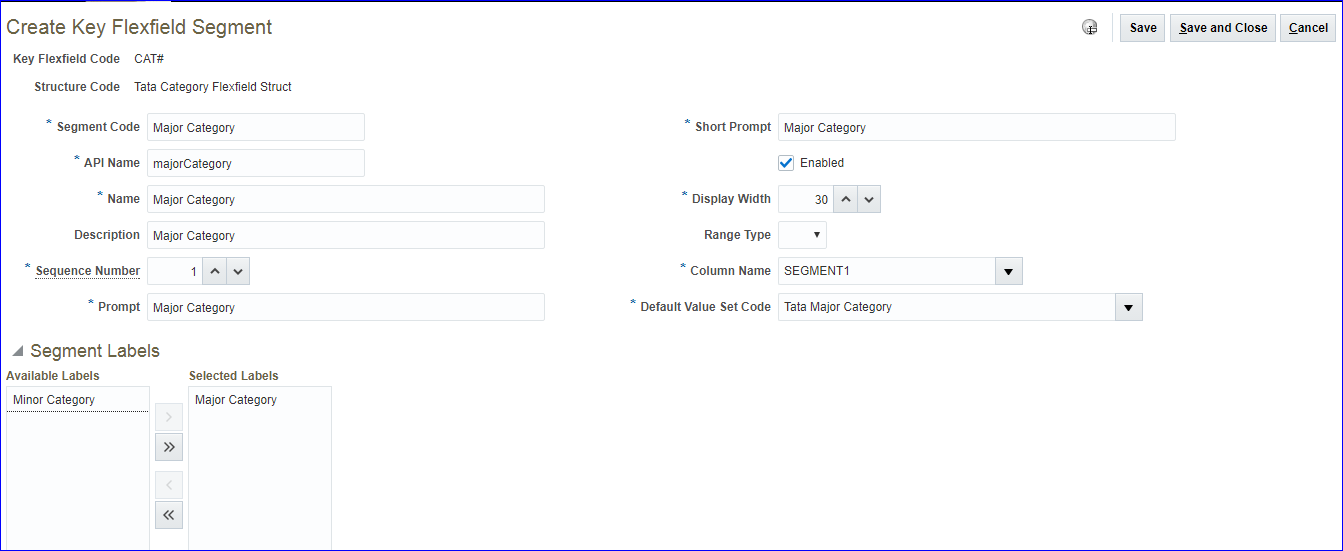
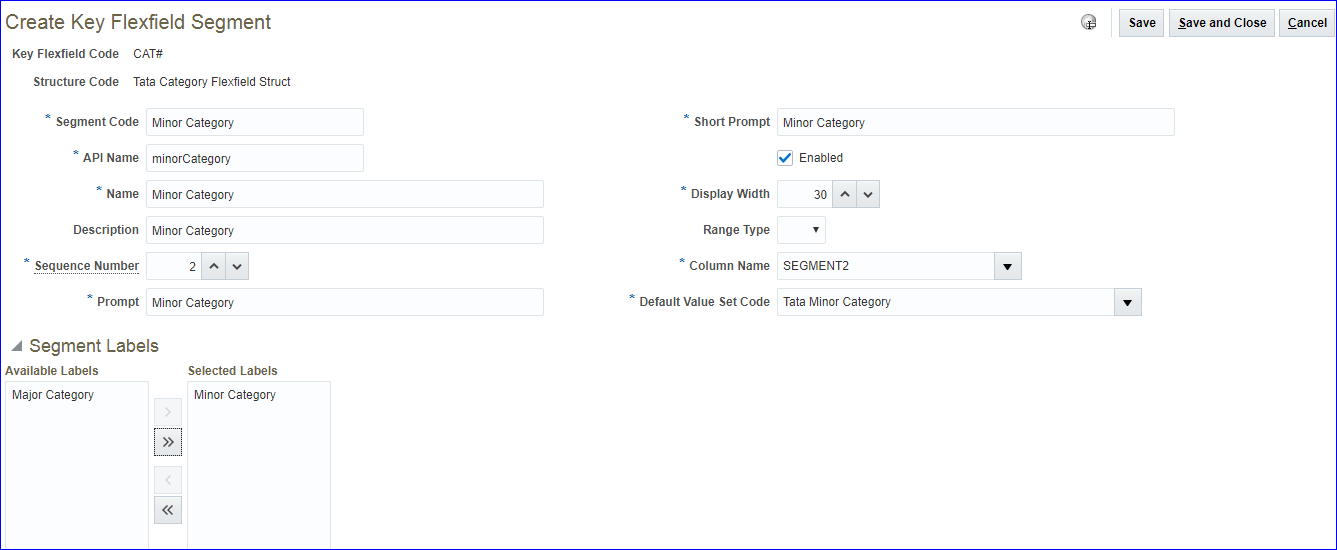 Save and Close >> Done
5. Create Location KFF Structure Task: Manage Fixed Assets Key Flexfields >> Key Flexfield Name: Location >> Search >> Select the line and click on 'Manage Structures' >> Search if any structure code already exists. If exists, disable since we can have only one enabled structure at any time >> Create Structure Code: Tata Location Flexfield Struct Name: Tata Location Flexfield Structure Description: Tata Location Flexfield Structure Delimiter: . Check enabled Save Click on create under segments. 41 - 25 mins
6. Create Asset Key KFF Structure
7. Create Category KFF Structure Instance
8. Create Location KFF Structure Instance
9. Create Asset Key KFF Structure Instance
10. Create Segment Values for 3 KFF segments
11. Configure System Controls
12. Create Fiscal Year Calendar
13. Create Asset Calendar/ Depreciation Calendar
14. Define Prorate Convention
15. Create Prorate Calendar
16. Create Asset Book/ Corporate Book
1. Create Value Sets for Category KFF Task: Manage Fixed Assets Flexfield Value Sets >> Create Value Set Code: Tata Major Category Description: Tata Major Category Module: Assets Validation Type: Independent Value Data Type: Character Value Subtype: Text Maximum Length: 30 Save and Close >> Create Value Set Code: Tata Minor Category Description: Tata Minor Category Module: Assets Validation Type: Dependent Value Data Type: Character Value Subtype: Text Maximum Length: 30 Value Set Code: Tata Major Category Save and Close
2. Create Value Sets for Location KFF Task: Manage Fixed Assets Flexfield Value Sets >> Create Value Set Code: Tata Country Description: Tata Country Module: Assets Validation Type: Independent Value Data Type: Character Value Subtype: Text Maximum Length: 30 Save and Close >> Create Value Set Code: Tata State Description: Tata State Module: Assets Validation Type: Independent Value Data Type: Character Value Subtype: Text Maximum Length: 30 Save and Close >> Create Value Set Code: Tata City Description: Tata City Module: Assets Validation Type: Independent Value Data Type: Character Value Subtype: Text Maximum Length: 30
3. Create Value Sets for Asset Key KFF Task: Manage Fixed Assets Flexfield Value Sets >> Create Value Set Code: Tata Asset Key Description: Tata Asset Key Module: Assets Validation Type: Independent Value Data Type: Character Value Subtype: Text Maximum Length: 30
4. Create Category KFF Structure Task: Manage Fixed Assets Key Flexfields >> Key Flexfield Name: Category >> Search >> Select the line and click on 'Manage Structures' >> Search if any structure code already exists. If exists, disable since we can have only one enabled structure at any time >> Create Structure Code: Tata Category Flexfield Struct Name: Tata Category Flexfield Structure Description: Tata Category Flexfield Structure Delimiter: . Check enabled Save Click on create under segments.
Save and Close >> Done
5. Create Location KFF Structure Task: Manage Fixed Assets Key Flexfields >> Key Flexfield Name: Location >> Search >> Select the line and click on 'Manage Structures' >> Search if any structure code already exists. If exists, disable since we can have only one enabled structure at any time >> Create Structure Code: Tata Location Flexfield Struct Name: Tata Location Flexfield Structure Description: Tata Location Flexfield Structure Delimiter: . Check enabled Save Click on create under segments. 41 - 25 mins
6. Create Asset Key KFF Structure
7. Create Category KFF Structure Instance
8. Create Location KFF Structure Instance
9. Create Asset Key KFF Structure Instance
10. Create Segment Values for 3 KFF segments
11. Configure System Controls
12. Create Fiscal Year Calendar
13. Create Asset Calendar/ Depreciation Calendar
14. Define Prorate Convention
15. Create Prorate Calendar
16. Create Asset Book/ Corporate Book